Best Ad Tools for Non-Marketers Running Their Own Ads (2026)
By the AdFlint research team · We run live campaigns on these platforms; every screenshot is from our own sessions · Published August 3, 2026 · Updated August 3, 2026
TL;DR
- Best if you want the ads written for you: AdFlint (our product - disclosed and marked below). AI writes, launches, and optimizes Google and Meta campaigns inside an ad account you own, nothing goes live until you click Launch or turn on Full Autopilot, and the fee is flat from $40/mo with a 7-day free trial.
- Best free starting point, and the right answer under roughly $300/mo of ad spend: the automation already built into the platforms - Meta Advantage+ and Google Performance Max. $0 software cost, but they only optimize toward the conversion event you configured, and configuring that event correctly is the actual hard part.
- Widest network coverage on one flat fee: AdControlCenter at $39.90/mo generates campaigns for six ad networks and deploys them paused into your own account. Researched from its own live site on August 3, 2026 - we have not tested it, and say so plainly in the entry.
- Skip the rules engines unless you can already finish the sentence "IF cost per lead rises above X for three days, THEN..." We ran Birch (formerly Revealbot) hands-on on July 30-31 and August 3, 2026: it is an execution engine that supplies no strategy, and automated rules require the $99/mo Pro plan, not the $49 Essential plan most roundups quote.
- Trial Madgicx only with a calendar reminder set: real Meta toolset, but a 1.8/5 Trustpilot score across 269 reviews (checked July 2026) dominated by trial auto-conversion and surprise charges - the exact failure mode a non-marketer is most exposed to.
- One question sorts every option on this page, including freelancers: who holds the ad account login, and whose card pays Google or Meta? If the answer is not "you, and you," walk away.
Quick answer: if you want the ads written for you, our pick is AdFlint (our product, disclosed below), a flat fee from $40 a month with a 7-day free trial. Under roughly $300 a month of ad spend, the free Meta Advantage+ and Google Performance Max are the better start. Whoever you pick, you should hold the ad account login.
This page is for the person who ended up with the ads job by default: the owner, office manager, or founder who is not a marketer, does not want to become one, and typed this search hoping software can close the gap. The first thing that will cost you money is a category confusion nobody labels. Two very different kinds of product get recommended in the same breath for this search. One kind connects to your ad account and changes something in it. The other kind shows you what other advertisers are running - Meta's free public Ad Library is the purest example, and paid creative-research tools sit on the same layer. Both are legitimate. Only one of them will ever put an ad live for you.
So here is the line, drawn: an ad management tool must connect to your ad account and change something in it - write an ad, launch a campaign, adjust a budget, pause a loser. Every entry below clears that bar. If a roundup pitched you an "analyzer" or an "ad intelligence" product and you could not tell from the page whether it touches your account, that is the question to ask before you enter a card, because buying the wrong half leaves you exactly where you started: with great competitor screenshots and no ads live. The line is blurrier than it used to be, too - Birch, ranked fourth here, bundles a creative-insights module (Explorer) inside a genuine management product. Judge the feature, not the marketing noun.
The second thing the ranking pages skip is the fear that actually drives this search. Most non-marketers have heard the horror story - a freelancer or agency ran the ads from an account they owned, the relationship ended, and the business lost its campaign history, its pixel data, and its ad account overnight. So every entry below answers two questions before anything else: who holds the ad account login, and whose card pays the ad platform. It is the pass/fail test we applied to the whole roster, and it is the test we would apply to us.
On that note, disclosure: AdFlint - ranked first - is our product, and this page is published on our site. The ranking is built to survive a hostile reading: the cons on our own entry are real, the hands-on claims are dated, we tell you outright where a competitor beats us on breadth, and where we have not tested something we say so in the entry itself rather than in a footnote. We ran one competitor on this list hands-on (Birch, July 30-31 and August 3, 2026), ran another tool the same week and deliberately left it off (Optmyzr - see the FAQ), and read everyone else's own pricing pages instead of guessing.
AdFlint
Best for non-marketers who want the ads written for themOur product — disclosureDisclosure first: AdFlint is our product and this page is on our site. We rank it first on this specific query for a reason you can audit: most of the other options assume you can already do the thing non-marketers cannot do. The native platforms assume you can write your own ads and configure your own conversion tracking. Birch assumes you can write automation rules. Madgicx assumes you can act on a practitioner-grade audit. AdFlint's premise is the opposite - the AI writes the campaigns, and your job is reduced to the one thing a business owner is genuinely qualified to do: approve or reject ads about their own business. The honest exception is AdControlCenter, ranked third, which generates campaigns the same way; it beats us on network breadth and we say so in its entry.
The mechanics matter for the ownership test this page runs on everything. You connect your own Google Ads and Meta account through one-click OAuth - the account is yours, it stays yours, and your card pays Google and Meta directly. AdFlint charges a flat monthly fee, takes 0% of your ad spend on self-serve plans, enforces hard budget caps, and launches nothing without your explicit approval. If you cancel, you keep the account, the campaign history, and the pixel data, because they were never ours to hold.
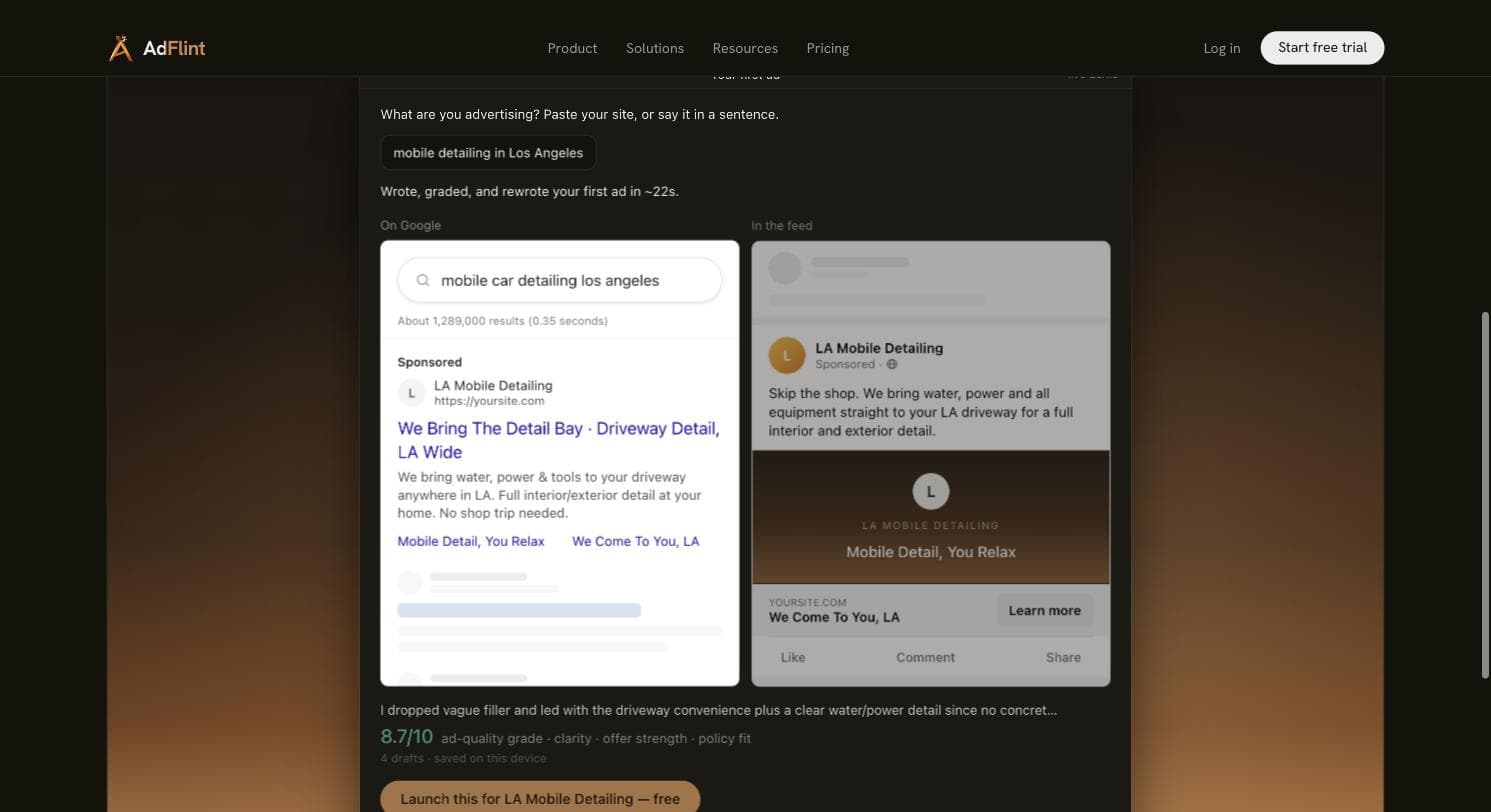
The evidence we will cite for ourselves is the evidence you can check in the next minute: the live demo on our homepage. Fed the prompt "mobile detailing in Los Angeles," it wrote, graded, and rewrote ad drafts in about 22 seconds, producing a Google search ad and a Meta feed preview and self-grading the final draft 8.7/10 across four drafts. That is a demonstration of writing speed and quality, judged by our own model - not a performance claim, and not evidence that the resulting ads convert.
The honest limits: AdFlint covers Google Ads and Meta only - no TikTok, LinkedIn, Microsoft, Pinterest, or X. It is a young product with no third-party review presence on G2 or Trustpilot yet, so unlike every other entry here we can offer you no independent social proof - only the demo, the 7-day trial, and this disclosure. We have no campaign track record in any specific industry to point at, and we publish no case studies or ROAS benchmarks, because we do not have sustained live-spend history to draw them from. And if your budget is under roughly $300/mo, the free native option ranked second is the better first move than paying us.
Pros
- + Writes, launches, and optimizes the ads rather than suggesting changes for you to make - the actual gap a non-marketer needs closed
- + Your account, your data, your billing: one-click OAuth into an ad account you own, with your card paying Google and Meta directly
- + On self-serve plans nothing goes live until you click Launch or turn on Full Autopilot, and hard budget caps are enforced by the product
- + Flat fee from $40/mo with 0% of ad spend taken on self-serve plans; entry is a 7-day free trial
Cons
- − Google Ads and Meta only - no TikTok, LinkedIn, Microsoft, Pinterest, or X, and AdControlCenter genuinely beats us on network breadth
- − Young product with no third-party review presence yet - you are trusting the demo, the trial, and this page's disclosure rather than a G2 or Trustpilot record
- − No published case studies, performance benchmarks, or industry-specific track record - we do not have sustained live-spend history to show you, and this page will not pretend otherwise
- − Self-serve plans top out at $30,000/mo of ad spend; above that is custom pricing
Ideal for
- Owner-operators and local service businesses starting on Google and Meta with roughly $300-$10,000/mo budgets
- The person who can confidently approve an ad about their business but would stare at a blank Ads Manager for an hour
- Anyone burned by an agency or freelancer who held the ad account hostage - the ownership model here is the direct answer to that
Pricing: Self-serve, flat fee, 0% of ad spend on self-serve plans, checked August 2026: Launch $40/mo (up to $1,000/mo ad spend), Growth $89 ($2,500), Scale $109 ($5,000), Accelerate $119 ($10,000), Performance $219 ($20,000), Premium $319 ($30,000), custom above. A separate managed done-for-you service is a monthly fee plus a share of managed spend, priced per account, and is not part of the self-serve 0% arrangement. Entry point is a 7-day free trial.
Try AdFlint freeMeta Advantage+ and Google Performance Max (native)
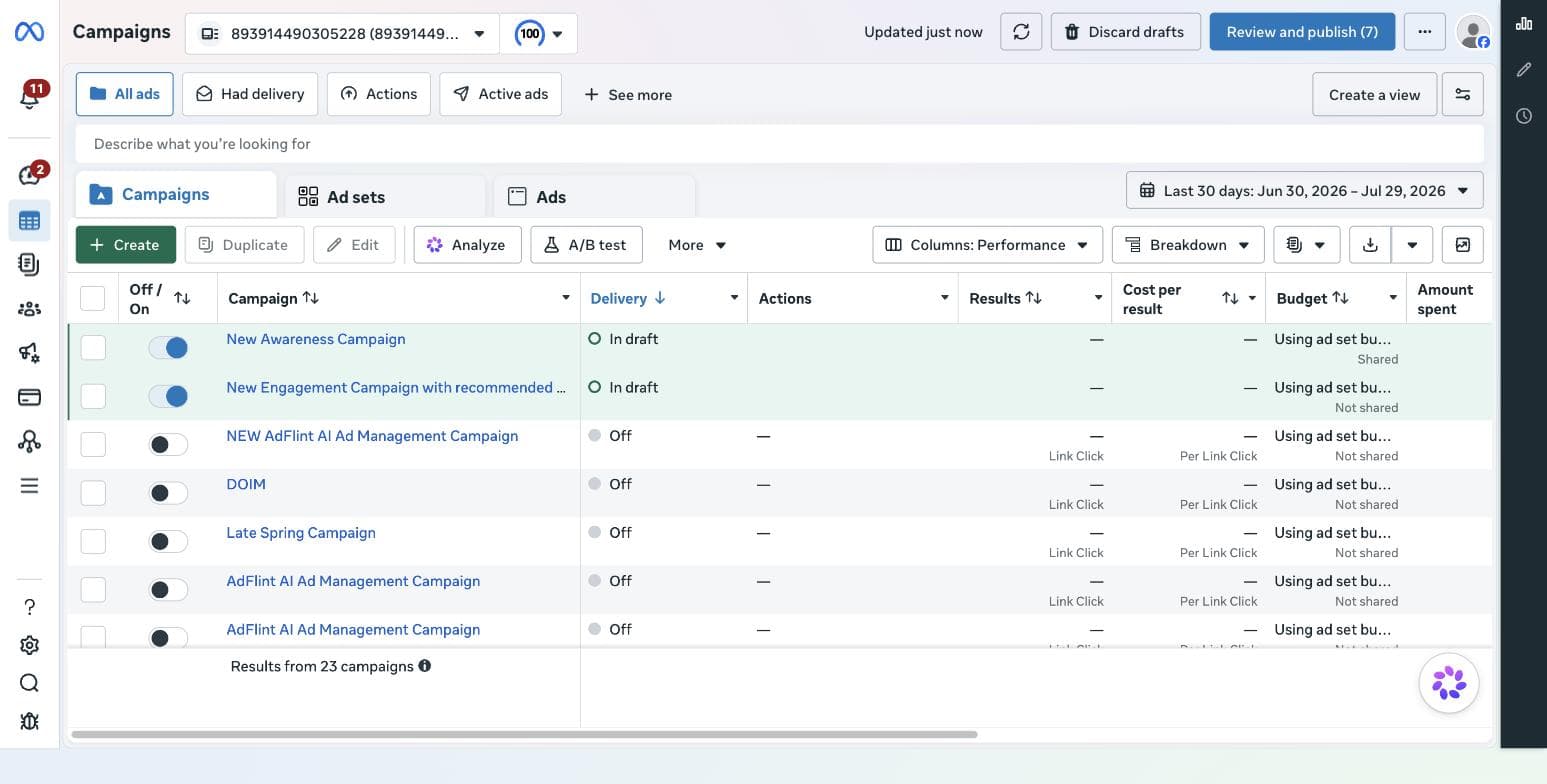
Best free starting point if you can write your own adsBefore paying anyone for software, you should know what the platforms already give you for free, because it is more than most roundups admit. Meta's Advantage+ campaign setup automates audience, placement, and budget decisions inside the Ads Manager you already have. Google's Performance Max runs a single campaign across Search, YouTube, Display, Gmail, Discover, and Maps - plus Shopping inventory if you connect a Merchant Center feed - from one set of assets. Both are free, both are native, no third party gets access to your account, and both are the honest baseline every paid tool on this page has to beat.
What they genuinely do well: delivery optimization. Deciding which user sees which ad at what bid is a problem Google and Meta solve with more data than any third-party tool will ever have, which is why no serious tool on this list competes on that layer - they compete on the layers the platforms leave to you.
And that is the catch, in three parts. First, native automation optimizes toward whatever conversion event you configured - if your tracking is missing or wired to the wrong event, Performance Max will confidently and efficiently spend your budget optimizing toward the wrong thing, and nothing in the interface will warn you. For most readers of this page the event that matters is a phone call or a form fill, not a purchase, and Google's documentation covers both cases (call-from-ad and call-from-website conversions) while Meta needs the pixel firing a Lead event on your thank-you page. Second, you still supply all strategy and creative: Advantage+ leans heavily on being given creative volume to work with, and Performance Max will absorb searches for your own business name into its results unless you configure brand exclusions - flattering your numbers with clicks you were already getting free. Third, visibility is thin: Performance Max gives you coarse search-term insights rather than a full query report, so diagnosing waste is genuinely hard for a beginner.
There is also a volume problem specific to small budgets that nobody puts in a roundup. Meta's own documentation describes an ad set leaving the learning phase after roughly 50 optimization events in a week. If your lead costs $40 and your whole budget is $300 a month, you will not produce 50 leads a week - so the algorithm never fully stabilizes, and results swing. When we asked Optmyzr's Sidekick assistant a bidding question during our hands-on trial on July 30, 2026, it made the same point from the Google side: get clean conversion tracking first, and treat automated bidding as appropriate once you are producing roughly three to five conversions a week, with manual CPC as the fallback below that. The practical read for a non-marketer: at very small budgets, pick one platform and one conversion event and concentrate spend, rather than splitting it and starving both.
Our verdict: at budgets under a few hundred dollars a month, start here and pay no one. The moment you catch yourself unable to answer "what conversion event is this campaign optimizing toward?", the free option has quietly become the expensive one - that is the moment paid help, human or software, earns its fee.
Pros
- + Free - the only cost is ad spend, billed by Google and Meta to your own card
- + No third-party access to your account, and nothing to cancel later
- + Delivery optimization backed by more data than any third-party tool can access
- + Enormous official documentation and setup guides for both platforms
Cons
- − Zero judgment about your business: both will optimize toward a misconfigured conversion event without complaint, and conversion setup is exactly where non-marketers go wrong
- − You write every ad and supply every image or video - the blank-page problem this search is usually trying to solve
- − Performance Max offers only coarse search-term visibility and will absorb your brand-name searches unless you set brand exclusions
- − At small budgets you may never generate enough weekly conversions for the algorithms to stabilize - Meta's docs describe roughly 50 optimization events a week as the learning-phase threshold
- − Effectively no human support at small spend levels, and learning-phase spending is real money
Ideal for
- Budgets under roughly $300/mo, where any software fee is a large percentage of spend
- People willing to spend a few hours getting conversion tracking right before launching anything
- Anyone who wants to understand the native baseline before judging what a paid tool adds
Pricing: Free - Advantage+ is built into Meta Ads Manager and Performance Max into Google Ads. You pay only ad spend, billed directly by each platform to your card.
Visit Meta Advantage+ and Google Performance Max (native)AdControlCenter
Best flat-fee coverage beyond Google and MetaWe have not tested AdControlCenter - everything in this entry was read from its own product and pricing pages on August 3, 2026, and you should weigh it accordingly. What it claims: the system scans your website first - in its words, "your products, audience, brand voice, colors, fonts, competitors - all extracted automatically before we write a single ad" - then generates complete campaigns for six networks: Google, Meta, Reddit, TikTok, LinkedIn, and X. Its site states that "AdControlCenter connects to your Google Ads account through Google's official sign-in (OAuth)" and that "every campaign deploys paused - nothing spends until someone on your team approves it."
Structurally, it answers this page's two ownership questions the right way: your account, connected with official OAuth sign-in, and a stated "No contract · No markup on your ad spend." The pricing is one flat plan - "Founder" at $39.90/mo, shown as discounted from $59 - covering up to 15 campaigns a month, with a 7-day free trial and a 7-day money-back guarantee stacked on top. For a non-marketer comparing this against percentage-of-spend agencies, that is a refreshingly legible offer, and on raw network coverage it beats us.
Why it ranks third rather than higher: it is unverified, by us and by anyone else we could find. There is essentially no third-party review base - no meaningful G2, Trustpilot, or app-store record - to check its claims against, so you are trusting its own marketing plus whatever the trial shows you. A six-network generator is also only as strong as its weakest network's output, and a non-marketer is poorly placed to judge whether an auto-generated Reddit or X campaign is any good - those are channels where even experienced buyers disagree about what works. The fair test costs nothing: run the trial, let it generate, deploy nothing out of its paused state, and judge the drafts against what AdFlint's demo or your own writing produces.
Pros
- + Flat $39.90/mo with a stated "No contract · No markup on your ad spend" - no percentage-of-spend pricing
- + Broadest network coverage on this list: Google, Meta, Reddit, TikTok, LinkedIn, and X from one generator
- + States that every campaign deploys paused into your own OAuth-connected account, so nothing spends without approval
- + 7-day free trial plus a 7-day money-back guarantee
Cons
- − Not tested by us - this entry is built entirely from the vendor's own pages, read August 3, 2026
- − Essentially no third-party review footprint we could find, so no independent signal on output quality, support, or whether the product delivers what the site describes
- − Capped at 15 campaigns per month on the only plan offered
- − Six-network breadth over depth: auto-generated campaigns for Reddit, X, and LinkedIn are the hardest for a beginner to quality-check
Ideal for
- Businesses that specifically want to test channels beyond Google and Meta without hiring anyone
- Flat-fee shoppers comparing against AdFlint who accept an unverified vendor in exchange for more networks
- Anyone willing to judge draft quality themselves during a free trial before deploying a single campaign
Pricing: One plan ("Founder"): $39.90/mo, shown as discounted from $59, including up to 15 campaigns per month across all six networks, conversion tracking, daily optimization, and team roles. 7-day free trial, 7-day money-back guarantee, "No contract · No markup on your ad spend." Read from adcontrolcenter.com's live pricing page, August 3, 2026.
Visit AdControlCenterBirch (formerly Revealbot)
Best only if you already know the rules you would writeThis entry is hands-on: we created a real Birch trial account on July 30-31, 2026 and went back in on August 3. First, the practical note that saves you ten minutes: revealbot.com and bir.ch/signup both 404 since the rebrand - the working signup is app.bir.ch/signup. From there it was under two minutes to a logged-in screen with no phone number and no card, the fastest, least gated signup we have run this year.
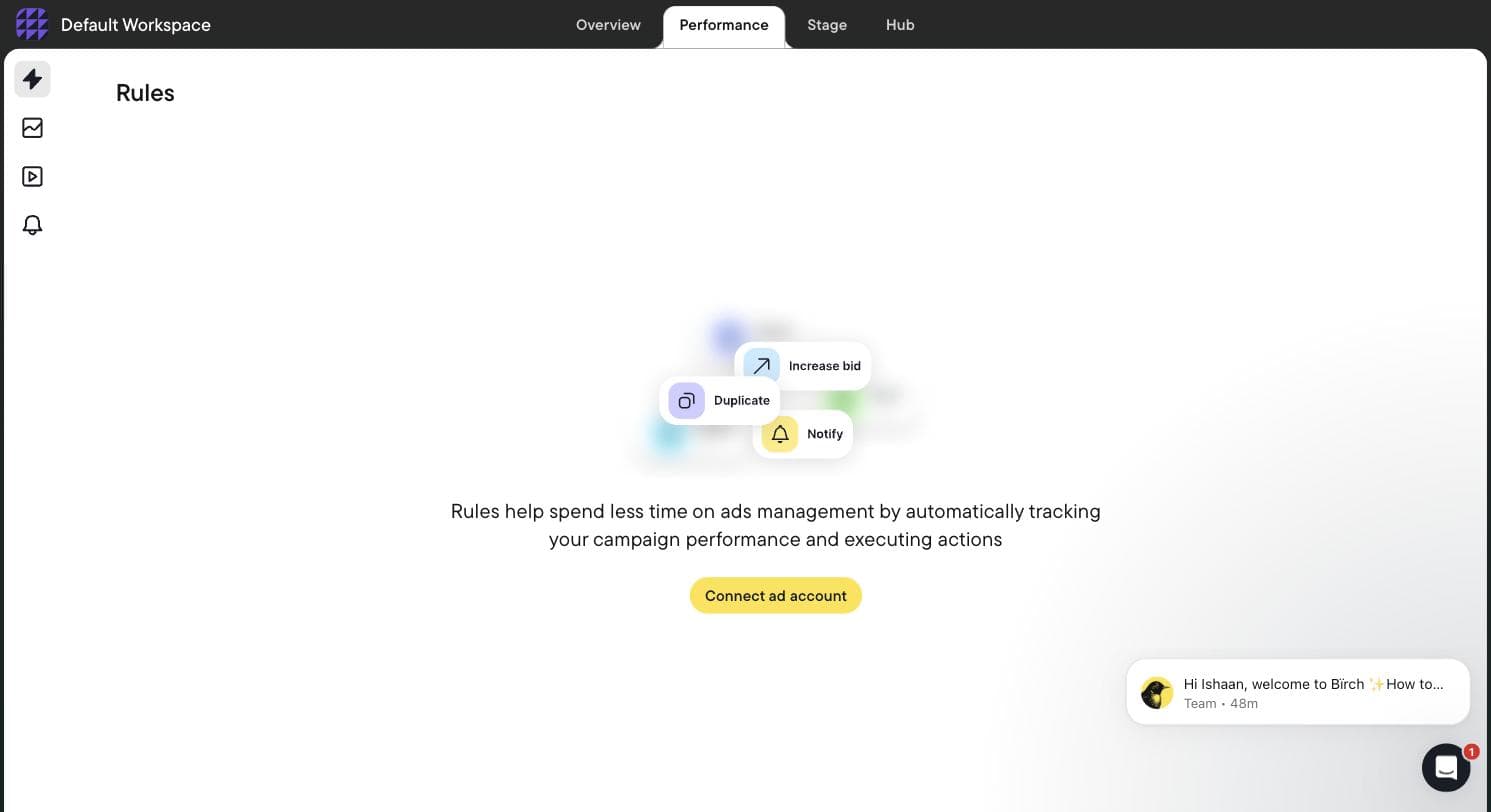
Then comes the gate that defines the product for this audience: Birch does nothing until you connect a live ad account. There is no sandbox, no demo data, and the rule builder - the product's entire point - is inaccessible without a connection. We did not connect one, so we can tell you exactly what Birch costs and gates but not how well its rules perform in a live account. Its empty state shows the three primitive actions everything is built from: increase bid, duplicate, and notify. That empty state is the honest pitch. Birch is an execution engine: you decide that winning ad sets should be duplicated or that a rising cost-per-lead means pausing, encode it as a rule, and Birch runs that rule on a schedule you never would. It supplies no strategy, no copy, and no opinion.
Beyond the rules engine, Birch now spans Stage (a planning Google Sheet plus Drive folders that turn into bulk Meta, TikTok, and Snapchat ads) and Hub (a Signals Gateway for server-side first-party tracking), with Explorer, a creative-insights module, sitting in the Pro tier. Stage's sheet-to-ads flow is genuinely clever if you refresh creative weekly. Its own homepage, read August 3, 2026, describes it as an official partner of Meta, Google, Snapchat, and TikTok and claims 15K connected ad accounts and 240M automated actions a year - vendor figures, not ours.
The catch we read off its own in-app billing slider: automated rules are not included in the $49 Essential plan. They are Pro-only, alongside Explorer, Stage, Launcher, custom audiences, and the Sheets/AppsFlyer/Hyros integrations - so the real entry price for the thing you would buy Birch for is $99/mo, not the $49 every roundup quotes. Prices then scale with your ad spend (the full ladder is below), overages bill via Stripe, and when the 14-day trial expires, rules and reports are disabled.
Verdict for a non-marketer: buy Birch only if you can already finish the sentence "IF cost per lead rises above X for three days, THEN..." If you cannot, you would be paying $99 a month to automate decisions you have not made yet - and the tools above this entry exist precisely because most non-marketers have not made them.
Pros
- + Purpose-built rules automation across Meta, Google, Snapchat, and TikTok, with official partner status on those platforms per its own site (August 2026)
- + Transparent pricing: the in-app billing slider shows the exact price at every spend tier before you pay - we read every tier
- + Fastest signup we tested - under two minutes, no phone wall, no card
- + Stage's Google Sheet-to-bulk-ads flow is a genuinely useful system for weekly creative refresh
Cons
- − Supplies zero judgment, strategy, or ad copy - it executes rules you must already know how to write
- − Automated rules are excluded from the $49 Essential plan; the real entry price for the core feature is the $99/mo Pro plan
- − Everything is gated behind connecting a live ad account, with no sandbox or demo data - which also means we could not evaluate rule execution quality, only pricing, gating, and onboarding
- − No Microsoft, Amazon, or LinkedIn integrations - the roster is Meta, Google, Snapchat, TikTok, YouTube plus analytics and attribution tools
Ideal for
- Someone who has run their own ads for a year and keeps repeating the same manual optimizations
- Meta-plus-TikTok-plus-Snapchat ecommerce operators who refresh creative on a weekly cycle
- Explicitly not the first tool for a non-marketer - graduate to it once you have rules worth automating
Pricing: Read off Birch's own in-app billing slider, July 30-31, 2026: at up to $10K/mo ad spend, Essential $49/mo and Pro $99/mo (annual $540/$1,090); up to $30K, Essential $149 / Pro $249 (annual $1,640/$2,740); up to $75K, Essential $299 / Pro $499 (annual $3,290/$5,490); up to $150K, Essential $499 / Pro $799 (annual $5,490/$8,790); up to $300K, Essential is not offered and Pro is $1,299 (annual $14,290); $500K+ is Enterprise only. Automated rules require Pro. Overages bill via Stripe; annual buys 12 months for the price of 11; 14-day trial, with rules and reports disabled on expiry.
Related: Revealbot (Birch) alternatives · AdFlint vs Revealbot
Visit Birch (formerly Revealbot)“The interface and insights are helpful at times, especially for identifying patterns like creative fatigue, but overall I felt there is still room for improvement in terms of depth, consistency, and actionable recommendations.”
— Bhoomi Arora, Trustpilot review, March 2026
Madgicx
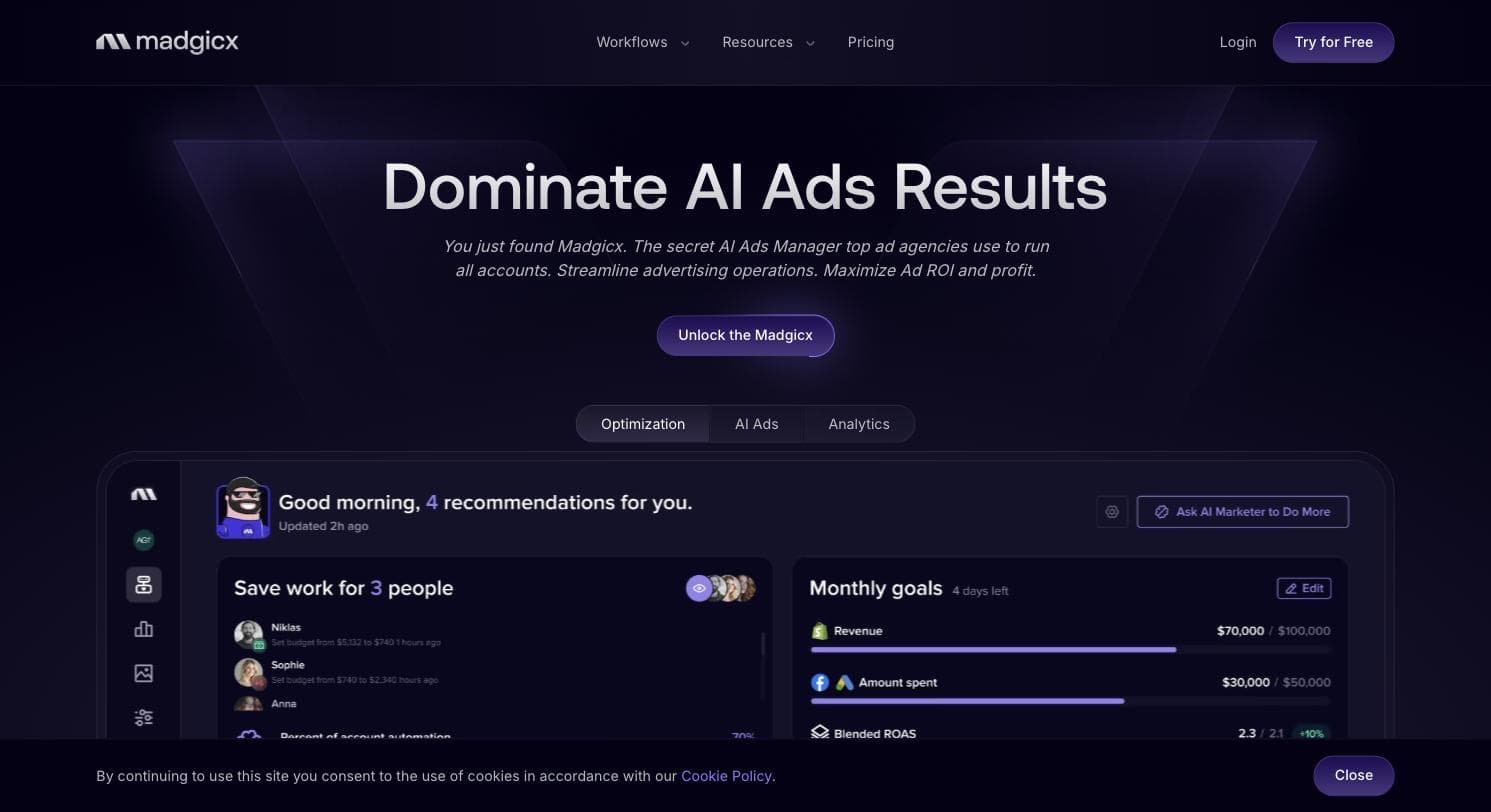
Best Meta-only toolkit - if you audit your card statementsMadgicx shows up in beginner roundups constantly, and it is worth being precise about what it is, because it is not a beginner product. It is a deep, Meta-only platform - its own homepage, read August 3, 2026, organizes around optimization (an AI Marketer that audits your account and surfaces opportunities), AI creative generation with automated launch, and analytics - plus an optional $49/mo Tracking Pro add-on for server-side attribution. There is no Google side at all, so it covers half of a sensible non-marketer starting stack. We have not tested Madgicx; this entry is built from its own pages and dated public reviews.
As a management platform it is genuinely deep - and genuinely built for practitioners. The toolset sprawls across audits, audiences, creative, and analytics, which reviewers praise and beginners drown in; and pricing is by ad-spend bracket, starting at $45/mo under $1,000 of monthly spend (full ladder below), with only the top bracket hidden in-app. If your instinct in the Ads Manager is already "I know what I'd change, I just need better data," it is a reasonable buy. If your instinct is "I don't know what any of this means," more dashboards is the opposite of what you asked for.
The reason it sits fifth on a page for non-marketers is the billing pattern. Its G2 profile reads 4.6/5 across 217 reviews, but its Trustpilot profile read 1.8/5 across 269 reviews when we checked in July 2026 - and the dominant themes there are trials auto-converting to paid, unexpected annual or quarterly charges, and refused refunds. That split usually means the product is good and the billing operation is aggressive - which is precisely the combination a non-marketer, the person least likely to audit a SaaS bill line by line, should handle with gloves. If you trial it: set a calendar reminder before day seven, screenshot your plan selection, and do not pick annual billing until you are certain.
Pros
- + Deepest Meta-specific toolset on this list: AI account audits, creative generation with automated launch, and analytics in one subscription
- + Publishes real self-serve prices for every spend bracket up to $30K/mo, starting at $45
- + Meta Business Partner per its own site, with a strong G2 rating (4.6/5 across 217 reviews, checked July 2026)
- + 7-day free trial of the full platform
Cons
- − Meta-only - it covers half of a sensible non-marketer starting stack, with no Google side at all
- − Trustpilot 1.8/5 across 269 reviews (checked July 2026), dominated by trial auto-conversion, surprise charges, and refused refunds - the riskiest billing pattern on this page for this audience
- − Built for practitioners: the breadth that impresses reviewers is a burden if you wanted less work, not more dashboards
- − The $30K+ bracket price is only revealed inside the app after signup
- − Not tested by us - pricing and feature claims here come from its own pages
Ideal for
- Meta-only ecommerce brands with some Ads Manager fluency and rising creative demands
- Advertisers disciplined about subscriptions - calendar reminders, screenshots, monthly billing only
- Not the buyer who arrived at this page wanting ads handled for them across Google and Meta
Pricing: One plan (Madgicx Pro Complete with AI), priced by monthly ad-spend bracket on monthly billing, checked July 2026: $45 under $1K of spend, $99 for $1K-$2.5K, $119 for $2.5K-$5K, $129 for $5K-$10K, $229 for $10K-$20K, $329 for $20K-$30K; the $30K+ bracket shows "See price inside the app." Tracking Pro add-on $49/mo per connected account. Quarterly and annual billing discounted. 7-day free trial.
Related: Madgicx alternatives · AdFlint vs Madgicx
Visit Madgicx“Madgicx was mediocre as a software. However, their billing is worse. They do not make it easy to cancel, they charged my card after canceling and they won't respond to refund requests”
— Luke Scherba on Trustpilot (Sep 2025)
A vetted freelancer (Upwork or Fiverr)
Best when you want judgment, not another subscriptionNo software roundup includes this option, because nobody earns a referral fee recommending it - which is exactly why it belongs here. If your actual problem is decisions rather than execution - is my offer wrong, should I split budget between Google and Meta, why does nobody call - then an hour of a competent human's judgment beats a year of any subscription on this page. Software executes and generates; it does not tell you your landing page is the problem.
What to buy, specifically: not a monthly retainer, not at first. Buy a fixed-scope engagement - an account and conversion-tracking setup, or a one-time audit of what you have built, with a written deliverable - then a monthly 30-minute check-in if it went well. Given that every optimization decision on this page is downstream of the conversion event, "set up call and form-fill conversion tracking correctly and show me it firing" is often the single highest-value thing you can pay a human for. Run the day-to-day yourself with the native tools or one of the products above.
How to vet, and this is where this page's ownership test does the interviewing for you: the campaigns must run in an ad account created under your email with your card on file at Google and Meta. The freelancer gets invited access; admin stays with you. Ask them to walk you through a search-term report from a past account (redacted is fine) and explain one change they made and why - fluency there is nearly impossible to fake. And two instant walk-aways: anyone proposing to run your ads from their own or their "agency" account - when you part ways, your campaign history, pixel data, and account standing leave with them - and anyone quoting a percentage of spend on a sub-$1,000 budget, which misaligns their incentive with yours from day one.
The honest downside: variance. Marketplace ratings are gameable, great freelancers are booked, and the interview above is work that software never asks of you. But it is the only option on this page that can look at your business and say "the ads are fine - your pricing page is the problem," and sometimes that sentence is worth more than every tool here combined.
Pros
- + Actual human judgment applied to your specific business - the one thing no tool on this page provides
- + Can be bought as a fixed-scope, one-time engagement instead of another monthly subscription
- + A competent hire sets up conversion tracking correctly - the single step every software option assumes you have done
- + Done right, you keep account ownership and learn enough to supervise anyone you hire next
Cons
- − Extreme quality variance, and marketplace review scores are an unreliable filter
- − The account-ownership interview is on you - hire wrong and you recreate the agency horror story at freelance prices
- − A good one costs more per month than any software fee on this page
- − Availability and responsiveness vary; you are hiring a person, not an SLA
Ideal for
- Someone who tried DIY, got nothing, and needs a diagnosis rather than another tool
- Businesses with a tricky or regulated offer where templated AI copy needs human review anyway
- Anyone who wants a one-time correct setup and then intends to self-serve on top of it
Pricing: No list price exists - that is the point. Public marketplace rates run from under $20/hr to well over $100/hr, and small-account monthly arrangements commonly land in the low hundreds of dollars plus your ad spend. Treat any exact figure printed in a roundup as stale; check live listings before hiring, and weigh the ownership questions above more heavily than the rate. (Assessment as of August 2026; we did not hire through either marketplace for this page.)
Related: Hiring someone to run Google Ads
Visit A vetted freelancer (Upwork or Fiverr)Side by side.
| Option | What it actually does | Ad account and platform billing | Software cost | Platforms |
|---|---|---|---|---|
| AdFlint (our product) | Writes, launches, and optimizes campaigns; you click Launch | Yours - one-click OAuth, your card pays Google/Meta, 0% markup on self-serve plans | Flat, from $40/mo; 7-day free trial | Google, Meta |
| Advantage+ / Performance Max (native) | Optimizes delivery of campaigns you build and write yourself | Yours - native, no third party involved | Free | Meta / Google |
| AdControlCenter | Generates campaigns from your website; states they deploy paused for approval (not tested by us) | Yours - OAuth connect; states no markup on ad spend | $39.90/mo flat, 15 campaigns/mo | Google, Meta, Reddit, TikTok, LinkedIn, X |
| Birch (formerly Revealbot) | Executes automation rules you write; supplies no strategy or copy (rule execution not tested by us) | Yours - connects to your existing accounts; unusable until you connect one | $49/mo, but automated rules require Pro at $99/mo | Meta, Google, Snapchat, TikTok, YouTube |
| Madgicx | Meta account audits, creative generation, and automation for practitioners (not tested by us) | Yours - connects to your existing Meta account | $45/mo under $1K spend, rising by bracket to $329 at $30K | Meta only |
| Vetted freelancer (Upwork/Fiverr) | Human judgment, setup, and management - scope is whatever you agree | Must be yours - verify before hiring; walk away if they run ads from their own account | No list price; commonly low hundreds per month plus ad spend | Any |
How we chose.
Hands-on: we created a real Birch (formerly Revealbot) trial account on July 30-31, 2026 and revisited it on August 3, 2026 - full signup, onboarding, the connect-your-ad-account gate, and its in-app billing slider read at every spend tier. Everything in the Birch entry, including the catch that automated rules are excluded from the $49 Essential plan, is first-hand observation from that account.
The limit of that hands-on work, stated plainly: Birch gates its rule builder behind connecting a live ad account and offers no sandbox or demo data, and we did not connect one. So we can report what Birch charges, what it gates, and what its empty states show - but we have not watched its rules execute against real campaigns, and nothing on this page claims otherwise.
We also ran Optmyzr hands-on the same week (July 30-31, 2026) and deliberately excluded it from this list: it is a genuinely excellent professional PPC toolkit whose signup spend brackets start at "Under $10,000/mo" and whose modules assume PPC vocabulary. It is the wrong purchase for this page's reader, and including it to pad the list would have been dishonest.
AdFlint is our own product and this page is published on our site. The evidence we cite for it is our live public demo - which wrote, graded, and rewrote an ad in about 22 seconds from the prompt "mobile detailing in Los Angeles" - because anyone can run that demo themselves before trialing. We cite no ROAS figures, case studies, or customer counts for AdFlint, because we do not have a sustained live-spend track record to cite, and we will not invent one.
AdControlCenter and Madgicx: NOT tested by us. Every claim about them comes from their own live product and pricing pages (AdControlCenter read on August 3, 2026; Madgicx read in July 2026 and re-checked August 3, 2026) and from dated public review scores on G2 and Trustpilot.
Meta Advantage+ and Google Performance Max are described from Google's and Meta's official documentation. They are free and native, so "testing" them means running ads - which is exactly the decision this page exists to inform. Where we cite platform thresholds, such as Meta's learning-phase guidance, they come from the platforms' own docs, not from campaigns of ours: AdFlint has no vertical campaign track record to draw on.
We fact-checked the category claim itself rather than repeating it. An earlier draft of this page named a specific vendor as a research-only "spy tool"; we opened its site on August 3, 2026, found it explicitly claims to plan, launch, and optimize Meta, Google, and YouTube campaigns, and deleted the claim. The distinction in the intro stands; the accusation against that vendor did not survive checking, so it is not here.
Review quotes on this page are verbatim, attributed, and linked to a public page you can check. Where no checkable third-party review base exists - AdControlCenter has essentially none we could find - we say so instead of manufacturing social proof.
- — Account ownership is pass/fail, not a scoring criterion: every option listed leaves - or, in the freelancer's case, must be made to leave - the ad account and the platform billing relationship in your name. Tools or hires that run your ads from an account they own were disqualified outright.
- — Judgment versus execution: a non-marketer needs a tool that supplies decisions (what to say, where to spend, what to pause), not a tool that executes decisions you have not made. This single distinction sorted most of the roster - it is why a rules engine we genuinely like ranks near the bottom of this particular list.
- — Time to a live, sensible ad without learning PPC vocabulary: could the target reader get from signup to an approved, running campaign without googling "what is tCPA"?
- — Whether the tool helps with the conversion event, or silently assumes you got it right. Every optimization claim on every product here is downstream of one setting - what counts as a conversion - and a non-marketer is most likely to get exactly that setting wrong.
- — Billing safety, weighted heavily for this audience: transparent pricing you can read before entering a card, trials that do not silently convert into annual contracts, and a visible cancel path. Non-marketers audit their SaaS bills less often than practitioners; the tools know it.
- — Total cost at small budgets: the fee as a percentage of a realistic $300-$1,000/mo ad budget, and flat fees over percentage-of-spend pricing, which punishes you for growing.
- — Platform coverage weighted for where a non-marketer should actually start - Google and Meta - rather than raw network count. Six mediocre networks do not beat two done well, though we say plainly below where more networks is a real advantage over us.
Common questions.
What is the difference between an ad management tool and an ad research tool - and why does it matter for this search?
An ad management tool connects to your ad account and changes something in it: writes an ad, launches a campaign, adjusts a budget, pauses a loser. Every entry on this page clears that bar. Ad research tools - Meta's free public Ad Library is the cleanest example, and paid creative-intelligence products sit on the same layer - show you what other advertisers are running and never touch your account or your budget. Both categories are legitimate; they answer different questions. It matters because roundups routinely list them side by side without labeling which is which, and a non-marketer who buys the research half ends up with great competitor screenshots and still zero ads live. The test is one question to any vendor: does this connect to my ad account and change something in it? Note that the categories can also live inside one product - Birch sells a rules engine and also ships a creative-insights module - so judge the feature you are buying, not the label on the homepage.
Can't I just use the free automation Google and Meta already give me?
Yes - and below roughly $300/mo of ad spend you probably should, which is why the native options rank second on this page ahead of most paid software. The catch is what they do not do: Advantage+ and Performance Max optimize toward whatever conversion event you configured, so if your tracking is missing or wrong, they efficiently spend your budget on the wrong goal without warning you. They also write nothing - the blank-page problem is still yours. The paid tools on this list earn their fee by writing the ads (AdFlint, AdControlCenter) or executing your rules (Birch), not by out-optimizing the platforms' delivery systems - nothing third-party does that.
What conversion event should I actually set up, and why does everything depend on it?
Every optimization claim made by every product on this page - ours included - is downstream of one setting: what counts as a conversion. Get it wrong and the algorithms optimize efficiently toward the wrong outcome. For most readers here, who sell a service rather than a product, the event is a phone call or a form submission, not a purchase. On Google that means setting up conversion actions for calls from ads and calls from a website number as well as form submissions, per Google's own documentation; on Meta it means the pixel firing a Lead event on the page someone lands on after submitting, not on the contact page itself - a genuinely common mistake that inflates your conversion count with people who never contacted you. Two sanity checks before you spend a dollar: submit your own form and confirm the conversion appears in the platform, and make sure you are not counting the same lead twice through both a form event and a call event.
What monthly ad budget do I need before paid software makes sense?
Do the percentage math before any feature comparison. On a $300/mo ad budget, Birch's real entry price of $99/mo (the Pro plan you need for automated rules) is a 33% overhead before a single ad runs; Madgicx's $45 bracket is 15%; AdControlCenter's $39.90 is about 13%. At that spend level, use the free native automation. Around $1,000/mo, flat fees stop mattering much ($40 is 4% of spend), and by $2,500-$5,000/mo the question flips from "can I justify the fee?" to "which mistakes is this tool preventing?" Percentage-of-spend pricing deserves extra suspicion at every level, because it charges you more for growing.
How much time does running my own ads actually take?
With the native tools: front-load two to four hours getting conversion tracking genuinely working - it is the step everyone skips and the step that determines whether every later decision is based on real data - then budget one to two hours a week reviewing results and search terms. Tools that write the ads compress the writing time but not the reviewing time: plan on 30-60 minutes a week regardless of what you buy, because you are the approval step. Be suspicious of anything promising zero minutes a week - a tool that needs none of your time is a tool spending your money unsupervised.
Is it safe to give a third-party tool OAuth access to my ad account?
OAuth is the safe way to do it - that is what it is for. The tool receives scoped, revocable access, and you never hand over your password; you can cut access at any time from your Google account's security settings or Meta's business integrations page. Three rules keep it boring: prefer tools that launch paused or require explicit approval before spend (AdFlint is built on this, and AdControlCenter's site states the same); revoke access the day you stop using a tool rather than leaving zombie connections; and never work with any service that asks for your actual platform password - OAuth exists precisely so nobody needs it.
Why isn't Optmyzr (or another big-name PPC platform) on this list?
Because we ran it and it is for a different buyer. We created a real Optmyzr trial account on July 30-31, 2026, alongside our Birch test: it is a genuinely impressive professional toolkit - its assistant answered a real bidding question well while our account had no ads connected - but its signup asks you to bracket your ad spend starting at "Under $10,000/mo," and its modules (rule engines, PPC investigators, account blueprints) assume PPC vocabulary on every screen. It earns its place on our comparisons written for practitioners and agencies. This page is scoped to people who do not want to become marketers, and padding it with excellent tools built for professionals is how the generic roundups ranking for this query got so useless.
Keep reading
- Roundup: AI ad management software
- Roundup: Online advertising management options
- Roundup: Automated Facebook ads tools
- Roundup: Ad platforms for small business
- Roundup: Google Ads tools for HVAC and plumbing
- Roundup: PPC tools for chiropractors and med spas
- Who Owns Your Ad Account, Pixel, and Audiences?
- Native Ad AI vs Third-Party Tools in 2026
- AI Ad Tool Pricing in 2026: What It Really Costs
- How Long to Get a First Ad Live, Tool by Tool
- DIY vs Agency vs AI: What Ad Management Costs
- Ad Account OAuth Scopes: What a Tool Really Gets
- Conversion Tracking Setup for Google and Meta
- Free tool: Ad Budget Calculator
- Free tool: Google vs Meta Budget Split Calculator
- Free tool: Landing Page Ad Readiness Checklist
- Free tool: Free AI Ad Copy Generator
- Free tool: Ad Management Cost Calculator
- Free tool: Meta Learning Phase Budget Calculator