The Best Ad Management Software for Small Business in 2026 (7 AI Tools Compared)
By the AdFlint research team · We built trial accounts on Optmyzr and Birch (formerly Revealbot) and worked inside them ourselves; every screenshot below is from those sessions, and the rest is documentation and verified user reviews · Published July 27, 2026 · Updated October 26, 2026
TL;DR
- Best for PPC professionals and agencies: Optmyzr. The most complete optimization toolkit across Google, Microsoft, Amazon, and Meta, from $209 a month billed annually ($299 month to month) at its lowest setting of $25,000 a month in ad spend. It earns the top spot on depth and reputation; a small business spending less should start with the picks below.
- Best for small businesses that want ads run for them on Google + Meta: AdFlint (that is us - full disclosure below). AI writes, launches, and optimizes inside your own ad account from $40 per month on self-serve plans, with no percentage of spend, and nothing goes live until you click Launch or turn on Full Autopilot. The 7-day free trial applies to monthly plans.
- Best Meta-first ecommerce stack: Madgicx. Best rule-based cross-platform automation: Birch (the tool formerly called Revealbot). Best free starting point: Adzooma.
- Enterprise teams producing creative at scale across nine-plus channels should look at Smartly - custom-quoted, percentage-of-spend pricing and a demo-only sales process put it out of reach for everyone else.
Search this query and almost every result is a software vendor's blog ranking its own product number one. That is not a comparison, it is a pitch with a table of contents. This page is published by AdFlint - we make one of the tools below and we mark it clearly - but the ranking is built to survive an honest reading: our product is not in the top spot, the cons columns contain real cons, and every dollar figure was pulled from the vendor's own live pricing page in July 2026 and re-checked on October 23, 2026. Where a vendor publishes no price, we say that rather than guess.
AI ad management software is not one category. Some tools are recommendation engines that suggest optimizations for a human to apply (Optmyzr, Adzooma). Some are rule engines that execute the automations you write (Birch). Some are autopilots that create and manage campaigns themselves (AdFlint, Madgicx in parts). And some are enterprise creative-and-media platforms that need an implementation project (Smartly). Picking the best one is mostly a question of how much PPC skill you have in-house and how much spend you are managing.
This guide is written for the buyer most roundups ignore: a business owner or lean marketing team spending anywhere from a few hundred dollars to a few thousand per month, plus the agencies and in-house pros who need heavier tooling. Each entry says who the tool genuinely fits, what it costs right now, and what verified users say about it - including the reviews vendors would rather you not read.
What is ad management software, and do you need it?
Ad management software is a tool that sits on top of your ad accounts and helps you create, run and measure ads. HubSpot puts it this way: it "helps teams execute optimized advertising campaigns across one or more channels". Skai calls the same thing "ad management tools". The pages we read use software, tool and platform interchangeably. On this page, "platform" means the heavier, multi-channel products that are sold through a sales conversation, like Smartly.
This page is for advertisers who buy ads on Google, Meta and similar channels. Some search results for the same words, such as Indiegraf's guide, are for news publishers who sell ad space. That is a different product category.
You also have four ways to get ads managed, and only one of them is software. Start with the native tools. Google says Google Ads has "no minimum" spend, and that you "only pay when someone clicks your ad". Meta describes Ads Manager as "a tool that lets you create and manage your ads" and it shows an opportunity score from 0 to 100. Our view: a paid tool has to save you more than its fee in time or wasted spend. If it does not, stay native.
Our rule of thumb, not a measured threshold: divide the tool's monthly fee by your monthly ad spend. About 5% or less is comfortable on a small budget, and above about 10% the tool has to save you real hours to earn its fee. At $1,000 a month, Birch Essential ($49) is 4.9% and Adzooma Silver ($69) is 6.9%. Optmyzr lists no setting below 25K of monthly ad spend, so at $25,000 a month its $209 (annual billing) is 0.8% and its $299 (monthly billing) is 1.2%. To run this with your own numbers, use the ad management cost calculator.
One caution on Optmyzr: its pricing page headline says plans start at $209 a month, but in the page's own pricing data that is the annual-billing price at the lowest ad spend setting, 25K. Monthly billing for the same plan is $299 (checked October 23, 2026).
Four ways to get ads managed, and what each costs.
| Option | What it is | What you pay | Fits best when |
|---|---|---|---|
| Native tools: Google Ads and Meta Ads Manager | The ad platforms' own dashboards. You build and edit campaigns yourself. | Google charges when someone clicks your ad. The Meta help page we read states no price for Ads Manager. | Our view: small budgets, or you enjoy the work. See our Google Ads software roundup and Facebook ads tools roundup for add-ons to each. |
| Ad management software | A tool connected to your own ad accounts that suggests changes, runs rules, or builds and launches campaigns. | A monthly fee, flat or scaled to spend. The tools on this page run from $0 (Adzooma Free) to custom quotes. | Our view: the fee is under about 10% of your spend, or the tool replaces hours of your own time. |
| Ad management platform | The same idea built for big teams: many channels, creative production, sales-led onboarding. | Custom quotes. Smartly's site offers Talk to Smartly and Get a Demo buttons and shows no prices; its /pricing URL returned Not Found on October 23, 2026. | Our view: several channels and a team to run them. |
| Agency, freelancer or managed service | A person is responsible for the account and does the work. | Varies by provider and by account. | Our view: you want someone accountable. |
Sources: Benefits of online advertising and Google Ads · About Meta Ads Manager · 12 Best Advertising Management Software · Ad management tools · Indie Ads Manager guide · Optmyzr pricing · Birch pricing · Adzooma pricing · Smartly homepage
Ad management software feature checklist: 9 things to test before you pay
Run each check from the tool's public pages or its trial. Every row has a pass condition.
Checklist for comparing ad management tools.
| Check | How to test it | Pass if |
|---|---|---|
| Price is public | Open the pricing page in a private window without signing up. | You can read a dollar figure. Madgicx shows prices up to $30,000 of spend and quotes above that inside the app; Smartly's /pricing page returned Not Found. |
| Covers where you spend | List the platforms on the pricing or product page and compare to your campaigns. | Every channel you use is listed. Birch lists Meta, Google, Snapchat and TikTok. AdFlint supports Google Ads and Meta only. |
| Fee model is clear | Write the monthly fee next to your monthly spend and divide. | You know what the fee becomes if spend doubles. Birch says its pricing is based on monthly ad spend across all connected accounts. |
| Works in your own ad account | After connecting, check whether you can still open the same ad account directly in Google Ads or Meta. | The account is in your name and you keep its history and billing if you cancel. |
| Approval step and spend cap | Set a small daily cap, then look for an approval step before a new ad goes live. | The tool shows a pending ad for you to approve and cannot spend past the cap. Some tools list approval as a plan feature: AdEspresso Plus lists "Campaign approval". |
| Does what you need | Decide first: suggestions, rules you write, or campaigns built for you. Then ask the tool to do one real task. | It completes the task. Birch lists "Automated rules and strategies", Adzooma lists "Automated Alerts", and Optmyzr lists a Campaign Automator on Premium. |
| Trial terms are written down | Read the trial text and the cancel page before entering a card. | You know whether a card is required and what happens when the trial ends. Optmyzr says no credit card is required. Madgicx offers 7 days free and says to cancel anytime. |
| Ads keep running if you leave | Search the help pages for what happens to campaigns when the subscription ends. | It says campaigns stay in your ad account. AdEspresso says campaigns stay active and manageable in Facebook Ads Manager. |
| Numbers match the platform | Pick one week and compare clicks and conversions in the tool with Google Ads or Meta for the same dates. | They match, or the tool explains the gap in writing. Reporting cadence differs: Adzooma's free plan reports monthly, Gold reports daily. |
Sources: Madgicx pricing · Smartly homepage · Birch pricing · AdEspresso pricing · Optmyzr pricing · Optmyzr Campaign Automator · Adzooma pricing · AdFlint pricing
We got inside. Here is every screen.
We created real trial accounts, cleared the verification walls, and worked through the products. Every screenshot below is from those sessions — no vendor marketing imagery, no stock dashboards.
Optmyzr
Walkthrough performed July 30, 2026We created an Optmyzr trial, cleared its phone-verification wall, completed the five-step setup wizard and worked inside the product. No credit card was requested at any point, and that claim holds up.
The single most useful thing we learned is one Optmyzr does not advertise: it will let you all the way into the application without connecting an ad account. Almost no competitor does that, and it changes how you can evaluate the tool.
- 01
Find the trial link
The /free-trial/ URL published in older articles now returns a 404 on Optmyzr's own site. The working path is the Start Trial button in the site header, which hands off to tools.optmyzr.com. Worth knowing if you are following an outdated guide.
- 02
Create the account and answer the qualification form
Work email plus a password, or one-click signup with Google or Microsoft. A marketing-consent checkbox is present and unticked by default. Then, before the product, Optmyzr asks for company name, whether you are an advertiser or an agency, country, monthly ad spend, where you heard about them, and your role. Five of those are mandatory. The ad-spend brackets start at Under $10,000 and climb to More than $500,000, which tells you plainly who this product is priced for.
- 03
Clear the phone-verification wall
Submitting the form does not open the product. It opens a Verify Phone Number screen that sends a one-time code by SMS, with no skip and no alternative method offered. This is the real gate on an Optmyzr trial, and it is not mentioned anywhere before you start. If you are evaluating tools on a burner email, budget for handing over a working phone number.
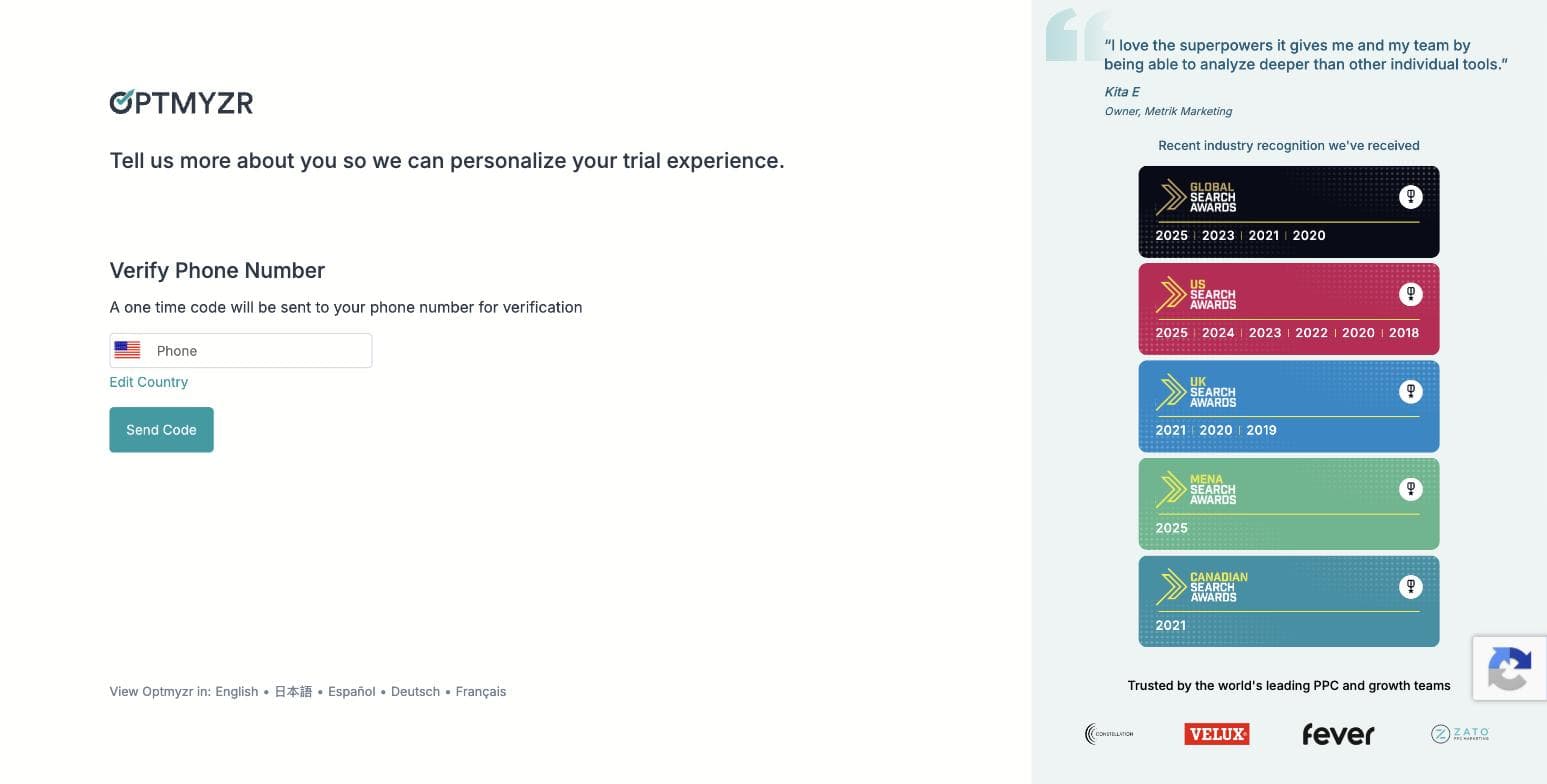
Optmyzr's phone-verification gate, captured during our own signup on 30 July 2026. No skip option is offered. - 04
Pick your goals: three of ten
Step two of the wizard asks you to choose exactly three priorities from ten: search queries and keywords, ad creation and testing, budget management, bid and target optimization, shopping campaigns, placements and audiences, performance analysis, account audits, report creation, and full AI account management. The three you pick genuinely shape what the product shows you afterwards: the AI assistant's opening plan named all three of ours back to us.
- 05
Choose how you want to work, and find the MCP connector
Step three offers three working modes, all pre-selected: hands-on in the browser, on autopilot with an automation agent sending you a digest, or, the one nobody is writing about, inside your own AI assistant, connecting Optmyzr over MCP to Claude or ChatGPT so you manage the account from where you already work. That third option is a real 2026 capability and it is absent from every Optmyzr roundup we found.
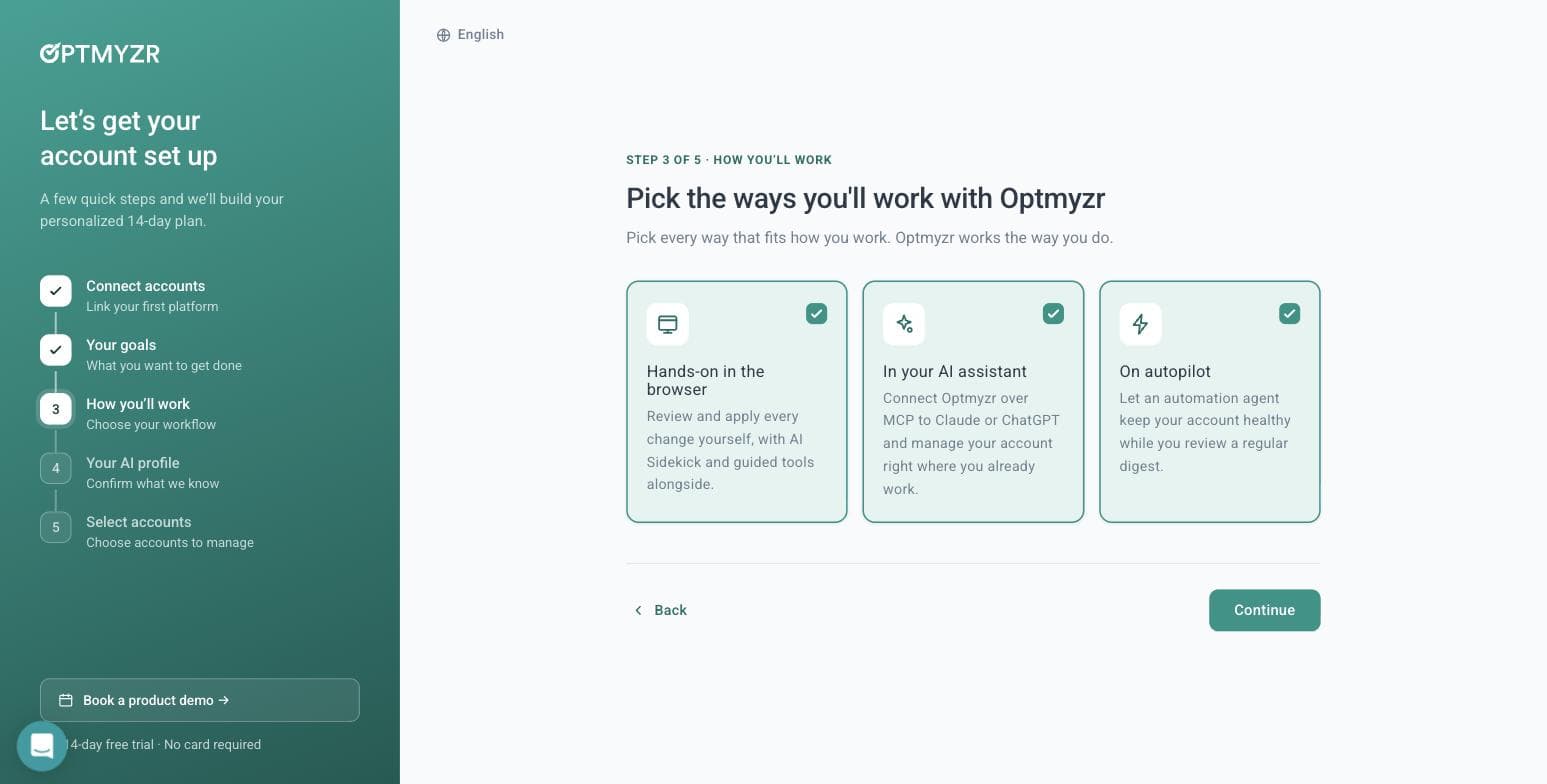
Optmyzr's three working modes, including an MCP connector for Claude and ChatGPT. Captured 30 July 2026. - 06
Let its AI read your website: we tested this properly
Step four builds an AI profile of your business, and offers to generate it from your website. We gave it adflint.com and timed it: roughly ten seconds. It came back with the company name, correctly classified the industry, set the language, and wrote a paragraph describing our free trial length, our budget caps, our zero-markup pricing and five specific in-product features. Several of those live on deep pages, not the homepage, so it is crawling more than one URL. It left the tone field blank rather than guessing, which we would call the right call.
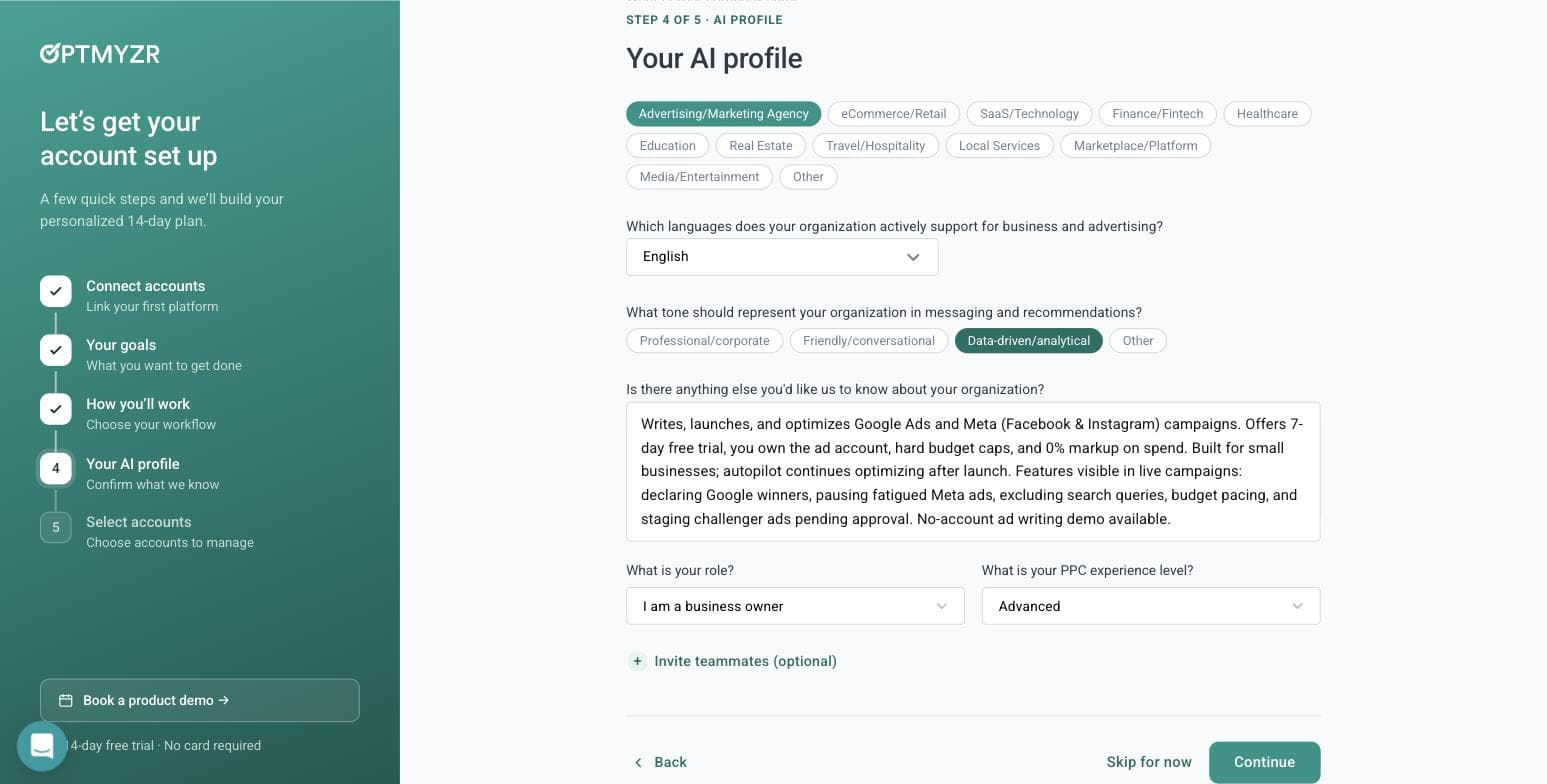
What Optmyzr's AI wrote about our business from the URL alone, in about ten seconds. Captured 30 July 2026. - 07
Skip the account connection, and get in anyway
Step five is where most tools stop you. Optmyzr does not. It says: you didn't connect an account, so we'll start you with a general plan, connect one anytime to tailor it. Then it opens the full application. You can browse the entire tool tree, read what every module does, and use the AI assistant before you ever grant a third party access to a live ad account. For anyone evaluating software on behalf of a client, that is a meaningful difference.
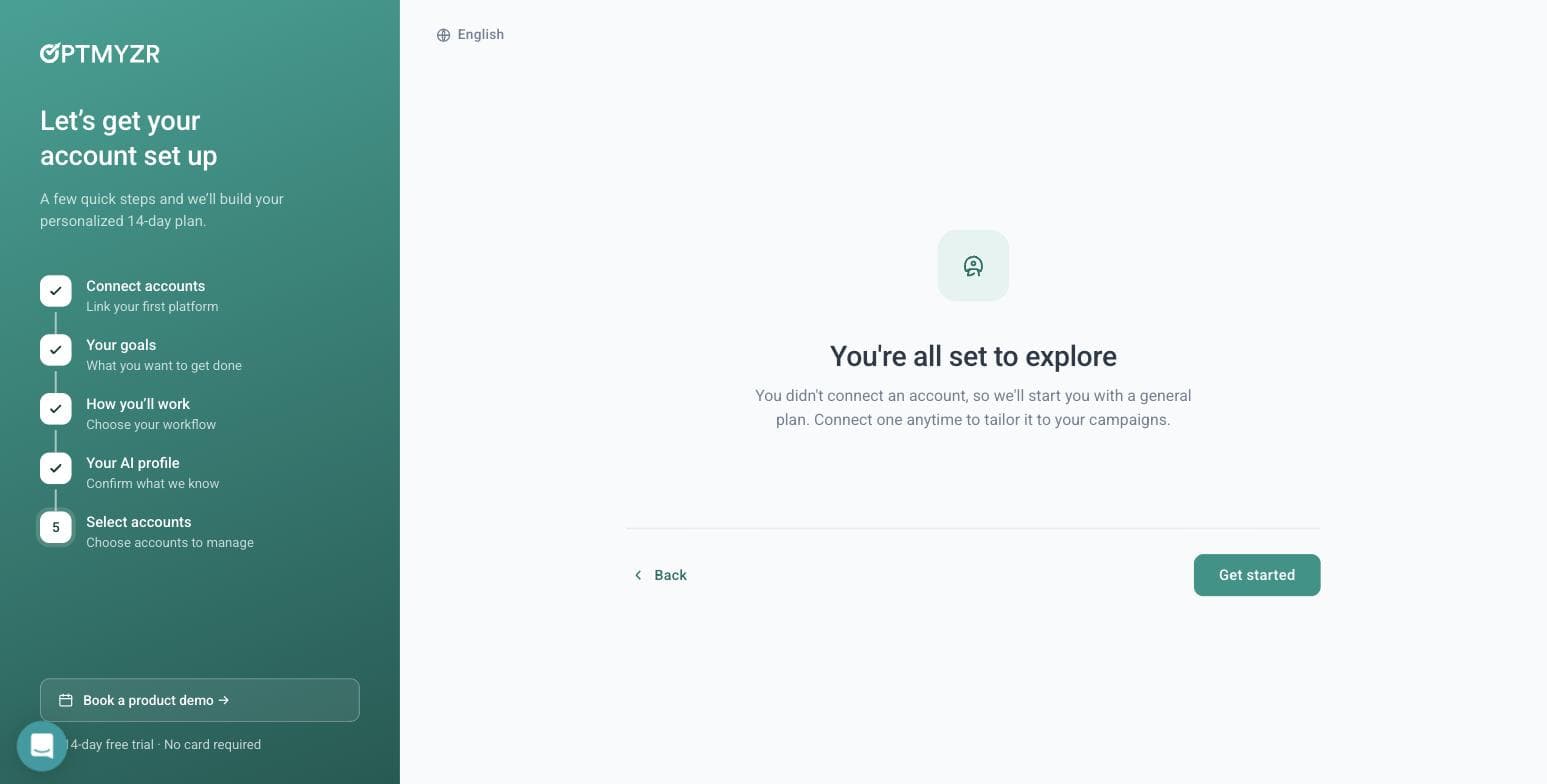
Optmyzr lets you into the product with no ad account connected. Captured 30 July 2026. - 08
Ask the AI assistant a real question
Sidekick 6.3 opens with a day-one-of-fifteen plan built from the three goals we picked. We asked it something a real advertiser would ask: whether a home-services business spending $900 a month should run Maximize Conversions or Manual CPC. It gave a properly conditional answer: Maximize Conversions if your conversion tracking is solid and you have volume for Google to learn from, Manual CPC if tracking is weak, conversions are sparse, or you are testing new keywords under tight control. That is the correct answer, and it arrived with an 'AI can make mistakes' disclaimer attached. Notably, all of this worked with no ad account linked.
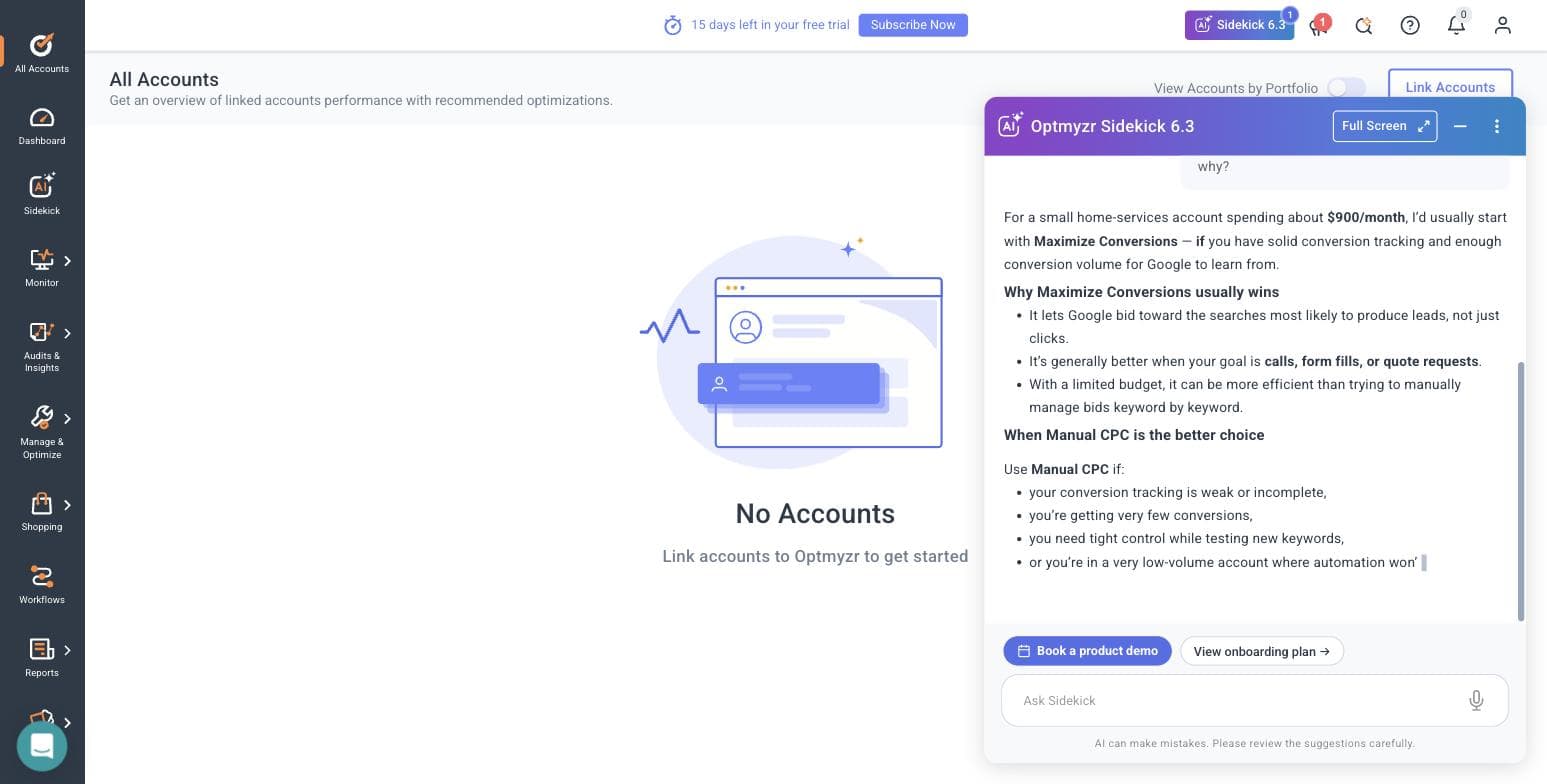
Sidekick's answer to our bidding question, with no ad account connected. Captured 30 July 2026. - 09
Open the Rule Engine strategy library
Manage & Optimize holds eight modules: Optmyzr Express, Search Queries & Keywords, Ads & Creatives, Bids & Targets, Budget, Placement & Targeting, Rule Engine, and Campaign Manager & Launcher. The Rule Engine ships pre-built strategies grouped by platform: Google Ads gets search-query trend analysis, a report on recommendations Google auto-applied on your behalf, and two new strategies for excluding gaming and kids placements from Performance Max. Microsoft Ads gets non-converting query cleanup and Smart Bidding target optimization. Amazon Ads gets negative-keyword automation and ACOS-based bid changes. The breadth here is the product's real argument.
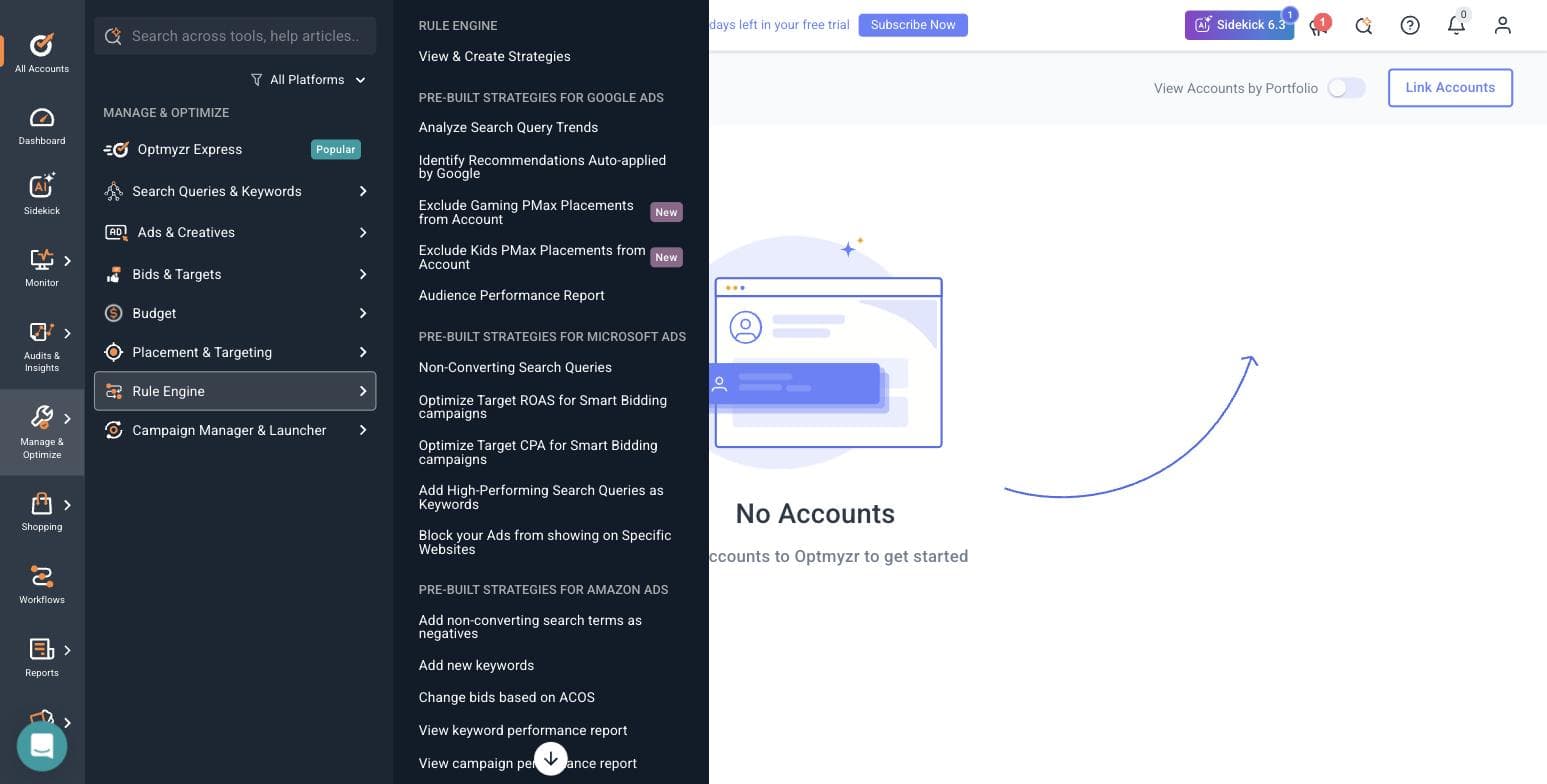
Optmyzr's pre-built Rule Engine strategies, split across three ad platforms. Captured 30 July 2026. - 10
Find where the open door closes
Browsing is free; running anything is not. Every optimization module we opened - Rule Engine, Reports, the rest - bounced straight back to the All Accounts screen with 'Link accounts to Optmyzr to get started'. So the honest shape of the trial is this: the AI assistant and the entire tool catalogue are open without a connection, and every tool that would touch a campaign is not.
- 11
Read the integration list, and the consent dialog nobody quotes
Optmyzr connects eleven sources: Amazon Ads, Amazon Seller Central, Meta Ads, LinkedIn Ads, Google Ads, Google Analytics, Google Merchant Center, HubSpot, Microsoft Ads, Search Ads 360 and Yahoo Japan. Worth noting for agencies: when you link a Google Ads account, Optmyzr offers an optional link to its own manager account for faster support, and the dialog makes you type CONNECT to confirm, warns that Google will automatically email everyone with access to the account, and states outright that it is not recommended if you are an agency without explicit client approval. We have read a lot of these dialogs. That one is unusually straight.
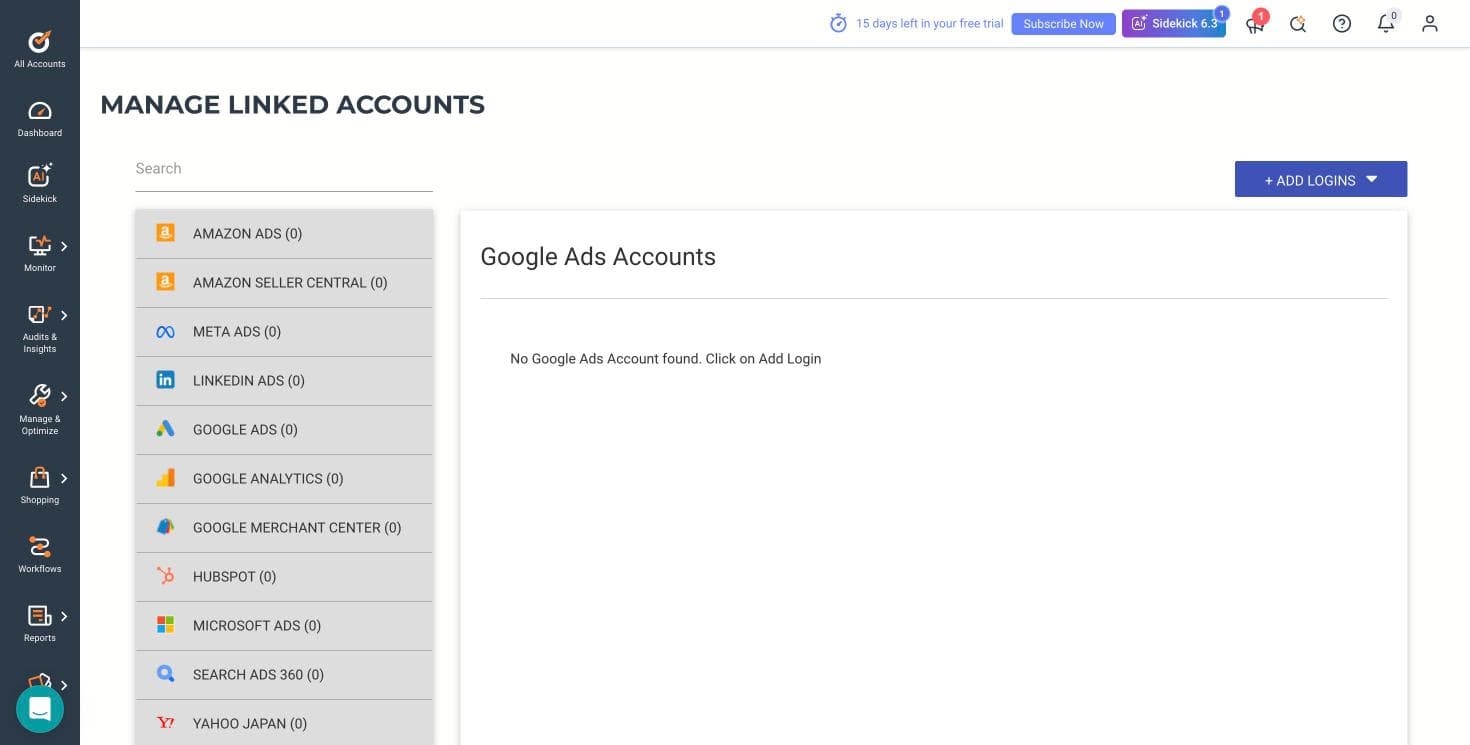
Optmyzr's eleven connectable platforms. Captured 30 July 2026.
What the signup told us
- — No credit card is required, and that claim holds up — we were never asked for one.
- — A phone number and SMS code are required, and that is not mentioned before you start.
- — The banner inside the product counts down from 15 days, while the marketing says 14. A day in your favour, but the two numbers disagree.
- — The wizard is five steps and the qualification form has five required fields. This is a long runway before you see a feature.
- — The lowest ad-spend bracket is Under $10,000 per month and the ladder runs to $500,000+. A business spending a few hundred dollars a month sits below the bottom rung of how this product thinks about customers.
- — Their own published /free-trial/ URL 404s, which suggests the marketing site and the app have drifted apart.
- — The genuine standout: you can enter the product, browse every module and use the AI assistant without connecting an ad account. Almost nothing else in this category allows that.
Where this stops: We did not connect a live Google Ads or Meta account, so no real campaign data ever flowed through Optmyzr for us. That means we cannot speak to the quality of its optimization suggestions against real spend, how its rules behave when they fire, or how its reports look populated. What we can speak to — because we did it — is the signup, the wizard, the AI assistant's reasoning, the tool catalogue, the integration list and the consent flow.
Birch (formerly Revealbot)
Walkthrough performed July 30, 2026Revealbot rebranded to Birch and moved to bir.ch. A lot of published roundups still send readers to revealbot.com, and the old /signup path 404s — the working signup is at app.bir.ch/signup.
We created an account, completed onboarding and worked through the product. The headline finding: Birch in 2026 is three products, not one. The automation tool everyone reviews is now sitting alongside a bulk creative launcher and a server-side tracking gateway, and it is priced against your ad spend.
- 01
Create the account
Email, a password of six or more characters, and your name, or one-click signup with Google. The page states a 14-day free trial, no credit card required, cancel anytime. A newsletter checkbox is present and unticked. No card was requested at any point, and no phone number either. Account creation to the connect screen took under two minutes.
- 02
Set up the company and declare your budget
Step two asks for company name, industry, monthly ad budget, and how you heard about them. Industry options are Agency, Services, Ecommerce, Mobile App, Lead Generation, and Other. The budget brackets run Below $10K, $10K-$30K, $30K-$75K, $75K-$150K, $150K-$300K, $300K-$500K, and Over $500K. As with Optmyzr, everything under ten thousand dollars a month is one undifferentiated bucket at the bottom, and it turns out that bracket is not just a survey question, it is the pricing.
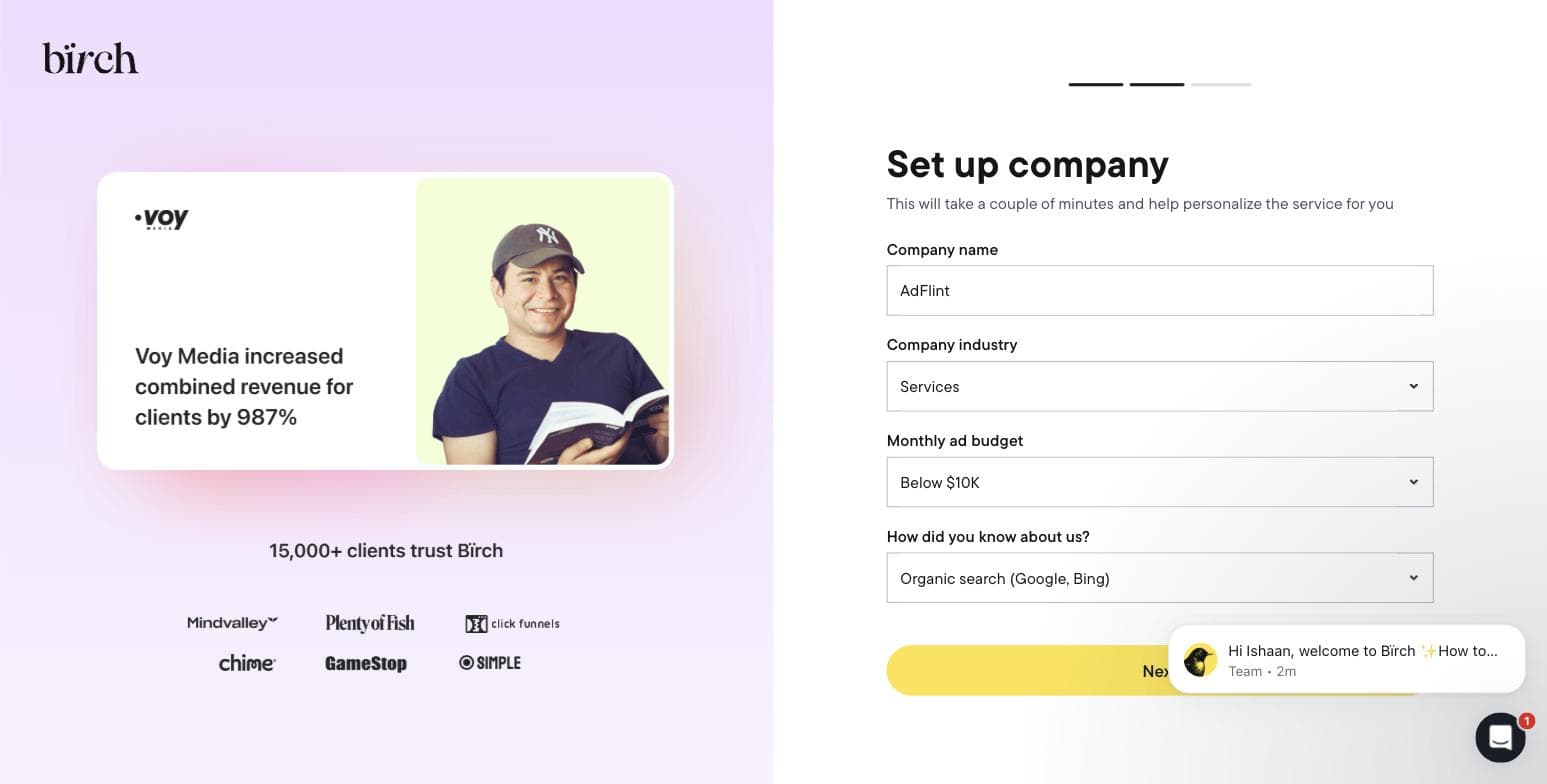
Step two of Birch's onboarding, captured during our own signup on 30 July 2026. - 03
Connect an ad platform, or don't, and see what breaks
Step three asks you to connect Meta Ads, TikTok, Google Ads, or Snapchat before you reach the product. Meta is presented first and most prominently, matching Birch's heritage. We skipped it deliberately, to find out how much of the product survives without granting a third party access to a live ad account. The answer is: the shell, but not the substance.
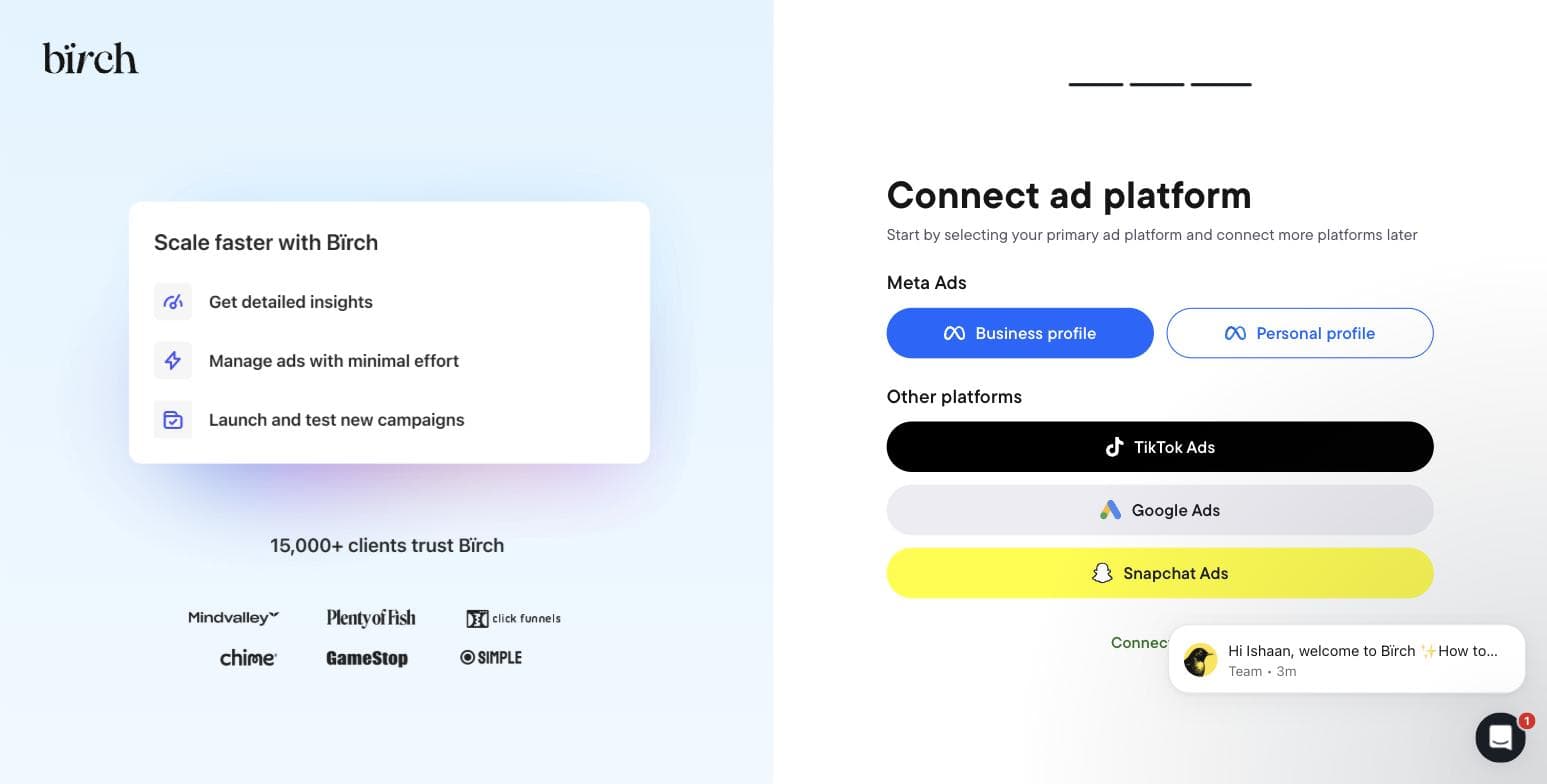
Birch's final onboarding step. Captured 30 July 2026. - 04
Open the Rules engine: the feature it is famous for
The automation screen is the reason most people arrive at Birch. Without a connected account it is a single button reading Connect ad account, over an illustration of the three action types it offers: increase bid, duplicate, notify. That is the entire surface available to an unconnected trial. There is no sandbox and no demo dataset, so you cannot evaluate the rule builder against sample data before handing over access to real campaigns.
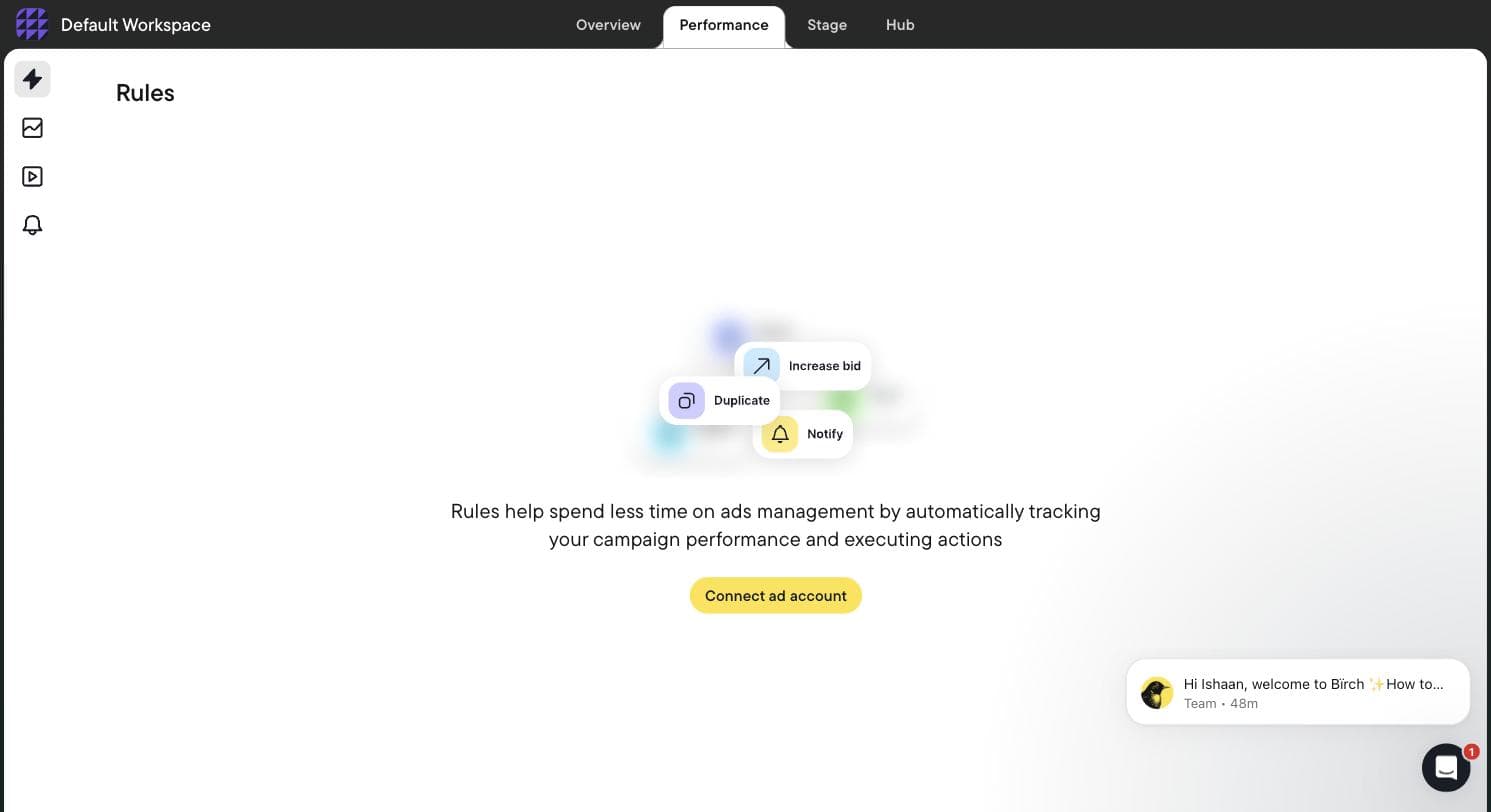
Birch's Rules screen with no ad account connected — the rule builder is entirely gated. Captured 30 July 2026. - 05
Find Stage, the product nobody has reviewed
Stage is a bulk creative launcher: you connect a planning Google Sheet and your Drive folders, and it builds the ads from there: launching creative tests from the sheet, mirroring your Drive folder structure into ad structure, duplicating winning setups with new creative swapped in, and working across multiple Drives and platforms at once. It targets Meta, TikTok and Snapchat. Birch states plainly that its Drive access is read-only and it cannot edit or delete anything. We could not find a single published roundup that mentions this exists.
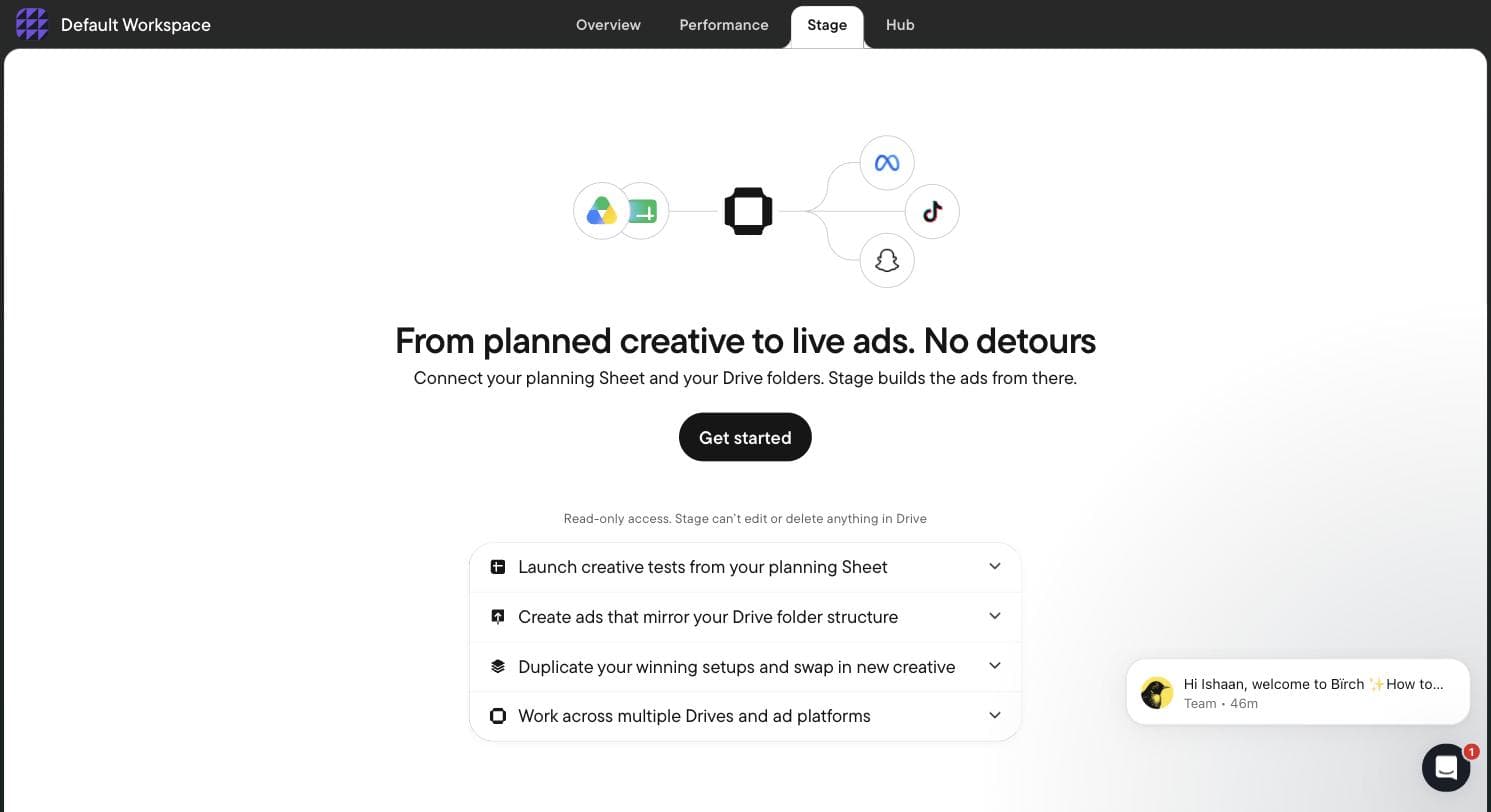
Birch Stage — a Sheet-and-Drive bulk ad launcher absent from every Revealbot-era review. Captured 30 July 2026. - 06
Find Hub, which is not an ads tool at all
Hub is server-side tracking infrastructure. You create a Signals Gateway, pick a hosting region, point it at your primary website, and it collects first-party data and forwards it to the ad platforms, the category occupied by conversions-API and server-side GTM setups. A company that used to sell Facebook rule automation now also sells you the tracking layer underneath it. That is a strategic move worth understanding before you compare Birch to anything on price alone.
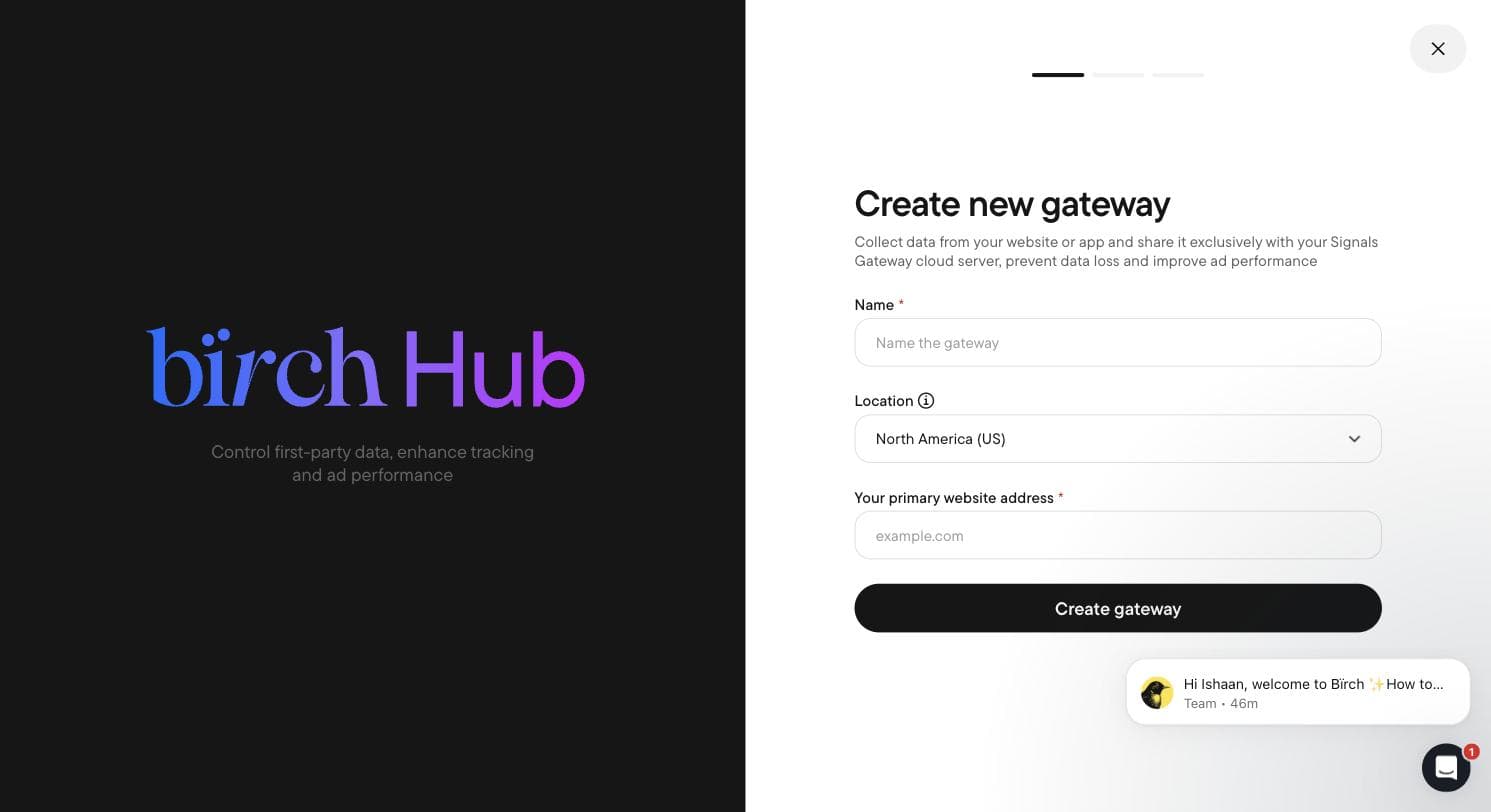
Birch Hub's Signals Gateway — server-side first-party data collection. Captured 30 July 2026. - 07
Read the integration list
Birch connects twelve services: Meta Ads, Google Ads & Google Drive, Snapchat Ads, TikTok Ads, YouTube, Google Analytics, Google Sheets, Slack, and, telling for who it is built for, the attribution stack of AppsFlyer, Adjust (in beta), Hyros and Wicked Reports. There is no Microsoft Ads, no Amazon and no LinkedIn. Set that against Optmyzr's Amazon, Microsoft, LinkedIn and Search Ads 360 and the two products stop looking like competitors at all: Optmyzr is built for search, Birch is built for paid social and direct-to-consumer attribution.
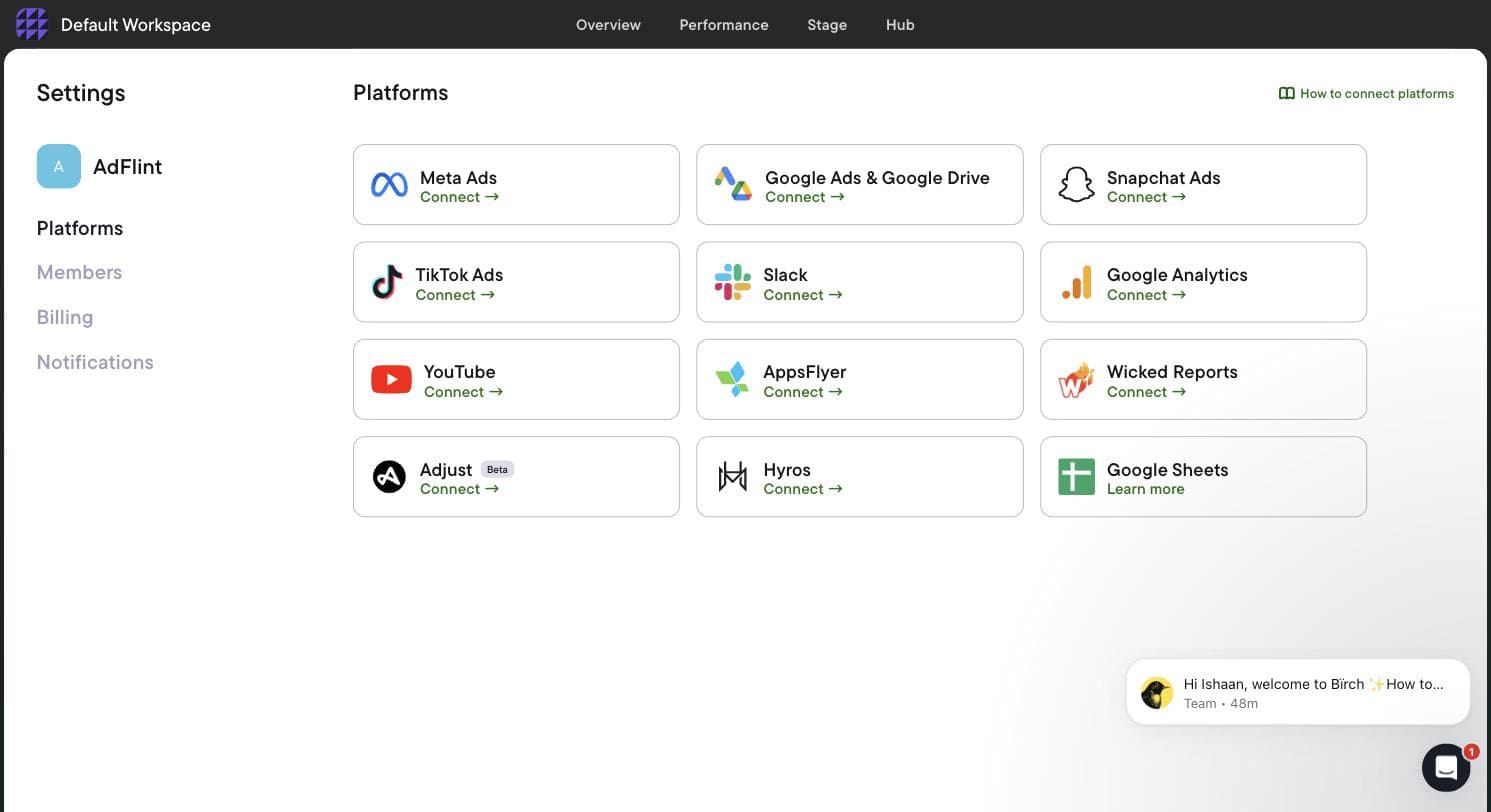
Birch's twelve integrations, heavy on paid social and attribution. Captured 30 July 2026. - 08
Read the real price off the billing screen
Birch does not have a flat price. The billing screen tracks cumulative spend across your connected accounts and charges you against it, with a slider that recalculates every plan as you move up the spend ladder. We walked the whole slider and wrote down every number. Two things matter more than the prices themselves: whether automated rules (the feature Revealbot was known for) are in the entry plan is unclear because Birch's pricing page contradicts itself, so confirm on the plan page before buying; and above roughly $150K in monthly spend the entry plan stops being offered.
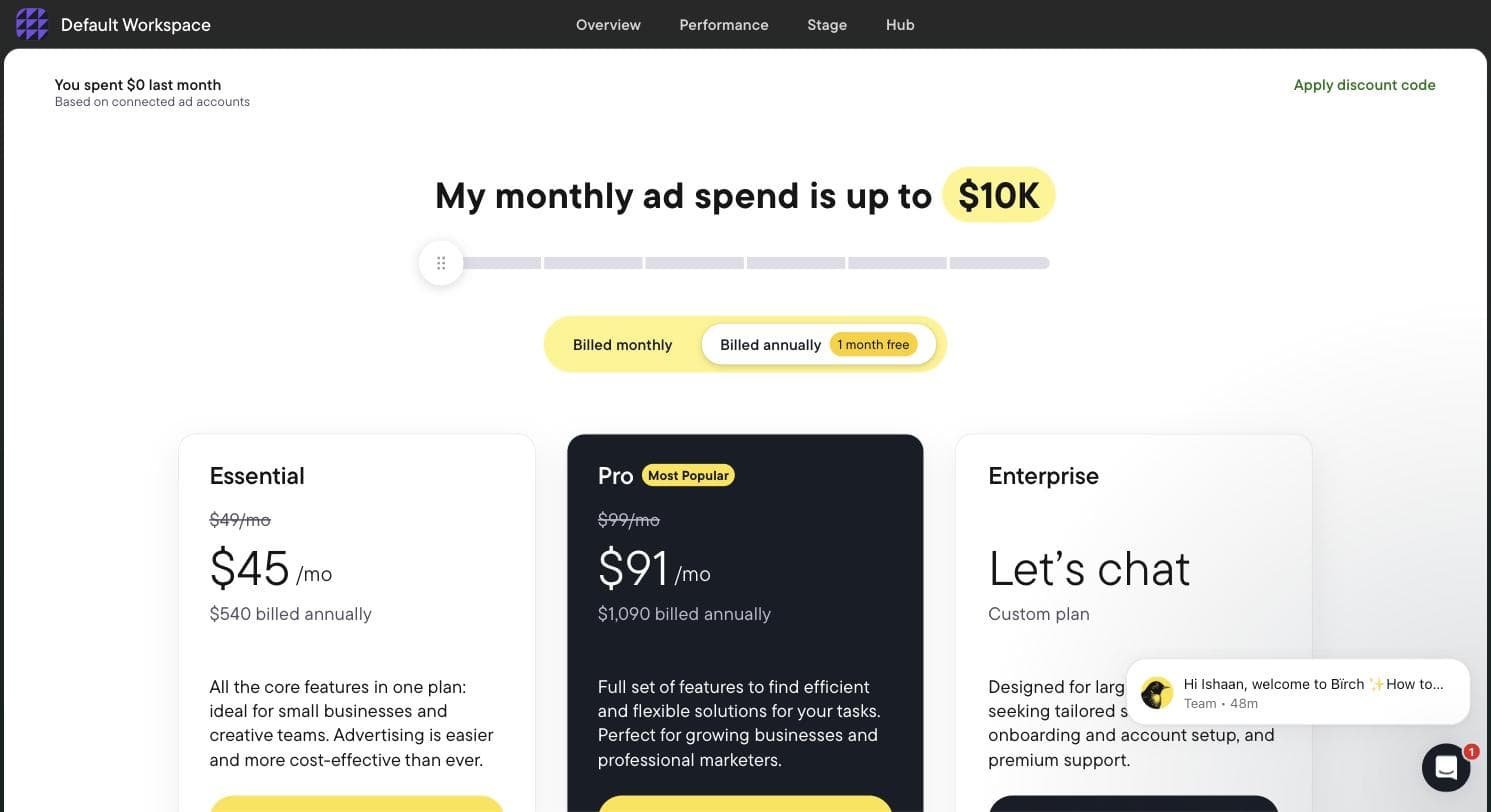
Birch's in-app pricing at the lowest spend tier. The slider above recalculates every plan. Captured 30 July 2026.
What the signup told us
- — Genuinely fast: account creation to the connect screen took under two minutes, with no phone number and no credit card.
- — The rebrand is badly signposted. Arriving from an older article pointing at revealbot.com or bir.ch/signup gets you a 404 before you find the app.
- — No sandbox and no demo data. The rule builder — the main reason to evaluate Birch — is completely inaccessible until you grant access to a live ad account.
- — Pricing is tied to your ad spend, not to seats or usage of the tool, so your bill grows as your campaigns do even if your use of Birch never changes.
- — Birch's pricing page is inconsistent on whether the entry plan includes automation, so confirm on the plan page before relying on the widely quoted 'from $49' figure for the rules engine.
- — Meta is the default and most prominent option; Google Ads is present but visually secondary. Treat this as a Meta-first tool that also does Google.
- — One URL we tried inside the app hung on a loading spinner indefinitely rather than resolving or erroring.
Pricing, read off the in-app billing screen
Every figure below was read directly off Birch's own in-app billing slider on 30 July 2026, at each spend tier in turn. Monthly prices are the headline rate; annual prices are the discounted equivalent, billed once a year.
| Your monthly ad spend | Essential | Pro | Annual (Essential / Pro) |
|---|---|---|---|
| Up to $10K | $49/mo | $99/mo | $540 / $1,090 |
| Up to $30K | $149/mo | $249/mo | $1,640 / $2,740 |
| Up to $75K | $299/mo | $499/mo | $3,290 / $5,490 |
| Up to $150K | $499/mo | $799/mo | $5,490 / $8,790 |
| Up to $300K | Not offered | $1,299/mo | — / $14,290 |
| $500K+ | Not offered | Not offered | Enterprise, custom quote |
- — Birch's pricing page is inconsistent on whether Essential includes automated rules: its feature list shows Automated rules and strategies under Pro, while its FAQ says all Birch features are available irrespective of the selected plan. Confirm on the plan page before buying. The Essential list we saw in July showed workspaces, post boosting, reports, an activity page, and Slack and email support.
- — Birch's feature list shows Pro adding automated rules and strategies, Explorer, top audiences, Launcher, Stage, custom metrics and timeframes, the custom and lookalike audience builder, the Sheets/AppsFlyer/Hyros integrations, and live chat support.
- — Price is set by total monthly ad budget across every ad account you connect. If your spend rises past your tier, Birch states you are charged an overage fee through Stripe and notified by email; your features keep working.
- — Annual billing is described as twelve months for the price of eleven.
- — The trial is 14 days with full feature access. When it expires, your rules and reports are disabled rather than deleted, and come back when you pick a plan.
Where this stops: We did not connect a live Meta or Google account, so we have not watched a Birch rule evaluate or fire against real campaigns, and we have not seen Explorer, Stage or Hub populated with real data. Everything above is what the product does and costs, verified in-app; how well its automation actually performs on live spend is not something this walkthrough can tell you.
Optmyzr
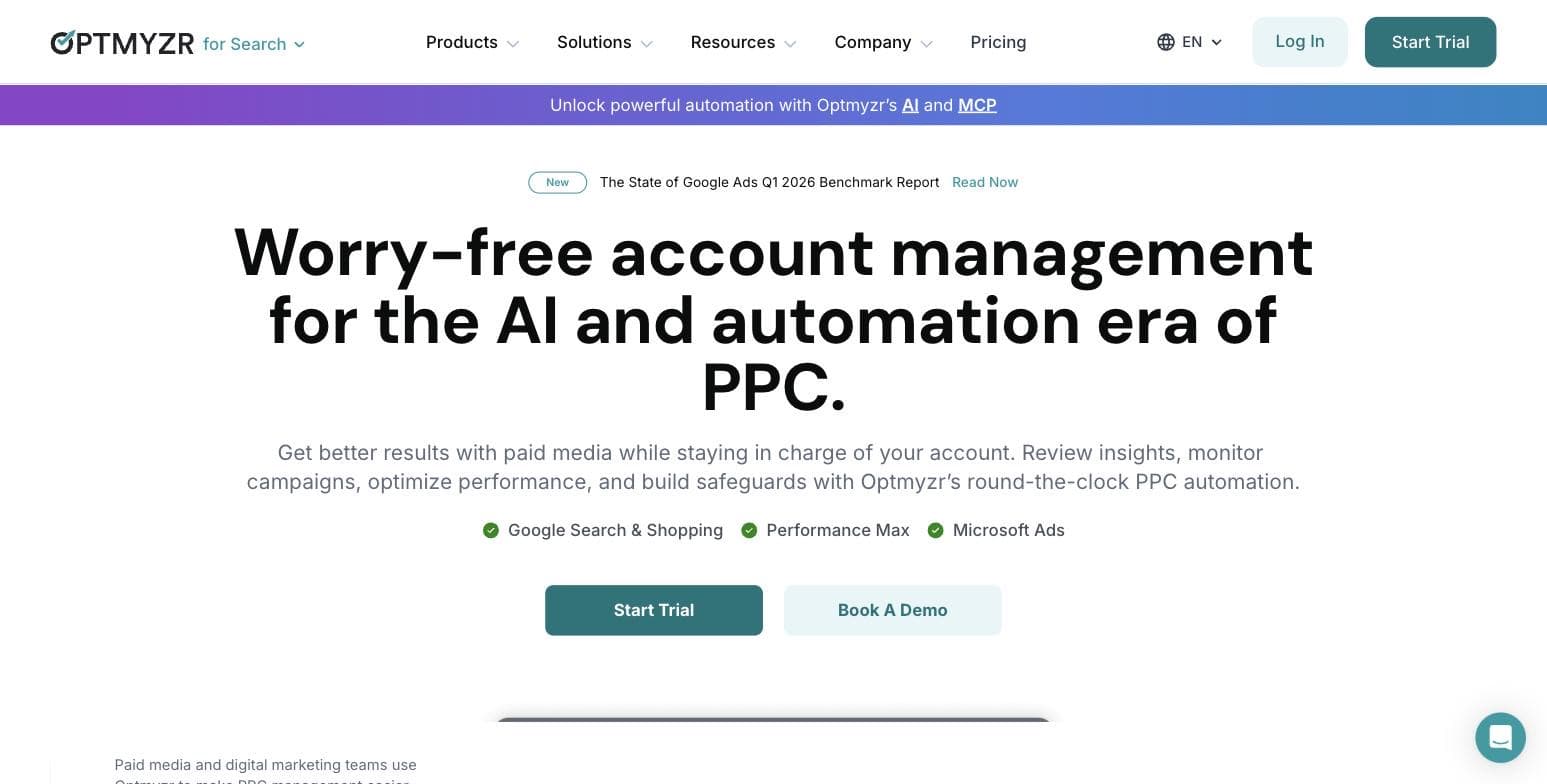
Best for PPC professionals and agenciesOptmyzr tops this list because its depth is documented rather than promised, and because agencies and in-house PPC teams are the bulk of its verified reviewers. It covers Google Ads, Microsoft Ads, Amazon Ads, Meta, LinkedIn, and Yahoo Japan, and its core loop is a large library of one-click optimizations, scripts, alerts, and audits that compress hours of routine account maintenance into minutes. It is an expert's power tool: the AI proposes, a human disposes.
Its pricing page headline reads, The complete PPC toolkit, starting at $209 a month, with tiers that scale by monthly ad spend, a note that Premium is the better value above $250K in monthly spend, and custom plans above $500K. Annual billing saves 30 percent, and there is a 14-day free trial with no credit card required. Its pricing FAQ says Amazon, Meta and LinkedIn tools are included in every plan at no extra cost.
Its public reputation backs the ranking: 4.7 out of 5 across 130 G2 reviews as of July 2026. The honest caveat is the audience. At $209 per month, Optmyzr only makes economic sense once you manage meaningful spend - a business spending $1,000 per month on ads would be paying more than 20 percent of its media budget on tooling. Campaign creation sits in a separate product, Campaign Automator, which builds and updates campaigns from a data feed using templates (Google Ads and Microsoft Ads); the core toolkit makes a competent operator dramatically faster rather than replacing the operator.
Pros
- + Broadest serious platform coverage in this list: Google, Microsoft, Amazon, Meta, LinkedIn, Yahoo Japan
- + Optimization, script, and audit library that reviewers credit with large time savings
- + Strong G2 rating: 4.7 out of 5 across 130 reviews as of July 2026
- + Transparent starting price and a 14-day trial with no credit card
- + Built for account managers, so nothing executes without a human decision by default
Cons
- − At $209 per month minimum, it is poor value below roughly $2,000 in monthly ad spend
- − Campaign creation runs through Campaign Automator, which builds and updates campaigns from a data feed using templates (Google Ads and Microsoft Ads). Optmyzr's pricing page lists it on Premium with one free account, and Optmyzr also sells it alone at $249 a month per account
- − Reviewers note report design and branding customization is limited compared to dedicated reporting tools
Ideal for
- Agencies managing many accounts
- In-house PPC specialists
- Advertisers spending $2,000 per month or more who want leverage, not delegation
Pricing: Starting at $209 per month with annual billing (the pricing page data shows $299 on monthly billing), at the lowest ad spend setting of 25K, scaling with monthly ad spend; annual billing saves 30 percent; custom plans above $500K monthly spend; Amazon, Meta and LinkedIn tools included in every plan (Amazon Ads tools are also sold stand-alone from $66 per month); 14-day free trial, no credit card required (pricing checked October 2026).
Visit Optmyzr“The automation framework, scripts, and optimisation workflows have greatly reduced the need for manual checks and repetitive tasks. This allows our strategists to dedicate more time to higher-value activities such as developing strategy, conducting tests, and generating client insights.”
— Bia C., Senior Google Ads Specialist, G2 review, January 2026
AdFlint
Best for small businesses that want ads run for themOur product — disclosureDisclosure first: AdFlint is our product, and this page is published on our site. We have ranked it second, not first, because the honest reading is that Optmyzr is the stronger tool for professionals - but for the small-business owner with no PPC staff, which is exactly who most of the self-crowning roundups ignore, AdFlint is the entry on this list actually built for you.
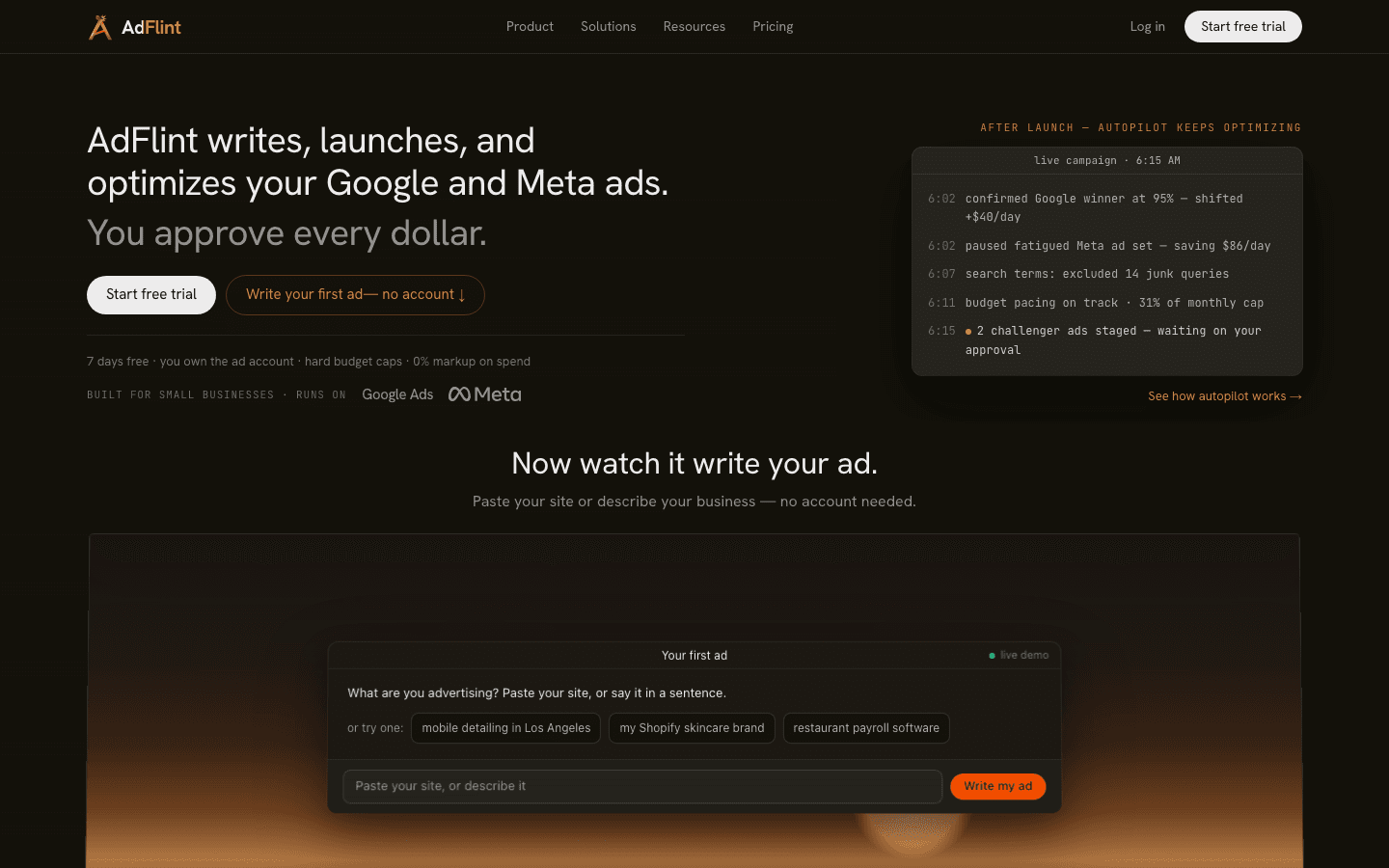
The model is different from the dashboards above: AdFlint's AI writes the ads, launches them, and optimizes them inside your own Google and Meta ad accounts - you keep ownership of the account, the data, and the billing relationship with Google and Meta. On self-serve plans, nothing goes live until you click Launch or turn on Full Autopilot, and budgets are enforced with hard caps. In Autopilot, the default, AdFlint can also pause weak ads and switch on new ad versions it writes. Every change is logged. AdFlint takes no percentage of your spend on self-serve plans; your card pays the ad platforms directly. The done-for-you Managed plan is a monthly fee plus a share of ad spend, priced per account. The screenshot below is the live autopilot demo on our public homepage, so you can watch the decision log it produces before signing up.
The honest limits: it covers Google and Meta only - no TikTok, Amazon, or LinkedIn - and self-serve plans cover up to $1,000 a month in ad spend on Launch ($40 a month) and up to $30,000 on Premium ($319 a month), with custom pricing above that - the sweet spot is still small budgets. As the publisher, we also do not cite third-party review scores for ourselves here; judge the demo instead.
Pros
- + AI creates, launches, and optimizes campaigns rather than just suggesting changes
- + Works inside your own ad account - you keep the account, data, and platform billing
- + Hard budget caps, and on self-serve plans nothing goes live until you click Launch or turn on Full Autopilot
- + No percentage-of-spend markup on self-serve; plans from $40 per month, with a 7-day free trial on monthly plans (card required; annual plans have no trial)
Cons
- − Google and Meta only - no TikTok, LinkedIn, Amazon, or programmatic channels
- − Self-serve plans top out at $30,000 a month in ad spend; larger accounts need custom pricing
- − A young product from the company publishing this list - weigh our disclosure accordingly
- − Google campaigns are Search campaigns only: no Display, YouTube, Performance Max or Shopping
Ideal for
- Small businesses spending $100 to a few thousand dollars per month on ads
- Owners with no time or desire to learn Ads Manager
- Anyone who wants a flat monthly fee instead of an agency retainer (self-serve plans; Managed takes a share of ad spend)
Pricing: Launch $40 per month (up to $1,000 per month ad spend), Growth $89 per month (up to $2,500), higher tiers up to Premium (up to $30,000 per month in ad spend), custom above that; 7-day free trial on monthly plans (card required; annual plans have no trial); no percentage of spend on self-serve plans, and your card pays the ad platforms directly (pricing checked October 2026).
Try AdFlint freeMadgicx
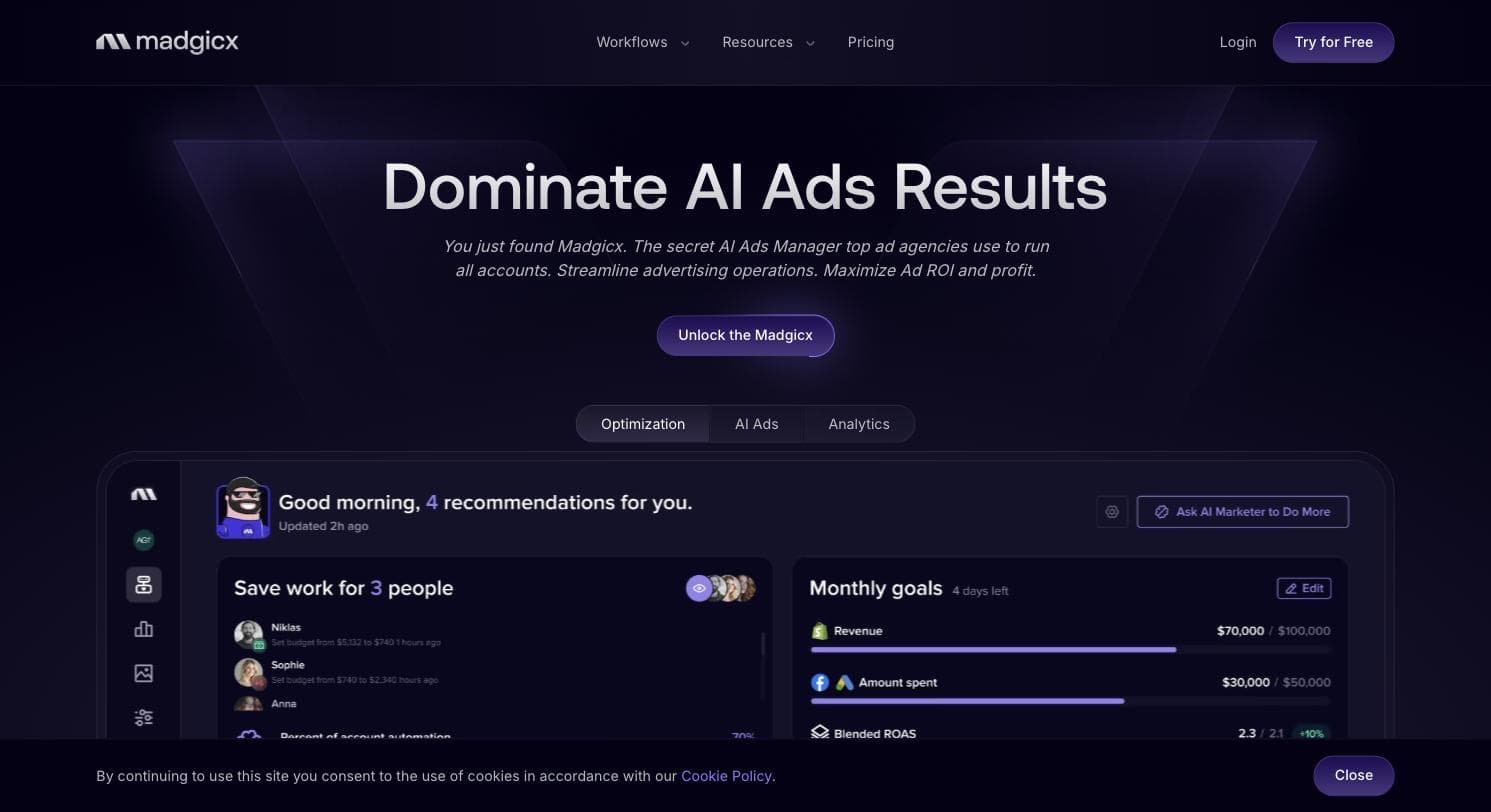
Best for Meta-first ecommerce brandsMadgicx positions itself as an ecommerce ad cloud for Meta advertisers, and within that lane it is the deepest AI toolset on this list: audience targeting, creative insights, automation tactics, and an AI marketer layer that surfaces daily actions across ad accounts. It is a Meta Business Partner and pairs the main product with a Tracking Pro add-on at $49 per month for server-side, first-party conversion tracking - increasingly necessary kit for DTC brands dealing with signal loss.
Two things temper the recommendation. First, price: the fee climbs with your monthly ad spend, from $45 a month under $1,000 to $329 a month at $20,000 to $30,000 on monthly billing (checked October 26, 2026), and spend above $30,000 is quoted inside the app. Second, the review split is unusually wide and worth reading before you buy: 4.6 out of 5 across 217 reviews on G2, but 1.8 out of 5 across 269 reviews on Trustpilot as of July 2026. Read the Trustpilot page and a pattern is hard to miss - across the most recent 80 reviews there, 65 are one-star and the dominant themes are trials auto-converting to paid, unexpected annual or quarterly charges, and refused refunds. Its Shopify App Store listing sits in between at 4 out of 5 across 13 reviews.
If you are a Shopify or DTC brand doing serious Meta volume and you want AI leverage without leaving Ads Manager behind entirely, Madgicx is the specialist pick. If you need Google, Microsoft, or anything beyond the Meta ecosystem at the core of the product, look elsewhere on this list.
Pros
- + Deep Meta-specific AI stack: audiences, creative analysis, automation tactics, daily recommended actions
- + Tracking Pro add-on ($49 per month) covers server-side first-party tracking for signal loss
- + Meta Business Partner with a 7-day free trial
- + Strong G2 rating: 4.6 out of 5 across 217 reviews as of July 2026
Cons
- − Price climbs with ad spend, from $45/mo under $1K to $329/mo at $20K-$30K, before the $49/mo Tracking Pro add-on
- − Trustpilot tells a much harsher story: 1.8 out of 5 across 269 reviews as of July 2026, dominated by trial auto-conversion, surprise charges, and refused refunds
- − Meta-centric: it is not the tool for a Google-first or genuinely multi-channel program
Ideal for
- DTC and Shopify brands spending most of their budget on Meta
- Media buyers who want AI assistance without giving up manual control
- Teams that need better conversion tracking as much as optimization
Pricing: Core plan priced by monthly ad spend: $45/mo under $1K, $99 up to $2.5K, $119 up to $5K, $129 up to $10K, $229 up to $20K and $329 up to $30K billed monthly, with lower quarterly and annual rates; spend above $30K quoted inside the app; Tracking Pro add-on $49 per month; 7-day free trial (pricing checked October 26, 2026).
Visit Madgicx“I have been using Madgicx for a year now, and it's an amazing platform. It has greatly simplified the management of my Facebook ad accounts.”
— Jet Italian Deli, verified merchant review on the Shopify App Store, November 2023
Birch (formerly Revealbot)
Best for rule-based automation across four platformsIf you searched for Revealbot and wondered where it went: it rebranded to Birch, and revealbot.com now redirects to bir.ch. The product remains what Revealbot always was - the strongest pure rule engine in this group. You define automation rules (pause when CPA exceeds X, scale budget when ROAS holds for Y hours, restart winners, rotate creatives), and Birch executes them around the clock across Meta, Google, Snapchat, and TikTok, with automated reporting for teams and clients.
Pricing is refreshingly public: Essential from $49 per month and Pro from $99 per month, scaling with connected ad spend, with a custom Enterprise tier and a 14-day free trial. That undercuts Optmyzr meaningfully, and for a media buyer who knows exactly what rules they want enforced, it is excellent value.
The trade-off is that a rule engine is only as good as its author - Birch executes your logic, it does not supply judgment, write ads, or plan strategy. Its public review record is thin and split: 4.6 out of 5 across 19 G2 reviews, but 3.8 out of 5 across 18 Trustpilot reviews as of July 2026 (55 percent five-star, 28 percent one-star). Both samples are small enough to read end to end yourself; the more measured reviews praise the automation while wanting more depth from its newer AI insights.
Pros
- + True cross-platform rule automation: Meta, Google, Snapchat, TikTok
- + Public, comparatively affordable pricing from $49 per month with a 14-day trial
- + Powerful budget scaling and creative rotation rules that run 24/7
- + Automated reporting suitable for agencies and clients
Cons
- − You have to know what rules to write - it automates execution, not judgment
- − No AI ad creation to speak of; it manages what you or the platform built
- − Thin, split public review record: 4.6 out of 5 from 19 G2 reviews but 3.8 out of 5 from 18 Trustpilot reviews as of July 2026, with 28 percent one-star
Ideal for
- Performance marketers with a proven playbook to automate
- Teams running Meta plus TikTok or Snapchat where few tools reach
- Agencies wanting scheduled client reporting bundled in
Pricing: Essential from $49 per month, Pro from $99 per month, scaling with monthly ad spend across connected accounts; annual billing is discounted ($45 Essential and $91 Pro per month at the lowest spend tier when billed annually, about 8 percent below the monthly prices by our math; the pricing toggle says 20 percent off while its FAQ says 12 months for the price of 11); Enterprise custom; 14-day free trial (pricing checked October 2026).
Visit Birch (formerly Revealbot)“The interface and insights are helpful at times, especially for identifying patterns like creative fatigue, but overall I felt there is still room for improvement in terms of depth, consistency, and actionable recommendations.”
— Bhoomi Arora, Trustpilot review, March 2026
Adzooma
Best free starting pointAdzooma is the lowest-risk way on this list to find out what an optimization layer can do, because its entry price is zero. The free plan connects unlimited Google, Microsoft, and Meta ad accounts and delivers monthly performance reports, a limited set of improvement opportunities, and three PPC alerts. Paid tiers raise the cadence and remove the limits: Silver at $69 per month moves reporting and opportunity analysis to weekly with unlimited seats, and Gold at $179 per month makes both daily.
The opportunity engine is the heart of the product - scored suggestions (pause this keyword, adjust this bid, fix this ad schedule) that you apply with a click. By design that is the layer a small team without a PPC specialist gets value from, while staying shallower than Optmyzr on advanced workflows, scripts, and audits.
The catch is baked into the free tier's design: monthly-only analysis means a problem can burn budget for weeks before the free plan surfaces it, which is of course the argument for upgrading. One more thing to weigh, since the quote below is a glowing one: Adzooma's overall Trustpilot score is 3.1 out of 5 across 184 reviews as of July 2026, so the enthusiastic reviews sit alongside a meaningful body of unhappy ones. Treat free Adzooma as a monitoring layer and a taste test, not as management.
Pros
- + Real free plan covering Google, Microsoft, and Meta with unlimited connected accounts
- + One-click opportunity suggestions that non-experts can safely apply
- + Sensible mid-tier pricing: Silver $69 per month, Gold $179 per month, unlimited seats on paid plans
- + Includes reporting with branding options on paid tiers
Cons
- − Free plan analyzes and reports only monthly - too slow to catch budget waste in progress
- − Optimization depth is opportunity-level, not the script and audit depth serious PPC teams need
- − No TikTok, Amazon, or LinkedIn coverage
- − Middling aggregate reputation: 3.1 out of 5 across 184 Trustpilot reviews as of July 2026
Ideal for
- Small businesses that want a free health check on their ads before paying for anything
- Lean teams managing Google, Microsoft, and Meta together
- Anyone graduating from doing nothing to doing something about ad performance
Pricing: Free plan $0; Silver $69 per month ($700 per year on annual billing); Gold $179 per month ($1,800 per year); Enterprise custom (pricing checked October 2026).
Visit Adzooma“Adzooma's interface is incredibly intuitive, making it easy to navigate and use effectively. With its automation features, I've saved valuable time on tasks like ad scheduling and bid management, allowing me to focus on other important aspects of my business.”
— Mantas Malukas, Trustpilot review, June 2023
Smartly
Best for enterprise creative and media at scaleSmartly is the enterprise contrast on this list, and it is here so you know where the ceiling is. It combines generative AI creative production, cross-channel media buying, and measurement in one platform spanning Meta, TikTok, Pinterest, Snap, Google, YouTube, Reddit, Spotify, and connected TV. For a global brand producing hundreds of localized creative variations and moving budget across all of those channels, nothing else in this article competes - reviewers on G2 rate it 4.4 out of 5 across 475 reviews as of July 2026.
It is ranked sixth not on quality but on fit for the person typing this search into Google. There is no public pricing at all - smartly.io publishes no pricing page, and every path on the site ends at a demo request rather than a signup form. A verified Capterra reviewer notes the model is based on a percentage of total media spend for connected ad accounts, which they flag as a barrier for high-spend advertisers who only want a subset of features. This is procurement with an onboarding project attached, not a tool you switch on this afternoon.
Reviewers consistently praise the creative-at-scale workflow and support, while the recurring critiques are bugs, a steep learning curve, and that percentage-of-spend pricing. If your ad budget has a comma in it every day and you have a creative team to feed, book the demo; otherwise this is the tool to grow into, not start with.
Pros
- + Widest channel coverage here: Meta, TikTok, Pinterest, Snap, Google, YouTube, Reddit, Spotify, CTV
- + Creative automation built specifically for producing localized ad variations at scale
- + Strong verified review base: 4.4 out of 5 across 475 G2 reviews as of July 2026
- + Predictive budget allocation across channels from one workflow
Cons
- − No public pricing; custom quotes, with users reporting percentage-of-spend pricing
- − No self-serve signup anywhere: every entry point is a sales demo followed by an onboarding project
- − Reviewers cite bugs and a steep learning curve alongside the praise
Ideal for
- Enterprise brands and large agencies with dedicated creative and media teams
- Advertisers running five or more channels including CTV
- Teams whose bottleneck is creative production volume, not ad management basics
Pricing: No public pricing; custom-quoted enterprise contracts, with verified reviewers describing pricing as a percentage of total media spend on connected accounts (checked October 2026: its /pricing URL returns Not Found, so no pricing page is published).
Visit Smartly“Smartly allows our small but mighty team to act double the size by creating a space that allows us to manage, execute, report, and scale creative. It takes our team of 3 working at the level of a team of 10.”
— Allison W., Senior Manager, Paid Social, Capterra review, December 2021
AdEspresso
Best flat-rate Facebook and Instagram split testingAdEspresso, a Hootsuite product (G2 lists it as AdEspresso by Hootsuite), made its name as the approachable way to A/B test Facebook and Instagram ads, and the core appeal survives: a simple campaign creator that spins one concept into many test variations, automated optimization, and flat-rate pricing that is easy to budget for. Starter is $49 per month covering up to $1,000 per month in ad spend, Plus is $99 with unlimited spend, bulk creation, campaign approval and up to 15 seats, and Enterprise starts at $259 with a dedicated Facebook marketing consultant, unlimited seats, and API access. AdEspresso's pricing page offers a free 14-day trial on every plan.
It sits last on this list because the evidence around it is the weakest. Its pricing page today describes Facebook and Instagram campaigns only - the narrowest coverage here - and its public review record is thin and rough: 3.6 out of 5 across 74 G2 reviews, a 4.6 from just 5 Capterra reviews, and a 2.5 on Trustpilot from 5 reviews, 80 percent of them one-star, several alleging continued billing after trial cancellation. Its widely linked guide to Facebook automated ads is still dated March 2021, from before Meta consolidated its automation under Advantage+, so check publication dates before leaning on its content library.
There is still a user this fits: a solo advertiser on Facebook and Instagram who wants structured split testing at a predictable flat rate and finds Madgicx overwhelming. But given the billing complaints on record, set a calendar reminder for the trial end date, and know that the $49 tier's $1,000 spend cap means growing accounts outgrow it quickly.
Pros
- + Beginner-friendly split-testing workflow that G2 reviewers consistently single out as easy to use
- + Flat-rate pricing from $49 per month with unlimited ad accounts on every tier
- + Campaign approval workflow on Plus and above suits small teams
- + Free 14-day trial on every plan
Cons
- − Facebook and Instagram only per its current pricing page - the narrowest platform coverage in this roundup
- − Weak public review record: 3.6 out of 5 on G2 (74 reviews) and 2.5 on Trustpilot (5 reviews, 80 percent one-star) as of July 2026
- − Multiple recent Trustpilot reviews allege charges continued after trial cancellation
- − Starter's $1,000 monthly ad spend cap is easy to outgrow
Ideal for
- Solo advertisers and very small teams focused only on Facebook and Instagram
- Marketers who want structured A/B testing without a learning curve
- Budget-holders who need a flat, predictable tool cost
Pricing: Starter $49 per month (up to $1,000 per month ad spend), Plus $99 per month (unlimited ad spend, up to 15 seats), Enterprise from $259 per month; free 14-day trial on every plan (pricing checked October 2026).
Visit AdEspresso“Still charging us after a free trial which was cancelled a month ago.. we have had two $49 invoices come out of our account”
— Mark Brown, Trustpilot review, July 2025
Side by side.
| Tool | Best for | Starting price | Platforms covered | Standout limitation |
|---|---|---|---|---|
| Optmyzr | PPC professionals and agencies | $209/mo (annual billing; $299 monthly) | Google, Microsoft, Amazon, Meta, LinkedIn, Yahoo Japan | Poor value below about $2,000/mo ad spend |
| AdFlint (our product) | Small businesses wanting ads run for them | $40/mo | Google, Meta | Self-serve plans cover up to $30,000/mo in ad spend; custom pricing above that. Google and Meta only |
| Madgicx | Meta-first ecommerce brands | $45/mo under $1K ad spend, rising to $329/mo at $20K-$30K | Meta (plus tracking add-on) | Price climbs with spend; 1.8 Trustpilot score |
| Birch (ex Revealbot) | Rule-based automation | $49/mo | Meta, Google, Snapchat, TikTok | Executes your rules - supplies no judgment or creative |
| Adzooma | Free starting point | $0 (paid from $69/mo) | Google, Microsoft, Meta | Free tier only analyzes accounts monthly |
| Smartly | Enterprise creative and media at scale | Custom quote only | Meta, TikTok, Pinterest, Snap, Google, YouTube, Reddit, Spotify, CTV | Percentage-of-spend pricing; demo-only, no self-serve signup |
| AdEspresso | Flat-rate Facebook/Instagram split testing | $49/mo | Facebook, Instagram | Narrowest coverage; billing complaints on Trustpilot |
How we chose.
This is a researched comparison with two hands-on signup walkthroughs (Optmyzr and Birch) below. We have not run paid campaigns through each of these platforms, and nothing on this page claims otherwise. The only product we operate daily is our own, AdFlint, which runs live campaigns on Google Ads and Meta Ads - and that entry carries a visible disclosure tag.
What we actually did, in July 2026: loaded each vendor's live pricing page and recorded plan names and figures verbatim (Madgicx quotes spend above $30,000 only inside the app and Smartly publishes no pricing page at all; we say so instead of guessing); read official documentation and product pages for platform coverage and feature claims; and pulled short verbatim quotes from verified public reviews on G2, Capterra, Trustpilot, and the Shopify App Store, each attributed with a source link. We re-checked prices on October 23, 2026. We also caught details most roundups miss, like Revealbot's rebrand to Birch.
Star ratings and review counts are labeled with their source and the month we read them. Trustpilot and Shopify App Store figures were read directly on those sites. G2 gates automated access behind a bot check we will not work around, so the G2 scores here come from G2's own product pages as they appear in search results - if a G2 number matters to your decision, open the profile yourself. Where we could not fetch a real, attributable quote for a product, that entry simply has no quote - nothing here is invented.
- — Live pricing transparency: every figure comes from the vendor's own pricing page, read in July 2026 and re-checked on October 23, 2026, and vendors that hide pricing are flagged for it.
- — Automation depth versus assumed skill: whether the tool executes for you, suggests to you, or waits for you to write the rules.
- — Platform coverage that matches the buyer: Google and Meta for most small businesses, broader channel lists for agencies and enterprise.
- — What verified reviewers actually say, on G2, Capterra, Trustpilot, and app stores - including the critical reviews.
- — Safety rails: spend caps, human approval steps, and what happens when the AI gets it wrong with your money.
- — Fit by budget tier, from a $0 plan to custom enterprise contracts, so there is a defensible pick at every spend level.
Common questions.
What does AI ad management software actually do?
It depends on the category. Recommendation tools like Optmyzr and Adzooma analyze your accounts and suggest changes a human approves. Rule engines like Birch execute automations you write, around the clock. Autopilot tools like AdFlint go further: the AI writes the ads, launches them once you click Launch, and optimizes them. Enterprise platforms like Smartly add AI creative production and cross-channel budget allocation on top. No serious tool in any category runs well with zero human oversight - be suspicious of any that claims to.
Can AI really run my ads without me?
It can do most of the recurring work - writing variations, adjusting bids and budgets, pausing losers - but the trustworthy implementations keep a human in the loop for judgment calls. That is why approval steps and hard budget caps matter more than raw automation claims: they define the worst case when the AI is wrong. When comparing tools, ask what happens without your sign-off, and what physically limits overspend.
How much does AI ad management software cost in 2026?
As of October 2026, prices on this page run from $0 (Adzooma's free plan) to custom quotes. AdFlint's self-serve plans cost $40 to $319 a month depending on your ad spend limit. Birch and AdEspresso both list plans at $49 and $99 a month. Optmyzr starts at $209 a month billed annually ($299 month to month). Smartly sells custom enterprise contracts that reviewers describe as a percentage of media spend, and Madgicx runs from $45 to $329 a month by ad spend, with spend above $30,000 quoted inside the app. Watch the pricing model as much as the number: flat fees are predictable, spend-scaled fees grow with your budget, and percentage-of-spend models charge you more for spending more.
Is AI ad software better than hiring a freelancer or an agency?
Below a few thousand dollars per month in ad spend, software usually wins on economics: a competent freelancer or agency typically costs several hundred to several thousand dollars per month, which can exceed a small ad budget entirely. Above that, it becomes a management question - agencies bring strategy and accountability, tools bring speed and lower cost, and many businesses land on software plus occasional expert help. Our related comparisons below break down the freelancer, agency, and AI-software trade-offs in detail.
Do these tools work inside my own ad account?
The tools on this list connect to ad accounts you own - which means you keep your account history, pixel data, and billing relationship with Google or Meta if you ever cancel. This matters: some managed services run your ads from accounts they control, and leaving them means starting your performance history from zero. Before buying anything in this category, confirm the ads run in an account you own.
What happened to Revealbot?
Revealbot rebranded to Birch and moved to bir.ch - revealbot.com now 301-redirects there, and both its G2 and Trustpilot profiles read Birch (ex. Revealbot), which is why the rebrand is easy to miss when you search. It is the same rule-based automation product covering Meta, Google, Snapchat, and TikTok, with published pricing from $49 per month as of July 2026.
What is the difference between ad management software and an ad management platform?
In the pages we read, nothing consistent. HubSpot and Skai use "software" and "tools" for the same thing. We use "platform" for the heavier multi-channel products with sales-led onboarding, like Smartly, and "software" for tools you can sign up for today.
Is Google Ads or Meta Ads Manager enough without extra software?
Our view: often yes at small spend. Google Ads has no minimum spend and you pay per click, and Meta Ads Manager lets you create and manage ads and shows an opportunity score. Add a paid tool when the time you spend on the account is worth more than its fee.
How much should I pay for ad management software?
Our rule of thumb: keep the fee at about 5% of your monthly ad spend or less, and be wary above 10%. At $1,000 a month that means about $50 is comfortable and $100 is the ceiling: Birch Essential ($49) fits, and Adzooma Silver ($69) sits under the ceiling. Optmyzr's lowest listed setting is for $25,000 of monthly spend.
Is ad management software for advertisers or for publishers?
Both exist. Some results for this search are built for publishers who sell ad space. This page covers tools advertisers use to run their own Google and Meta campaigns.
Keep reading
- Native Ad AI vs Third-Party Tools in 2026
- AI Ad Tool Pricing in 2026: What It Really Costs
- Can ChatGPT or Claude Manage Your Ad Accounts?
- Google Ad Manager vs Google Ads: What's the Difference?
- How Long to Get a First Ad Live, Tool by Tool
- Guide: Google Ads Bidding Strategies: The Complete Guide
- Guide: Meta Ads Objectives and Bidding: The Complete Guide
- Guide: Ad Budgets, Pacing, and What Ad Management Costs
- AI Ad Management Software vs DIY Ad Management
- AI Ad Management Software vs Done-For-You Ad Management
- AI Ad Management Software vs a Freelance PPC Specialist
- AI Ad Management Software vs a Marketing Consultant
- Done-For-You Ad Management vs a PPC Agency
- Free tool: Ad Budget Calculator
- Free tool: ROAS Calculator
- Free tool: Cost Per Acquisition Calculator
- Free tool: Free AI Ad Copy Generator