Best Google Ads Tools for HVAC and Plumbing Companies (2026)
By the AdFlint research team · We run live campaigns on these platforms; every screenshot is from our own sessions · Published August 3, 2026 · Updated August 3, 2026
TL;DR
- Start with the free stack, and we mean before you buy anything on this page: Google Local Services Ads plus the free Google Ads Editor. LSA bills per lead rather than per click, carries the Google Guaranteed badge, and leads the page on emergency queries - and no software on this page can manage LSA for you, so it stays a hands-on job whatever else you buy.
- Want your search and social campaigns written, launched and watched for a flat fee: AdFlint - our product, disclosure below - manages Google and Meta campaigns inside your own ad account, with hard budget caps, from $40 to $319 per month with 0% of spend on self-serve plans, where nothing goes live until you click Launch or turn on Full Autopilot.
- Have a dedicated PPC person: Optmyzr (from $209/mo annual, $299 monthly; hands-on tested 30-31 July and 3 August 2026). Its Monitor suite - budget alerts, spend projection, anomaly detection - is the closest thing on this page to heat-wave and cold-snap early-warning tooling.
- Already on ServiceTitan: Marketing Pro (researched, not tested) is the only entry that ties advertising back to booked jobs and revenue inside the CRM your dispatch already runs on - but per its own product page it reports on Google Ads, it does not manage them.
- Birch (formerly Revealbot) only makes sense if you also run Meta or TikTok and will write your own rules - and know that automated rules are not in the $49 Essential plan; they start on Pro at $99/mo.
- WordStream's free Google Ads Performance Grader is still worth running quarterly, but the Advisor software old roundups recommend is no longer sold - the brand now routes you to LocaliQ's managed service, which is what you searched 'tools' to avoid.
Quick answer: start with the free stack, Google Local Services Ads plus Google Ads Editor, and know that no software on this page can manage Local Services Ads for you. To have search and social campaigns written and watched for a flat fee, AdFlint (our product, disclosed below) is next, from $40 a month. Shops with a dedicated PPC person should look at Optmyzr.
This page is for the owner, GM or office manager at an HVAC or plumbing company who runs the Google Ads themselves - or is about to, after the agency retainer stopped making sense - and typed 'tools' because that is what they want: software, not a sales call. The current results for this search mostly will not give you that. When we pulled the top ten, six were agencies ranking themselves (the best tool, it turns out, is hiring them), and the one genuine software list was a template reused across a dozen home-service verticals with the trade name swapped. Nobody in this SERP appears to have opened the products they recommend.
Two questions matter enormously for this vertical and are answered nowhere in those results. First: can any third-party tool manage Local Services Ads - the pay-per-lead, Google Guaranteed placements that sit above the paid search results on emergency HVAC and plumbing queries? We checked every product on this page and could not find one that does, and we explain why below; a tool comparison that skips LSA is skipping the placement where a large share of your Google budget probably belongs. Second: what actually happens to your account during a heat wave or a hard freeze, when a week of demand arrives in two days - which budgets bend (Google will spend up to double your daily budget on a hot day), which caps bind, and which tools can at least alert you in time to act.
Where this page's information comes from, plainly: we build AdFlint, one of the tools below, and it is marked with a disclosure. We created real trial accounts and worked hands-on inside Optmyzr and Birch on 30-31 July and 3 August 2026, with screenshots from our own sessions. Everything else - the Google native stack, WordStream/LocaliQ, ServiceTitan Marketing Pro - is researched from vendor documentation and pricing pages, and each of those entries says so. One more thing we will not fake: we have never run campaigns for an HVAC or plumbing company. The vertical guidance here comes from Google's published documentation and state licensing rules, not from our own case studies - which is more than the template listicles offer, and less than a good specialist could. You deserve to know exactly which is which.
Google Local Services Ads + Google Ads Editor
Best starting point - and the only way to run LSAsThis is first for a reason we would rather state than bury: for most HVAC and plumbing shops, the free native stack beats anything you can buy, and every paid tool below is a layer on top of it rather than a replacement for it. Local Services Ads - the Google Guaranteed units with the green check that sit above the regular paid results - lead the page on emergency queries in US metros where the program operates, and HVAC and plumbing are two of its core categories. LSA charges per lead rather than per click, requires license and insurance verification plus background checks to earn the badge, and per Google's documentation backs consumer claims up to a lifetime cap under the Google Guarantee - $2,000 in the US. In a trade where emergency clicks are among the most expensive local keywords Google sells, pay-per-lead placement above the search ads your competitors are bidding on is not optional coverage. It is the first budget line.
Here is the fact this entire SERP skips: no tool on this page manages LSA, and we could not find a mainstream PPC platform that does. Google runs LSA through its own dashboard and mobile app, and third-party API access to LSA is thin - largely lead reporting rather than campaign control - so the software market has not built management tooling on top of it. Whatever you buy, LSA stays a hands-on job: respond to leads fast (Google's own help documentation lists responsiveness among ranking factors), dispute invalid leads, and mark jobs booked so the system learns what a good lead looks like. Budget half an hour a week for it, and put one question to any vendor promising to 'manage your Google presence': does that include LSA? Expect the answer to be no.
The other half of the free stack is Google Ads Editor, the desktop bulk editor for your regular search campaigns. It is genuinely free, works offline, and does the one thing the web interface is miserable at: bulk edits. Swapping every AC tune-up headline to furnace language across forty ad groups in October is a find-and-replace, not an afternoon. Copying a proven campaign structure into a second service area takes minutes. It is the same tool agencies use on your account when you pay them.
What the free stack does not do is think. Editor executes your changes and offers no opinion; LSA gives you almost no levers beyond budget, hours and service areas. Nothing here watches performance, catches a mid-month pacing blowout, or writes copy - and nothing here will notice at 6am that a cold snap is emptying your daily budget by noon. That is what the paid entries on this page are for, and knowing the free foundation first is how you judge whether any of them earns its fee. We have not tested this stack as a product review; the program details here come from Google's own documentation.
Pros
- + Free software; LSA bills per lead, not per click - with the Google Guaranteed badge and top-of-page placement on emergency queries
- + LSA leads are phone-first by design, matching how HVAC and plumbing jobs actually arrive
- + Ads Editor makes seasonal bulk copy swaps - cooling to heating and back - a minutes-long job
- + No lock-in: this stack is the baseline every paid product on this page works alongside
Cons
- − LSA offers very few controls - no keywords, no ad copy, little beyond budget, hours and service areas
- − Lead disputes and responsiveness are a recurring manual chore no software on this page can take over
- − Ads Editor has a real learning curve and offers zero optimization guidance
- − Nothing in the free stack monitors your account or catches problems between your check-ins
- − Not tested by us as a product review - this entry is built from Google's own documentation
Ideal for
- Every HVAC and plumbing shop, before any paid tool - this is the foundation, not an alternative
- Shops whose demand is mostly emergency calls, where LSA placement matters most
- Owners who want to see what free covers before judging what paid tools add
Pricing: Both free to use. LSA charges per lead, with prices varying by market and category - Google publishes a cost estimator for your area - and reimburses consumers up to a lifetime cap under the Google Guarantee, $2,000 in the US, per Google's documentation. Google Ads Editor is a free desktop download. Program details checked against Google's own help documentation, August 2026; not hands-on tested by us.
Related: AdFlint vs Google Ads Manager
Visit Google Local Services Ads + Google Ads EditorAdFlint
Best for owners running their own ads without an agencyOur product — disclosureAdFlint is our product - keep that in mind while you read - and we have ranked it second rather than first because the argument above is the honest one: the free native stack comes before any paid tool in this vertical, and we are not going to contradict our own page to sell you something. Where AdFlint fits is the layer the free stack cannot cover. It is aimed at exactly the person this search implies: someone who wants the campaigns handled without hiring an agency. The AI plans campaigns, writes the ads, launches them inside your own Google Ads and Meta accounts, and keeps optimizing after launch. Two guardrails define it: on self-serve plans nothing goes live until you click Launch or turn on Full Autopilot, and hard monthly caps mean the system cannot spend past the budget you set. In Autopilot, the default, AdFlint can also pause weak ads and switch on new ad versions it writes. Every change is logged, and Assisted mode applies each later fix only when you click. You connect your own ad account with one-click OAuth, you keep ownership of the account and its history, and your card pays Google and Meta directly - there is no house account sitting between you and the platform.
For a licensed trade, the approval gate is not a formality. You know things the AI does not: that your state board may want your license number in the ad (California's CSLB, for one, requires contractors to include their license number in advertising), that furnace language belongs in October rather than July, and which suburbs you will actually roll a truck to. Approval-gated copy keeps those judgments yours. And in a vertical where the weather runs the calendar, hard caps cut both ways: a cold snap cannot blow the month's budget in a week without your say-so, but you are also the one who has to raise the cap while the surge is on.
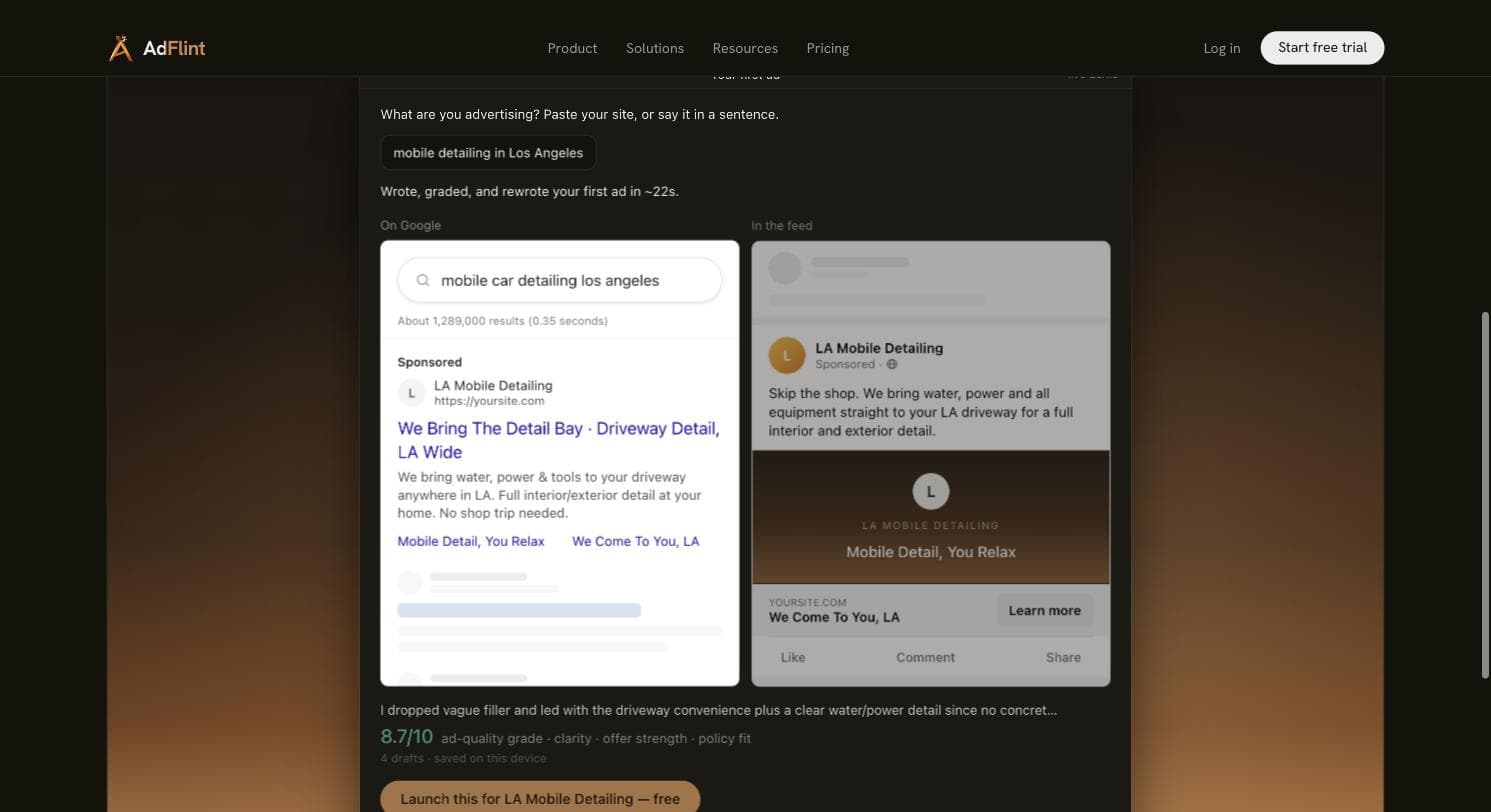
What we can show rather than claim: our live public demo writes, grades and rewrites an ad in about 22 seconds from a one-line business description - the run in the screenshot produced a Google search ad and a Meta feed preview from 'mobile detailing in Los Angeles,' self-graded 8.7/10 across four drafts. That is a local-service prompt, not an HVAC one, and we will be straight about the gap: AdFlint has no HVAC or plumbing case studies and no sustained live-spend track record of its own to publish. The vertical guidance on this page comes from platform documentation, not from our campaigns.
The pricing logic fits how service businesses spend. Self-serve plans are a flat software fee with 0% of ad spend, laddered by a hard spend cap: $40/mo covers up to $1,000 of monthly ad spend, $89 up to $2,500, and on up to $319/mo at a $30,000 cap - the software bill is set by the cap you choose, not by how hard the season is running. What it does not do, so you are not surprised: nothing for Local Services Ads, no Microsoft Ads, and no built-in call tracking - phone-first shops should run Google's forwarding numbers or a dedicated tracker alongside it. A done-for-you Managed tier is priced per account as a monthly fee plus a share of managed spend; the entry point for everything else is a 7-day free trial.
Pros
- + Flat monthly fee with 0% of self-serve ad spend - the bill does not climb because a heat wave did
- + Writes, launches and optimizes inside your own Google and Meta accounts; you keep the account and its history
- + Review before launch, plus Assisted mode for later fixes: the practical way to keep state-required license numbers and seasonal judgment in your copy
- + Hard budget caps the AI cannot exceed on its own
- + Covers Meta too, which is where shoulder-season tune-up promotions and tech-recruiting ads live
Cons
- − Google Ads and Meta only - no Microsoft Ads, and nothing for Local Services Ads, which in this vertical is a real gap
- − No HVAC or plumbing track record: no case studies and no vertical performance data - our vertical guidance is documentation-based
- − Young product with almost no third-party review presence to check us against
- − No built-in call tracking; phone-first shops need Google forwarding numbers or a third-party tracker alongside it
- − There is no free plan: after the 7-day trial, running ads needs a paid plan
Ideal for
- Owner-operators and office managers running $500-$10,000/mo in ad spend without a media buyer
- Shops leaving a percentage-of-spend agency who want the ad account and its history in their own hands
- Licensed trades that want to review the copy before launch and approve later fixes one by one
Pricing: Self-serve, flat fee, 0% of ad spend on self-serve plans: Launch $40/mo (up to $1,000/mo ad spend), Growth $89 (up to $2,500), Scale $109 (up to $5,000), Accelerate $119 (up to $10,000), Performance $219 (up to $20,000), Premium $319 (up to $30,000), custom above that. Managed done-for-you is a monthly fee plus a share of managed spend, priced per account. The entry point is a 7-day free trial on monthly plans. Checked August 2026.
Try AdFlint freeOptmyzr
Best for shops with a real PPC person on the accountOptmyzr is the professional's PPC toolkit, and we say that from inside the product: we ran a real trial across 30-31 July and 3 August 2026. Signup tells you who it is for before the app does - five mandatory qualification fields, then a phone and SMS verification wall (no credit card), and onboarding spend brackets that start at 'Under $10,000/mo' and run past $500,000. Its own /free-trial/ URL 404s, which is its own small signal about who is expected to arrive here. This is software priced and designed for people who manage ad budgets for a living.
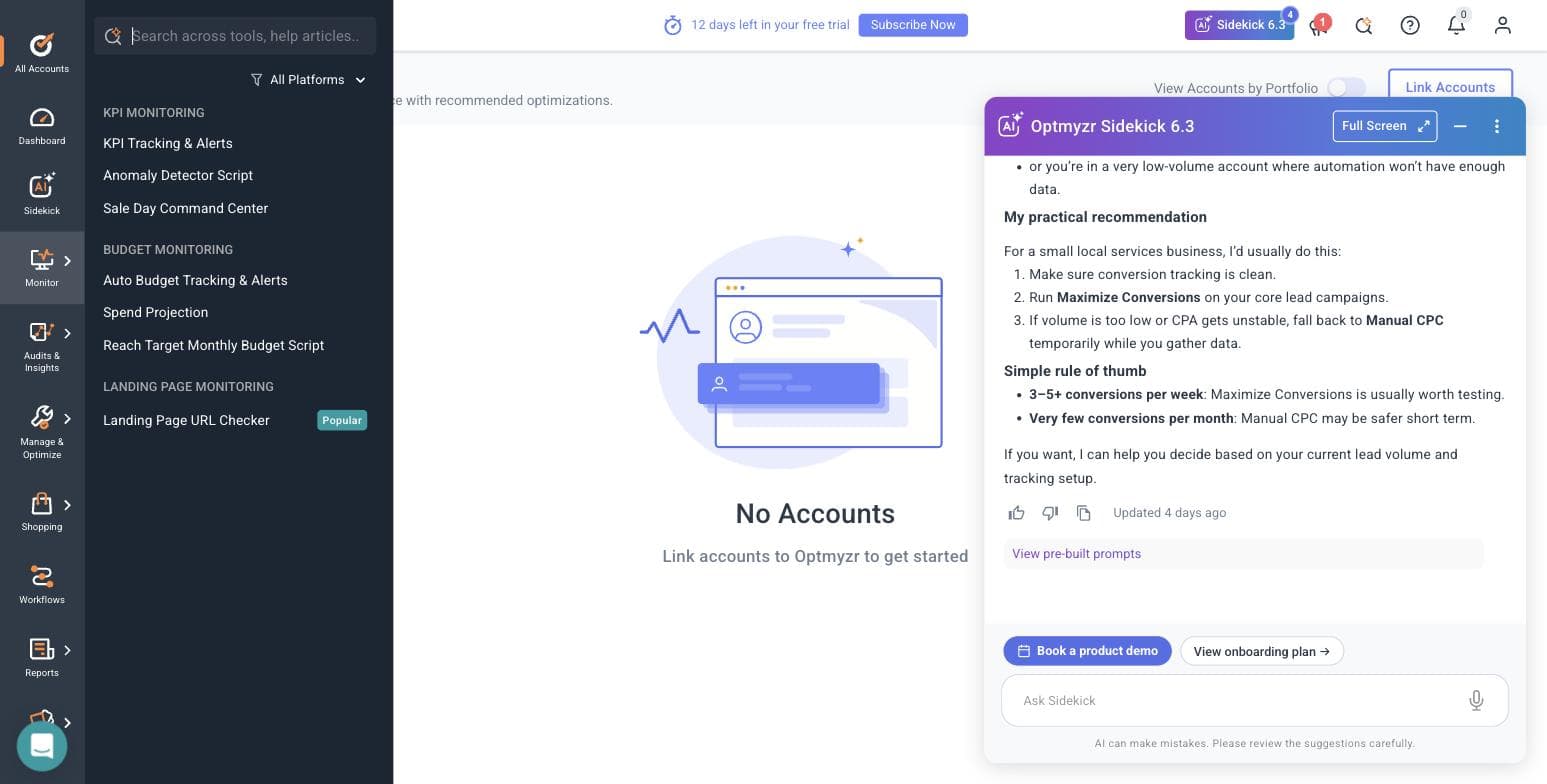
Two findings from our sessions matter for a service business. First, Optmyzr let us into the full application with no ad account connected - genuinely rare; every tool that would touch a campaign bounced us back to an All Accounts screen, but every menu was explorable, which means you can evaluate the whole product before granting OAuth access to anything. Second, its Sidekick assistant (version 6.3) gave a correct, appropriately hedged answer to a question that maps exactly onto a small shop's situation: when to use Maximize Conversions versus Manual CPC. It recommended getting conversion tracking clean first, Maximize Conversions on core lead campaigns, Manual CPC as the fallback at low volume, and a rule of thumb of 3-5 conversions per week before trusting automated bidding. A shop booking ten jobs a month from ads is precisely the low-volume case that rule protects.
For the heat-wave problem, Optmyzr's Monitor suite is the strongest tooling on this page: Auto Budget Tracking & Alerts, Spend Projection, an Anomaly Detector script that flags when metrics move off-pattern - an impression surge during a cold snap is exactly that pattern - plus KPI Tracking & Alerts and a Sale Day Command Center built for planned demand spikes. Its Rule Engine ships pre-built optimization strategies across Google, Microsoft and Amazon Ads. None of it executes your seasonal strategy for you: Optmyzr recommends and monitors, and a human applies the judgment. And nothing in the app touches Local Services Ads - no LSA tooling surfaced anywhere in our trial.
The honest fit for this page's reader: if your company has a dedicated marketing person who knows what a search-terms report is - or you are an owner who genuinely enjoys running the account and wants professional instruments - Optmyzr is the deepest Google tooling here. If nobody at the company wants to be the PPC person, its recommendations will sit unapplied and you are paying for a cockpit without a pilot. Two small things we noticed and report because we would want them reported about us: the in-product trial banner said 15 days while the marketing site says 14, and its optional MCC-link dialog makes you type CONNECT, warns that Google auto-emails everyone with account access, and says it is not recommended for agencies without explicit client approval - a good-faith warning most tools skip.
Pros
- + Deepest Google Ads toolkit on this page - audits, spend projection, anomaly detection, rule engine - all seen hands-on in our trial
- + Monitor suite is the best demand-spike early-warning system here: budget alerts, spend projection, anomaly detection
- + Full app access with no ad account connected, so you can evaluate every screen before granting OAuth to anything
- + Sidekick assistant gave a correct, hedged answer on low-volume bidding - the exact situation most service shops are in
- + MCP connector to Claude and ChatGPT offered as a first-class working mode in onboarding
Cons
- − Priced and gated for professionals: five qualification fields and a phone + SMS wall before you see the product
- − The pricing selector's lowest bracket is $25,000/mo in ad spend - a shop spending $1,500/mo is far below the smallest budget it is built around
- − Recommends rather than executes - without a person applying the recommendations, you are paying for unread advice
- − Nothing for Local Services Ads anywhere in the app during our sessions
- − Trial-length inconsistency we observed: the in-product banner said 15 days, the marketing site says 14
Ideal for
- Shops with a dedicated marketing hire, or an owner who genuinely works the account weekly
- Multi-location or multi-brand operations spending $25,000/mo and up, where its pricing brackets start
- Anyone who wants audit-grade visibility before deciding whether to fire or keep an agency
Pricing: Essentials, Premium and Enterprise tiers priced by monthly ad spend, with selector brackets running from $25,000/mo to $500,000+. At the entry $25,000 bracket: Essentials $299/mo billed monthly or $209/mo billed annually; Premium $389/mo or $272/mo annually; Enterprise quote-only. Annual billing is advertised as 30% off. 14-day free trial with no credit card - but phone and SMS verification are required - plus a 30-day money-back guarantee. Pricing read from optmyzr.com/pricing, July 2026; signup and in-app details hands-on, 30-31 July and 3 August 2026 (the in-product banner told us 15 days, not 14).
Related: AdFlint vs Optmyzr
Visit OptmyzrServiceTitan Marketing Pro
Best for shops already running ServiceTitanFirst, the disclosure this entry needs: we have not tested ServiceTitan Marketing Pro. There is no trial to sign up for - it is a quote-based add-on to the quote-based ServiceTitan platform - so everything here comes from ServiceTitan's own product page as of August 2026, and should be read that way. Where its materials did not confirm something, we have left it out.
What it is, per that page: a marketing suite bolted onto the field-service platform that already runs scheduling, dispatch and invoicing for a large share of American HVAC and plumbing companies. It covers email campaigns, automated direct mail, reputation and listings management, and Google Ads with ROI visibility. The piece relevant to this page is attribution: because the campaigns run off the customer data already in ServiceTitan, it can tie booked jobs and revenue back to the campaign that produced them. That is the metric this vertical actually runs on - revenue per campaign, not cost per lead - and no pure ad tool on this page can produce it, because none of them can see your job tickets.
The audience-building is the part that is unmistakably built for the trades rather than adapted to them: ServiceTitan's own examples are targeting customers with unsold estimates or expiring memberships. That is the HVAC maintenance-agreement renewal cycle and the 'we quoted a system replacement in March and never heard back' list, which is where a lot of a service company's cheapest revenue actually sits - and it is a channel Google Ads cannot reach at all.
The equally important thing Marketing Pro is not: a Google Ads management tool. Per its own page it gives you ROI visibility on your ad spend; it does not write, launch or optimize search campaigns. A shop on ServiceTitan still needs a person, an agency or a tool from this page doing the actual Google Ads work. We also found no mention of Local Services Ads anywhere on its product page, so do not assume LSA is covered - ask sales directly. And the real entry price is the platform: if you are not already committed to ServiceTitan core - a significant, quote-priced operational decision that has nothing to do with advertising - Marketing Pro alone is not a reason to become so.
Pros
- + Ties booked jobs and revenue back to the campaign that produced them - the number an HVAC or plumbing owner actually manages by - per ServiceTitan's own product page
- + Audience building off real service data: customers with unsold estimates or expiring memberships, which is the maintenance-agreement revenue Google Ads cannot reach
- + Email, direct mail and reputation/listings management in the same place as dispatch and invoicing
- + Built entirely for the trades - service businesses are its whole customer base, not a vertical it added
Cons
- − Not tested by us: no self-serve trial exists, so this entry is documentation-based - weigh it accordingly
- − Requires ServiceTitan core, a major quote-priced platform commitment unrelated to advertising
- − No published pricing anywhere - both the platform and the add-on are quote-only
- − Does not create, write or optimize Google Ads campaigns - you still need a person or a tool doing the ads work
- − No mention of Local Services Ads on its product page - confirm with sales rather than assuming coverage
Ideal for
- Multi-truck shops already running ServiceTitan for dispatch and invoicing
- Owners who want ad decisions driven by ticket revenue rather than lead counts
- Shops sitting on a large customer list with unsold estimates and expiring maintenance agreements
Pricing: Quote-based, as an add-on to the also-quote-based ServiceTitan platform. No public pricing published as of August 2026 - per ServiceTitan's own site, every path leads to a demo or sales conversation for both the platform and the add-on.
Visit ServiceTitan Marketing ProBirch (formerly Revealbot)
Best for shops that also run Meta or TikTokBirch is the ad-automation product formerly known as Revealbot, and we signed up for real on 30 July 2026 - which is how we know the rebrand left broken glass: revealbot.com and bir.ch/signup both 404; the working signup lives at app.bir.ch/signup. Once found, it was the fastest onboarding on this page: under two minutes to a logged-in screen, no phone call, no credit card.
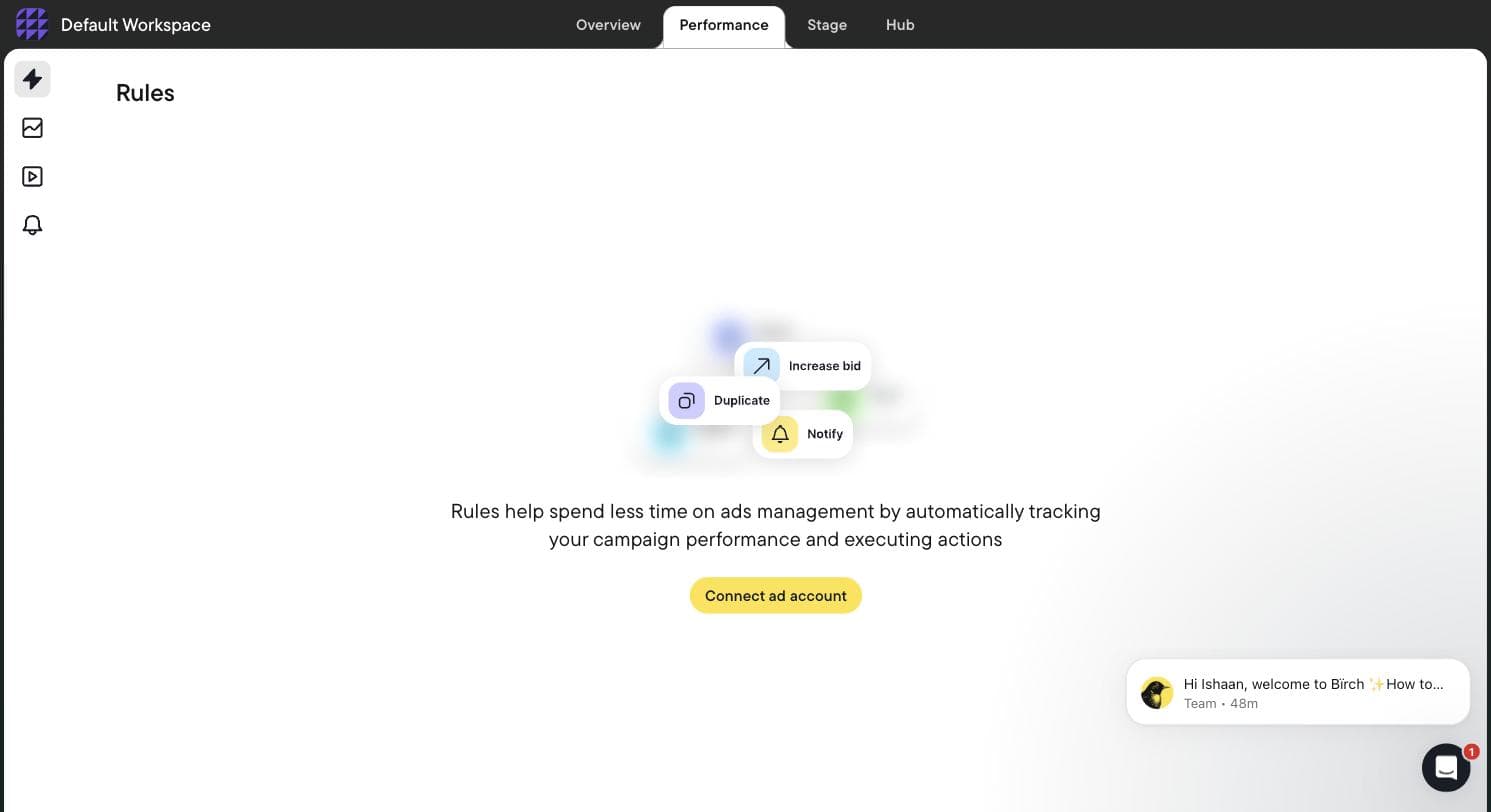
It was also where our hands-on session hit its wall, and the wall is the finding: Birch gates everything on connecting a live ad account. No sandbox, no demo data - the rule builder, the product's whole point, is inaccessible until you hand it OAuth access to real campaigns. The empty state shows three action types (increase bid, duplicate, notify), and that is all you see before connecting. For an owner deciding whether to grant a third-party tool access to the account their business runs on, evaluate-before-connect matters; Optmyzr allows it, Birch does not.
What Birch is, from inside the app plus its own docs: three products now. The rules engine everyone knows Revealbot for - metric-triggered automations on spend, CPA and ROAS, with Slack notifications. Stage, a planning flow that turns a Google Sheet and a Drive folder into bulk ads for Meta, TikTok and Snapchat, with read-only Drive access. And Hub, server-side first-party tracking built on Signals Gateway. Notice what that list orbits: social. Its twelve integrations are Meta, Google Ads, Google Drive, Snapchat, TikTok, YouTube, Google Analytics, Google Sheets, Slack, AppsFlyer, Adjust (beta) and Hyros, plus Wicked Reports - no Microsoft Ads, no Amazon, no LinkedIn, and, like every tool here, nothing for Local Services Ads. Google Ads is supported; the product's center of gravity is plainly Meta-side.
For this page's reader, the honest verdict: an HVAC or plumbing shop running Google-only should not start here. Where Birch earns its slot is the shop that also runs Meta - recruiting ads for techs, seasonal tune-up promos, awareness in a new service area - and has someone willing to write and babysit rules. A spend-velocity rule plus a Slack notify is a workable DIY cold-snap alarm, and an increase-budget rule could even act on the surge unattended - though budget raises with no human in the loop are exactly the kind of automation a small business should think hard about before enabling. And the pricing gotcha half the internet still gets wrong: automated rules are not in the $49 Essential plan. They are Pro-only, so the real entry price for the headline feature is $99 a month.
Pros
- + Fastest signup we tested: under two minutes, no phone, no card (hands-on, 30 July 2026)
- + Mature metric-triggered rule engine with Slack alerts - a workable DIY demand-spike alarm
- + Stage turns a Google Sheet and a Drive folder into bulk Meta/TikTok/Snapchat ads - useful for weekly seasonal promos
- + Spend-tiered pricing shown transparently on its own in-app billing slider, at every tier
Cons
- − Automated rules - the reason you would buy it - are not in the $49 Essential plan; they start on Pro at $99/mo
- − Gates entirely on connecting a live ad account: no sandbox or demo data, so you cannot evaluate the rule builder before granting OAuth access
- − Social-skewed for a Google-first vertical: no Microsoft Ads, no Amazon, no LinkedIn, nothing for LSAs
- − You write and maintain the rules yourself - it automates execution, not judgment
- − The bill scales with connected ad spend, from $99/mo to $1,299/mo on Pro as you grow
Ideal for
- Shops running Meta or TikTok alongside Google - tech recruiting, seasonal promos, new-territory awareness
- Owners or marketers comfortable writing if-then rules and watching them
- Teams that want Slack pinged the moment spend goes off-pattern
Pricing: Spend-tiered, read off Birch's own in-app billing slider at every tier on 30 July 2026. Up to $10K/mo ad spend: Essential $49/mo, Pro $99/mo (annual $540 / $1,090). Up to $30K: Essential $149, Pro $249 (annual $1,640 / $2,740). Up to $75K: Essential $299, Pro $499 (annual $3,290 / $5,490). Up to $150K: Essential $499, Pro $799 (annual $5,490 / $8,790). Up to $300K: Essential is not offered, Pro $1,299 (annual $14,290). $500K+ is Enterprise only. Annual billing is 12 months for the price of 11; overages are billed via Stripe. Automated rules, Explorer, Launcher, Stage, custom audiences and the Sheets/AppsFlyer/Hyros integrations are Pro-only. 14-day trial; on expiry, rules and reports are disabled.
Related: Revealbot (Birch) alternatives · AdFlint vs Revealbot
Visit Birch (formerly Revealbot)WordStream (by LocaliQ)
Best free account grader - not a tool you can buyWordStream appears in nearly every stale HVAC-marketing roundup, usually described as affordable PPC management software with a '20-Minute Work Week.' We have not tested WordStream - and more to the point, as of August 2026 you cannot buy what those roundups describe: WordStream's own site no longer sells the Advisor software. The brand today operates as the free-tools and education arm of LocaliQ, the marketing services company under the USA TODAY/Gannett umbrella, and routes buyers toward LocaliQ's managed marketing services.
What is still worth your time is free: the Google Ads Performance Grader. Connect your account and it produces an audit against benchmarks - wasted-spend estimates, Quality Score distribution, click-through rate, impression share, account activity and account structure. Run it quarterly the way you would glance at a scoreboard: useful directional signal, and simultaneously a lead magnet, so expect sales follow-up. The audit is real; just remember what it is selling.
The LocaliQ path deserves clear labeling on a page about tools: it is an agency service, custom-quoted, in which people manage campaigns for you - precisely the arrangement a 'tools' search suggests you are trying to leave or avoid. If that is what you actually want, it is a legitimate answer to the same problem, but compare it against independent agencies on price, on who owns the ad account, and on whether Local Services Ads is explicitly in scope before signing anything. Since no software manages LSA, a service engagement is the only way to hand it off at all - which makes 'is LSA included?' the single most useful question you can ask any agency in this vertical.
Pros
- + Google Ads Performance Grader is free and produces a genuinely useful quarterly audit
- + Large free library of PPC content and published benchmark data for sanity-checking your costs
- + A managed path exists via LocaliQ if you conclude you do not want to run ads yourself after all
Cons
- − Not tested by us - this entry is based on WordStream's and LocaliQ's own sites as of August 2026
- − The Advisor software old roundups recommend is no longer sold - pages still pitching it are out of date
- − The paid path is a custom-quoted agency service, not self-serve software, with no public pricing
- − The free grader is a lead magnet - expect sales outreach after running it
Ideal for
- Any shop wanting a free quarterly second opinion on its Google Ads account
- Owners still deciding between running ads themselves and handing them off
Pricing: Free tools, including the Google Ads Performance Grader. LocaliQ managed services are custom-quoted with no public pricing as of August 2026 - every path on its site leads to a demo or consultation, per the companies' own sites.
Related: WordStream alternatives · AdFlint vs WordStream
Visit WordStream (by LocaliQ)Side by side.
| Tool | Best for | Price as checked | Local Services Ads | Hands-on tested? | Standout limitation |
|---|---|---|---|---|---|
| Local Services Ads + Google Ads Editor | The free foundation every shop needs first | Free software; LSA bills per lead (Aug 2026) | Yes - the LSA dashboard is the only place LSAs can be managed | No - Google's own documentation | No optimization layer; LSA stays a manual weekly chore |
| AdFlint | Owner-run Google + Meta campaigns without an agency | $40-$319/mo flat, 0% of self-serve spend (Aug 2026) | No | Our product (disclosure) | No LSA or call tracking; no vertical track record |
| Optmyzr | Shops with a dedicated PPC person | $299/mo monthly, $209/mo annual at the $25K spend bracket (July 2026) | No - nothing in the app touches LSAs | Yes - trial, 30-31 July and 3 Aug 2026 | Recommends rather than executes; priced from a $25K/mo spend bracket |
| ServiceTitan Marketing Pro | ServiceTitan shops wanting booked-job attribution | Quote-based; no public pricing (Aug 2026) | Not mentioned on its product page - ask sales | No - documentation-based | Requires ServiceTitan core; does not manage Google Ads campaigns |
| Birch (formerly Revealbot) | Shops also running Meta/TikTok who will write rules | $49-$1,299/mo by spend tier; rules need Pro from $99 (July 2026) | No | Yes - trial, 30 July 2026 | Rules are Pro-only; no sandbox before connecting a live account |
| WordStream (by LocaliQ) | Free quarterly account audit | Free tools; LocaliQ agency custom-quoted (Aug 2026) | Agency services are the only way to hand LSA off at all - confirm scope | No - documentation-based | Advisor software no longer sold; the paid path is an agency |
How we chose.
Hands-on, dated: we created real trial accounts and worked inside Optmyzr and Birch on 30-31 July 2026 and again on 3 August 2026 - full signup flows, onboarding, and every module we could reach without connecting a live client ad account. The screenshots on those two entries come from our own sessions.
AdFlint is our product. Its entry carries a visible disclosure, everything we say about it comes from operating it, and its cons are written with the same bluntness as everyone else's.
Not tested by us: ServiceTitan Marketing Pro, WordStream/LocaliQ, and the Google native stack - Local Services Ads and Google Ads Editor. Those entries are built strictly from the vendors' own product pages, pricing pages and help documentation as of August 2026, they carry no screenshots, and they say so inline. Where a vendor's own page did not confirm a capability, we left the claim out rather than assume it.
We have never run HVAC or plumbing campaigns. Every piece of vertical guidance on this page - LSA mechanics, budget behaviour during demand spikes, emergency-intent economics, license-number advertising rules - is sourced from platform documentation and published state licensing-board requirements, not from campaign results of ours. No performance figures, ROAS claims or case studies appear here because we do not have any.
Every price was read from the vendor's live pricing page or, for Birch, off its own in-app billing slider at every spend tier, and is dated in the entry. Prices change; confirm on the vendor's site before buying.
No affiliate links, no sponsored placements, and no reviewer quotes we could not open ourselves. No vendor on this page paid to be here or saw it before publication.
- — Built for the actual searcher: an owner or office manager at a service company, not an agency media buyer. Tools that presume a PPC professional are ranked for shops that have one, and say so.
- — Hands-on beats brochure: the two third-party tools we could genuinely test (Optmyzr and Birch, 30-31 July and 3 August 2026) are judged on what we found inside the product; every other entry is judged strictly on the vendor's own documentation and marked as researched.
- — The Local Services Ads test: in a vertical where LSA leads the page on emergency queries, we checked what every tool actually does about LSA. The answer - nothing we could find, market-wide - reshaped this ranking and put the free native stack at #1, ahead of our own product.
- — Demand-spike readiness: HVAC and plumbing demand arrives with the weather. We weighted budget monitoring, alerting and pacing controls, and looked hard at what happens when a daily cap collides with a heat wave.
- — Real total cost against a service-business budget: flat fees versus percentage-of-spend versus spend-tiered software, priced at realistic shop budgets of $500 to $10,000 per month in ad spend - which is below where some of these tools start.
- — Disclosure-first ranking: our own product carries a visible tag and real cons - Google and Meta only, no LSA management, no call tracking, no vertical track record - and it sits at #2 because the free foundation genuinely comes first.
Common questions.
Can any software manage Google Local Services Ads for an HVAC or plumbing company?
Not that we could find. None of the tools on this page - and no mainstream PPC tool we checked - creates or manages Local Services Ads campaigns. Google operates LSA through its own dashboard and mobile app, and third-party API access to LSA is thin, largely lead reporting rather than campaign control, so the software market has not built management tooling on top of it. That leaves two options: manage it yourself, or hire people to do it, since agency service engagements are the only way to hand LSA off at all - and you should confirm in writing that LSA is in scope, because plenty of 'we manage your Google presence' pitches quietly mean search campaigns only. If you are doing it yourself, plan on responding to leads quickly - Google's help documentation lists responsiveness among ranking factors - disputing invalid leads, and keeping booked-lead status current. It is roughly a half-hour weekly job.
Should we run Local Services Ads or regular search ads first?
For most shops, LSA first: you pay per lead rather than per click, the Google Guaranteed badge and top-of-page placement come with it, and there are no keywords or ad copy to manage. But LSA only captures demand that already exists - someone with a burst pipe searching right now. It cannot put a $79 fall furnace tune-up in front of homeowners who were not searching, promote a maintenance plan, or defend your brand name against competitors bidding on it. That is what search campaigns are for, and Meta in the shoulder seasons. Established shops typically end up with both: LSA harvesting emergency intent, search adding coverage, control and promotion on top.
What do HVAC and plumbing clicks actually cost on Google?
Double-digit CPCs are normal, and emergency-intent keywords - 'emergency plumber,' 'AC repair near me' - in competitive metros are among the most expensive local keywords Google sells, typically well above maintenance-intent terms. We are not going to print a benchmark table pretending national averages describe your market: run Google Keyword Planner on your own ZIP codes, and Google's LSA cost estimator for per-lead prices in your category and area. Then do the math this vertical actually runs on - cost per booked job against ticket value. The same $40 click is ruinous on drain-cleaning tickets and trivial against a $6,000 AC replacement, which is why call tracking and job attribution matter more here than any click metric ever will.
How do we keep ads from going dark during a heat wave or cold snap?
Know the mechanics first: per Google's documentation, Google can spend up to twice your average daily budget on any given day while holding your monthly charge to your daily budget times 30.4, and Smart Bidding recalibrates as demand surges, so a spike both spends faster and behaves differently. The failure mode is a daily cap exhausted by noon during the most profitable week of your year. The playbook: decide your surge budget before the season, not during it; set up alerting so you find out the morning it happens rather than on the invoice - Optmyzr's Auto Budget Tracking & Alerts and Anomaly Detector (which we saw hands-on) and Birch's notify rules both do this, and AdFlint's hard caps mean overspend cannot happen without you raising the cap; and remember that caps cut both ways - the control protecting your budget in April is the thing you must consciously raise during the July surge.
Should emergency-service campaigns run 24/7?
Only if a human answers the phone. The classic waste in this vertical is paying premium emergency CPCs at 2 a.m. for calls that ring to voicemail - the click is billed whether or not anyone picks up. If you run a live answering service, 24/7 emergency campaigns with call assets make sense, and overnight competition is often thinner. If you do not, use Google Ads ad scheduling to run only during answered hours, and add a separate always-on campaign for your true emergency keywords only once after-hours intake actually works. Every tool on this page inherits Google's native ad scheduling; none of them can answer your phone.
Do our Google ads need to include our contractor license number?
In several states, yes - and it is your state licensing board's rule, not Google's, so no ad platform will warn you. California is the clearest example: the CSLB requires licensed contractors to include their license number in their advertising, and its definition of advertising is broad enough that ads and landing pages should both carry it. Other states have their own requirements for licensed trades. Check your board's advertising rules before launch - and if a tool writes your ad copy, including ours, check the license line before you launch, and in any new ad versions the tool writes on its own.
Has AdFlint actually run HVAC or plumbing campaigns?
No, and we would rather say so here than have you discover it later. AdFlint has no HVAC or plumbing case studies, and the vertical guidance on this page comes from Google's documentation and published state rules, not from our own campaign results. That is also why our product sits at #2 behind a free stack rather than at the top of its own roundup. What AdFlint does bring: it writes, launches and optimizes Google and Meta campaigns inside your own ad account, with hard budget caps, a launch that waits for your click on self-serve plans, and a flat fee starting at $40/mo with 0% of self-serve spend. The 7-day free trial exists precisely so you can judge the output on your own business instead of trusting a roundup - including this one.
Keep reading
- Roundup: PPC software for small business
- Roundup: Google Ads management software
- Roundup: PPC software for law firms
- Roundup: Hiring someone to run Google Ads
- How Much Do Google Ads Cost for a Small Business?
- Conversion Tracking Setup for Google and Meta
- Radius Targeting on Google and Meta, Compared
- Who Owns Your Ad Account, Pixel, and Audiences?
- DIY vs Agency vs AI: What Ad Management Costs
- Google Ads Advertiser Verification Deadline
- Free tool: Google Ads Budget Calculator
- Free tool: Cost Per Acquisition Calculator
- Free tool: Ad Management Cost Calculator
- Free tool: Landing Page Ad Readiness Checklist