Online Advertising Management in 2026: The Five Disciplines and Who Should Own Them
By the AdFlint research team · We built trial accounts on Optmyzr and worked inside them ourselves; every screenshot below is from those sessions, and the rest is documentation and verified user reviews · Published July 28, 2026 · Updated July 30, 2026
TL;DR
- If you have more time than budget: manage it yourself with Google Ads Editor and Meta Ads Manager. Both are free - Google calls Editor 'a no-cost, downloadable application' - and every option below is really a way of paying someone or something to spare you from learning them.
- If you want the work done without hiring: AI ad management software. AdFlint (that is us - full disclosure below) writes, launches, and optimizes ads inside your own Google and Meta accounts for a flat monthly fee from $40, with no percentage of spend, and on self-serve plans nothing goes live until you click Launch or turn on Full Autopilot.
- If you want a human: a freelancer runs $22 to $125 per hour by 7 Mile Media's ads-expert hiring guide, and an agency typically charges $1,000 to $3,000 per month or 10 to 20 percent of spend by WebFX's published figures - agencies only start making sense above roughly $3,000 per month in ad spend, because below that the fee is bigger than the ads.
- Most growing businesses end up hybrid: software runs the daily loop of bids, budgets, and testing, while a human owns strategy and audits the account a few times a year.
Online advertising management is five distinct jobs wearing one title: targeting (who sees the ads), budget and bidding (what you pay and how the algorithm spends it), creative (the ads themselves), tracking and attribution (knowing what actually produced revenue), and ongoing optimization (killing losers and feeding winners). Every option for managing ads - doing it yourself, buying software, hiring a freelancer, retaining an agency - is really a decision about who owns each of those five disciplines. Most comparison pages skip that framing and jump straight to a list of dashboards, which is how businesses end up paying for tools that solve two disciplines and quietly leave them holding the other three.
This page is written for the small-business owner or one-person marketing team searching this query - not for agencies picking their next reporting suite. The honest structure is a decision ladder, not a leaderboard: the numbering below runs from least outside help to most, not worst to best, and the hybrid at number five is where most growing businesses actually land. The right answer depends on your monthly ad spend, how many hours you can genuinely give this, and whether a mistake in your ad account costs you sleep or just money. We cover the five realistic options, what each actually costs as of July 2026 with sources for every figure, and the failure mode of each one - the part the pages selling you each option leave out.
One thing worth saying before the list: almost everything that ranks for this query is either a vendor putting its own product first or an index page with no opinion at all. We are a vendor too - AdFlint appears in the AI software entry with a visible disclosure tag - but every price on this page was read from a live page this month, every review quote is verbatim with a link, and the options that compete with ours are treated as real answers, because for plenty of readers they are.
We got inside. Here is every screen.
We created real trial accounts, cleared the verification walls, and worked through the products. Every screenshot below is from those sessions — no vendor marketing imagery, no stock dashboards.
Optmyzr
Walkthrough performed July 30, 2026We created an Optmyzr trial, cleared its phone-verification wall, completed the five-step setup wizard and worked inside the product. No credit card was requested at any point, and that claim holds up.
The single most useful thing we learned is one Optmyzr does not advertise: it will let you all the way into the application without connecting an ad account. Almost no competitor does that, and it changes how you can evaluate the tool.
- 01
Find the trial link
The /free-trial/ URL published in older articles now returns a 404 on Optmyzr's own site. The working path is the Start Trial button in the site header, which hands off to tools.optmyzr.com. Worth knowing if you are following an outdated guide.
- 02
Create the account and answer the qualification form
Work email plus a password, or one-click signup with Google or Microsoft. A marketing-consent checkbox is present and unticked by default. Then, before the product, Optmyzr asks for company name, whether you are an advertiser or an agency, country, monthly ad spend, where you heard about them, and your role. Five of those are mandatory. The ad-spend brackets start at Under $10,000 and climb to More than $500,000, which tells you plainly who this product is priced for.
- 03
Clear the phone-verification wall
Submitting the form does not open the product. It opens a Verify Phone Number screen that sends a one-time code by SMS, with no skip and no alternative method offered. This is the real gate on an Optmyzr trial, and it is not mentioned anywhere before you start. If you are evaluating tools on a burner email, budget for handing over a working phone number.
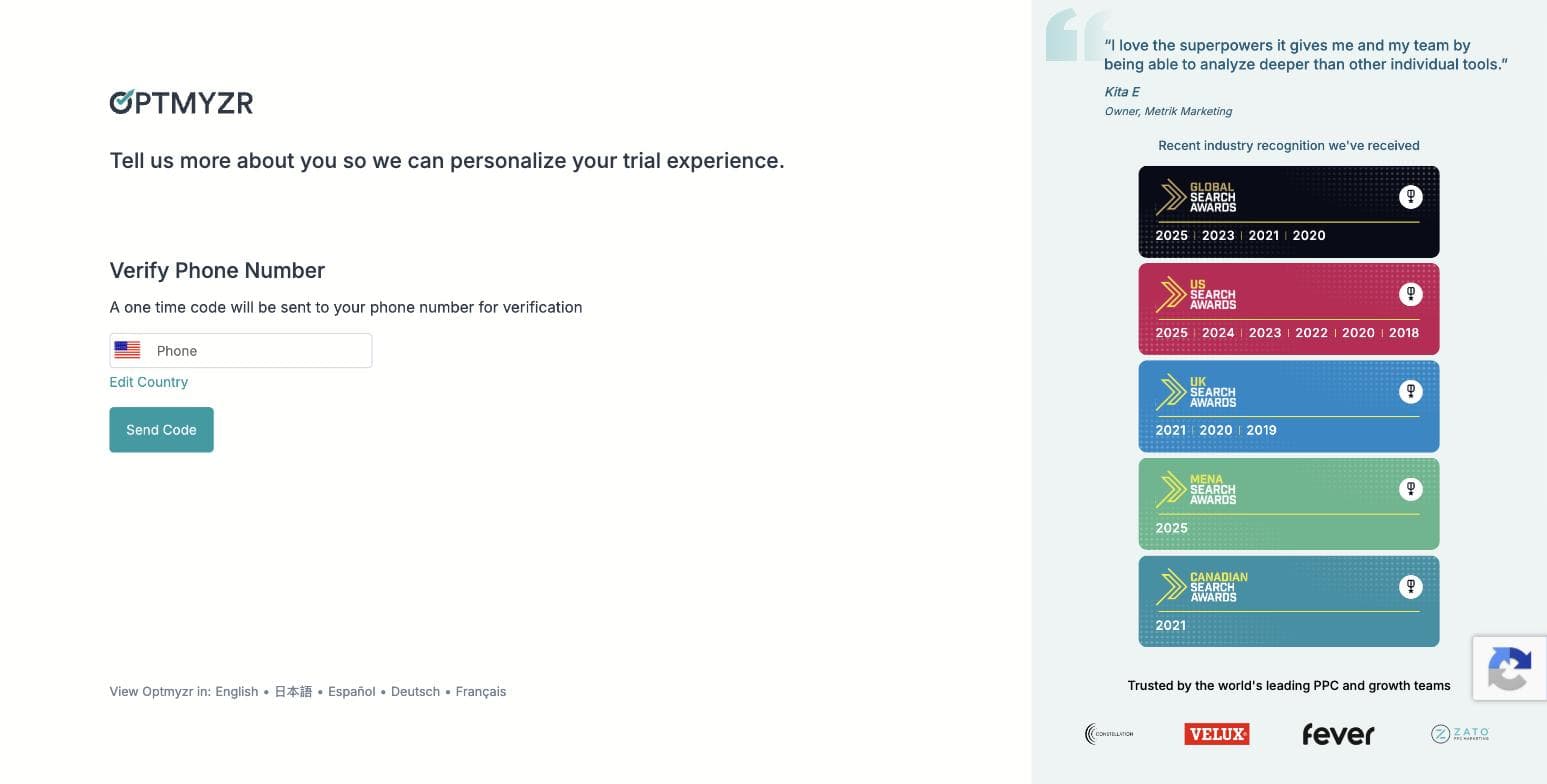
Optmyzr's phone-verification gate, captured during our own signup on 30 July 2026. No skip option is offered. - 04
Pick your goals — three of ten
Step two of the wizard asks you to choose exactly three priorities from ten: search queries and keywords, ad creation and testing, budget management, bid and target optimization, shopping campaigns, placements and audiences, performance analysis, account audits, report creation, and full AI account management. The three you pick genuinely shape what the product shows you afterwards — the AI assistant's opening plan named all three of ours back to us.
- 05
Choose how you want to work — and find the MCP connector
Step three offers three working modes, all pre-selected: hands-on in the browser, on autopilot with an automation agent sending you a digest, or — the one nobody is writing about — inside your own AI assistant, connecting Optmyzr over MCP to Claude or ChatGPT so you manage the account from where you already work. That third option is a real 2026 capability and it is absent from every Optmyzr roundup we found.
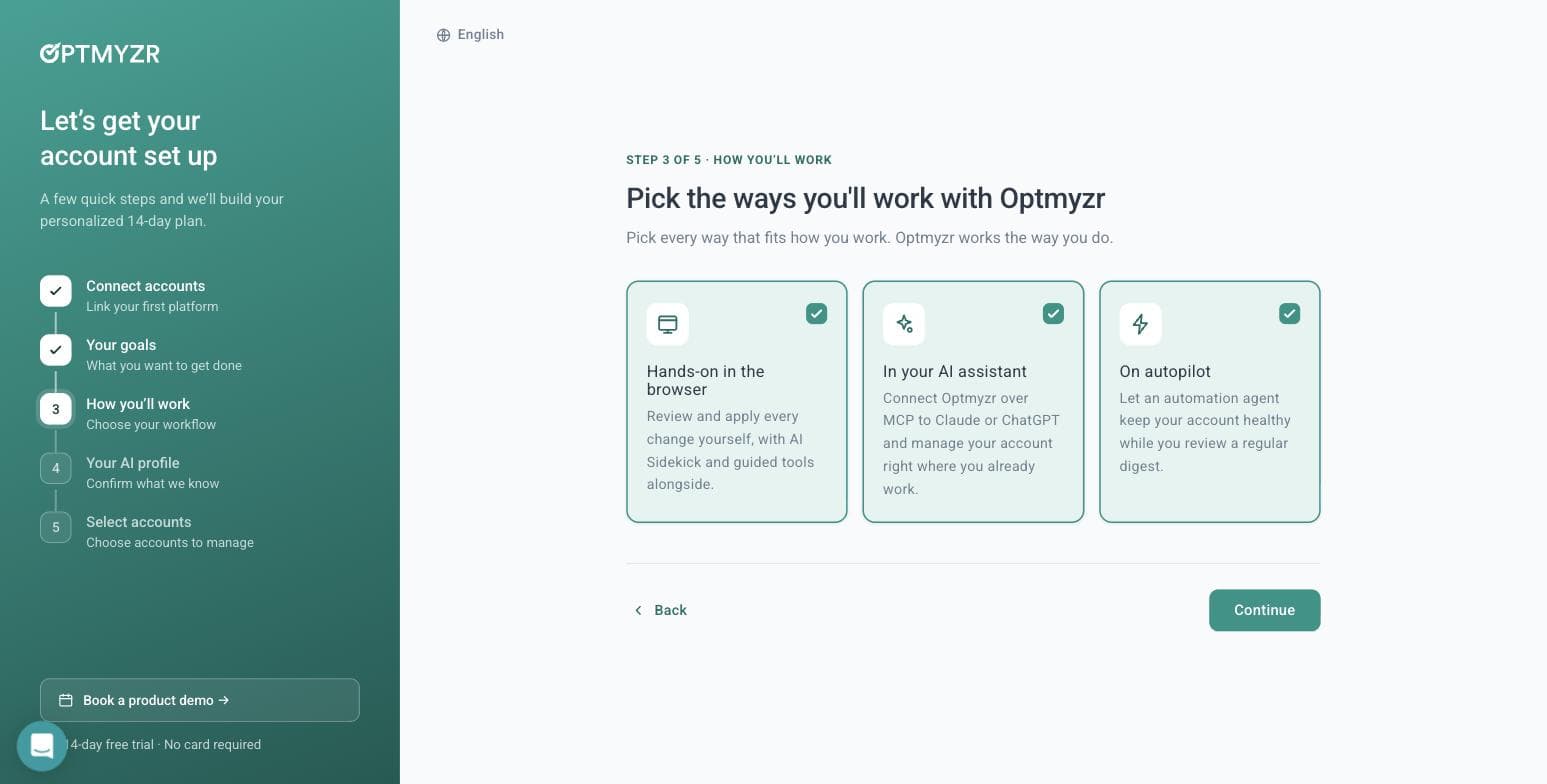
Optmyzr's three working modes, including an MCP connector for Claude and ChatGPT. Captured 30 July 2026. - 06
Let its AI read your website — we tested this properly
Step four builds an AI profile of your business, and offers to generate it from your website. We gave it adflint.com and timed it: roughly ten seconds. It came back with the company name, correctly classified the industry, set the language, and wrote a paragraph describing our free trial length, our budget caps, our zero-markup pricing and five specific in-product features. Several of those live on deep pages, not the homepage — so it is crawling more than one URL. It left the tone field blank rather than guessing, which we would call the right call.
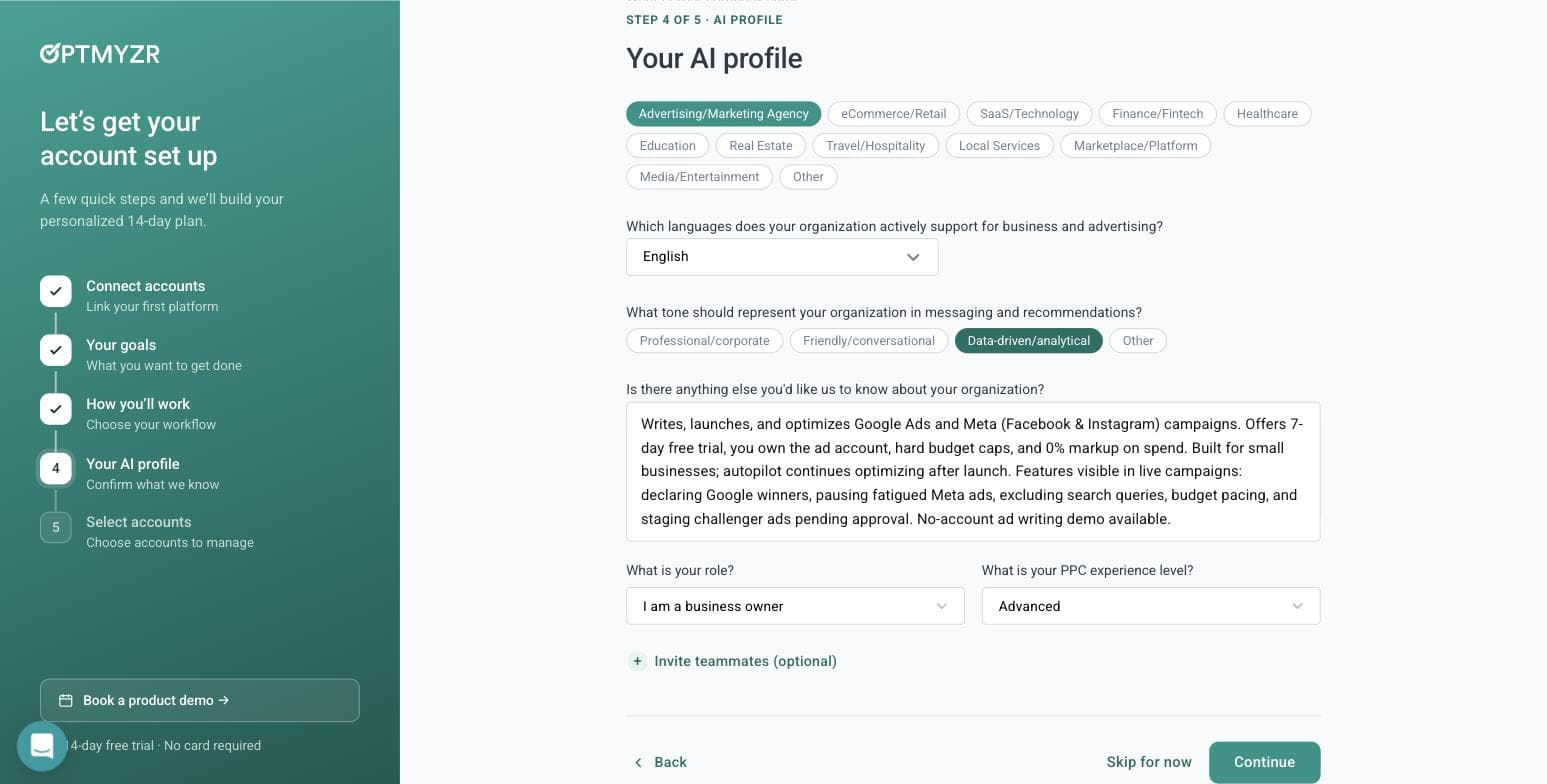
What Optmyzr's AI wrote about our business from the URL alone, in about ten seconds. Captured 30 July 2026. - 07
Skip the account connection — and get in anyway
Step five is where most tools stop you. Optmyzr does not. It says: you didn't connect an account, so we'll start you with a general plan, connect one anytime to tailor it. Then it opens the full application. You can browse the entire tool tree, read what every module does, and use the AI assistant before you ever grant a third party access to a live ad account. For anyone evaluating software on behalf of a client, that is a meaningful difference.
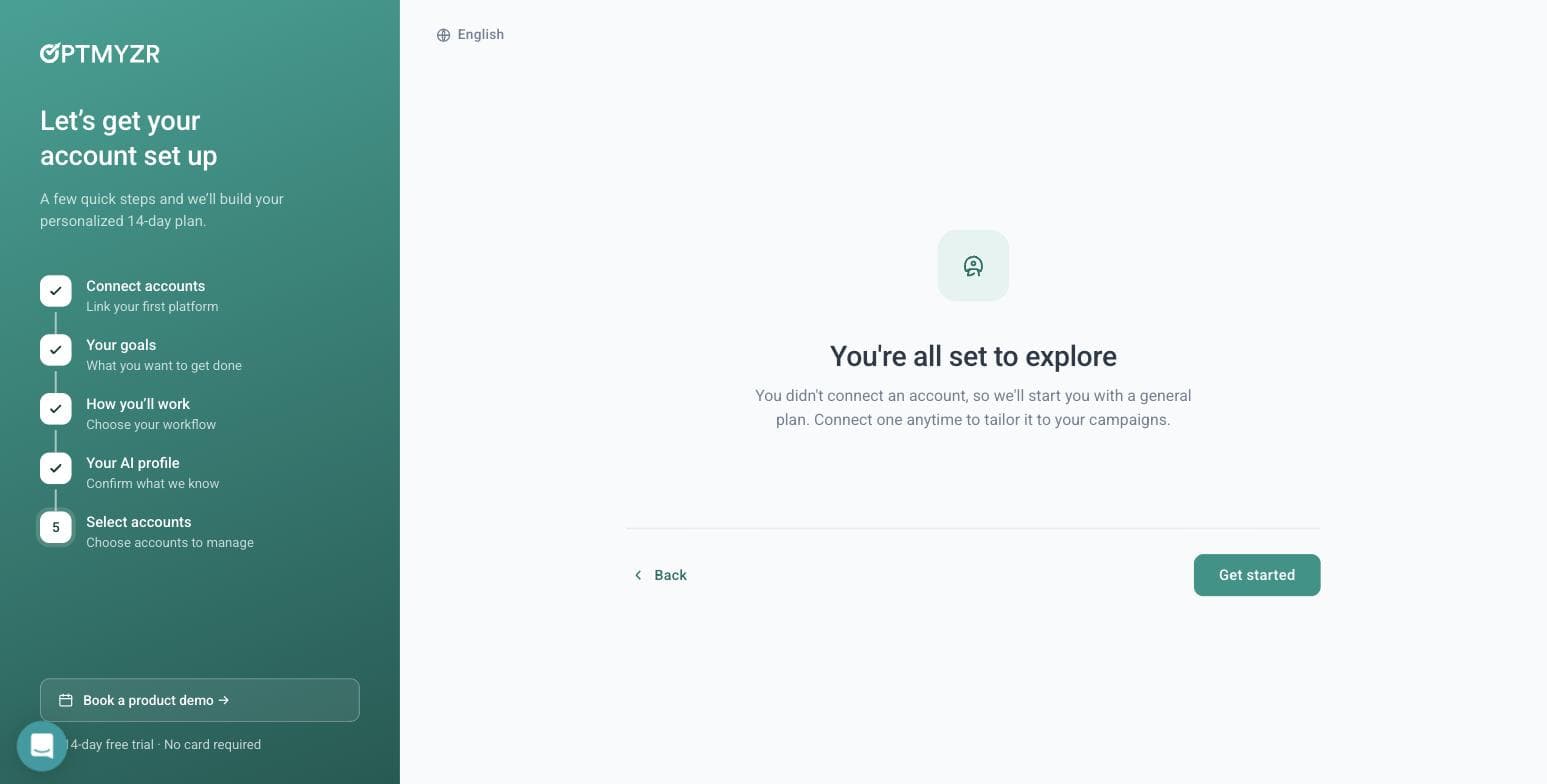
Optmyzr lets you into the product with no ad account connected. Captured 30 July 2026. - 08
Ask the AI assistant a real question
Sidekick 6.3 opens with a day-one-of-fifteen plan built from the three goals we picked. We asked it something a real advertiser would ask: whether a home-services business spending $900 a month should run Maximize Conversions or Manual CPC. It gave a properly conditional answer — Maximize Conversions if your conversion tracking is solid and you have volume for Google to learn from, Manual CPC if tracking is weak, conversions are sparse, or you are testing new keywords under tight control. That is the correct answer, and it arrived with an 'AI can make mistakes' disclaimer attached. Notably, all of this worked with no ad account linked.
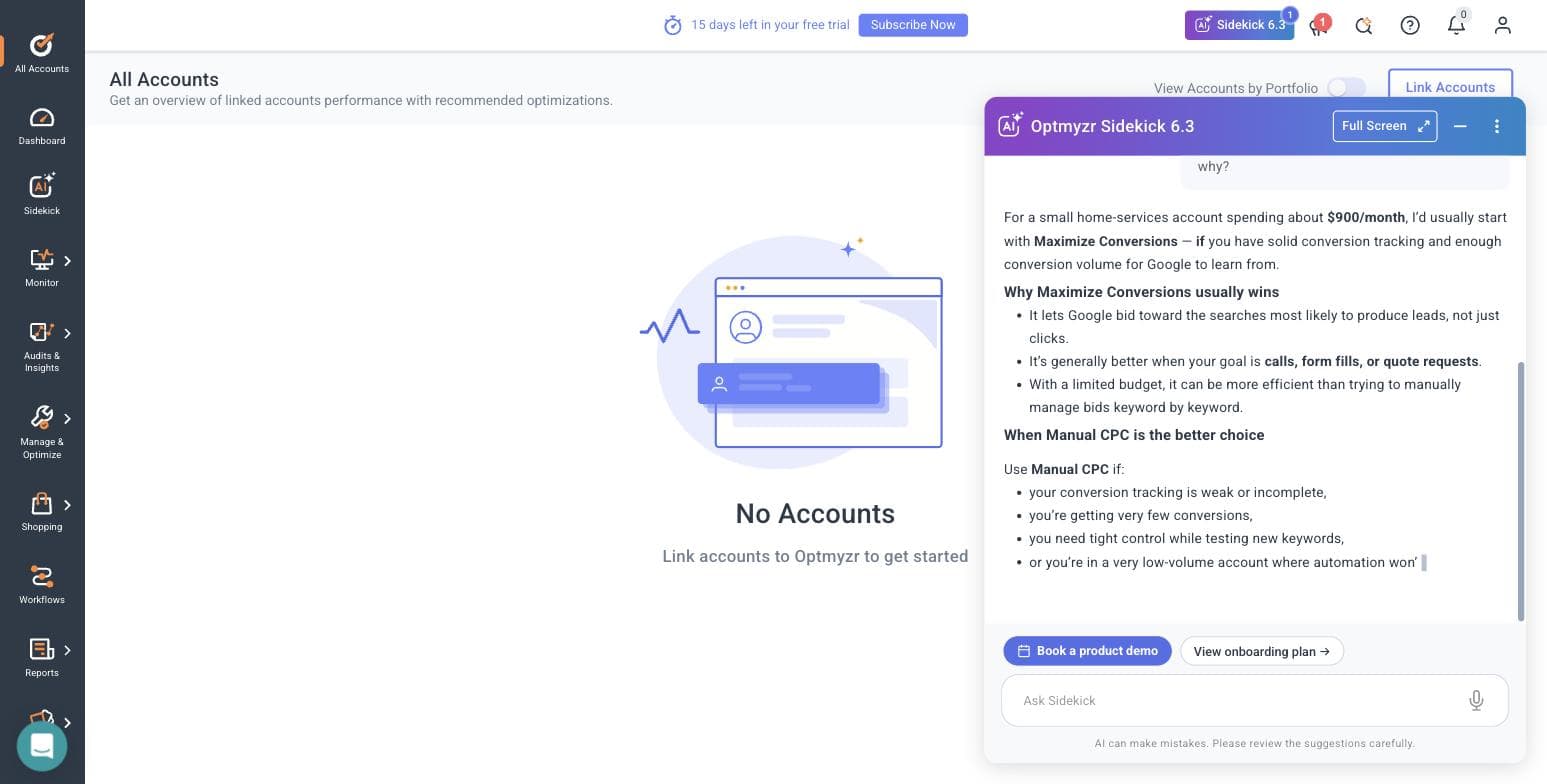
Sidekick's answer to our bidding question, with no ad account connected. Captured 30 July 2026. - 09
Open the Rule Engine strategy library
Manage & Optimize holds eight modules: Optmyzr Express, Search Queries & Keywords, Ads & Creatives, Bids & Targets, Budget, Placement & Targeting, Rule Engine, and Campaign Manager & Launcher. The Rule Engine ships pre-built strategies grouped by platform — Google Ads gets search-query trend analysis, a report on recommendations Google auto-applied on your behalf, and two new strategies for excluding gaming and kids placements from Performance Max. Microsoft Ads gets non-converting query cleanup and Smart Bidding target optimization. Amazon Ads gets negative-keyword automation and ACOS-based bid changes. The breadth here is the product's real argument.
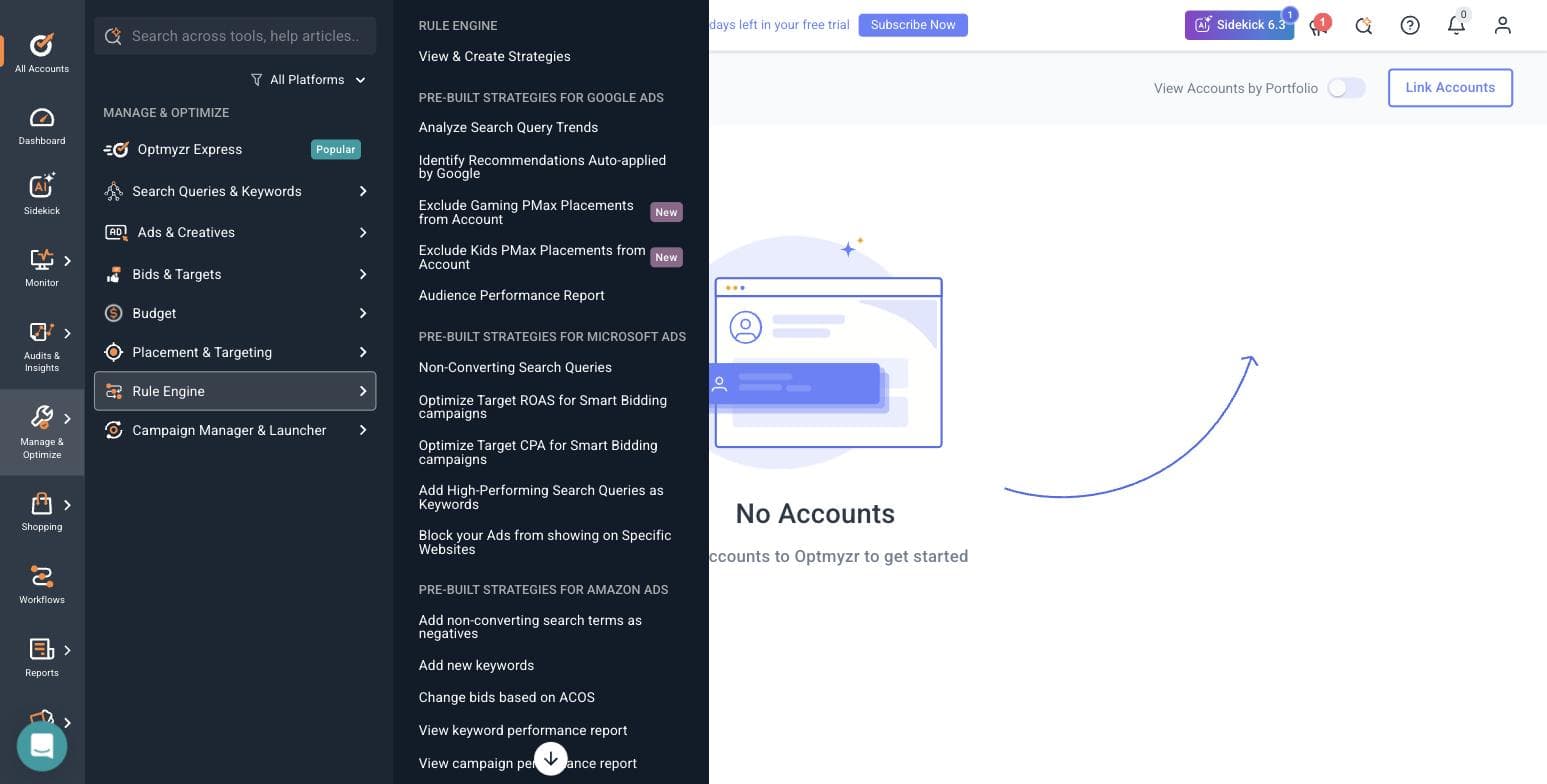
Optmyzr's pre-built Rule Engine strategies, split across three ad platforms. Captured 30 July 2026. - 10
Find where the open door closes
Browsing is free; running anything is not. Every optimization module we opened — Rule Engine, Reports, the rest — bounced straight back to the All Accounts screen with 'Link accounts to Optmyzr to get started'. So the honest shape of the trial is this: the AI assistant and the entire tool catalogue are open without a connection, and every tool that would touch a campaign is not.
- 11
Read the integration list, and the consent dialog nobody quotes
Optmyzr connects eleven sources: Amazon Ads, Amazon Seller Central, Meta Ads, LinkedIn Ads, Google Ads, Google Analytics, Google Merchant Center, HubSpot, Microsoft Ads, Search Ads 360 and Yahoo Japan. Worth noting for agencies: when you link a Google Ads account, Optmyzr offers an optional link to its own manager account for faster support, and the dialog makes you type CONNECT to confirm, warns that Google will automatically email everyone with access to the account, and states outright that it is not recommended if you are an agency without explicit client approval. We have read a lot of these dialogs. That one is unusually straight.
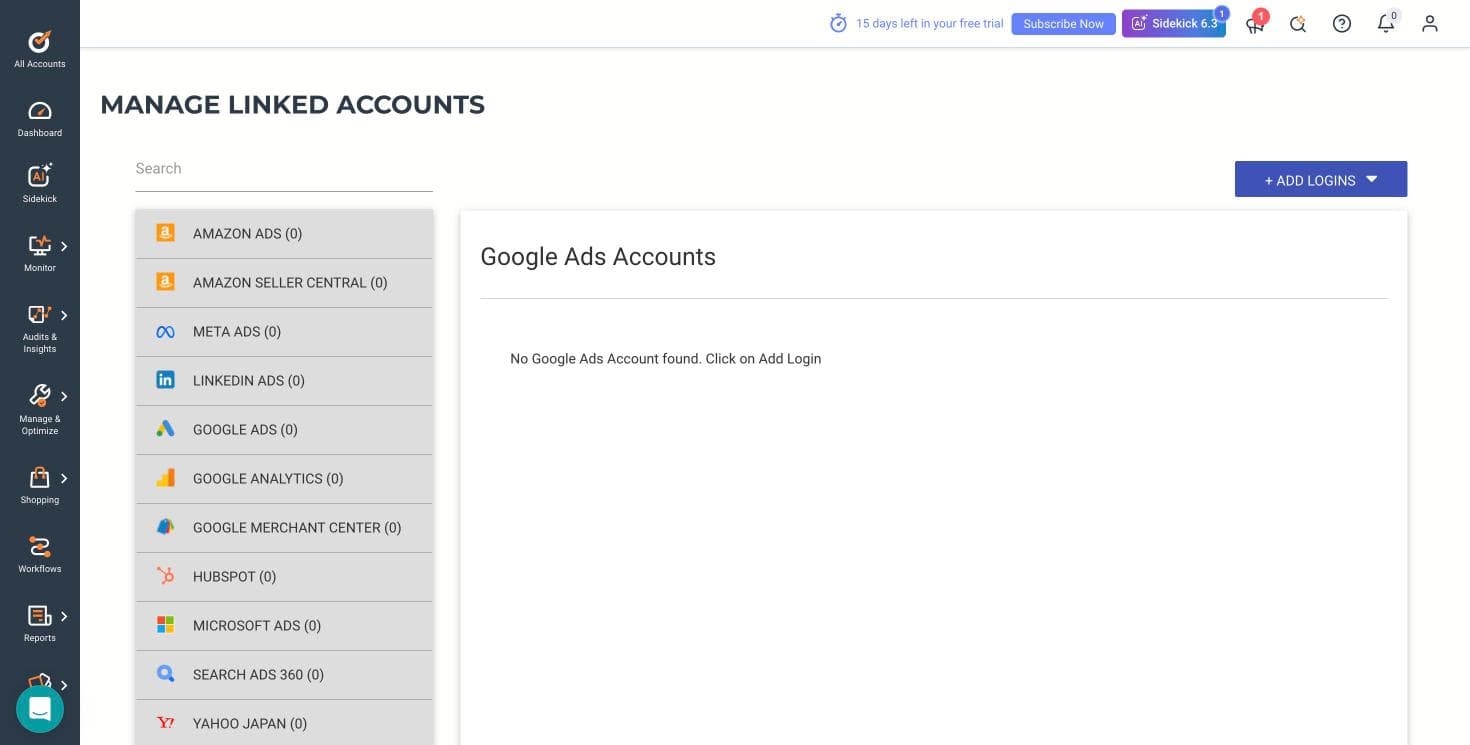
Optmyzr's eleven connectable platforms. Captured 30 July 2026.
What the signup told us
- — No credit card is required, and that claim holds up — we were never asked for one.
- — A phone number and SMS code are required, and that is not mentioned before you start.
- — The banner inside the product counts down from 15 days, while the marketing says 14. A day in your favour, but the two numbers disagree.
- — The wizard is five steps and the qualification form has five required fields. This is a long runway before you see a feature.
- — The lowest ad-spend bracket is Under $10,000 per month and the ladder runs to $500,000+. A business spending a few hundred dollars a month sits below the bottom rung of how this product thinks about customers.
- — Their own published /free-trial/ URL 404s, which suggests the marketing site and the app have drifted apart.
- — The genuine standout: you can enter the product, browse every module and use the AI assistant without connecting an ad account. Almost nothing else in this category allows that.
Where this stops: We did not connect a live Google Ads or Meta account, so no real campaign data ever flowed through Optmyzr for us. That means we cannot speak to the quality of its optimization suggestions against real spend, how its rules behave when they fire, or how its reports look populated. What we can speak to — because we did it — is the signup, the wizard, the AI assistant's reasoning, the tool catalogue, the integration list and the consent flow.
DIY with native tools (Google Ads Editor + Meta Ads Manager)
Best for owners with more time than budgetThe baseline every paid option should be measured against: run the five disciplines yourself inside the platforms' own tools. Google Ads Editor is, in Google's own words, 'a no-cost, downloadable application' that lets you work offline, make bulk edits across campaigns, review changes in draft before posting them live, and manage multiple accounts in one place. Meta Ads Manager is 'your starting point for running ads on Facebook, Instagram, Messenger or Audience Network' - a free, all-in-one surface for creating ads, scheduling them, and tracking performance, with mobile apps for managing campaigns on the go. Neither costs anything beyond your ad spend.
The honest case for DIY is stronger than most software vendors admit. You keep full control and full context: nobody understands your margins, your seasonality, or your customers better than you, and at small budgets that context beats generic optimization. Editor in particular is built for the mechanical work: Google's own description covers search and replace across multiple campaigns, undo and redo, and reviewing edits in draft before they post. The case against is time and the direction of the defaults: both platforms steer you toward spending more, from auto-applied recommendations to automatic audience expansion, and there is no one between you and an expensive mistake. Every discipline is yours, including the ones you have not learned yet.
The friction is real even for people who stick with it. The Meta Ads Manager app rates 4.5 out of 5 across roughly 49,000 App Store ratings as of July 2026, but the written reviews skew toward two complaints we saw again and again: interface dead ends and account restrictions with no human support path. If your working hours are worth more than the software fees further down this page, DIY is not actually free - it just moves the cost somewhere your books do not show it.
Pros
- + Zero software cost - both native tools are free, so every dollar goes to ad spend
- + Full control and full context: no translation loss between your business and the account
- + Google Ads Editor covers bulk edits, draft review, undo and redo, and multiple accounts in one place
- + Skills transfer: everything you learn makes you a better client for any option below
Cons
- − You own all five disciplines and every mistake, on the platforms' clock, not yours
- − Platform defaults and recommendations consistently push toward higher spend
- − No human support path when an account gets restricted - a recurring theme in public reviews
- − The time cost is invisible but real; hours in Ads Manager are hours not running the business
Ideal for
- Owners spending under a few hundred dollars per month who can give it several hours a week
- Anyone who wants to understand ads well enough to supervise a future hire
- Businesses whose niche knowledge matters more than optimization polish
Pricing: Free. Google Ads Editor is a no-cost downloadable application and Meta Ads Manager carries no software fee - the only cost is your ad spend itself (both product pages read July 2026).
Related: AdFlint vs doing it yourself
Visit DIY with native tools (Google Ads Editor + Meta Ads Manager)“Sometimes errors will pop up due to little mistakes like missing info or something, and when you're looking for the place to insert the missing info, it's nowhere to be found.”
— SpaceBearPluto, Apple App Store review of Meta Ads Manager, December 30, 2024
AI ad management software
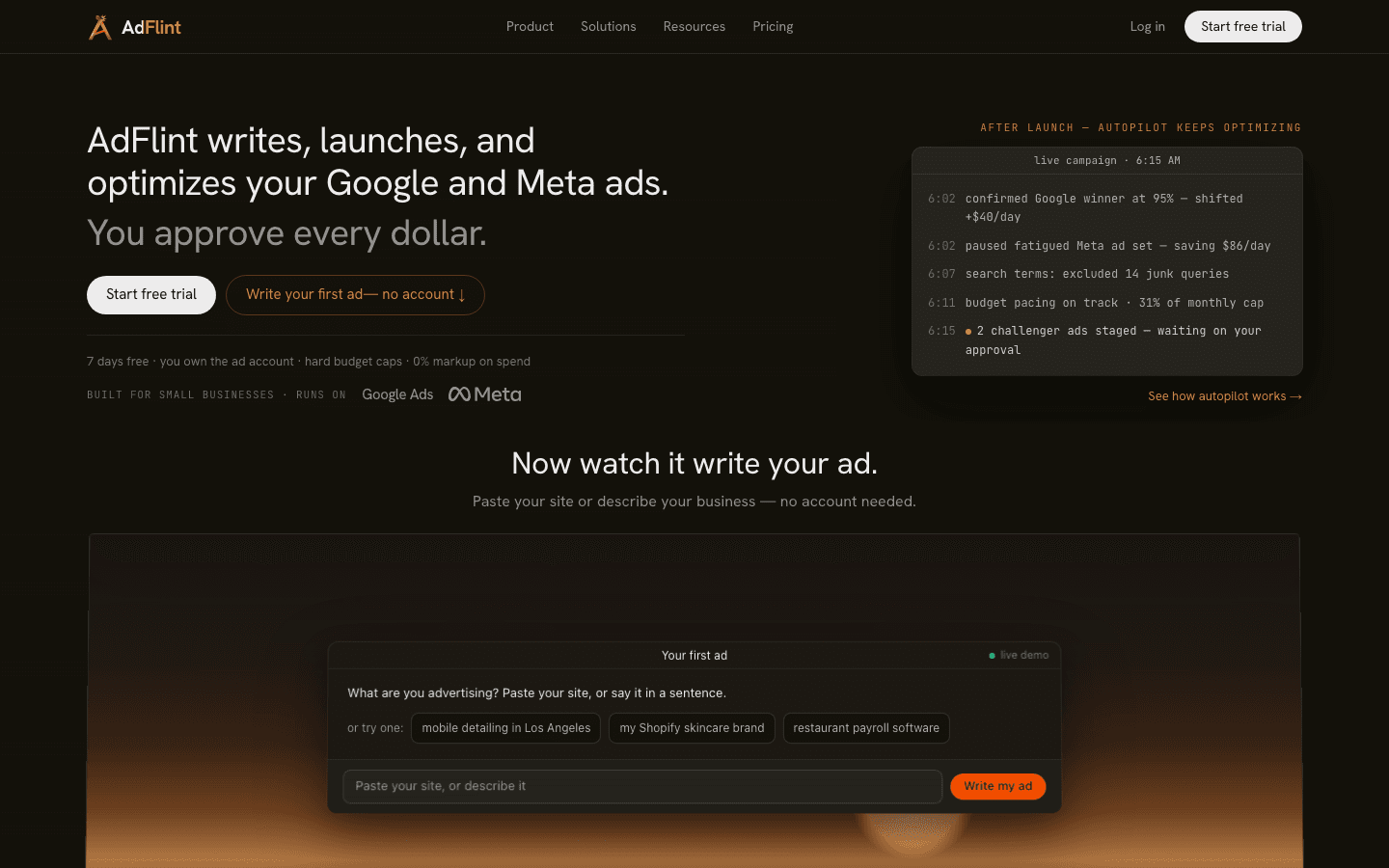
Best for getting the work done without hiring anyoneOur product — disclosureDisclosure first: AdFlint is our product and this page is published on our site. It sits second because the honest reading is that DIY is the right first answer for people with more time than budget - but if you are here because you do not have that time, this is the entry built for you. AdFlint's AI writes the ads, launches them, and optimizes them inside your own Google and Meta ad accounts: you keep the account, the data, and the billing relationship with the platforms. On self-serve plans nothing goes live until you click Launch or turn on Full Autopilot, budgets are enforced with hard caps, and the fee is a flat monthly price set by your ad-spend cap, starting at $40, with no percentage taken of your self-serve ad spend. In Autopilot, the default, AdFlint can also pause weak ads and switch on new ad versions it writes. Every change is logged.
The category is wider than us, and the honest peers deserve naming. Optmyzr is the professional's optimization suite - deep rule-based and suggestion-driven tooling across platforms, priced by your monthly ad-spend tier with a 14-day trial that needs no card. Two things to know before you shortlist it: it assumes a skilled operator is driving, and its pricing selector starts at the $25,000 per month ad-spend tier, so it is priced for agencies and large in-house teams rather than the budgets this page is about. Madgicx is a Meta-first stack with AI analysis and automation, priced by monthly ad spend from $45 a month under $1,000 (its pricing page, checked October 26, 2026), with a 7-day free trial and a $49 per month Tracking Pro add-on. In July 2026 its Shopify App Store listing showed 4.0 out of 5 across 13 reviews, a small sample that cuts both ways, and the app has since been withdrawn from that store.
The honest limits of the whole category, ours included: software executes disciplines, it does not own outcomes. AdFlint covers Google and Meta only (no TikTok, LinkedIn, or Amazon), and its self-serve plans top out at $30,000 a month in ad spend, with custom pricing above that. A complex B2B funnel or a multi-channel brand account will outrun what any of these tools can safely automate. And as the publisher, we do not cite third-party review scores for ourselves here; the live autopilot demo on our homepage is the evidence we would rather be judged on.
Pros
- + Executes targeting, bidding, creative, and optimization instead of just reporting on them
- + AdFlint works inside your own ad account - you keep the account, data, and platform billing
- + AdFlint's fees are flat from $40 per month with no percentage of spend, after a 7-day trial (card required)
- + Safety rails a spreadsheet never gives you: hard budget caps, a log of every change, and on self-serve plans nothing goes live until you click Launch or turn on Full Autopilot
Cons
- − AdFlint covers Google and Meta only, and each self-serve plan caps monthly ad spend, so a growing account has to move up plans
- − No software owns your outcome - tracking gaps and bad offers stay your problem
- − Peer pricing climbs with spend or is aimed elsewhere: Madgicx rises by spend bracket from $45 a month, and Optmyzr's tiers start at $25,000 per month in spend
- − AdFlint is a young product from the company publishing this list - weigh the disclosure accordingly
Ideal for
- Small businesses spending $100 to $2,500 per month on Google and Meta
- Owners with no time or desire to learn the native tools in the entry above
- Anyone burned by percentage-of-spend pricing who wants a flat, capped bill
Pricing: AdFlint: Launch $40 per month (up to $1,000 per month in ad spend), Growth $89 (up to $2,500), higher self-serve plans stepping up with spend and custom pricing above $30,000; Managed tier custom-quoted; 7-day free trial with card required and no software charge until day 8; no percentage of self-serve spend. Peers: Optmyzr prices by monthly ad-spend tier starting at the $25,000 per month tier, with a 14-day no-card trial and a 30 percent annual-billing discount; Madgicx prices by monthly ad-spend bracket from $45 per month under $1,000 (checked October 26, 2026) and offers a 7-day free trial plus a $49 per month Tracking Pro add-on (other pricing pages read July 2026).
Try AdFlint freeFreelance PPC specialist
Best for human expertise without agency overheadA freelancer is one skilled operator renting you a slice of their week: they take over the disciplines you are worst at - usually bidding strategy, account structure, and optimization - while you keep creative input and final say on budget. 7 Mile Media's guide to hiring an ads expert - written about Facebook ads specialists, so read it as directional for Google work too - tells buyers to expect $22 to $125 per hour for freelancers, often around $71.50 per hour (read July 2026); marketplaces themselves publish no standard rate card, and Upwork's and Fiverr's own rate pages blocked automated access this pass, so treat any single range as directional. At a few hours a week, a good freelancer costs a fraction of an agency retainer and brings judgment no rule-based tool has.
The catch is that the vetting is entirely on you, and the marketplace layer adds its own risk. Upwork's Sitejabber profile - which now redirects to smartcustomer.com - shows a 2.3 out of 5 rating across 2,130 reviews as of July 2026; that reflects the marketplace experience (disputes, suspensions, fees) rather than freelancer skill, but it is the environment you are hiring through. Vetted networks like Toptal screen harder but publish no rate card - their marketing hire page quotes nothing and routes you to a consultation (read July 2026). The practical filter is unglamorous: ask for anonymized account screenshots, ask what they would do in the first 30 days, and never accept 'proprietary strategy' as a reason you cannot see your own account.
The structural weakness is continuity. One person means vacations, illness, better clients, and churn - and unless you insist on documentation, the reasoning behind your account structure lives in their head. Hire a freelancer into your own ad account with admin access retained, require a monthly change log, and the exit cost stays low; skip those two rules and you inherit the same lock-in an agency has, without the agency's bench.
Pros
- + Real human judgment at a fraction of agency cost - sourced rates start around $22 per hour
- + Flexible scope: a few hours a month for audits, or part-time ownership of the whole account
- + Direct access to the person doing the work, with no account-manager layer
- + Easy to trial: a one-off audit is a cheap way to test both the account and the person
Cons
- − Quality varies enormously and the vetting burden is entirely yours
- − Marketplace friction is real: Upwork rates just 2.3 out of 5 across 2,130 Sitejabber reviews (July 2026)
- − Single-person dependency - continuity breaks when they get sick, busy, or a better client
- − No published standard pricing anywhere; every engagement is a negotiation
Ideal for
- Businesses spending roughly $500 to $5,000 per month that need judgment, not just execution
- Accounts with nuance that automation handles badly - local service areas, regulated niches, long B2B cycles
- Owners willing to spend real effort on vetting and to demand documentation
Pricing: No standard rate card - each freelancer sets their own price, typically hourly or a flat monthly fee. 7 Mile Media's ads-expert hiring guide puts freelancers at $22 to $125 per hour, often around $71.50 per hour (read July 2026); it is written about Facebook ads specialists, so treat it as directional for Google work. Upwork's and Fiverr's own rate pages could not be independently fetched this pass, so no marketplace-published figures appear here.
Related: Hiring someone to run Google Ads
Visit Freelance PPC specialist“But the freelancer delivered absolutely nothing. Instead, he kept making up excuses”
— abdullah a., Sitejabber review of Upwork, now hosted at smartcustomer.com (worst-case, not typical - the vetting burden is the point)
PPC agency
Best for complex accounts spending $3,000+ per monthAn agency is the only option on this page that hands all five disciplines to a team with a process: a strategist, a media buyer, creative support, and reporting, held together by an account manager. Very few agencies publish prices, which is itself worth knowing; WebFX, one of the largest that does, says PPC management typically runs 10 to 20 percent of ad spend or around $1,000 to $3,000 per month in management fees, recommends $1,000 to $3,000 per month in ad spend just to gather meaningful data, and starts its own PPC service at $750 per month (pricing guide read July 2026). Those numbers set the honest floor: an agency is a four-figure monthly commitment before a single click is bought. Run the ratio before you sign - at $3,000 per month in ad spend a $1,000 minimum fee is already a third of your budget, and at $1,000 in spend it is the whole thing, which is why the $3,000 spend level is the earliest point the math starts working rather than a comfortable one.
When the math works, it really works - multi-channel accounts, complex funnels, and spend levels where a percentage point of efficiency pays the fee. Client reviews show both faces of the model in the same profile: WebFX holds 4.9 out of 5 across 450 reviews on Clutch as of July 2026, where one client writes that 'They made it a priority to understand our unique business' while another reports that 'While the relationship began with promise, execution steadily deteriorated.' Both are the agency experience. The difference is usually the fit between your account size and the agency's attention, which is why minimums exist.
Two structural cautions before signing. Percentage-of-spend pricing means the agency's revenue grows when your budget grows - an incentive worth naming out loud in the first call, and a reason flat-fee arrangements are worth asking for. And insist on running inside your own ad account from day one: if campaign history lives in the agency's account, the exit cost of a deteriorating relationship is losing years of optimization data. Any agency that resists either conversation is answering a question you had not asked yet.
Pros
- + A full team covers all five disciplines with process and redundancy no individual matches
- + Bench depth across industries - patterns from dozens of accounts get applied to yours
- + Continuity survives any one person leaving
- + The strongest option for multi-channel accounts and complex funnels at real spend
Cons
- − Fees of $1,000 to $3,000 per month or 10 to 20 percent of spend rarely pencil out below $3,000 per month in ad spend
- − Percentage-of-spend pricing rewards bigger budgets, not necessarily better results
- − Small accounts get the B team - minimums exist because attention follows revenue
- − Exit cost is high if campaign history lives in the agency's account instead of yours
Ideal for
- Businesses spending $3,000 per month or more across multiple channels
- Teams that need strategy, execution, and reporting owned end to end
- Accounts complex enough that a single freelancer or a software tool would be out of depth
Pricing: Most agencies do not publish prices. WebFX, one of the few that does, cites typical PPC management at 10 to 20 percent of ad spend or around $1,000 to $3,000 per month, recommends $1,000 to $3,000 per month in ad spend for meaningful data, and starts its own service at $750 per month (pricing guide read July 2026).
Related: AdFlint vs an ad agency
Visit PPC agency“They made it a priority to understand our unique business.”
— Donna Devaul, Marketing and Operations, Enabling Devices - Clutch review of WebFX
Hybrid: software plus a human on call
Best operating model for most growing businessesThe hybrid is not a product you can buy on one pricing page - it is the operating model most businesses quietly converge on after trying one of the pure options above. The split follows the disciplines: software owns the daily loop that machines are good at (bid adjustments, budget pacing, creative rotation, kill-the-loser optimization), while a human owns what machines are bad at (strategy, offer, landing pages, and the quarterly question of whether the whole account is pointed at the right goal). Concrete versions: DIY plus a freelancer audit every quarter; an autopilot tool like AdFlint doing the daily work while you read its change log and a specialist reviews tracking twice a year; or an agency on one channel and software on another.
The cost logic is what makes it the default endgame. A flat software fee - $40 to $89 per month for AdFlint, since spend-tiered suites like Optmyzr start at ad-spend levels far above this audience - plus a handful of expert hours at the sourced $22 to $125 per hour runs a few hundred dollars a month at small-business scale, well under the $1,000 to $3,000 agency floor, while covering more disciplines than either piece alone. It also fixes each side's weakness: the software never goes on vacation, and the human catches the strategic drift no rule or model flags.
The honest limitation: you are the general contractor. Nobody in a hybrid sees the whole picture unless you make them - the tool does not know what the freelancer changed, and the freelancer will not read the tool's logs unless you ask. It takes one disciplined habit to work: a single monthly review where you look at spend, results, and every change made by anyone, human or machine. If you will not do that one hour, pick a single accountable option above instead.
Pros
- + Covers all five disciplines by assigning each to whoever does it best, machine or human
- + Typically a few hundred dollars a month at small-business scale - under the sourced agency floor
- + Redundancy: the software never goes on vacation, the human catches strategic drift
- + Scales piecewise - upgrade the human or the software independently as spend grows
Cons
- − You are the coordinator - integration and accountability do not come built in
- − No single throat to choke when results dip; the tool and the human can point at each other
- − Requires a disciplined monthly review, or the two halves quietly diverge
Ideal for
- Businesses that have outgrown pure DIY but cannot justify a $1,000+ monthly retainer
- Owners willing to spend one focused hour a month supervising the whole system
- Accounts where daily execution is routine but strategy still needs a human
Pricing: No single price - it is a stack. A typical small-business version: a flat software fee (AdFlint from $40 to $89 per month; spend-tiered suites like Optmyzr price from the $25,000 per month ad-spend tier upward) plus occasional expert hours at the sourced $22 to $125 per hour freelance range, totaling a few hundred dollars a month against the $1,000 to $3,000 per month agency floor (component figures read July 2026).
Side by side.
| Option | Best for | Typical monthly cost | Who does the work | Standout limitation |
|---|---|---|---|---|
| DIY with native tools | Owners with more time than budget | Free - ad spend only | You, in Google Ads Editor and Meta Ads Manager | Every discipline and every mistake is yours |
| AI ad management software (AdFlint) | Getting the work done without hiring | From $40 flat (AdFlint), stepping up with spend; peers priced by spend tier | AI executes; you click Launch | Google and Meta only; ad spend capped per plan |
| Freelance PPC specialist | Human expertise without agency overhead | $22-$125 per hour, often ~$71.50 (7 Mile Media, July 2026) | One person, part-time | Quality varies wildly and the vetting is on you |
| PPC agency | Complex accounts spending $3,000+ per month | $1,000-$3,000 fees or 10-20% of spend (WebFX, July 2026) | A full team on retainer | Fees rarely pencil out below $3,000 per month in ad spend |
| Hybrid: software + human | Most growing businesses | Software fee plus occasional expert hours | Split: tools run daily, a human audits | You are the coordinator; accountability is not built in |
How we chose.
This is a researched comparison, not a hands-on test of every option. We have not personally hired the freelancers or retained the agencies discussed here, and nothing on this page claims otherwise. The only product we operate daily is our own, AdFlint, which runs live campaigns on Google Ads and Meta Ads - and that entry carries a visible disclosure tag and is ranked where an honest reading puts it, not first.
What we actually did, in July 2026: loaded the live pricing and product pages for every named product - AdFlint's pricing page, Google's page for Ads Editor, Meta's page for Ads Manager, Optmyzr's and Madgicx's pricing pages, WebFX's published PPC pricing guide, and 7 Mile Media's guide to hiring an ads expert - and recorded figures verbatim. Where a vendor does not list a flat figure (Optmyzr prices by ad-spend tier without listing flat figures on the page we could read), we say so instead of guessing. Madgicx's spend-bracket prices were re-checked on its pricing page on October 26, 2026. For the human options, which have no vendor pricing page, cost figures are attributed to the named published source we read them from.
Review evidence comes from public review pages we could actually fetch this pass: the Apple App Store listing for Meta Ads Manager, Clutch's profile of WebFX, Sitejabber's Upwork page (which now redirects to smartcustomer.com), and Madgicx's Shopify App Store listing. Trustpilot, G2, Capterra, and the Upwork and Fiverr rate pages all blocked automated access this session, so nothing on this page cites them. Every rating is labeled with its source and the month we read it, and where we could not fetch a real, attributable quote for an entry, that entry simply has no quote - nothing here is invented.
- — Total cost of ownership at small-business spend levels, using only figures read from live pages in July 2026, each with its source named.
- — Coverage of the five disciplines: which of targeting, budget and bidding, creative, tracking, and optimization each option actually owns, and which it quietly leaves with you.
- — Assumed skill and time: whether the option executes for you, advises you, or waits for you to already know what to do.
- — Accountability and safety rails: approval steps, spend caps, contracts, and what happens when the person or machine managing your money gets it wrong.
- — Evidence from verified public reviews we could actually fetch - including the critical ones - attributed with source and date rather than summarized into a safe blur.
- — Exit cost: how much history, data, and momentum you lose the day you switch away from each option.
Common questions.
What does online advertising management actually involve?
Five recurring jobs: targeting (choosing and refining who sees your ads), budget and bidding (setting spend and the strategy the platform uses to spend it), creative (writing and refreshing the ads), tracking and attribution (connecting spend to actual revenue), and ongoing optimization (cutting what fails, scaling what works). Every management option is a decision about who owns each job - the most common failure is paying for help with two of them and not noticing the other three are still yours.
Is Google Ad Manager the same thing as Google Ads?
No - they are opposite sides of the same market, and the near-identical names catch people out constantly. Google Ads is the advertiser tool: you use it to buy ads. Google Ad Manager is a publisher platform: websites and apps use it to sell their ad space to advertisers. If you want people to find your business, you want Google Ads - and its free companion desktop application, Google Ads Editor - not Ad Manager.
How much does online advertising management cost in 2026?
Sourced figures from this July: the native tools are free beyond ad spend. AI software starts at $40 per month flat on AdFlint's published plans and steps up with your ad spend, with peers like Optmyzr priced by ad-spend tier (its selector starts at $25,000 per month in spend). Freelancers run $22 to $125 per hour, often around $71.50, per 7 Mile Media's ads-expert hiring guide. Agencies typically charge $1,000 to $3,000 per month or 10 to 20 percent of spend per WebFX's published pricing guide, on top of a recommended $1,000 to $3,000 per month in ad spend.
Can I manage my own online advertising without hiring anyone?
Yes - Google Ads Editor and Meta Ads Manager are free and complete enough to run everything yourself, and at very small budgets your business context is worth more than professional optimization polish. The honest cost is time: several hours a week to run the five disciplines properly, plus the learning curve, plus the fact that platform defaults consistently steer beginners toward spending more. DIY is the right answer when those hours are genuinely available.
When should a small business stop doing it themselves?
Watch for three signals rather than a magic spend number: you are skipping weekly account reviews because the business needs you elsewhere; your results have plateaued and you no longer know what to try next; or a platform change (a policy update, a tracking change) costs you real money before you notice it. Any one of those is the point where a flat-fee tool or a few freelancer hours costs less than the drift it prevents.
Is AI ad management software a replacement for an agency?
At small-business spend on Google and Meta, the overlap is real: software now executes the daily disciplines - bidding, budget pacing, creative testing, optimization - that junior agency staff used to bill for, at a flat fee instead of a retainer. It is not a replacement for what senior agency people actually do: multi-channel strategy, complex funnels, and creative direction. Full disclosure: we make AdFlint, one of the tools in that category, so weigh this answer with the same skepticism the page applies to everyone else.
Keep reading
- Roundup: Hiring someone to run Google Ads
- Roundup: Hiring someone to run Facebook ads
- Roundup: AI ad management software
- Roundup: Ad platforms for small business
- Who Owns Your Ad Account, Pixel, and Audiences?
- Ad Account OAuth Scopes: What a Tool Really Gets
- DIY vs Agency vs AI: What Ad Management Costs
- What a PPC Retainer Actually Buys You Each Month
- Guide: Google Ads Bidding Strategies: The Complete Guide
- Guide: Meta Ads Objectives and Bidding: The Complete Guide
- Guide: Ad Budgets, Pacing, and What Ad Management Costs
- AI Ad Management Software vs DIY Ad Management
- AI Ad Management Software vs a Freelance PPC Specialist
- Done-For-You Ad Management vs a PPC Agency
- DIY Ad Management vs Done-For-You Ad Management
- Flat Fee vs Percentage of Ad Spend
- Free tool: Ad Budget Calculator
- Free tool: ROAS Calculator
- Free tool: Cost Per Acquisition Calculator
- Free tool: Free AI Ad Copy Generator