Best PPC Software for Law Firms (2026)
By the AdFlint research team · We run live campaigns on these platforms; every screenshot is from our own sessions · Published August 3, 2026 · Updated August 3, 2026
TL;DR
- For most law firms, "PPC software" is really two purchases: call tracking to turn phone calls into keyword-level conversion data (CallRail is the default choice, published list pricing $50-$195/mo), plus a management layer — AdFlint ($40-$319/mo flat, our product) if you are running your own ads, or Optmyzr (roughly $209/mo billed annually and up) if a marketer or consultant manages $10,000+/mo of search spend for you.
- The math that decides everything: published search benchmarks put the average legal CPC in the high single digits to low teens, but published keyword-cost research consistently shows the queries that sign clients — "car accident lawyer [city]", "dui attorney near me" — auctioning in the $50-$150 range, with mass-tort and mesothelioma phrases historically listed at several hundred dollars per click. At those prices, one wasted click can cost more than a month of most software on this page.
- Legal leads are phone-first. If your Google Ads account only counts form fills as conversions, smart bidding is training on the minority of your leads. That is why call tracking ranks first here, ahead of every optimization suite — including ours.
- Birch (formerly Revealbot) is the wrong shape for a search-first firm: its center of gravity is Meta/TikTok/Snapchat, its integrations skew social and e-commerce attribution, and the automated rules everyone reviews are not in the $49 Essential plan — we read off its own in-app billing slider that they require Pro at $99/mo and up. It only makes sense if your practice buys Meta lead ads at volume (mass tort, estate planning, immigration).
- WordStream's software no longer exists as a product you can buy. wordstream.com today is a set of free diagnostic tools in front of LocaliQ, Gannett's managed-marketing arm. The free Google Ads Performance Grader is still worth running on an existing account; just know that what follows is a sales conversation, not a software trial.
- None of these tools manage Google Local Services Ads — the pay-per-lead, Google Screened placements many consumer practices live on. LSAs are run from Google's own dashboard regardless of what software you buy.
This page is for the attorney or firm administrator who typed "PPC software" and meant software: something you or your staff log into, that helps you run Google and Meta ads without handing the account to an agency. Search this phrase today and roughly half the first page is legal-marketing agencies ranking themselves, and the rare genuine tool list is the same roster you would hand a dentist or a roofer — nothing about the two facts that make legal PPC its own discipline: your leads arrive by phone, and your clicks cost more than almost any other industry's.
Those two facts reorder the whole category. At $50-$150 for a high-intent click, the difference between software fees is noise — what matters is which tool stops wasted clicks and proves which keywords produce signed clients, not visits. And because an injured person or someone arrested last night calls rather than fills out a form, any stack that cannot attribute phone calls back to a campaign and keyword is optimizing blind. So this list is organized around the call as the conversion event: call tracking first, then the layer that manages the ads, then the free baseline, then two tools you will see on every other list ranked where they honestly belong.
A disclosure before rankings: AdFlint, our own product, appears on this list at #2 and is labeled as ours everywhere it appears. We built it for exactly the buyer this page addresses — a small operation running its own Google and Meta ads with hard budget caps and an approval gate before launch — and we explain below why that fits a law practice's professional-responsibility constraints unusually well (the plain-English version of running ads without an agency lives at /ads-without-agency). We also tell you plainly what AdFlint does not do, including the fact that we have never run a legal campaign and will not pretend otherwise.
CallRail
Best first purchase: call trackingThe uncomfortable truth about legal PPC software is that the most important tool is not a bid optimizer. Legal problems are urgent and personal, so prospects call — after-hours DUI arrests, injury consultations, custody emergencies. If your Google Ads account counts only form submissions as conversions, every "smart" feature downstream — Maximize Conversions bidding, Optmyzr's optimizations, AdFlint's autopilot — is being trained on a minority slice of your actual leads. Call tracking fixes the data before anyone optimizes on it: dynamic number insertion swaps in a tracking number per visitor session, so each call maps back to the campaign and keyword that produced it, and calls flow into Google Ads as conversions your bidding can learn from.
The tier that matters for an intake desk is not the cheapest one. CallRail's entry plan covers the mechanics — a handful of local numbers, a monthly minute pool, recording, routing and transcription — but the plans that add its AI conversation analysis are the ones built for a law office's phone reality: a large share of inbound calls are existing clients, opposing counsel, court staff and solicitors. Automatic call categorization separates a genuine new-matter consultation from the noise, so only qualified calls train your bidding. At $100-a-click economics, feeding Google ten junk "conversions" a week is an expensive way to teach it the wrong lesson.
One compliance note a law firm of all businesses cannot skip: call recording is subject to consent law, and states including California, Florida, Pennsylvania, Washington and Illinois require all-party consent. CallRail documents a pre-call recording announcement and per-number recording controls — decide this policy before the first tracked call, not after. We have not run CallRail hands-on; this entry is built entirely from its published documentation and list pricing, and its pricing page could not be machine-read on 3 August 2026. It ranks first anyway, because every other tool on this list — ours included — gets better when keyword-level call data is present.
Pros
- + Keyword-level attribution for phone calls — the conversion event that actually matters in legal — via dynamic number insertion
- + Pushes calls into Google Ads as conversions, giving smart bidding enough volume to work in low-lead accounts
- + Documented automatic call categorization on its higher tiers separates new-matter consults from solicitors and existing clients before they pollute your data
- + Free trial and month-to-month billing, so you can prove attribution before committing
- + Recording controls (per-number disable, pre-call announcements) that make consent-state compliance workable
Cons
- − It manages nothing — no bids, no budgets, no ad copy; it is the data layer, not the management layer
- − The included minutes on the entry plan disappear fast on a busy intake line, and per-minute overages are billed on top — budget realistically rather than off the sticker price
- − The full stack (calls + forms + AI analysis) is roughly four times the entry price everyone quotes
- − Recording-consent compliance is configured by you, not guaranteed by the tool
- − We did not test it hands-on and could not machine-verify its pricing page — treat our figures as published list prices, confirm them yourself, and run the free trial before trusting it with intake
Ideal for
- Any firm spending $1,500+/mo on search ads whose leads arrive primarily by phone
- Practices with an intake desk that needs qualified-call reporting, not just call counts
- Firms about to adopt any optimizer or autopilot on this list — install call tracking first so the optimizer has real data
Pricing: Published list pricing runs roughly $50/mo for the entry call-tracking plan (a small pool of local numbers, minutes and texts, with recording and transcription), about $95/mo to add form tracking, about $150/mo to add AI conversation analysis, and about $195/mo for everything, plus per-minute overages (published in the ~$0.05/min range for local numbers) and about $3/mo per extra local number. A free trial is offered. CallRail's pricing page renders client-side and we could not machine-read it on 3 August 2026, so confirm current figures at callrail.com/pricing before buying.
Visit CallRailAdFlint
Best for running your own ads without an agencyOur product — disclosureAdFlint is our product — read this entry with that disclosure in mind. It writes, launches and optimizes Google Ads and Meta campaigns for people who do not want to learn Ads Manager or hire an agency: you describe the practice, it drafts the campaign, and on self-serve plans nothing goes live until you click Launch or turn on Full Autopilot. You connect your own ad account with one-click OAuth, your card pays Google and Meta directly, and the fee is flat — $40 to $319 a month depending on ad-spend tier, with 0% of spend taken on the self-serve plans. Compare that to the standard legal-marketing arrangement of 10-20% of spend: on a $5,000/mo budget that is $500-$1,000 every month before a single click.
Three design choices happen to line up with how a law practice has to advertise. First, the approval gate: under attorney-advertising rules (ABA Model Rule 7.1 and its state variants), you are professionally responsible for every public communication about your services, no matter who — or what — wrote it. On self-serve plans nothing goes live until you click Launch or turn on Full Autopilot, which is exactly where you check draft copy against your state bar's rules before it exists in public. In Autopilot, the default, AdFlint can also switch on new ad versions it writes, so a law practice should use Assisted mode, which applies each later fix only when you click. Second, ownership: because the ad account is yours, the campaign history, conversion data and copies of every ad stay with you — relevant both to bar record-keeping expectations and to the day you leave any vendor, including us. Third, hard budget caps: at $50-$150 per click, a runaway campaign burns real money in hours, so caps are enforced at the account level, not promised in a dashboard.
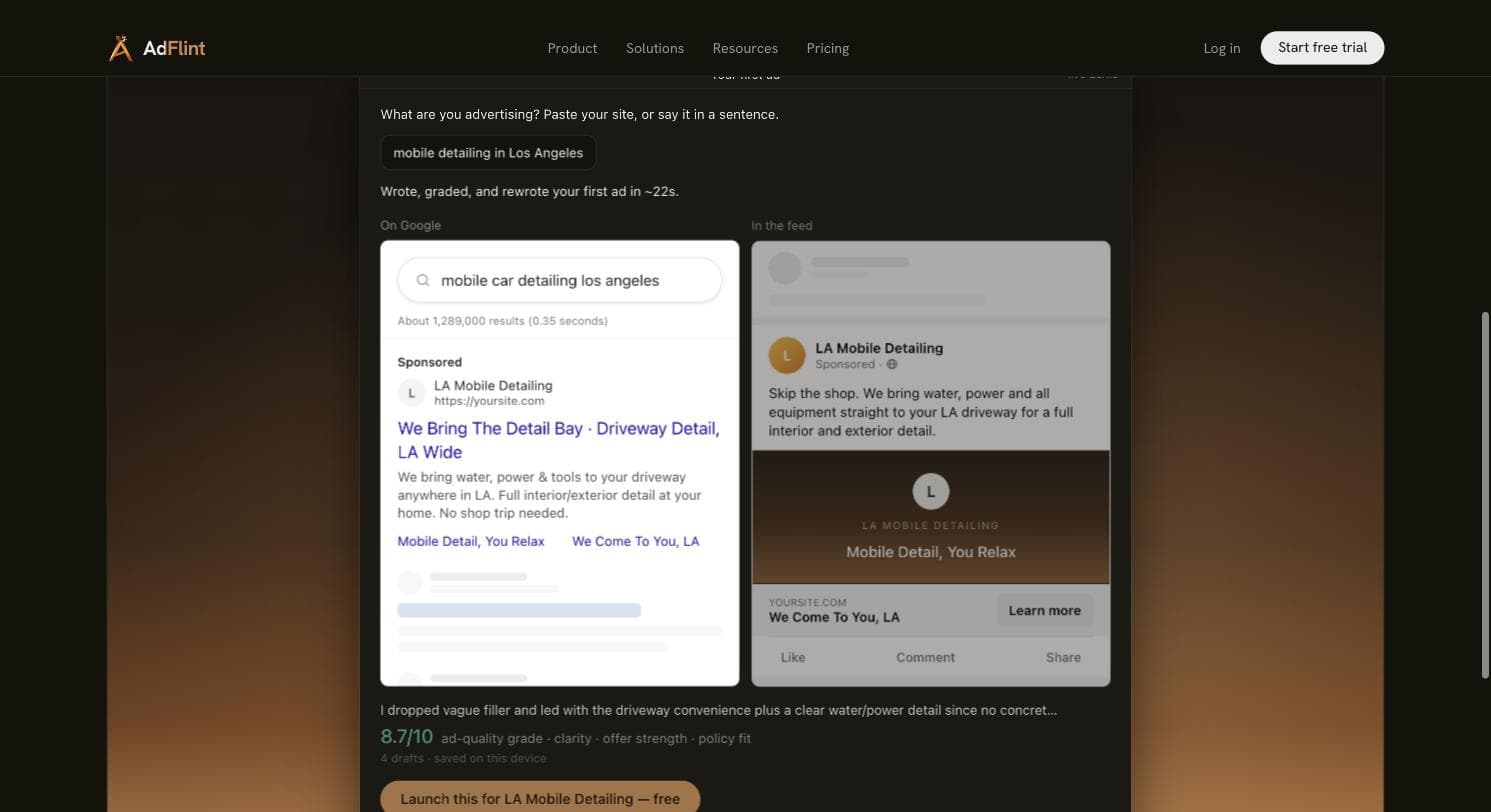
Now the honesty section, because it is load-bearing. We have never run a legal campaign: the vertical specifics on this page come from platform documentation and published bar rules, not from matters we generated. AdFlint has no published performance record, so we have no ROAS figures, case studies or testimonials to show you, and we refuse to invent any. What we can show is the live public demo: given "mobile detailing in Los Angeles" (deliberately not a legal prompt), it wrote, self-graded and rewrote a Google search ad and a Meta feed preview in about 22 seconds, scoring its fourth draft 8.7/10. That demonstrates the writing-and-launching machinery, not legal results. AdFlint also has no built-in call tracking: for a phone-first practice, pair it with CallRail and import calls as conversions, exactly as you would with every other tool on this list.
Pros
- + Flat fee with 0% of spend on the self-serve plans — at legal budgets the savings versus percentage-of-spend arrangements are large and compound monthly
- + Nothing goes live until you click Launch, and Assisted mode applies each later fix only when you click: the natural checkpoint for state-bar compliance review
- + You own the ad account and everything in it via one-click OAuth; leaving costs nothing and loses nothing
- + Hard budget caps enforced at the account level, which matter most in the highest-CPC vertical there is
- + Writes the ads for you — the step every other self-serve tool on this list still leaves to you
Cons
- − Google Ads and Meta only — no Microsoft Ads (where legal CPCs are typically cheaper), no LinkedIn, and no management of Google Local Services Ads
- − No built-in call tracking; a phone-first firm needs CallRail or similar alongside it
- − No legal vertical track record and no published performance record, so you are trusting product design and a live demo, not case studies
- − Young product with essentially no third-party review presence on G2 or Capterra yet
- − The approval step is where bar-rule compliance happens, but checking copy against your state's rules is still your job — AdFlint does not know Texas filing requirements from New York labeling rules
Ideal for
- Solo and small firms spending roughly $500-$10,000/mo who want ads run for them without an agency retainer or a percentage of spend
- Attorneys who want a hard approval gate for professional-responsibility reasons, using Assisted mode
- Firms burned by agency lock-in who now insist on owning their own ad account
Pricing: Self-serve, flat fee, 0% of ad spend: Launch $40/mo (up to $1,000/mo ad spend), Growth $89 ($2,500), Scale $109 ($5,000), Accelerate $119 ($10,000), Performance $219 ($20,000), Premium $319 ($30,000), custom above that. The managed done-for-you service is separate: a monthly fee plus a share of managed spend, priced per account. Entry point is a 7-day free trial. Current as of 3 August 2026.
Try AdFlint freeOptmyzr
Best for in-house marketers at $10K+/moWe ran Optmyzr hands-on across late July and early August 2026, and it earned this position honestly. Getting in has friction — five mandatory qualification fields, then a phone-and-SMS wall before you see the product (no credit card, though, and their own /free-trial/ URL 404s) — but past the wall it does something we saw nowhere else: it lets you into the full application with no ad account connected. Every campaign-touching tool bounces you back to an All Accounts screen until you connect, but you can inspect the entire module map before granting a vendor access to a live account. For a profession that should be paranoid about account access, that is the right order of operations, and its optional MCC-link dialog doubles down: it makes you type CONNECT, warns that Google auto-emails everyone with account access, and explicitly says it is not recommended for agencies without explicit client approval.
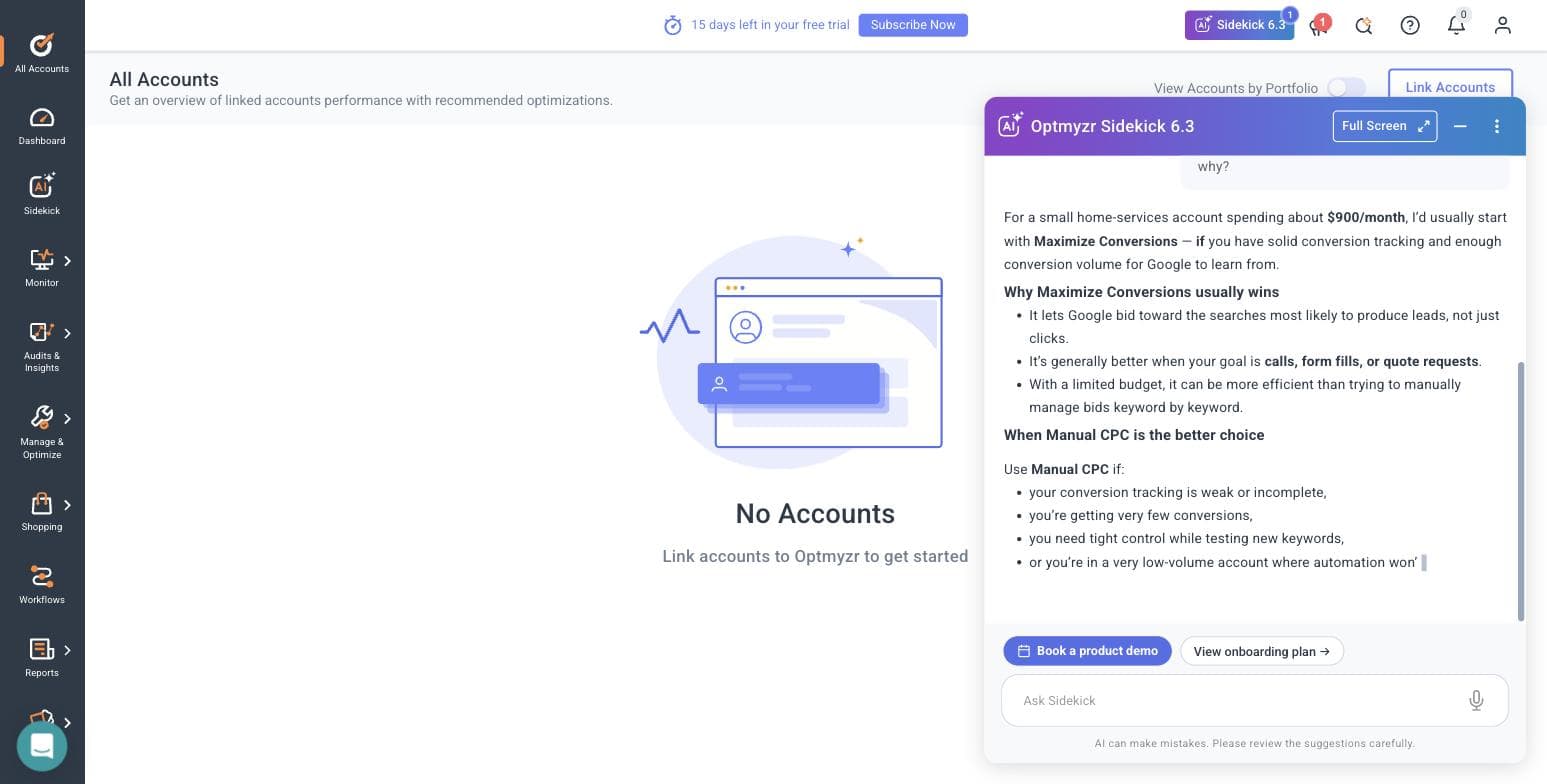
The moment that sold us is directly relevant to law firms. We asked Sidekick 6.3, its AI assistant, a real question — Maximize Conversions or Manual CPC? — with no account connected, and it answered sensibly: get conversion tracking clean first, run Maximize Conversions on core lead campaigns, keep Manual CPC as the low-volume fallback, and use roughly 3-5 conversions per week as the threshold. That threshold is the law-firm problem in one number. A solo firm spending $3,000/mo at $75 average CPC buys about 40 clicks — maybe a handful of calls and a couple of consults. Below the threshold, smart bidding starves, which is why importing tracked calls as conversions (see CallRail, above) is what makes an account like this optimizable at all.
For the firm with an in-house marketer or a fractional PPC consultant, the module set maps well onto $50-$150 CPC economics. Search Term Analysis is the highest-ROI screen in legal PPC — mining negatives like "free legal advice", "lawyer salary", "pro bono" and "how to become a paralegal" out of your queries pays for the subscription in a handful of blocked clicks. The Monitor suite (KPI tracking and alerts, an anomaly-detector script, auto budget tracking, spend projection) catches the overnight blowout that a $150-CPC account cannot absorb, and the Rule Engine ships pre-built strategies across Google, Microsoft and Amazon, including two new Performance Max placement-exclusion strategies for gaming and kids placements — exactly where a dignified firm does not want its brand appearing. There is even an MCP connector that plugs Optmyzr into Claude or ChatGPT as a first-class working mode. The catch is who it is for: the spend brackets in our signup flow started at "Under $10,000/mo" and ran to "$500,000+", pricing is well into the hundreds per month, and it optimizes campaigns you (or your marketer) still have to build and understand. One more hands-on detail: marketing says a 14-day trial; the in-product banner told us 15.
Pros
- + Full application explorable with no ad account connected — inspect everything before granting a vendor access to a live account, which no other tool we tested allows
- + Search Term Analysis and the negative-keyword workflow pay for themselves quickly at legal CPCs
- + Monitor suite (anomaly detection, budget alerts, spend projection) is real protection in a $150-per-click account
- + Account-access hygiene is best-in-class: type-CONNECT confirmation and explicit client-approval warnings on MCC linking
- + AI assistant gave a sensible, appropriately-hedged answer to a real bidding question in our test — plus an MCP connector for Claude/ChatGPT
Cons
- − Entry pricing lands around $209/mo billed annually (roughly $299 month-to-month at the advertised 30% annual saving) — more than many solo firms spend on all other software combined
- − It optimizes campaigns; it does not write or launch them for you. Without someone who knows PPC, you are paying for dials you will not turn
- − Phone number and SMS verification required before you ever see the product
- − Search-skewed: strong on Google/Microsoft/Amazon, thin for a Meta-first lead-gen practice
- − No call tracking of its own — like everything here, it depends on calls being imported as conversions first
Ideal for
- Firms with an in-house marketing hire or fractional PPC consultant managing $10,000+/mo of search spend
- Multi-office firms running several campaigns per practice area who need audits, alerts and bulk optimization
- Marketers who want AI assistance inside a professional PPC toolset rather than a black-box autopilot
Pricing: Priced by monthly ad spend across Essentials, Premium and Enterprise tiers. Optmyzr's pricing page (checked 3 August 2026) advertises "Save 30%" for annual billing and a 14-day free trial with no credit card, but renders exact figures dynamically in a calculator; the entry tier works out to roughly $209/mo billed annually, or about $299 month-to-month at that discount, scaling up through brackets to $500K+/mo of spend and then Enterprise custom quotes. In our own trial the signup flow's spend brackets started at "Under $10,000/mo" and the in-product banner offered 15 days rather than 14. Confirm your bracket's price on optmyzr.com/pricing.
Related: AdFlint vs Optmyzr
Visit OptmyzrGoogle Ads Editor
Best free manual baselineBefore paying for anything, know what Google gives you free. Google Ads Editor is a desktop application (Windows/Mac) that downloads your account, lets you make bulk edits offline, and posts changes back when you are ready. It was not part of our hands-on test protocol — we describe it from Google's own documentation — but it is free, ungated and made by the platform itself, which makes it the honest baseline every paid tool on this page should be measured against: what are you getting for your money that Editor plus discipline does not already do?
For a law firm specifically, Editor's bulk operations map onto the most common structural chore: duplicating a proven campaign across practice areas and cities. Build your "car accident lawyer + [city]" campaign once, copy it, and find-and-replace your way to the DUI, slip-and-fall and motorcycle variants — with shared negative-keyword lists applied across all of them in one operation, which matters when every stray "free legal advice" click costs real money. The offline-drafts model has a quiet professional-responsibility benefit too: you can stage every change, export it, and have the supervising partner review before anything goes live. What Editor will not do is anything ongoing — no automation, no alerts, no bidding intelligence, no call tracking, and nothing at all for Meta. It is a power tool for making changes, not a system for deciding which changes to make.
Pros
- + Free, from Google itself — no subscription, no data-sharing with a third party, no OAuth grant to an outside vendor
- + Bulk copy and find-and-replace make practice-area and city campaign duplication fast
- + Offline drafts let a supervising partner review every change before it posts
- + Shared negative lists applied across campaigns in one operation
Cons
- − No automation, alerts or monitoring — nothing watches the account between your sessions
- − Google only; your Meta campaigns are invisible to it
- − No call tracking or conversion insight of any kind
- − A power tool with a learning curve, and it assumes you already know what changes to make
- − We did not test it hands-on for this page — this entry comes from Google's own product documentation
Ideal for
- Firms managing Google Ads in-house on a $0 software budget
- Anyone duplicating campaign structures across practice areas or office locations
- Accounts where a partner wants to review staged changes before they go live
Pricing: Free. Desktop download from Google; works with any Google Ads account. Described from Google's own product documentation, 3 August 2026.
Related: AdFlint vs Google Ads Manager
Visit Google Ads EditorBirch (formerly Revealbot)
Best for Meta-first lead-gen practicesWe ran Birch hands-on in the same late-July and early-August 2026 sessions as Optmyzr, and the two could not be more different. Signup is the fastest we have seen — under two minutes to a logged-in screen, no phone, no card (though be warned the rebrand left debris: revealbot.com and bir.ch/signup both 404; the working door is app.bir.ch/signup). Then it stops: Birch gates hard on connecting a live ad account. No sandbox, no demo data, rule builder entirely inaccessible — the empty state teases exactly three action types (increase bid, duplicate, notify) and nothing more until you hand it a real account. For a firm cautious about vendor access, that is the reverse of Optmyzr's try-before-you-connect posture.
Here is the honest verdict for this vertical: Birch is the wrong shape for a search-first law firm. Its twelve integrations — Meta, Google Ads and Google Drive, Snapchat, TikTok, YouTube, Google Analytics, Google Sheets, Slack, AppsFlyer, Adjust (beta), Hyros and Wicked Reports — skew social and e-commerce attribution, with no Microsoft Ads, no LinkedIn and not one call-tracking platform in the list. Where it earns its place is the slice of legal that genuinely runs on Meta lead ads at volume: mass-tort case acquisition, estate-planning webinar funnels, immigration practices. For those, Birch is now three products: the automated-rules engine everyone reviews (watch cost-per-lead, pause fatigued creative, get Slack alerts), Stage (a planning Google Sheet plus Drive folders that becomes bulk-launched ads across Meta/TikTok/Snapchat, with read-only Drive access — a real fit for the dozens of creative variants a mass-tort campaign chews through), and Hub, a Signals Gateway for server-side first-party tracking that matters if lead-form quality signals are your optimization currency.
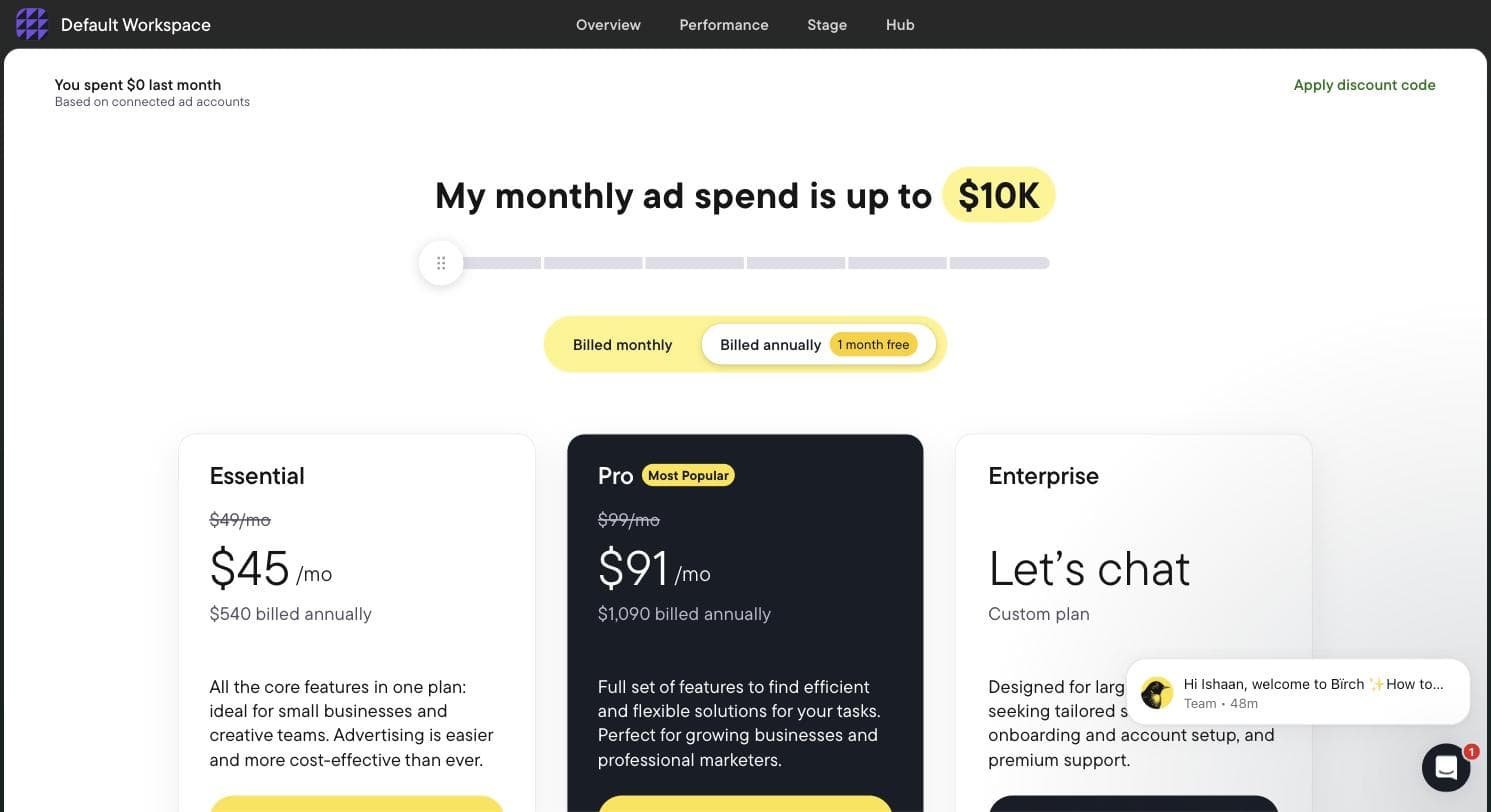
Then there is the fact that every "Revealbot from $49" roundup gets wrong, which we read directly off Birch's own in-app billing slider: automated rules are not in the $49 Essential plan. Rules — the reason anyone buys this product — require Pro at $99/mo, along with Explorer, Launcher, Stage, custom audiences and the Sheets/AppsFlyer/Hyros integrations. Pricing is spend-tiered from there and climbs fast (see below). On trial expiry, rules and reports are disabled. Price it against what your Meta spend actually is before assuming the entry number applies to you.
Pros
- + Fastest signup we tested — under two minutes, no phone call, no credit card
- + Rules engine with Slack alerts genuinely fits high-volume Meta lead-gen (watch CPL, pause fatigued creatives, notify intake)
- + Stage turns a Google Sheet into bulk-launched ads across Meta/TikTok/Snapchat — built for the creative volume mass-tort campaigns burn through
- + Hub's server-side first-party tracking is a real answer to lead-form signal loss
- + Transparent in-app pricing slider — we could read the entire ladder without talking to sales
Cons
- − Automated rules — the headline feature — are not in the $49 Essential plan; they require Pro at $99/mo and up
- − Hard-gates on connecting a live ad account: no sandbox or demo data, so you cannot evaluate the rule builder before granting access
- − No Microsoft Ads, no LinkedIn and no call-tracking integrations — phone-first attribution is simply not in its worldview
- − Search-first firms will find its Google support present but clearly second to its social center of gravity
- − Spend-tiered pricing climbs steeply: $99/mo Pro at up to $10K spend becomes $499/mo Pro at up to $75K, and rules and reports shut off the day the trial ends
Ideal for
- Mass-tort and class-action case acquisition teams running high-volume Meta lead ads
- Estate-planning and immigration practices whose funnel is Meta lead forms and webinars, not search
- Firms with a media buyer who wants rule-based guardrails and Slack alerts on social spend
Pricing: Read off Birch's own in-app billing slider during our trial (July-August 2026), tiered by monthly ad spend: up to $10K — Essential $49/mo, Pro $99/mo (annual $540/$1,090); up to $30K — Essential $149, Pro $249 (annual $1,640/$2,740); up to $75K — Essential $299, Pro $499 (annual $3,290/$5,490); up to $150K — Essential $499, Pro $799 (annual $5,490/$8,790); up to $300K — Essential not offered, Pro $1,299/mo (annual $14,290); $500K+ — Enterprise only. Automated rules require Pro. Annual is 12 months for the price of 11; overages billed via Stripe. 14-day trial; rules and reports are disabled on expiry.
Related: Revealbot (Birch) alternatives · AdFlint vs Revealbot
Visit Birch (formerly Revealbot)WordStream (LocaliQ)
Best free account graders — no software to buyWordStream is on this list because it is still on every other list, and an attorney comparing options deserves to know what it actually is in 2026. The WordStream that legal marketers remember — WordStream Advisor, the "20-minute work week" software you could buy and log into — is not sold on wordstream.com today. When we read the site on 3 August 2026, it offered free diagnostic tools in front of its parent platform: "LocaliQ offers technology-backed marketing solutions built to help you find, convert, and keep more customers," with a USA TODAY Co (Gannett) copyright in the footer. That is an agency engagement with proprietary tech, not software you operate. We have not tested LocaliQ's service and make no claims about its quality either way; we simply note that if you typed "software" and meant it, this is now a different product category wearing a familiar name.
What survives is genuinely worth your time: the free Google Ads Performance Grader, which the site describes as an instant audit across nine key areas of an existing account, remains one of the better first diagnostics. For a firm that has been running ads for six months and suspects the money is leaking, running the grader before buying anything on this page is a rational first step; at legal CPCs, the wasted-spend line alone can be a five-figure annual number. There is a Facebook Ads Performance Grader, a free keyword tool, a website grader and a ROAS calculator as well. Go in knowing the transaction: the graders are lead generation, your contact information is the price, and the follow-up will be a services conversation. Everything in this entry comes from WordStream's own site as read on 3 August 2026 — not from hands-on testing of any paid product.
Pros
- + Google Ads Performance Grader is a free, fast diagnostic of an existing account — the wasted-spend line is worth reading at legal CPCs
- + Free keyword tool, Facebook grader, website grader and ROAS calculator for zero-budget research
- + Backed by a large organization (Gannett/LocaliQ) with a long content history in PPC education
Cons
- − The software product lawyers remember is not sold here anymore — there is no WordStream application to subscribe to or log into
- − The free graders are lead generation; expect a LocaliQ sales follow-up
- − LocaliQ services have no public pricing — it is a quote-based managed engagement, the very thing a "software" searcher is usually trying to avoid
- − We did not test LocaliQ's managed service and cannot vouch for it in either direction
Ideal for
- Firms with an existing Google Ads account that want a free second opinion before buying tools
- Practices that, after reading this page, decide they actually want a managed service rather than software
Pricing: Free: Google Ads Performance Grader, Facebook Ads Performance Grader, keyword tool, website grader, ROAS calculator. LocaliQ managed services are quote-based with no public pricing. Per wordstream.com, read 3 August 2026.
Related: WordStream alternatives · AdFlint vs WordStream
Visit WordStream (LocaliQ)Side by side.
| Tool | Best for a law firm | Price (Aug 2026) | Call tracking | Platforms | Hands-on tested? |
|---|---|---|---|---|---|
| CallRail | Turning phone calls into keyword-level conversions — buy this first | ~$50-$195/mo published list; free trial | Yes — it is the product | Tracks any traffic source; feeds Google Ads and GA4 | No — published documentation only; pricing page not machine-readable 3 Aug 2026 |
| AdFlint (our product) | Solo/small firms running their own ads, with Assisted mode as the approval gate | $40-$319/mo flat, 0% of self-serve spend; 7-day trial | No — pair with CallRail | Google + Meta only | Ours — vendor knowledge, disclosed throughout |
| Optmyzr | In-house marketer or consultant on $10K+/mo of search | ~$209/mo billed annually (~$299 monthly); 14-day trial, no card | No — relies on imported call conversions | 11 integrations incl. Google, Microsoft, Amazon, Meta, LinkedIn, Search Ads 360, Yahoo Japan | Yes — 30-31 Jul and 3 Aug 2026, full app |
| Google Ads Editor | Free bulk-editing baseline; staged changes a partner can review | Free | No | Google only | No — from Google's documentation |
| Birch (Revealbot) | Meta lead-ad volume: mass tort, estate planning, immigration | $49-$1,299/mo by spend tier; rules need Pro ($99+); 14-day trial | No — no call-tracking integrations at all | Meta, Google, TikTok, Snapchat, YouTube — no Microsoft/LinkedIn | Yes — 30-31 Jul and 3 Aug 2026, gated at account connect |
| WordStream (LocaliQ) | Free account graders; managed service if you decide against software | Free tools; LocaliQ services quote-based | Via LocaliQ services only | Google + Facebook graders | No — from its own site, read 3 Aug 2026 |
How we chose.
We created real trial accounts and worked hands-on inside exactly two third-party products on this list — Optmyzr and Birch — on 30-31 July 2026 and again on 3 August 2026. We drove both onboardings end-to-end, worked inside every module we could reach, read Birch's pricing off its own in-app billing slider at every spend tier, and asked Optmyzr's AI assistant a real bidding question. The screenshots on this page come from those sessions.
AdFlint is our product. We know it completely, but that is vendor knowledge, not neutral testing, and every AdFlint claim here is labeled with that disclosure.
CallRail, WordStream/LocaliQ and Google Ads Editor were NOT tested hands-on. Everything we say about them comes from their own published documentation and marketing pages. We read wordstream.com on 3 August 2026 and quote it directly. CallRail's pricing page renders client-side and we could not machine-read it on that date, so the CallRail figures below are its published list prices — treat them as a starting point and confirm current numbers on callrail.com before you buy.
Optmyzr's public pricing page (checked 3 August 2026) shows Essentials, Premium and Enterprise tiers priced by monthly ad spend with annual billing advertised as "Save 30%" and a 14-day free trial with no credit card. Exact dollar figures render dynamically in its calculator, so where we quote a number we say how we arrived at it rather than implying we read it off the page.
We have never run PPC campaigns for a law firm — no vertical on this site pretends to client experience we do not have. The legal specifics here (call-first intake, CPC ranges, recording-consent rules, bar advertising rules, Local Services Ads) come from platform documentation, published bar rules and published keyword-cost research, not from campaigns we managed.
AdFlint has no published performance record. Evidence for our own entry is the product's design and its live public demo, not performance figures, which we do not have and therefore do not cite. No case studies, no testimonials, no ROAS numbers appear on this page because we have none.
No affiliate links anywhere on this page. No vendor paid for placement, and the ranking would survive any of them objecting.
- — We ranked around the call as the conversion event. Legal leads are phone-first, so a tool's value here starts with whether it can create, use or at least consume keyword-level call data. That is why a call-tracking platform outranks every optimizer, including our own product.
- — We did the $50-$150 CPC math on every recommendation. At legal click prices, software fees are noise and wasted clicks are the real cost — so tools were judged on how quickly they stop waste (negative mining, budget caps, anomaly alerts, qualified-call tagging), measured in clicks-to-payback rather than sticker price.
- — Hands-on evidence is labeled, and its absence is labeled too. We tested Optmyzr and Birch inside real trial accounts (30-31 July and 3 August 2026); AdFlint is ours; CallRail, WordStream/LocaliQ and Google Ads Editor are covered from their own published documentation, and each entry says so.
- — Account ownership and access hygiene counted. Attorneys are professionally responsible for their advertising, so we weighted approval gates, whether you keep your own ad account and its records, and how carefully a vendor handles account-access grants (Optmyzr's type-CONNECT dialog is the standard the industry should copy).
- — Pricing had to be specific and sourced — read off in-app billing screens where we had access (Birch's full slider ladder), off vendor pricing pages where they were readable, and clearly flagged as unverified published list pricing where they were not (CallRail). Where a widely-quoted number is misleading (Birch's $49 plan lacking rules), we said so.
- — Agencies dressed as software were excluded from the rankings. Half the SERP for this query is legal-marketing agencies ranking themselves; LocaliQ appears here only to explain what happened to WordStream, and its managed service is not ranked as software because it is not software.
Common questions.
What does a law firm actually pay per click on Google Ads?
Published search-ads benchmarks put the average across all legal queries in the high single digits to low teens per click — but averages mislead here, because they blend cheap informational queries with the ones that sign clients. Published keyword-cost research consistently shows high-intent local terms like "car accident lawyer [city]" or "dui attorney near me" auctioning in the $50-$150 range, and mass-tort and mesothelioma phrases have long been listed at several hundred dollars per click. The practical rule: price your own terms in Google's Keyword Planner before believing any benchmark, and treat every optimization decision as if a click cost $100 — in this vertical, the important ones do.
Which practice areas can afford $100+ clicks — and which should not try?
It comes down to fee-per-matter. A contingency personal-injury practice where a signed case is worth five or six figures in fees can pencil out even at $150 CPC and a low single-digit click-to-signed-client rate. A $1,500 flat-fee estate plan cannot — if one client costs 30 clicks at $50, the math is dead on arrival. That is why estate planning, immigration and much of family law lean on Meta lead ads, webinars and Local Services Ads instead of high-intent search, and it is why the right software depends on your practice area more than your firm size: search-first practices need the call-tracking-plus-management stack; Meta-first practices are the one legal case where Birch makes sense.
Do any of these tools manage Google Local Services Ads?
No — none of them, including AdFlint. Local Services Ads (the "Google Screened" pay-per-lead placements above regular ads, which require bar-license verification and background checks) are managed entirely inside Google's own LSA dashboard. For many consumer practices LSAs are the cheapest qualified phone call available and should be turned on before, or alongside, regular search ads. The software on this page manages the search and social side of your acquisition, not LSAs.
Is legal advertising a restricted category on Google or Meta?
Less than most attorneys assume. On Meta, legal services are not a Special Ad Category. Those restrictions cover housing, employment, financial products and services (which replaced the credit category in January 2025) and social issues/elections/politics, so you keep full targeting options. Google allows legal-services advertising with standard advertiser verification; the notable prohibition is bail bonds, which Google banned in 2018. The real constraints come from your state bar, not the platforms: ABA Model Rule 7.1 bars false or misleading communications everywhere, New York requires an "Attorney Advertising" label on covered materials, and states including Texas and Florida run mandatory ad-filing or review programs. Check your own state's rules before launch, and use a workflow where every ad is reviewed before it goes live.
Can my firm legally record tracked calls?
It depends on consent law, and a law firm has the least excuse of any business for getting this wrong. States including California, Florida, Pennsylvania, Washington, Illinois, Massachusetts and Maryland require all-party consent to record; most other states are one-party. Call-tracking platforms document a pre-call recording announcement and per-number recording controls, and you should configure that policy before the first tracked call. Note that call tracking itself — attributing the call to a keyword — works with recording turned off; attribution and recording are separate switches.
Should a small firm use Maximize Conversions or manual bidding?
The clearest framing we encountered came from Optmyzr's own AI assistant during our hands-on test: fix conversion tracking first, use Maximize Conversions on your core lead campaigns, and fall back to Manual CPC where volume is too thin — with roughly 3-5 conversions per week as the threshold. Smart bidding needs conversion volume to learn, and most small firms fail that threshold on form fills alone. That is the practical argument for call tracking: importing tracked calls as conversions can move an account from two conversions a week to ten, which is the difference between smart bidding learning and smart bidding guessing at $75 a click.
Is WordStream Advisor still available for law firms?
No. WordStream now sits under LocaliQ, Gannett's managed-marketing arm, and wordstream.com no longer offers a WordStream application to subscribe to — when we read the site on 3 August 2026 it was free tools in front of a managed-services pitch. Those free tools — Google Ads Performance Grader, Facebook Ads Performance Grader, keyword tool, website grader, ROAS calculator — are still live and remain useful diagnostics, but the paid offering behind them is a quote-based managed service. If you see a roundup recommending WordStream software to law firms, it was written from an old template.
Who is responsible for bar compliance if AI writes my ads?
You are. Attorney-advertising rules attach to the lawyer, not the copywriter — ABA Model Rule 7.1 and its state variants make you responsible for every public communication about your services regardless of whether an associate, an agency or an AI drafted it. Practically, that means two software requirements: a mandatory approval step before anything publishes, so review happens while the ad is still a draft, and your own copy of every ad that runs, which you get automatically when the ad account belongs to you rather than a vendor. AdFlint covers both in Assisted mode, where nothing goes live until you click Launch or turn on Full Autopilot and each later fix applies only when you click. In Autopilot, its default, it can switch on new ad versions it writes, so use Assisted for a legal account. The principle applies whatever you buy: never run legal ads through a tool that can publish without you.
At what budget does paid PPC software start making sense?
Below roughly $1,500/mo in ad spend — which at legal CPCs may be only 10-30 clicks — skip paid software: turn on Local Services Ads, use Google's free call reporting and GA4, and consider Google Ads Editor for bulk edits. From about $1,500/mo, call tracking is the first paid purchase, because it fixes the data everything else depends on. From about $3,000/mo self-managed, add a management layer — that is the gap AdFlint is built for. Above $10,000/mo with a marketer or consultant in the loop, Optmyzr's audit-and-monitor suite starts paying for itself in prevented waste.
Keep reading
- Roundup: PPC software for medical practices
- Roundup: PPC software for small business
- Roundup: Google Ads management software
- Roundup: Hiring someone to run Google Ads
- Who Owns Your Ad Account, Pixel, and Audiences?
- Conversion Tracking Setup for Google and Meta
- How Much Do Google Ads Cost for a Small Business?
- DIY vs Agency vs AI: What Ad Management Costs
- Google or Meta Ads First? Decide by Budget
- AI Ad Tool Pricing in 2026: What It Really Costs
- Free tool: Google Ads Budget Calculator
- Free tool: Cost Per Acquisition Calculator
- Free tool: Ad Management Cost Calculator
- Free tool: Google vs Meta Budget Split Calculator