PPC Management Software for Small Business (2026)
By the AdFlint research team · We built trial accounts on Optmyzr and worked inside them ourselves; every screenshot below is from those sessions, and the rest is documentation and verified user reviews · Published July 28, 2026 · Updated October 26, 2026
TL;DR
- Best for most small businesses on Google + Meta: AdFlint (our product - disclosed below). Flat self-serve plans from $40/mo for up to $1,000/mo in ad spend, AI that writes and optimizes ads inside your own account, and nothing goes live until you click Launch or turn on Full Autopilot.
- Best once your spend or account count grows: Optmyzr. Agency-grade optimization for Google and Microsoft, priced by monthly ad spend - $299/mo month-to-month, or $209/mo billed annually, at its lowest $25K spend tier - with a 14-day trial that needs no card. If you are Google-only, Opteo at $129/mo is the highest-rated tool in this roundup.
- Best on a zero budget: Adzooma's free plan for cross-platform monitoring, WordStream's free graders for one-off audits, and the native Google Ads Editor + Meta Ads Manager for hands-on management.
- Rather hand it all off? PPC agencies typically charge 10% to 20% of ad spend or $1,000 to $3,000 per month in management fees (WebFX's published ranges) - the math usually starts working above roughly $5,000/mo in ad spend.
This guide is for the owner or one-person marketing team running paid search and social on a small-business budget: roughly $100 to $5,000 a month in ad spend, no dedicated PPC hire, and no appetite for surprise fees. That audience is poorly served by most PPC software lists, which mix agency dashboards, enterprise bid platforms, and generic project tools into one undifferentiated pile.
The category actually splits three ways. Optimizer tools like Optmyzr and Opteo assume a competent human is at the wheel and make that human faster - and their plans are sized for consultants managing $25,000 or more in monthly spend. Automation products like AdFlint and Adzooma aim at the owner-operator, doing more of the work themselves at prices that fit small budgets. And underneath both sits the free native stack - Google Ads Editor and Meta Ads Manager - which is what you are implicitly comparing everything else against.
We compared all three groups plus the non-software option most lists ignore: hiring an agency. Every price on this page was re-checked on the vendor's own pricing page on October 23, 2026 (WebFX, Optmyzr, Opteo, Adzooma, AdFlint), every review quote is verbatim and linked to its source, and every entry lists the cons a vendor would rather you not read. One entry is our own product, and it is labeled as such.
PPC software vs PPC tool vs PPC agency: which one fits your spend and time?
These three words get used as if they meant the same thing. A PPC tool does one job: Google Ads Editor, for example, is a no-cost downloadable application for bulk changes, and a free grader audits an account once. PPC software connects to your ad account and keeps working on it for a monthly fee, with alerts, suggestions or automatic changes. A PPC agency is a person or team who runs the account for you, for a flat fee or a share of your ad spend.
The cleanest way to choose is to turn each fee into a share of your ad spend. The table divides each published monthly price by monthly ad spend, so you can redo it with your own number.
Fees are from each vendor's own pricing page, checked October 23, 2026. Optmyzr sets its price with a spend selector that starts at $25K, so $299 a month is the lowest month-to-month Essentials price, not a price scaled down to your spend. Opteo covers Google Ads only. WebFX lists Lite for $100 to $5,000 a month in ad spend and Pro for $5,000 to $30,000, so both tiers are shown at $5,000, and it lists a larger first month ($1,200 on Lite, $2,250 on Pro). The tiers include different services, so the table compares the size of the fee, not the amount of work done.
Our view: if you spend a few hundred dollars a month and check in weekly, none of the paid options on this page is required. See how to hire someone to run Google Ads for the agency route. The ad management cost calculator runs the same fee-as-a-share math with your own spend. The steps below are our rules of thumb, not vendor figures.
| Monthly ad spend | AdFlint plan (our product) | Opteo Basic (Google only) | Optmyzr Essentials, month to month | WebFX PPC management |
|---|---|---|---|---|
| $1,000 | Launch $40 (4.0%) | $129 (12.9%) | $299 (29.9%) | Lite $750 (75%) |
| $2,500 | Growth $89 (3.6%) | $129 (5.2%) | $299 (12.0%) | Lite $750 (30%) |
| $5,000 | Scale $109 (2.2%) | $129 (2.6%) | $299 (6.0%) | Lite $750 (15%) or Pro $975 (19.5%) |
| $10,000 | Accelerate $119 (1.2%) | $129 (1.3%) | $299 (3.0%) | Pro, 15% = $1,500 (15%) |
- Spend under $1,000 a month and 2 or more hours a week to spare: start with the native tools, Google Ads Editor (no cost) and Meta Ads Manager, and run a free grader once. At $300 a month in ad spend, a $40 monthly fee is 13% of what you spend.
- Spend under $1,000 and under 1 hour a week: software is worth a look only if the fee is a small share of your spend. Our rule of thumb is about 5% or less, which makes a $40 plan fit from $800 a month in ad spend.
- Spend $1,000 to $10,000 a month: compare software fees as a share of spend. In the table, the plan column runs from 1.2% to 4.0% of spend, Opteo from 1.3% to 12.9%, and WebFX from 15% to 75%.
- Spend above $10,000 a month, or you need channels beyond Google and Meta, or you run several locations: price an agency, and compare it with software plus an in-house hire. On WebFX's Pro tier, 15% of $10,000 is $1,500 a month.
- Whichever you pick, confirm the campaigns sit in an ad account you own, so your history stays yours if you leave.
Sources: Optmyzr pricing · Opteo pricing · Opteo · WebFX PPC pricing · AdFlint pricing · Google Ads Editor · Meta Ads Manager
PPC management software feature checklist: what to test in the free trial
Searches for 'AdWords management software' and 'PPC management software' point to the same kind of tool: Google renamed AdWords to Google Ads on July 24, 2018. Use this checklist on any tool on this page.
Eleven checks you can run during a trial; each has a pass or fail.
| Check | How to test it | Pass if |
|---|---|---|
| Runs in your own ad account | After connecting, open Google Ads and Meta under your own login and look for the campaigns. Then remove the tool's access. | Campaigns and history are still there after access is removed |
| Platforms named before signup | Read the pricing page for the list of platforms. | Google and Meta are both listed if you run both. If not, budget for a second tool |
| Approval before changes | Ask it to make one change and watch the ad account before you approve anything. | Nothing changes in the ad account until you approve, or you can switch automatic changes off |
| Spend ceiling | Find the plan limit or setting that caps monthly ad spend. | You can see the number, and the page says what happens at the limit |
| Change history | Make one change, then look for a log. | The log shows what changed, when and why |
| Location controls | Start a campaign and look for a radius option and the Presence setting. | Radius is available (Google needs at least 1 km) and you can see which location option applies |
| Call counting | Place a test call to the ad number. | The call appears with duration, using Google call reporting or your own call tracker |
| Lead capture | Submit a test lead form. | The lead reaches your email or CRM within minutes, not only inside Google Ads (it keeps leads 60 days) |
| Fee against spend | Divide the monthly fee by your monthly ad spend. | Our rule of thumb: about 5% of ad spend or less for small budgets, and no extra percentage taken from your spend |
| Cancel and trial terms | Find the cancel button before you pay. Read the trial terms. | You can cancel without a sales call, and the page says whether a card is needed (Optmyzr's pricing page says no card) |
| What it will not touch | Ask what happens to campaigns you built before. | The answer is written down before you sign up |
Sources: Google Ads Help: AdWords renamed · Optmyzr pricing · Google Ads Help: location targeting · Google Ads Help: lead form assets
Local PPC software: what a local business should check before paying
A local business (a dentist, an HVAC company, a salon) needs three things from its ads: showing them only near the shop, counting phone calls, and catching form leads. Before paying for software, check each one in your own Google Ads account, because Google Ads has built-in settings for all three. Then ask whether any software adds to them.
Our view: a tool that cannot show you radius, calls and leads for each location is a reporting dashboard, not local PPC software. Our Google Ads management software roundup compares Google Ads tools.
- Set a radius, not only a city. Google Ads radius targeting needs at least 1 km around the location, and Google warns that a very small target may show ads only intermittently or not at all. Set the radius to the distance your customers actually travel.
- Choose the location option on purpose. Google recommends broad geo targeting (Presence or Interest) on Search, and says to consider Presence when you only want users in specific locations. Check which one each campaign uses. Local radius targeting on Google and Meta walks through both platforms.
- Count calls. Turn on call reporting in Account settings. Google then assigns a forwarding number and reports call duration, start time and whether the call connected, plus the caller number for calls over 15 seconds (except in India). Clicks on a call asset cost the same as headline clicks.
- If you already pay for a separate call-tracking service, Google says you can turn off call reporting so your own business number shows instead of a Google forwarding number. Decide which tracker is the source of truth before you compare cost per lead.
- Catch form leads before they expire. Lead form assets let people submit their details inside the ad. Google Ads stores leads for 60 days and the CSV download covers only the last 30. Google can email you each lead, and you can send leads to your CRM with a webhook or Zapier, so set one up on day one. Lead forms need an account in an eligible vertical, so check yours before you plan around them.
Sources: Google Ads Help: location targeting · Google Ads Help: call reporting · Google Ads Help: call asset costs · Google Ads Help: lead form assets
We got inside. Here is every screen.
We created real trial accounts, cleared the verification walls, and worked through the products. Every screenshot below is from those sessions — no vendor marketing imagery, no stock dashboards.
Optmyzr
Walkthrough performed July 30, 2026We created an Optmyzr trial, cleared its phone-verification wall, completed the five-step setup wizard and worked inside the product. No credit card was requested at any point, and that claim holds up.
The single most useful thing we learned is one Optmyzr does not advertise: it will let you all the way into the application without connecting an ad account. Almost no competitor does that, and it changes how you can evaluate the tool.
- 01
Find the trial link
The /free-trial/ URL published in older articles now returns a 404 on Optmyzr's own site. The working path is the Start Trial button in the site header, which hands off to tools.optmyzr.com. Worth knowing if you are following an outdated guide.
- 02
Create the account and answer the qualification form
Work email plus a password, or one-click signup with Google or Microsoft. A marketing-consent checkbox is present and unticked by default. Then, before the product, Optmyzr asks for company name, whether you are an advertiser or an agency, country, monthly ad spend, where you heard about them, and your role. Five of those are mandatory. The ad-spend brackets start at Under $10,000 and climb to More than $500,000, which tells you plainly who this product is priced for.
- 03
Clear the phone-verification wall
Submitting the form does not open the product. It opens a Verify Phone Number screen that sends a one-time code by SMS, with no skip and no alternative method offered. This is the real gate on an Optmyzr trial, and it is not mentioned anywhere before you start. If you are evaluating tools on a burner email, budget for handing over a working phone number.
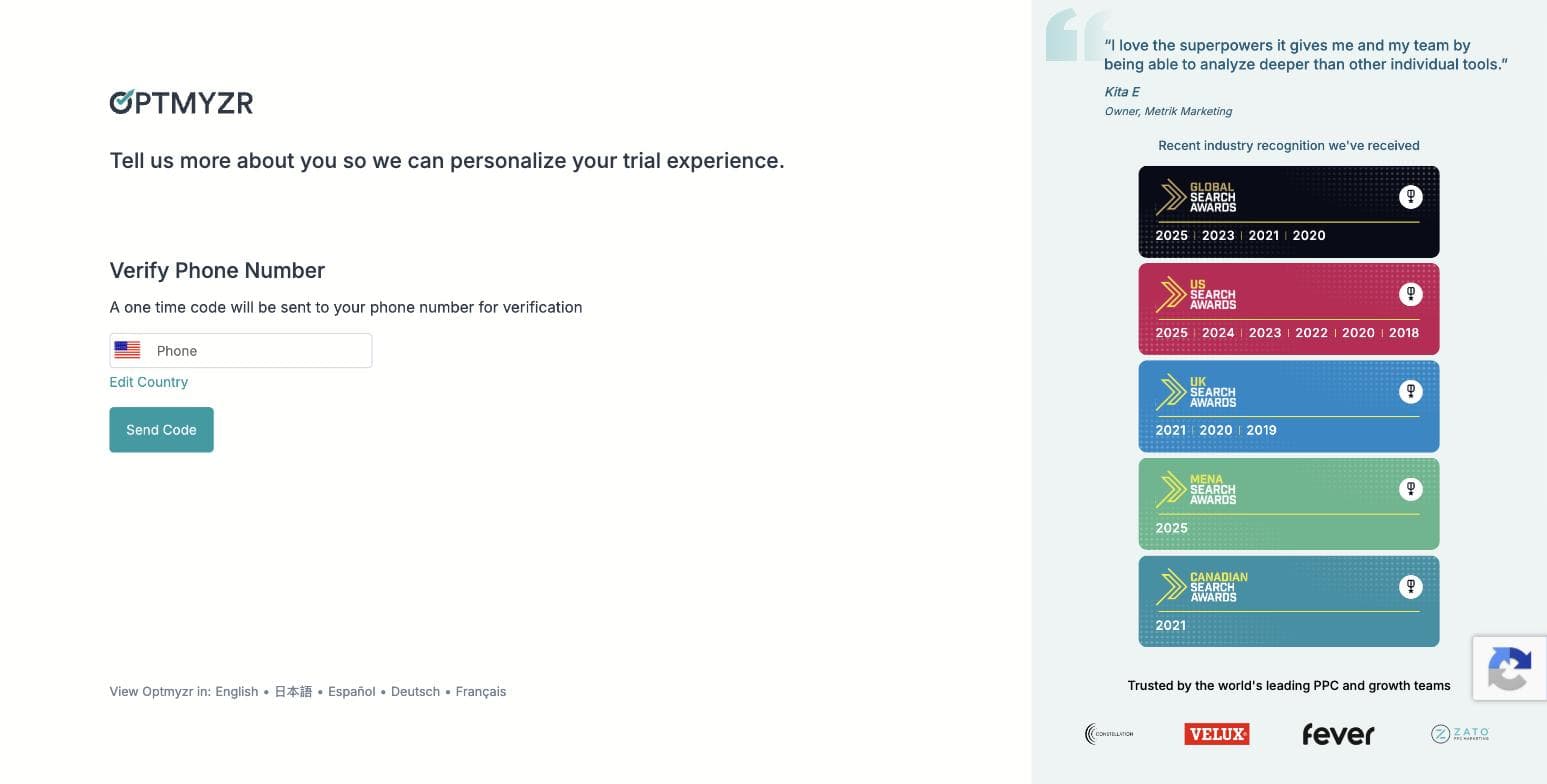
Optmyzr's phone-verification gate, captured during our own signup on 30 July 2026. No skip option is offered. - 04
Pick your goals — three of ten
Step two of the wizard asks you to choose exactly three priorities from ten: search queries and keywords, ad creation and testing, budget management, bid and target optimization, shopping campaigns, placements and audiences, performance analysis, account audits, report creation, and full AI account management. The three you pick genuinely shape what the product shows you afterwards — the AI assistant's opening plan named all three of ours back to us.
- 05
Choose how you want to work — and find the MCP connector
Step three offers three working modes, all pre-selected: hands-on in the browser, on autopilot with an automation agent sending you a digest, or — the one nobody is writing about — inside your own AI assistant, connecting Optmyzr over MCP to Claude or ChatGPT so you manage the account from where you already work. That third option is a real 2026 capability and it is absent from every Optmyzr roundup we found.
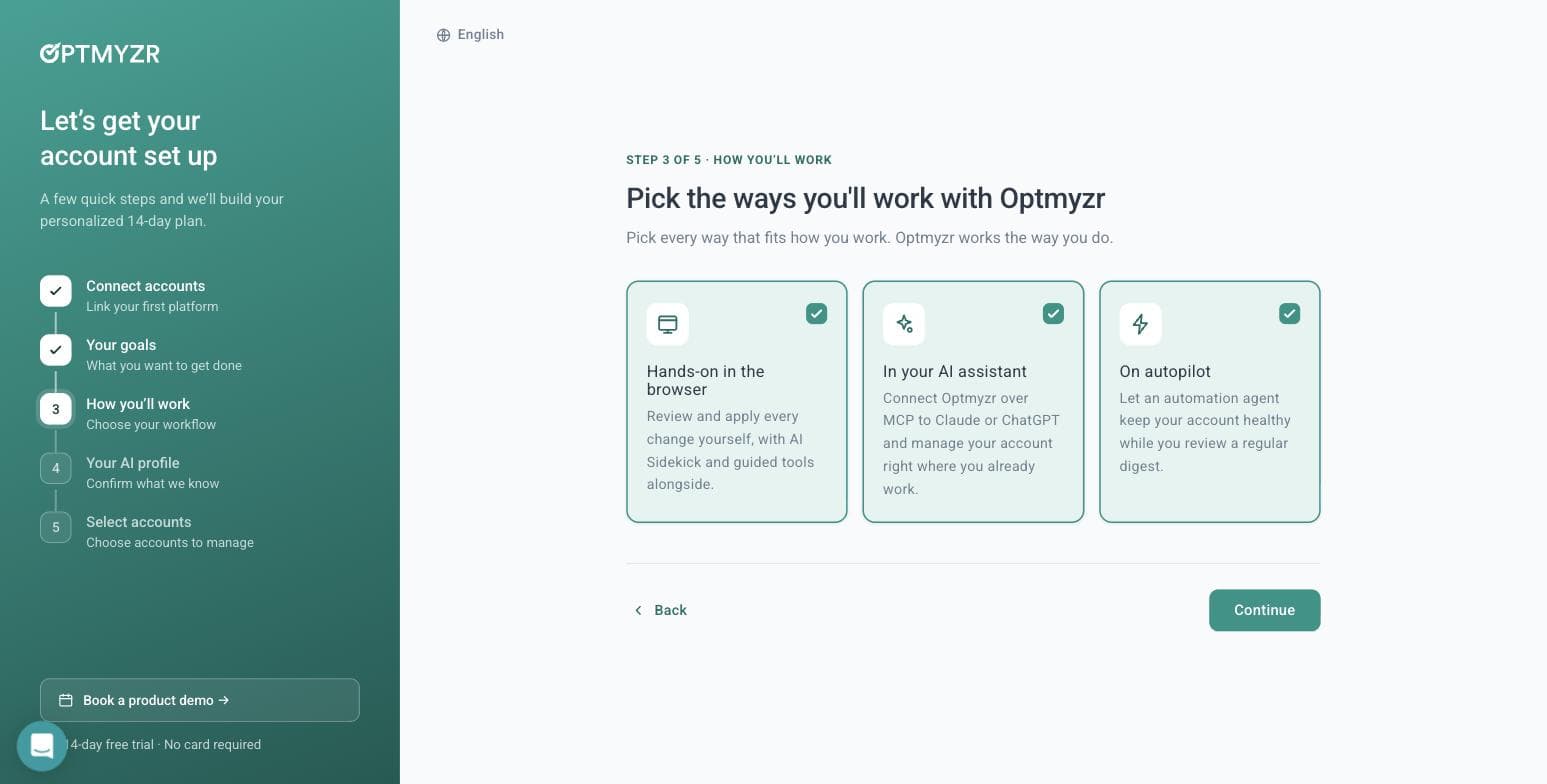
Optmyzr's three working modes, including an MCP connector for Claude and ChatGPT. Captured 30 July 2026. - 06
Let its AI read your website — we tested this properly
Step four builds an AI profile of your business, and offers to generate it from your website. We gave it adflint.com and timed it: roughly ten seconds. It came back with the company name, correctly classified the industry, set the language, and wrote a paragraph describing our free trial length, our budget caps, our zero-markup pricing and five specific in-product features. Several of those live on deep pages, not the homepage — so it is crawling more than one URL. It left the tone field blank rather than guessing, which we would call the right call.
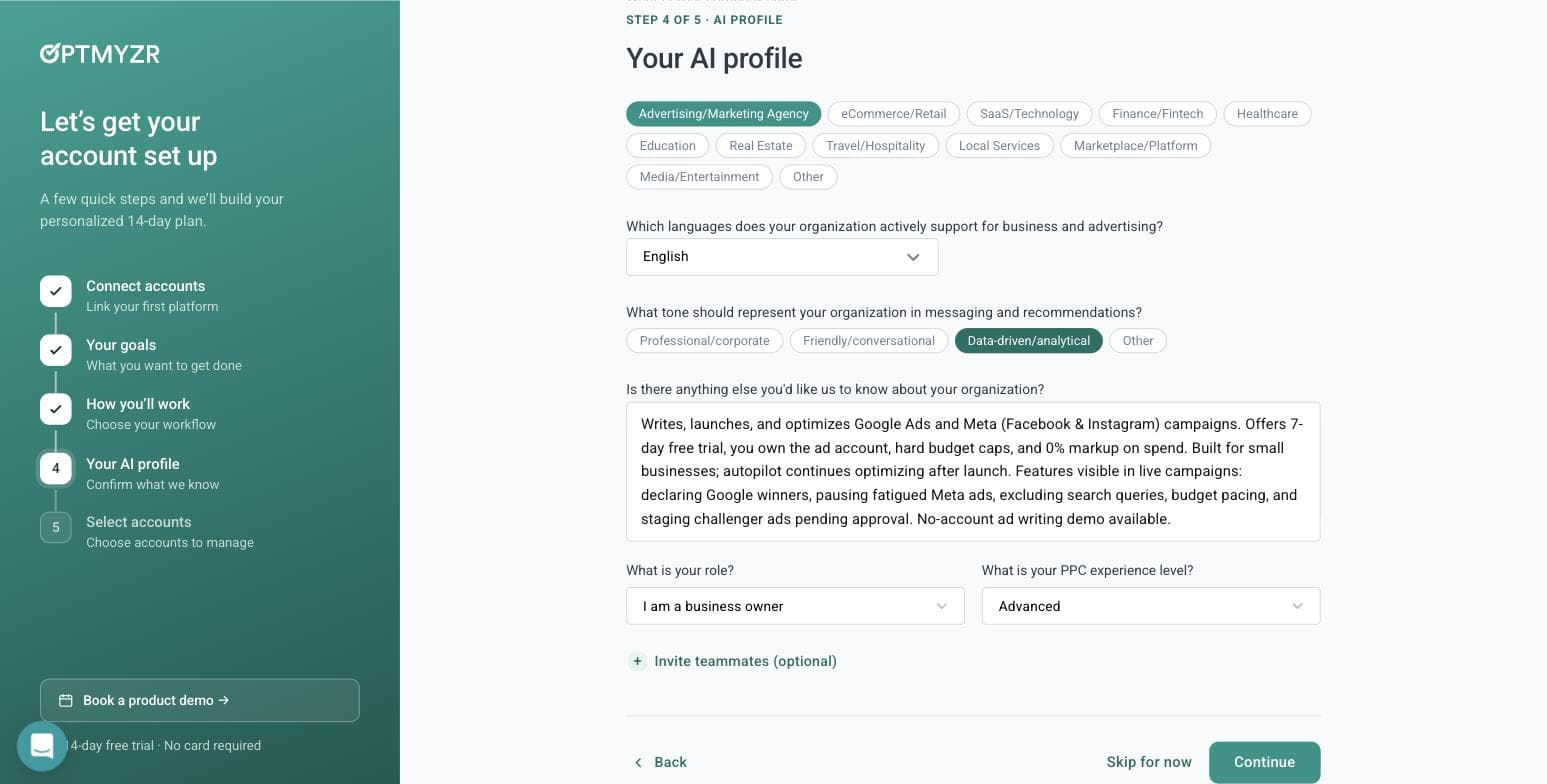
What Optmyzr's AI wrote about our business from the URL alone, in about ten seconds. Captured 30 July 2026. - 07
Skip the account connection — and get in anyway
Step five is where most tools stop you. Optmyzr does not. It says: you didn't connect an account, so we'll start you with a general plan, connect one anytime to tailor it. Then it opens the full application. You can browse the entire tool tree, read what every module does, and use the AI assistant before you ever grant a third party access to a live ad account. For anyone evaluating software on behalf of a client, that is a meaningful difference.
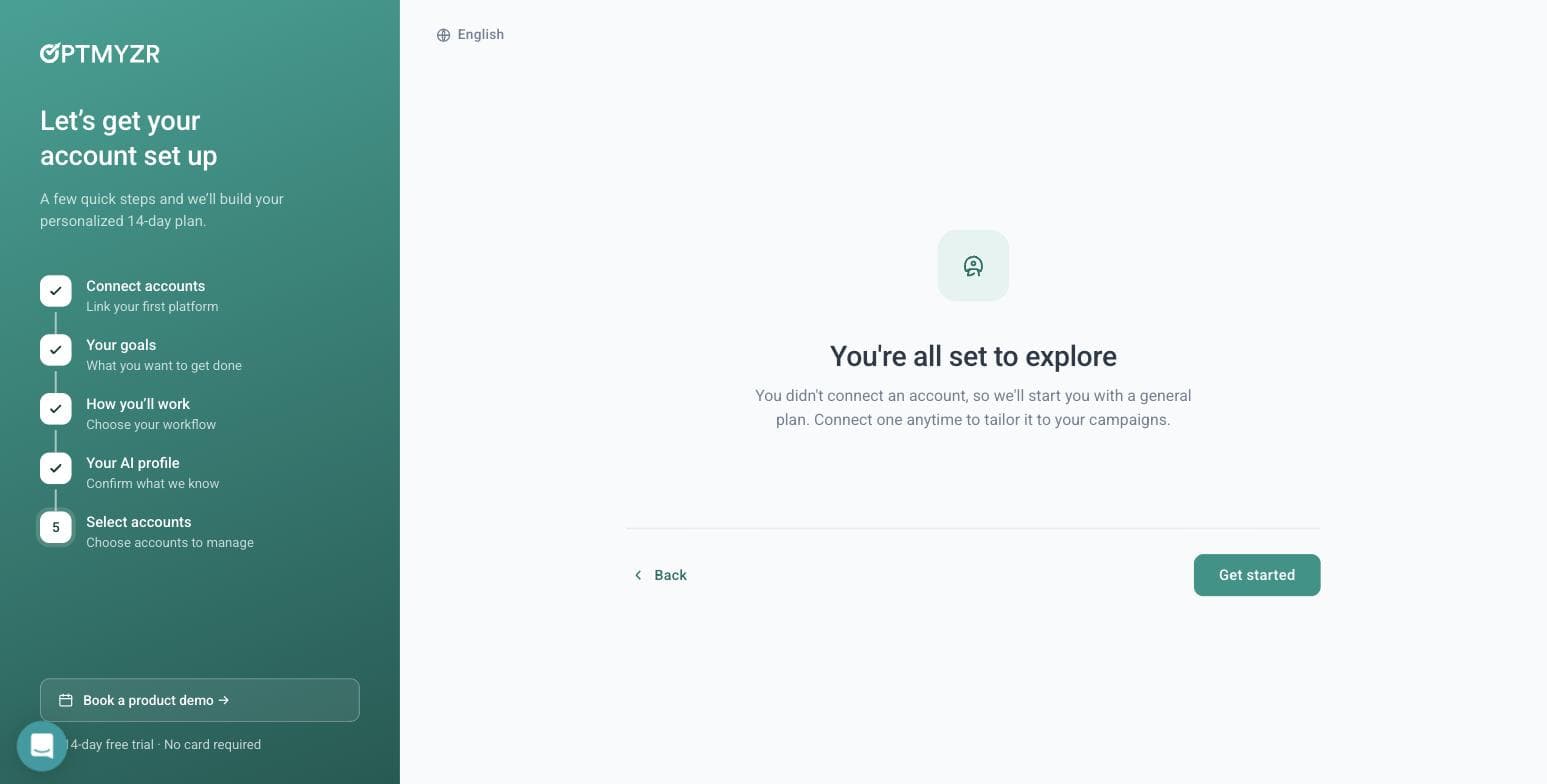
Optmyzr lets you into the product with no ad account connected. Captured 30 July 2026. - 08
Ask the AI assistant a real question
Sidekick 6.3 opens with a day-one-of-fifteen plan built from the three goals we picked. We asked it something a real advertiser would ask: whether a home-services business spending $900 a month should run Maximize Conversions or Manual CPC. It gave a properly conditional answer — Maximize Conversions if your conversion tracking is solid and you have volume for Google to learn from, Manual CPC if tracking is weak, conversions are sparse, or you are testing new keywords under tight control. That is the correct answer, and it arrived with an 'AI can make mistakes' disclaimer attached. Notably, all of this worked with no ad account linked.
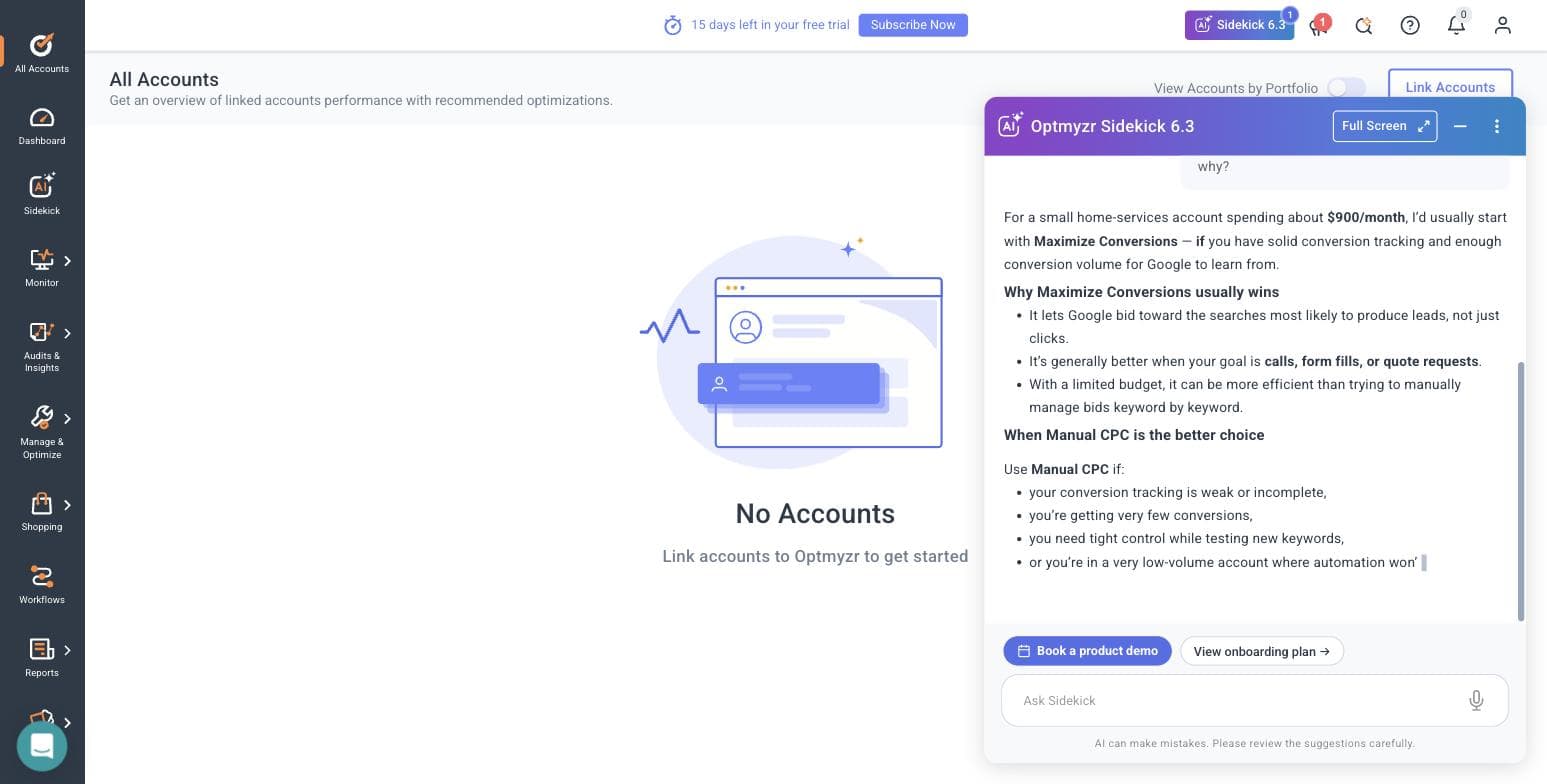
Sidekick's answer to our bidding question, with no ad account connected. Captured 30 July 2026. - 09
Open the Rule Engine strategy library
Manage & Optimize holds eight modules: Optmyzr Express, Search Queries & Keywords, Ads & Creatives, Bids & Targets, Budget, Placement & Targeting, Rule Engine, and Campaign Manager & Launcher. The Rule Engine ships pre-built strategies grouped by platform — Google Ads gets search-query trend analysis, a report on recommendations Google auto-applied on your behalf, and two new strategies for excluding gaming and kids placements from Performance Max. Microsoft Ads gets non-converting query cleanup and Smart Bidding target optimization. Amazon Ads gets negative-keyword automation and ACOS-based bid changes. The breadth here is the product's real argument.
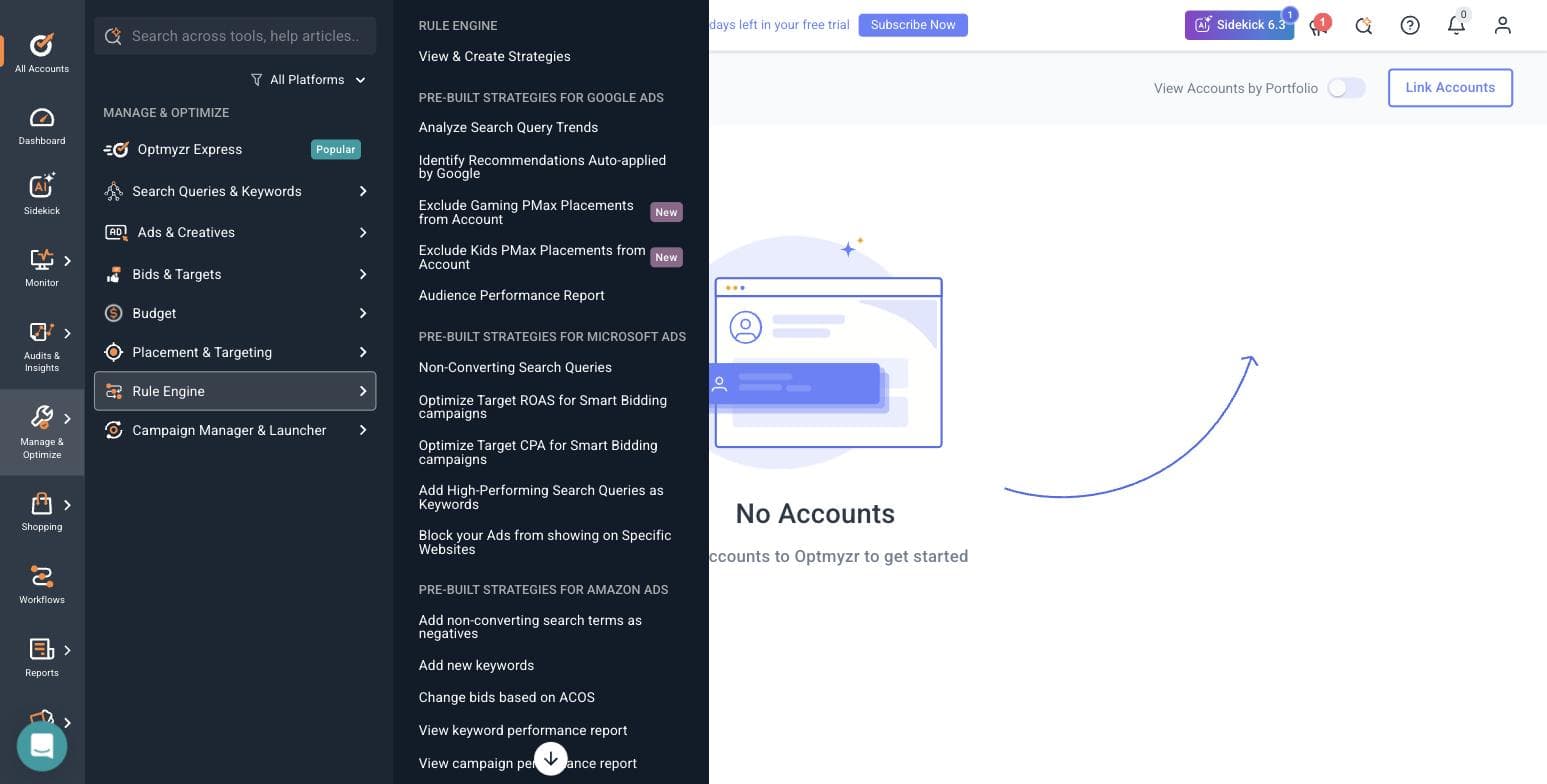
Optmyzr's pre-built Rule Engine strategies, split across three ad platforms. Captured 30 July 2026. - 10
Find where the open door closes
Browsing is free; running anything is not. Every optimization module we opened — Rule Engine, Reports, the rest — bounced straight back to the All Accounts screen with 'Link accounts to Optmyzr to get started'. So the honest shape of the trial is this: the AI assistant and the entire tool catalogue are open without a connection, and every tool that would touch a campaign is not.
- 11
Read the integration list, and the consent dialog nobody quotes
Optmyzr connects eleven sources: Amazon Ads, Amazon Seller Central, Meta Ads, LinkedIn Ads, Google Ads, Google Analytics, Google Merchant Center, HubSpot, Microsoft Ads, Search Ads 360 and Yahoo Japan. Worth noting for agencies: when you link a Google Ads account, Optmyzr offers an optional link to its own manager account for faster support, and the dialog makes you type CONNECT to confirm, warns that Google will automatically email everyone with access to the account, and states outright that it is not recommended if you are an agency without explicit client approval. We have read a lot of these dialogs. That one is unusually straight.
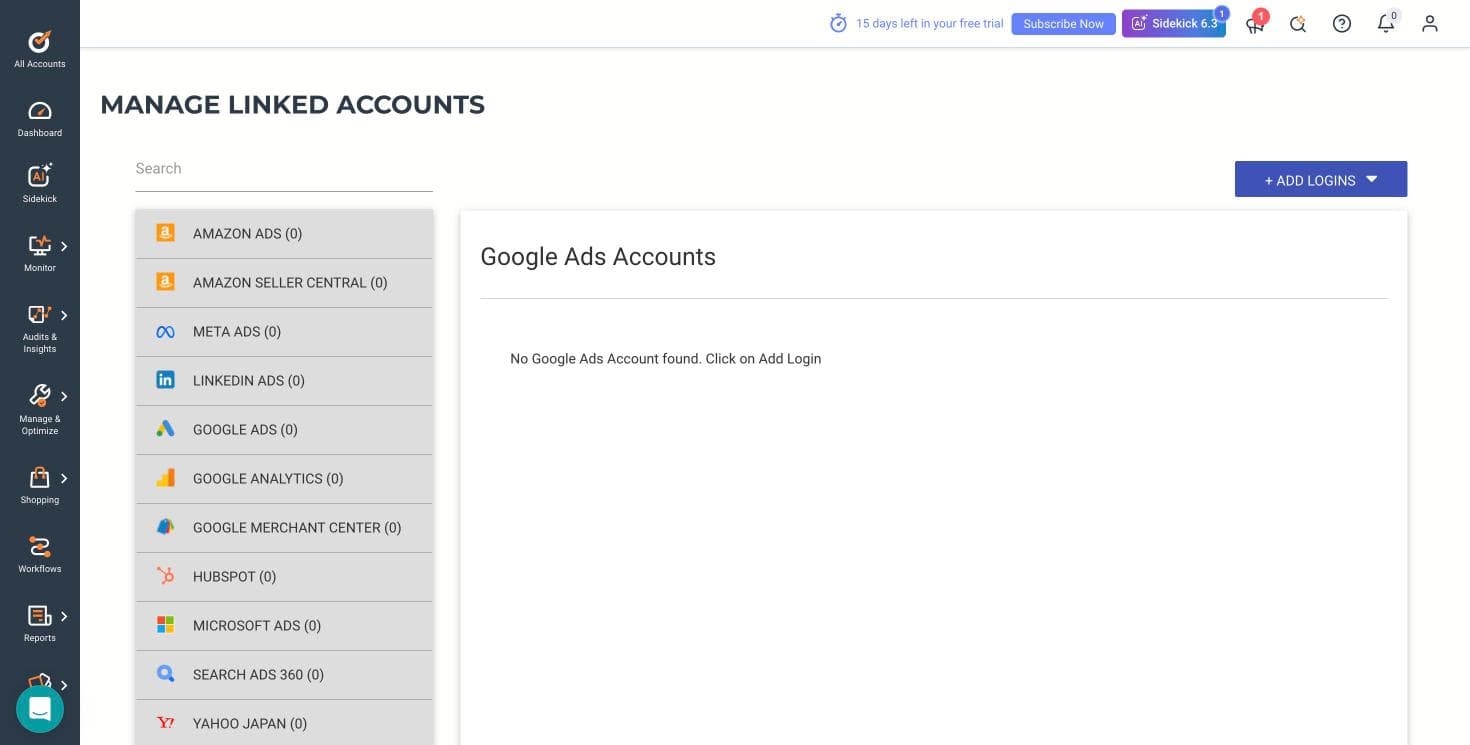
Optmyzr's eleven connectable platforms. Captured 30 July 2026.
What the signup told us
- — No credit card is required, and that claim holds up — we were never asked for one.
- — A phone number and SMS code are required, and that is not mentioned before you start.
- — The banner inside the product counts down from 15 days, while the marketing says 14. A day in your favour, but the two numbers disagree.
- — The wizard is five steps and the qualification form has five required fields. This is a long runway before you see a feature.
- — The lowest ad-spend bracket is Under $10,000 per month and the ladder runs to $500,000+. A business spending a few hundred dollars a month sits below the bottom rung of how this product thinks about customers.
- — Their own published /free-trial/ URL 404s, which suggests the marketing site and the app have drifted apart.
- — The genuine standout: you can enter the product, browse every module and use the AI assistant without connecting an ad account. Almost nothing else in this category allows that.
Where this stops: We did not connect a live Google Ads or Meta account, so no real campaign data ever flowed through Optmyzr for us. That means we cannot speak to the quality of its optimization suggestions against real spend, how its rules behave when they fire, or how its reports look populated. What we can speak to — because we did it — is the signup, the wizard, the AI assistant's reasoning, the tool catalogue, the integration list and the consent flow.
AdFlint
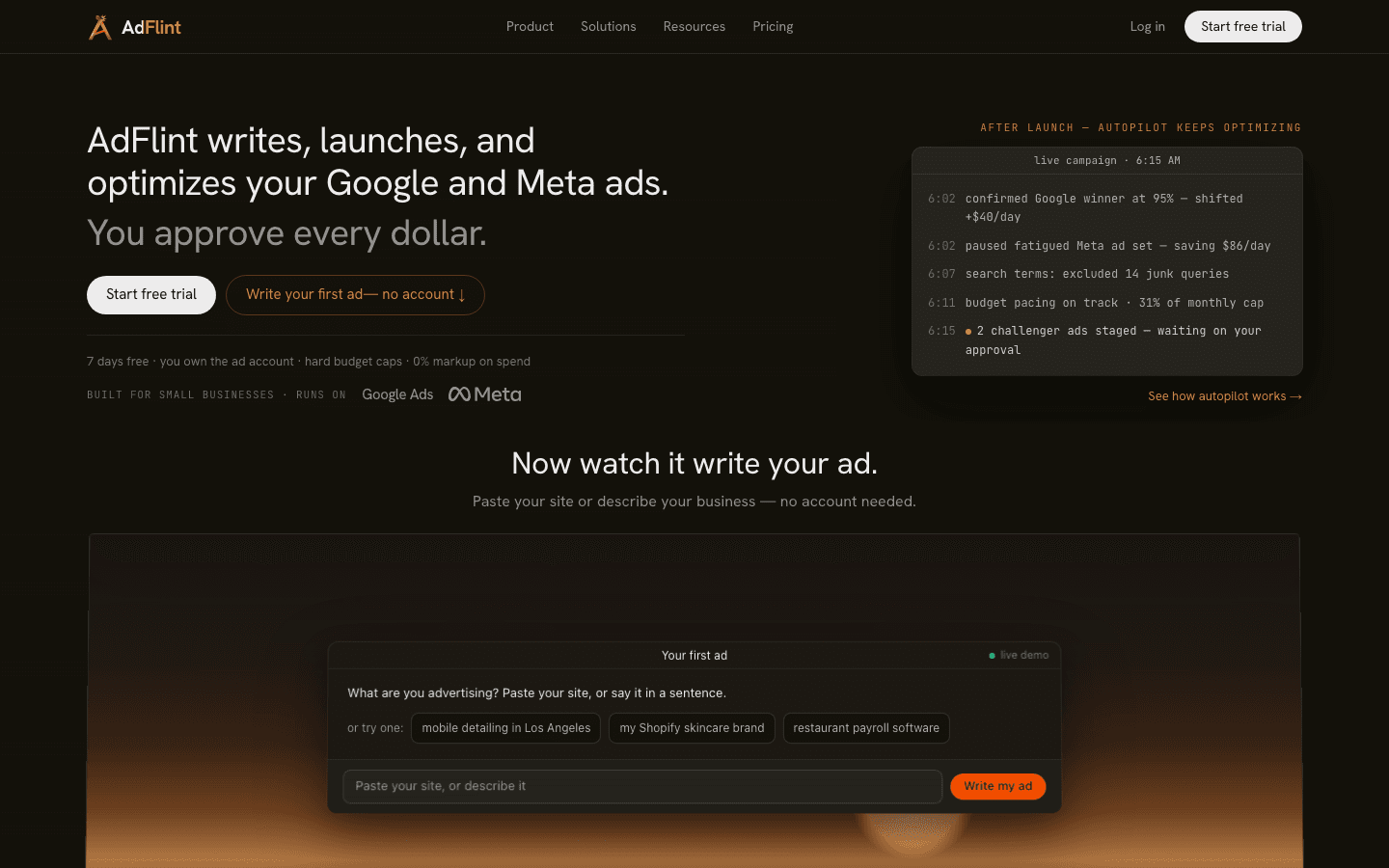
Best for small budgets on Google + MetaOur product — disclosureAdFlint is an AI ad manager built specifically for small businesses on Google and Meta. It connects to your own ad accounts, writes the ad copy, launches the campaigns, and keeps optimizing them. On self-serve plans nothing goes live until you click Launch or turn on Full Autopilot, and hard budget caps protect your spend. In Autopilot, the default, AdFlint can also pause weak ads and switch on new ad versions it writes. Every change is logged. You keep the account, the history, and the learning data; AdFlint is a layer on top, not a replacement account you rent.
The pricing maps directly to small budgets, which is rare in this category: Launch is $40/mo for up to $1,000/mo in ad spend, and Growth is $89/mo for up to $2,500. Those two are the headline self-serve plans, but the ladder does not stop there - a spend-headroom expander on the same pricing page continues to Scale at $109/mo (up to $5,000), Accelerate at $119/mo (up to $10,000), Performance at $219/mo (up to $20,000), and Premium at $319/mo (up to $30,000), with quote-only pricing above that. Every monthly plan starts with a 7-day free trial and a card is required; annual billing gives two months free but is charged up front and includes no trial. On self-serve plans the fee is flat: your card pays Google and Meta directly and AdFlint takes no percentage of that spend.
Full disclosure: AdFlint is our product, and it is the only tool on this page we operate ourselves. We rank it first for this page's specific audience because nothing else here both creates and runs campaigns and starts at $40/mo - the optimizer tools below start at $129/mo and are sized for $25,000 or more in monthly spend. The honest limit is scope, not budget: if you need Microsoft, Amazon or LinkedIn, start with Optmyzr. If you want a long third-party review record before you commit, Optmyzr and Opteo both have one.
Pros
- + Works inside your own ad account, so history and learning data stay yours if you leave
- + Flat monthly fee on every self-serve plan, with no percentage-of-spend markup
- + Hard budget caps, and on self-serve plans nothing goes live until you click Launch or turn on Full Autopilot
- + Covers Google and Meta from one place
- + Plans priced for real small-business budgets, starting at $40/mo
Cons
- − Google and Meta only - no Microsoft, Amazon, LinkedIn, or TikTok
- − Only three plans are shown by default; the $5,000 to $30,000/mo spend tiers sit behind an expander on the pricing page, and above $30,000/mo is quote-only
- − The done-for-you Managed tier is a monthly fee plus a share of ad spend, priced per account on a short call, and runs on approval-by-exception, so neither the flat-fee promise nor the approve-every-ad promise applies to it
- − Young product without an established Capterra or G2 review base yet - you are trusting our word and the trial, not a long third-party track record
- − The approval step means it is not fully hands-off by design; expect a few minutes of review time per batch of ads
- − Google campaigns are Search campaigns only: no Display, YouTube, Performance Max or Shopping
Ideal for
- Owner-operators with no PPC staff and budgets from $1,000 to a few thousand dollars a month
- Local service businesses that should be on Google and Meta at the same time
- Anyone burned by percentage-of-spend fees who wants flat, capped costs
Pricing: Self-serve monthly plans: Launch $40 (up to $1,000/mo ad spend), Growth $89 (up to $2,500); behind the spend-headroom expander, Scale $109 (up to $5,000), Accelerate $119 (up to $10,000), Performance $219 (up to $20,000), Premium $319 (up to $30,000). Above $30,000/mo is quote-only, as is the done-for-you Managed tier. Every monthly plan starts with a 7-day free trial, card required; annual billing gives 2 months free, is charged up front, and includes no trial. No percentage-of-spend fee on self-serve plans. Pricing checked October 23, 2026.
Try AdFlint freeOptmyzr
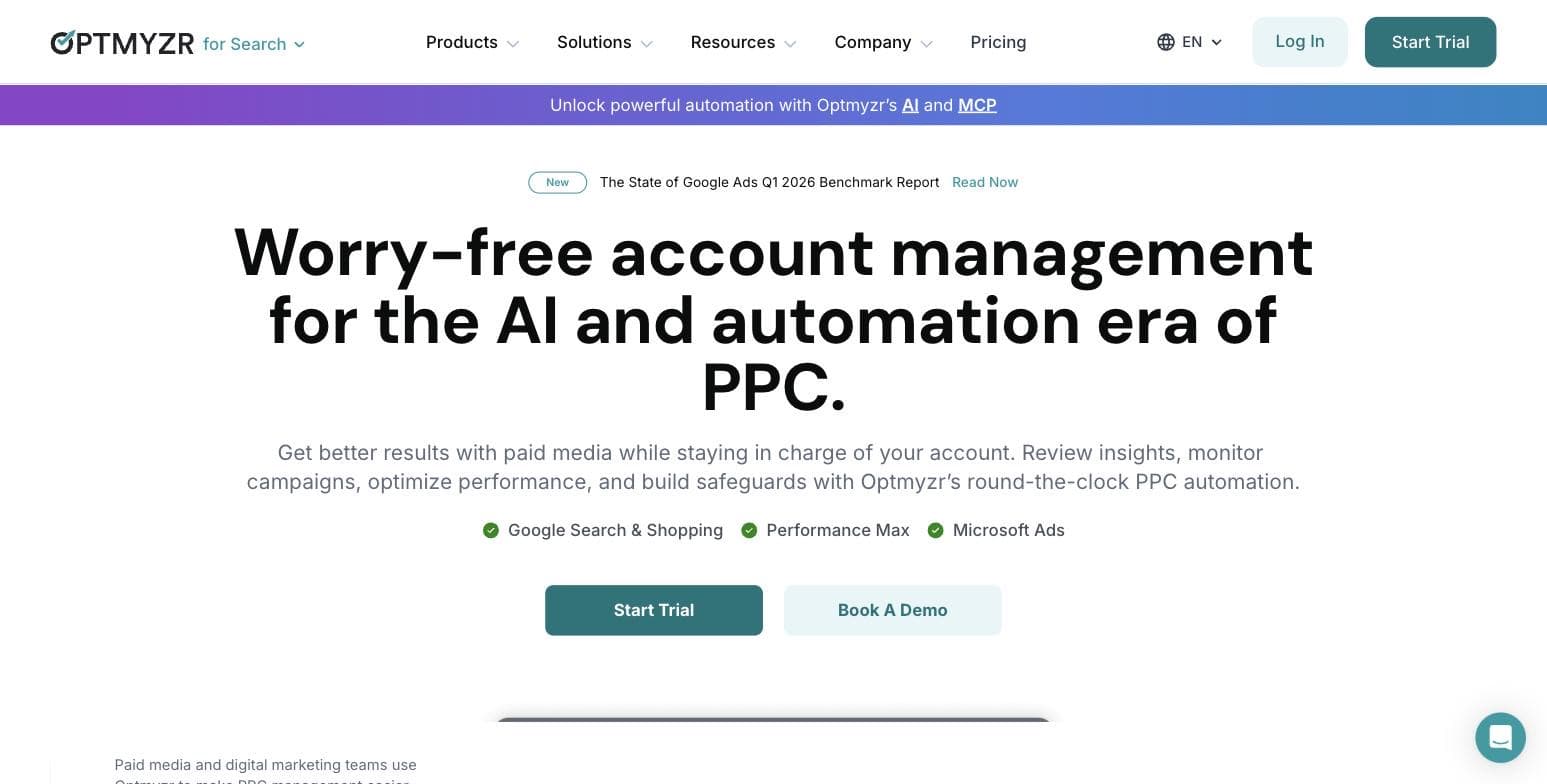
Best for scaling accounts and PPC prosOptmyzr is the establishment pick in PPC optimization software, and its 4.7/5 rating across 184 Capterra reviews (as of July 2026) reflects a mature, deep toolset. Its core audience is people who already know Google Ads well: the Capterra reviewer quoted below singles out reports like PMax Channel Distribution and Shopping Analysis, plus bulk campaign creation that outpaces working directly in Google Ads or Microsoft Ads. Optmyzr's pricing FAQ says its Amazon, Meta and LinkedIn tools come with every plan at no extra cost: Essentials gets single-account social tools, and Premium adds full portfolio-level access and cross-platform reports. Search is still where most of its depth sits.
Pricing is the honest catch for a small business. Optmyzr sells three tiers - Essentials, Premium, and Enterprise - priced by your monthly ad spend, with the pricing page's spend selector running from $25K up past $500K. The page headlines a starting price of $209 a month, which is the annual rate for Essentials at the lowest $25K tier; month-to-month at that tier is $299 for Essentials and $389 for Premium, and both figures climb with every step of the selector. Essentials covers up to 25 accounts, Premium is unlimited, and $500K+ is quote-based. Annual billing saves 30%, there is a 14-day free trial with no card required, and first-time subscriptions carry a 30-day money-back guarantee.
That structure tells you who this is for. If you are spending $1,000/mo, Optmyzr is a professional's toolkit priced above your problem. If you are past roughly $10K/mo, managing Microsoft alongside Google, or you are the in-house marketer a growing company just hired, it is the strongest graduation path on this page.
Pros
- + Deep, mature optimization toolset for Google and Microsoft Ads, with Amazon, Meta and LinkedIn tools in every plan
- + 4.7/5 across 184 reviews on Capterra (as of July 2026)
- + 14-day free trial with no card, plus a 30-day money-back guarantee
- + Scales cleanly from one account to an agency book
Cons
- − Only the entry price is headlined; every tier figure moves with the spend selector, so there is no single flat price to compare
- − Cost scales with your ad spend rather than staying flat
- − Built for PPC professionals; far more tool than a first-time advertiser needs
- − Essentials gets only single-account Meta and LinkedIn tools; portfolio-level social tools and cross-platform reports need Premium
Ideal for
- Businesses past roughly $10K/mo in ad spend
- In-house marketers who want pro-grade optimization controls
- Consultants and agencies managing multiple accounts
Pricing: Essentials, Premium, and Enterprise tiers priced by monthly ad spend (selector tiers run $25K to $500K+). At the entry $25K tier: Essentials $299/mo month-to-month or $209/mo billed annually; Premium $389/mo or $272/mo annually. Figures rise at every step of the selector; $500K+ and Enterprise are quote-based. Annual billing saves 30%. 14-day free trial, no card required; 30-day money-back guarantee. Pricing page checked October 23, 2026.
Visit Optmyzr“Tools like the PMax Channel Distribution and Shopping Analysis reports are especially useful for deeper insights, while the campaign management features make bulk campaign creation much faster than doing it directly in Google Ads or Microsoft Ads.”
— Tushar S. on Capterra (Optmyzr: 4.7/5, 184 reviews, as of July 2026)
Opteo
Best for Google Ads onlyOpteo does one platform on purpose. It monitors your Google Ads accounts and produces a stream of Improvements - in its own words, smart recommendations that can be pushed live to Google Ads in seconds - alongside alerts via email or Slack and client-ready reports. That recommend-then-approve model keeps you in control, and users clearly like the execution: Opteo holds the highest rating in this roundup, 4.9/5 across 114 Capterra reviews (as of July 2026), with support drawing particular praise.
The plan structure is the tell on audience. Basic is $129/mo and includes 10 accounts and $25,000 in monthly spend; Professional is $249/mo (25 accounts, $100K spend), Agency is $499/mo (75 accounts, $250K), and Enterprise is custom. Annual billing effectively discounts two months, and there is a 14-day free trial, though Opteo does not say on its pricing page whether the trial needs a card. A single small business will never touch 10 accounts - you would be paying consultant-grade pricing for one account's worth of use.
If Google Ads is your only paid channel and $129/mo pencils out against your spend, Opteo is an excellent, well-liked tool. If you also run Meta - which most small businesses on this page do - you will need a second product, and the economics get harder to defend.
Pros
- + Highest rating in this roundup: 4.9/5 across 114 Capterra reviews (as of July 2026)
- + Recommendations can be pushed live to Google Ads in seconds
- + Alerts via email or Slack plus branded reporting
- + 14-day free trial of the full product
Cons
- − Google Ads only - Meta requires a second tool
- − Entry plan is sized for 10 accounts and $25K/mo spend, more capacity than a single small business uses
- − It recommends rather than runs: someone still has to review and push improvements regularly
Ideal for
- Google-only advertisers with meaningful search spend
- Freelance consultants managing several client accounts
- Small agencies that want alerting and branded reports
Pricing: Basic $129/mo (10 accounts, $25,000 spend/mo), Professional $249/mo (25 accounts, $100,000 spend/mo), Agency $499/mo (75 accounts, $250,000 spend/mo), Enterprise custom. Two-month discount on annual billing; 14-day free trial, but Opteo does not say on its pricing page whether the trial needs a card. Pricing checked October 23, 2026.
Visit Opteo“I'd like to add that the customer support is next to none. When Covid struck, we were actively using Opteo and they contacted us to offer their service free of charge as a way to support other businesses.”
— Paul G. on Capterra (Opteo: 4.9/5, 114 reviews, as of July 2026)
Adzooma
Best free plan for cross-platform monitoringAdzooma is the cheapest way on this page to get Google, Microsoft, and Meta campaigns into one interface. Its own positioning is built for advertisers who manage Google, Microsoft, and Facebook campaigns, and the product centers on account audits that spot wasted spend, disapprovals, and broken tracking, a stream of suggested performance fixes, roughly 30 pre-built alert rules with custom thresholds, and budget pacing that flags overspend early.
The free plan is genuinely free rather than a disguised trial: $0 with unlimited connected ad accounts. The limits are cadence and depth, not access - reports and opportunity analysis run only monthly on Free, you see a limited slice of the available opportunities, and you get 3 PPC alerts and 1 user seat. Silver at $69/mo moves reporting to weekly and shows all opportunities; Gold at $179/mo makes everything daily. Annual billing saves about 16% on the listed prices ($700 vs $828 for Silver, $1,800 vs $2,148 for Gold). Silver includes 10 PPC alerts and Gold unlimited.
Two honest cautions. Adzooma surfaces fixes and applies them when you say so - it does not create campaigns or write ads for you. And its 4.0/5 across 22 GetApp reviews (as of July 2026) is the lowest score among the paid tools here, on a small review base. As a free monitoring layer it is easy to recommend; as a paid optimization engine the case is thinner.
Pros
- + Real free plan with unlimited connected ad accounts
- + Covers Google, Microsoft, and Meta in one view
- + About 30 pre-built alert rules plus custom CPA, CPC, and spend thresholds on paid tiers
- + Cheap paid step-up at $69/mo
Cons
- − Free tier runs reports and opportunity analysis only monthly, hides most opportunities, and allows just 3 alerts
- − 4.0/5 on GetApp (22 reviews, as of July 2026) is the lowest rating among paid tools in this roundup
- − Surfaces and applies fixes but does not create campaigns or write ads for you
Ideal for
- Advertisers on two or three platforms who want monitoring for free
- Budget-conscious DIYers who will act on suggestions themselves
- Anyone auditing a messy inherited account before deciding what to do next
Pricing: Free plan $0; Silver $69/mo or $700/yr; Gold $179/mo or $1,800/yr (annual saves about 16% on the listed prices). Enterprise pricing on request. Pricing checked October 23, 2026.
Visit Adzooma“I'm using Adzooma to keep track of all my campaigns and Ads account on a single interface.”
— Ade A. on GetApp (Adzooma: 4.0/5, 22 reviews, as of July 2026)
WordStream by LocaliQ
Best free audit before you spend anythingWordStream today is not the software company long-time PPC people remember - it is the free-tools and education arm of LocaliQ, the small-business marketing platform that owns it. The famous WordStream Advisor self-serve software no longer appears in the site's navigation, on its homepage, or on its tool pages. What remains is still worth your time: the Google Ads Performance Grader scores an account on wasted spend, Quality Score, click-through rate, impression share, account activity, and account structure, among other checks - WordStream's homepage calls it nine key areas while the grader's own page says 10 key metrics. There is also a Facebook Ads grader, a free keyword tool, and a website grader alongside one of the deepest free PPC education libraries anywhere.
The paid path is LocaliQ itself: managed search, display, video, and social advertising plus lead-management tooling, sold as a service rather than software. LocaliQ publishes no pricing - every path on the site leads to a demo or a talk-to-an-expert consultation, and its GetApp listing currently shows zero reviews, so there is no independent review base we could quote.
Our honest read: run the graders before you buy anything on this page - a free automated audit of your existing account is the single best due-diligence step available. Just go in knowing the graders are also lead generation for a sales conversation, and that you cannot comparison-shop LocaliQ's management service from its website.
Pros
- + Graders cost nothing and take minutes to run
- + Google Ads Performance Grader scores concrete metrics including wasted spend, Quality Score, and impression share
- + Free keyword tool and a deep PPC education library
- + Useful due diligence before buying anything else on this page
Cons
- − No self-serve software to buy anymore - the old WordStream Advisor product is gone from the site's navigation and tool pages
- − Running the grader means handing over an email and signing in with Google, and it funnels into a LocaliQ sales conversation; the paid offering is quote-only with no published pricing
- − Point-in-time audits, not ongoing management - nothing here runs your campaigns
Ideal for
- Owners who want a free second opinion on an existing account
- Anyone deciding between DIY and managed service
- Keyword research on a zero budget
Pricing: WordStream's graders, keyword tool, and website grader are free. LocaliQ's managed marketing services have no published pricing - quotes come via demo or consultation only. Checked October 23, 2026.
Visit WordStream by LocaliQGoogle Ads Editor + Meta Ads Manager
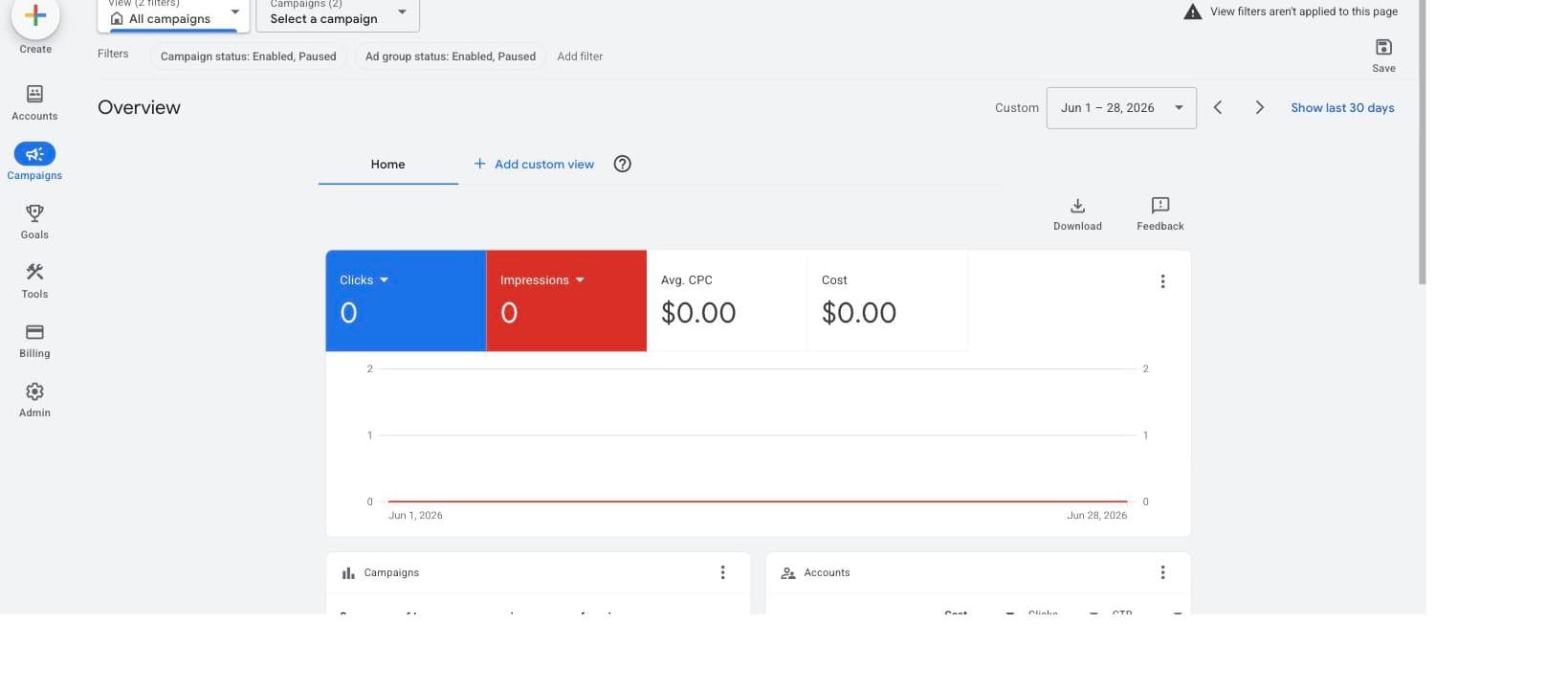
Best fully free stack for hands-on managersBefore paying for anything, be clear about what you already have. Google describes Google Ads Editor as a no-cost, downloadable application that lets you manage display advertising campaigns offline and make bulk changes quickly and easily - in practice that means search and replace across multiple campaigns, undo and redo, and, if you run several accounts, storage for easy viewing, creating, and editing. Meta Ads Manager is, in Meta's words, your starting point for running ads on Facebook, Instagram, Messenger or Audience Network, covering creation, scheduling, placement, and performance tracking, with mobile apps for both iOS and Android.
This stack costs nothing beyond your ad spend, and it is the baseline every paid tool on this page must beat. For a single-platform advertiser with more time than budget, it is entirely workable: Ads Editor is aimed squarely at structural work - restructuring campaigns, bulk keyword edits, copying builds between accounts - which is what Google built its bulk editing tools to handle, changing all of your campaigns at once.
The costs are real but hidden. You get two separate consoles with no combined view of spend or results, every optimization is manual and weekly hours add up, and both platforms' built-in recommendation prompts are written by the companies selling you the clicks - evaluate them against your own goals rather than accepting them by default. Most people reading this page are here because they hit exactly these walls.
Pros
- + Completely free - you pay only for ad spend
- + Ads Editor handles bulk edits, offline work, and multiple accounts
- + Ads Manager gives full targeting, placement, and tracking control on Meta
- + No third-party data access to grant
Cons
- − Two separate consoles with no combined cross-platform view
- − Everything is manual - the tools are free because your time is the cost
- − Native recommendation prompts serve the platform's goals as much as yours and need critical review
- − Ads Editor is desktop bulk-editing software with a real learning curve
Ideal for
- Hands-on owners with more time than budget
- Single-platform advertisers who do not need a combined view
- Anyone who wants to learn PPC mechanics before automating them
Pricing: Free. Google Ads Editor is a no-cost downloadable application; Meta Ads Manager is included with any Meta business account. You pay only for the ads themselves. Checked October 23, 2026.
Visit Google Ads Editor + Meta Ads ManagerHiring a PPC agency
Best when you want a human to own itThe honest alternative to every tool above is paying a person. An agency brings judgment, accountability, and coverage of any platform mix - and for a small business the economics are the whole question. WebFX, one of the few large agencies that publishes numbers, puts typical PPC management at 10% to 20% of ad spend or $1,000 to $3,000 per month in fees, with its own services starting at $750/mo. LocaliQ, the other managed option that appears in this roundup, quotes only after a consultation - which is the norm; most local shops publish nothing.
Run the math at small-business scale. At $1,500/mo in ad spend, a $1,000/mo management fee means 40% of your total outlay goes to fees before a single click lands. At $10,000/mo in spend, the same fee is 9% - suddenly reasonable against the hours and expertise you get back. That is why the crossover point for most businesses sits somewhere around $5,000/mo in ad spend, and below it software tends to win.
Two things to check before signing anywhere: whether campaigns run in an ad account you own (so history and data stay yours if you leave), and how the fee is structured - percentage-of-spend models tie the agency's revenue to your budget growing, not to your results improving.
Pros
- + Human strategy and accountability, not just software output
- + Covers any platform mix, including channels no small-business tool touches
- + Frees your time entirely
- + Economics become reasonable once ad spend clears roughly $5,000/mo
Cons
- − At small-business spend levels, fees rival the ad budget itself - $1,000/mo in fees on $1,500/mo of spend is 40% of total outlay
- − Most agencies, including LocaliQ, publish no pricing, making comparison shopping a sales-call gauntlet
- − Percentage-of-spend fee models reward growing your budget, not necessarily your results
- − Quality varies enormously and is hard to assess before you have paid for months
Ideal for
- Businesses spending $5,000+/mo on ads
- Complex funnels, multiple locations, or channels beyond Google and Meta
- Owners who want zero personal involvement in ad management
Pricing: No standard pricing. Published benchmark from WebFX (checked October 23, 2026): PPC management typically runs 10% to 20% of ad spend or $1,000 to $3,000 per month in fees; WebFX's own services start at $750/mo. LocaliQ and most local agencies quote only after a consultation.
Side by side.
| Tool | Best for | Starting price | Platforms covered | Standout limitation |
|---|---|---|---|---|
| AdFlint (our product) | Small budgets on Google + Meta | $40/mo flat | Google, Meta | Google and Meta only; no third-party review record yet |
| Optmyzr | Scaling accounts and PPC pros | $299/mo ($209 annual) at the $25K spend tier | Google, Microsoft, Amazon, Meta, LinkedIn | Price climbs with your ad spend |
| Opteo | Google Ads only | $129/mo | Google Ads | Single platform; plans sized for consultants |
| Adzooma | Free cross-platform monitoring | $0 (Silver $69/mo) | Google, Microsoft, Meta | Free tier reports only monthly |
| WordStream by LocaliQ | Free audits before buying | Free tools; managed service quote-only | Google, Meta (graders) | No self-serve software; sales-led |
| Google Ads Editor + Meta Ads Manager | Hands-on DIY | Free | Google (Editor), Meta (Ads Manager) | Two consoles, all manual |
| PPC agency | Handing it off entirely | About $750-$1,000+/mo in fees | Any, depends on agency | Fees rival small ad budgets |
How we chose.
Apart from the Optmyzr signup walkthrough below (performed July 30, 2026), we did not run hands-on trials of the third-party tools on this page, and nothing here implies we did. What we actually did: we fetched each vendor's live pricing page and official product documentation in July 2026 (prices re-checked on October 23, 2026), recorded plan names, dollar figures, spend limits, and trial terms exactly as published, and compared the tools on how those published capabilities fit a small-business budget. Where a vendor has no single flat price - Optmyzr's figures move with a spend-tier selector, LocaliQ quotes only after a consultation - we say so and give the entry figure where one exists, rather than guessing at the rest.
Hands-on experience on this page comes from named, attributed reviewers on public review platforms. Every quote is reproduced verbatim from a page we fetched (Capterra's PPC software category and GetApp's Adzooma review page), with the reviewer's name and the source URL. Where we could not fetch a real review base - LocaliQ's GetApp page shows zero reviews, and several review sites block automated access - we omitted the quote rather than inventing one.
One disclosure: AdFlint is our product. It is the only tool on this page we operate daily, and it carries a visible disclosure tag. We ranked it using the same criteria as everything else and listed its real limitations - including the ones that should send you to a competitor.
- — Priced for small business: the tool needs a plan that makes sense under $5,000/mo in ad spend, without agency-tier minimums doing silent gatekeeping.
- — Live pricing only: every figure comes from the vendor's current pricing page, checked October 23, 2026. Gated or quote-only pricing is flagged as exactly that.
- — Automation depth: we distinguish tools that create and manage campaigns from tools that surface suggestions, and both from plain monitoring dashboards.
- — Platform coverage: Google + Meta covers most small-business ad spend, so cross-platform tools scored higher - but a single-platform tool that is honest about its lane beats a shallow everything-tool.
- — Independent trust signals: attributed quotes from public review platforms, never vendor-site testimonials.
- — Real limitations: every entry lists the cons we would want to know before paying, including our own product's.
Common questions.
Do I need PPC management software, or is the native Google and Meta automation enough?
Start native if you have one platform, a simple offer, and time to check in weekly - Google Ads Editor and Meta Ads Manager are free and fully capable. Software starts earning its fee when you run Google and Meta together (two consoles, no combined view), when you stop having time for weekly reviews, or when you want an audit trail of what changed and why. Run WordStream's free grader on your account first; the result usually makes the decision for you. Our rule of thumb: keep the fee at about 5% of your ad spend or less.
How much does PPC management software cost for a small business in 2026?
The honest range at small-business scale, from live pricing checked October 23, 2026: $0 for Adzooma's free monitoring plan and the native Google and Meta tools; $40 or $89/mo for AdFlint's two headline flat plans (Launch and Growth), covering up to $2,500/mo in ad spend, with self-serve tiers continuing to $319/mo for up to $30,000; $69/mo for Adzooma's paid Silver tier; $129/mo for Opteo's entry plan; and $299/mo month-to-month, or $209/mo billed annually, for Optmyzr at its lowest $25K spend tier. Optmyzr's figure climbs as your ad spend does. Watch for percentage-of-spend fees anywhere - they scale your cost with your budget rather than your results.
Should I buy software or hire an agency?
It is mostly a spend-level question. Published agency benchmarks (WebFX, October 2026) put typical management at 10% to 20% of ad spend or $1,000 to $3,000/mo in fees. Below roughly $5,000/mo in ad spend those fees consume a huge share of your total outlay, and software - or software plus a few hours of your month - usually wins. Above that, an agency's hours and judgment start being worth the fee. Whichever you choose, insist that campaigns run in an ad account you own.
Can AI safely manage my ad budget?
Safely, yes - autonomously, not quite. The pattern that works for small budgets is AI doing the labor with two safety rails: a hard budget cap enforced by the tool, and a person who clicks Launch before a campaign goes live. That is the model AdFlint's self-serve plans use, and it is the standard we would apply to any AI ad tool: if a product can spend your money with neither a cap nor an approval gate, the savings are not worth the tail risk of a runaway campaign.
What is the best free PPC management tool?
Three different jobs, three answers. For ongoing monitoring across Google, Microsoft, and Meta: Adzooma's free plan, which allows unlimited connected accounts but only monthly reports. For a one-off account audit: WordStream's free Google Ads Performance Grader, which scores wasted spend, Quality Score, impression share, and related checks. For actually making changes: Google Ads Editor, Google's free desktop app for bulk campaign editing. None of them creates or manages campaigns for you - free tools watch and advise, paid tools and agencies do.
Why does it matter whose ad account the campaigns run in?
Ad accounts accumulate history and conversion data that the platforms' bidding algorithms learn from. If a tool or agency runs your ads inside an account they own, leaving them means starting that learning from zero - which is a quiet form of lock-in. Every software tool in this roundup works inside your own account. Agencies vary, so ask before signing: if the answer is their account, understand you are renting your own performance history.
What is the best PPC management software for a small business?
For most small businesses running Google and Meta on under $2,500 a month, our pick is AdFlint (our product), at $40 or $89 a month on self-serve plans. If you run Google only and spend more, Opteo starts at $129 a month. If you manage several accounts or spend $25,000 a month or more, Optmyzr starts at $209 a month billed annually. If you have spare hours, Google Ads Editor (no cost) and Meta Ads Manager charge nothing beyond your ad spend. Divide any fee by your monthly ad spend before you pick.
Is AdWords management software the same as Google Ads management software?
Yes. Google renamed AdWords to Google Ads on July 24, 2018, so pages that still say AdWords are describing Google Ads.
What is the best local PPC software?
Our view: for a local business, radius targeting, call reporting and lead forms matter more than the brand. Set those up in your own Google Ads account first, then choose software that shows calls and leads per location.
What is PPC budget management software?
It watches what you spend against a budget and warns you, or acts, before you overspend. On this page, every Adzooma plan includes budget tracking and PPC alerts (3 on Free, 10 on Silver), Optmyzr's Essentials plan lists budget monitoring, management and optimization, and Opteo has a Manage Budgets feature. If all you need is a ceiling, Google Ads lets you set what you spend per month, per day and per ad, and Meta lets you set a daily budget or one budget for the whole campaign.
Do I need PPC bid management software?
Our view: usually not at small-business spend. Google's Smart Bidding strategies, such as Target CPA and Maximize conversions, use Google AI to bid for conversions in every auction. In our view, bid tools such as Optmyzr's Bids & Targets module and Opteo's Optimise Bids feature earn their fee when you manage several accounts and want rules or checks on top of Google's targets.
Keep reading
- Google or Meta Ads First? Decide by Budget
- First Campaign, No Results: A 16-Step Diagnostic
- Conversion Tracking Setup for Google and Meta
- AI Ad Tool Pricing in 2026: What It Really Costs
- Guide: Google Ads Bidding Strategies: The Complete Guide
- Guide: Meta Ads Objectives and Bidding: The Complete Guide
- Guide: Ad Budgets, Pacing, and What Ad Management Costs
- AI Ad Management Software vs DIY Ad Management
- AI Ad Management Software vs Done-For-You Ad Management
- Done-For-You Ad Management vs a PPC Agency
- AI Ad Management Software vs a Freelance PPC Specialist
- Flat Fee vs Percentage of Ad Spend
- Smart Bidding vs Manual CPC: When Automation Actually Wins
- Free tool: Google Ads Budget Calculator
- Free tool: Ad Budget Calculator
- Free tool: ROAS Calculator
- Free tool: Cost Per Acquisition Calculator
- Free tool: Google vs Meta Budget Split Calculator