Google Ads Management for Small Business: Software, Agency or Do It Yourself (2026)
By the AdFlint research team · We built trial accounts on Optmyzr and worked inside them ourselves; every screenshot below is from those sessions, and the rest is documentation and verified user reviews · Published July 28, 2026 · Updated October 12, 2026
TL;DR
- Three routes, three price levels. Doing it yourself costs nothing beyond the clicks. Recommendation software starts free (Adzooma) and runs $129 to $299 a month for the professional tools. Few agencies publish prices; WebFX, one that does, lists $1,200 for the first month and then $750 a month on its smallest plan. At $5 to $30 a day of ad spend, keep the fee small next to the budget - the worked example below shows why.
- Install Google Ads Editor first no matter what else you buy. It is Google's own free desktop app for bulk edits and multi-account work, and it covers more ground than most owners expect.
- If nobody at your company wants to manage ads at all, AdFlint (our product - disclosure applies) is the pick: the AI writes, launches, and optimizes inside your own Google and Meta accounts from $40 a month, and on self-serve plans nothing goes live until you click Launch or turn on Full Autopilot.
- If you enjoy running your own account and want a smart assistant, Opteo ($129 a month) is the easiest recommendation engine to live with. Agencies and power users should look at Optmyzr instead, but note its advertised $209 is the annual-prepay rate - month to month it is $299.
- Most of the affordable tools here optimize Google only. If you also run Meta ads, the small-business shortlist is AdFlint for hands-off management or Adzooma for lightweight multi-platform checkups; Optmyzr covers Meta too, at professional-tier prices.
This page is for the owner or one-person marketing team spending a few hundred to a few thousand dollars a month on Google Ads, wondering whether software can take some of the weight. It is not written for agencies managing fifty client accounts, although two tools here (Optmyzr, Opteo) are honestly better suited to them, and we say so.
The category name hides three very different products. Some tools are editors: they help you make changes faster but offer no opinions (Google Ads Editor). Some are recommendation engines: they analyze your account and suggest changes that you review and apply (Opteo, Optmyzr, Adalysis, Adzooma). And some actually do the work: they write ads, launch campaigns, and adjust budgets themselves, with you approving rather than operating (AdFlint on the software side, LocaliQ as a human-run service). Which type you need depends on one question - how many hours a month do you actually want to spend inside your ad account?
Price structure matters as much as price. The professional tools charge based on your ad spend and start at $129 to $299 a month on month-to-month billing - defensible when you spend $25,000 a month, hard to justify when you spend $800. Watch for advertised prices that quietly assume annual prepayment; Optmyzr's headline $209 is one. The small-business options start at $0 to $89. LocaliQ, the managed service here, does not publish prices at all. We pulled every figure below from each vendor's live pricing page in July 2026 and re-checked the software prices in October 2026, so you can do that math for your own budget.
Software, agency or do it yourself: what each route costs.
Every way of managing Google Ads comes down to one trade: money or hours. Google charges nothing to use Google Ads itself - you pay for the clicks - so the only extra cost of doing it yourself is your time. Software trades some of that time for a monthly fee. An agency trades nearly all of it for a bigger one.
Which route fits depends less on which tool is best and more on how big the fee is next to your ad budget. A $129 tool is a rounding error on $20,000 a month of spend and a large surcharge on $450. The table shows the entry price of each route as published on the vendors' own pricing pages; the example after it runs the numbers for a local business spending $15 a day.
| Route | What you pay each month, on top of ad spend | Your time | Fits | Watch out for |
|---|---|---|---|---|
| Do it yourself (Google Ads plus the free Google Ads Editor) | $0. Google bills only the ad spend. | The most: you build, check and fix the account yourself | Owners who want to learn it and will check in every week | Google's built-in suggestions tend to favour spending more; nobody catches mistakes but you |
| Recommendation software (Adzooma, Opteo, Adalysis, Optmyzr) | $0 on Adzooma's free plan or $69 on Silver; the professional tools start at $129 (Opteo), $149 (Adalysis) and $299 month to month (Optmyzr) | Some: the tool finds the problems, you review and apply the fixes | Someone in-house who will log in every week | Entry prices are set for bigger budgets, and the software does not do the work for you |
| Done-for-you software (AdFlint - our product, disclosed) | $40 flat on the Launch plan, covering up to $1,000 a month of ad spend; plans step up as spend grows | Less: you approve launches and big budget changes | Owners who want the ads run without learning PPC | Young product with little public review history; Google and Meta only |
| Agency or managed service (for example WebFX or LocaliQ) | WebFX's smallest plan lists $1,200 for the first month, then $750 a month; LocaliQ quotes privately | The least: a person runs it and reports to you | Budgets large enough that the fee is a small share of spend | Fees can exceed a small ad budget; ask about minimum terms and who owns the ad account |
Example: a local business spending $15 a day
- This is arithmetic on published prices, not customer data.
- $15 a day is about $456 a month of ad spend. Google can spend up to twice the daily budget on a busy day, but caps the month at about 30.4 times it.
- Do it yourself: $456 a month, plus your hours.
- Adzooma's free plan for checkups: $456 + $0.
- AdFlint Launch (our product): $456 + $40 = $496, so the fee adds about 9%.
- Opteo Basic: $456 + $129 = $585, so the tool adds about 28%.
- WebFX Lite: $1,200 for the first month, then $750 a month. After month one that is $456 + $750 = $1,206 a month, and the management fee is about 1.6 times the ad spend.
- Spending $5 to $30 a day (roughly $150 to $900 a month): keep the fee small next to the spend. Free tools plus your own time cost nothing extra; a flat $40 fee adds about 4% to 26% across that range; a $129 tool adds 14% to 85%; and an agency minimum like WebFX's $750 a month is close to or larger than the whole ad budget.
- Someone on your team enjoys the work and will log in weekly: recommendation software multiplies those hours. Start with Adzooma's free plan, then consider Opteo if you want deeper suggestions.
- Spending several thousand a month and nobody has the time: an agency fee becomes a smaller share of spend. Get the fee, the minimum term and who owns the ad account in writing before you sign.
Sources: WebFX PPC pricing · Opteo pricing · Adalysis pricing · Optmyzr pricing · Adzooma pricing · AdFlint pricing
We got inside. Here is every screen.
We created real trial accounts, cleared the verification walls, and worked through the products. Every screenshot below is from those sessions — no vendor marketing imagery, no stock dashboards.
Optmyzr
Walkthrough performed July 30, 2026We created an Optmyzr trial, cleared its phone-verification wall, completed the five-step setup wizard and worked inside the product. No credit card was requested at any point, and that claim holds up.
The single most useful thing we learned is one Optmyzr does not advertise: it will let you all the way into the application without connecting an ad account. Almost no competitor does that, and it changes how you can evaluate the tool.
- 01
Find the trial link
The /free-trial/ URL published in older articles now returns a 404 on Optmyzr's own site. The working path is the Start Trial button in the site header, which hands off to tools.optmyzr.com. Worth knowing if you are following an outdated guide.
- 02
Create the account and answer the qualification form
Work email plus a password, or one-click signup with Google or Microsoft. A marketing-consent checkbox is present and unticked by default. Then, before the product, Optmyzr asks for company name, whether you are an advertiser or an agency, country, monthly ad spend, where you heard about them, and your role. Five of those are mandatory. The ad-spend brackets start at Under $10,000 and climb to More than $500,000, which tells you plainly who this product is priced for.
- 03
Clear the phone-verification wall
Submitting the form does not open the product. It opens a Verify Phone Number screen that sends a one-time code by SMS, with no skip and no alternative method offered. This is the real gate on an Optmyzr trial, and it is not mentioned anywhere before you start. If you are evaluating tools on a burner email, budget for handing over a working phone number.
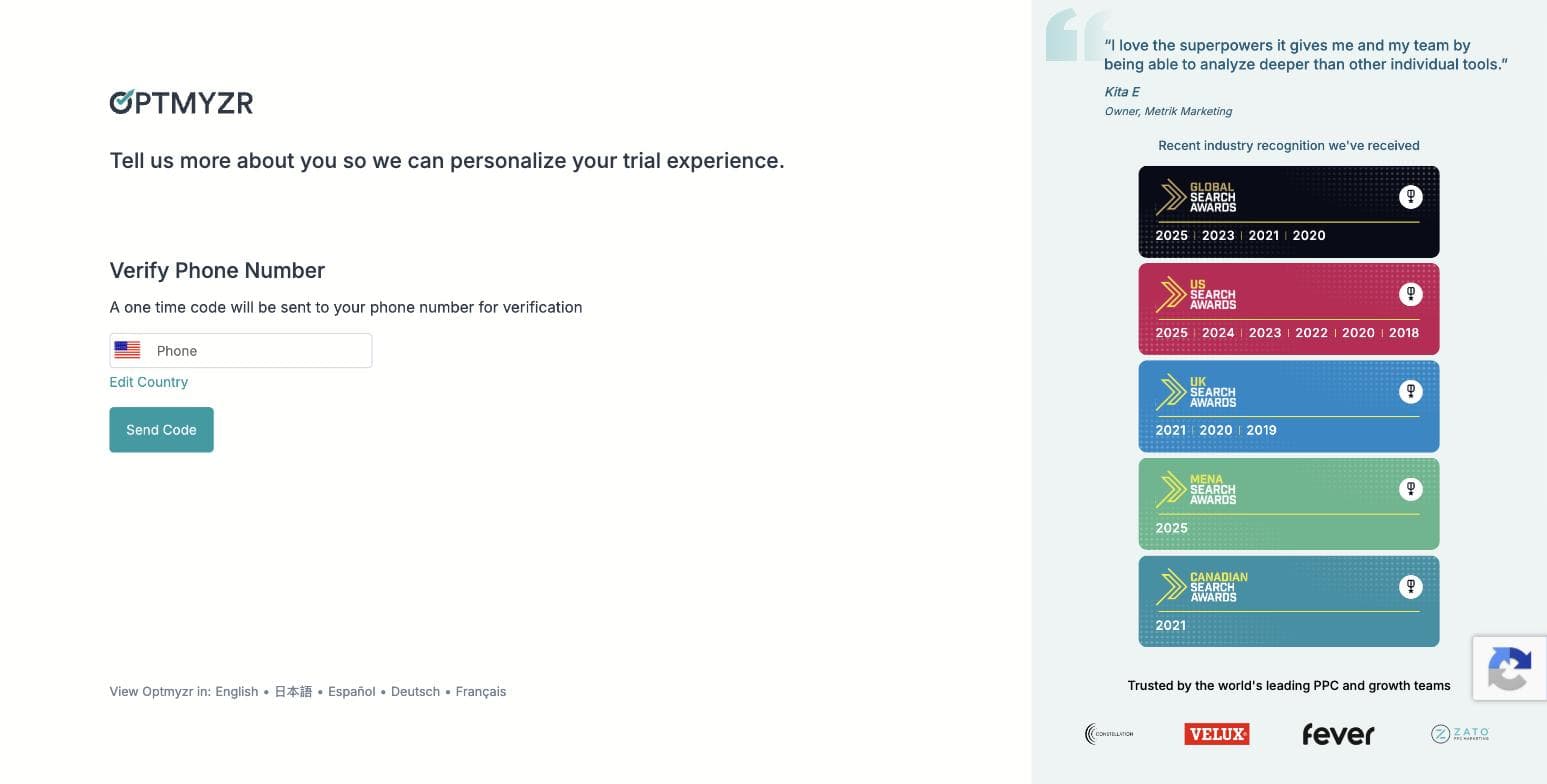
Optmyzr's phone-verification gate, captured during our own signup on 30 July 2026. No skip option is offered. - 04
Pick your goals — three of ten
Step two of the wizard asks you to choose exactly three priorities from ten: search queries and keywords, ad creation and testing, budget management, bid and target optimization, shopping campaigns, placements and audiences, performance analysis, account audits, report creation, and full AI account management. The three you pick genuinely shape what the product shows you afterwards — the AI assistant's opening plan named all three of ours back to us.
- 05
Choose how you want to work — and find the MCP connector
Step three offers three working modes, all pre-selected: hands-on in the browser, on autopilot with an automation agent sending you a digest, or — the one nobody is writing about — inside your own AI assistant, connecting Optmyzr over MCP to Claude or ChatGPT so you manage the account from where you already work. That third option is a real 2026 capability and it is absent from every Optmyzr roundup we found.
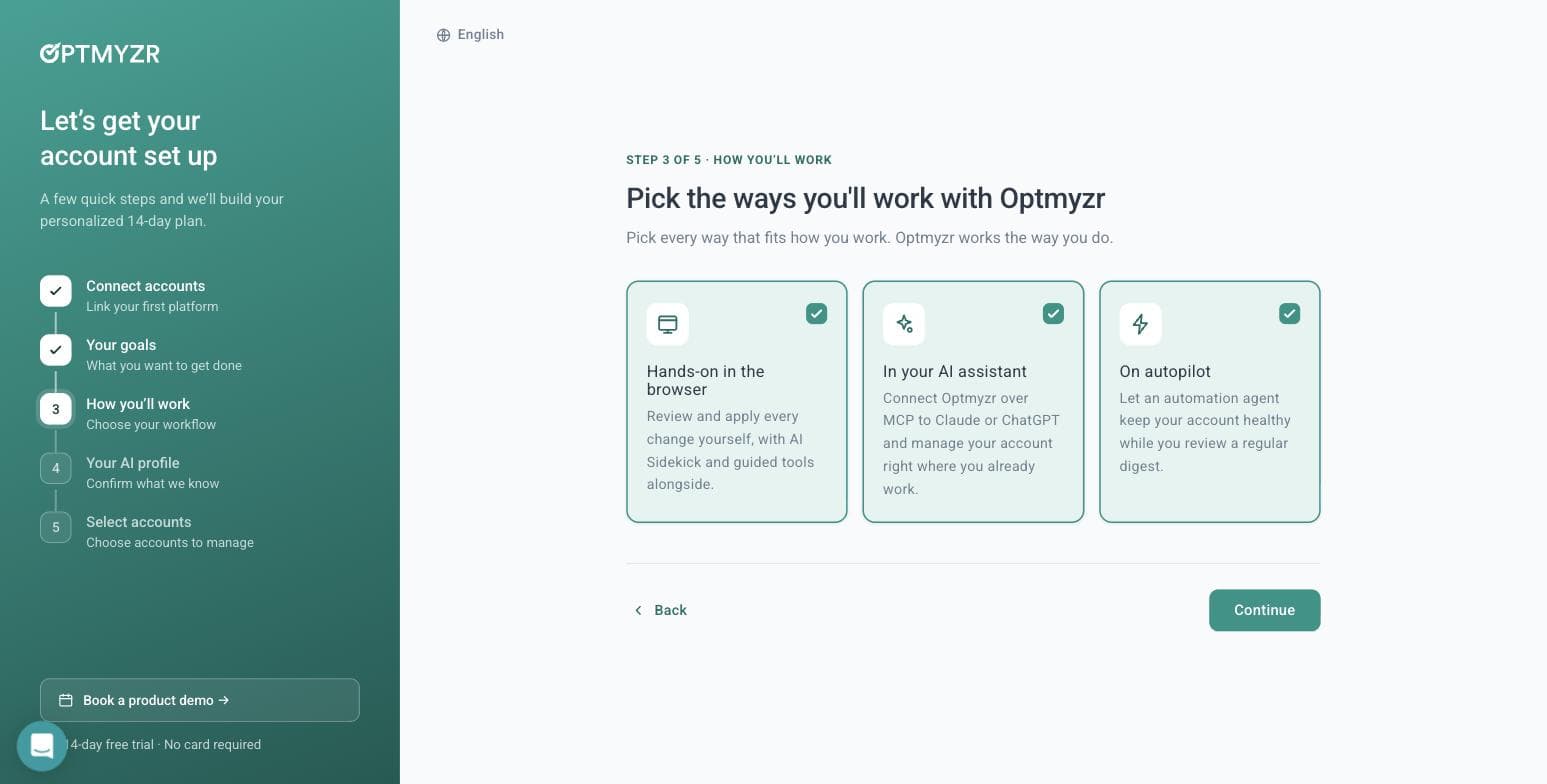
Optmyzr's three working modes, including an MCP connector for Claude and ChatGPT. Captured 30 July 2026. - 06
Let its AI read your website — we tested this properly
Step four builds an AI profile of your business, and offers to generate it from your website. We gave it adflint.com and timed it: roughly ten seconds. It came back with the company name, correctly classified the industry, set the language, and wrote a paragraph describing our free trial length, our budget caps, our zero-markup pricing and five specific in-product features. Several of those live on deep pages, not the homepage — so it is crawling more than one URL. It left the tone field blank rather than guessing, which we would call the right call.
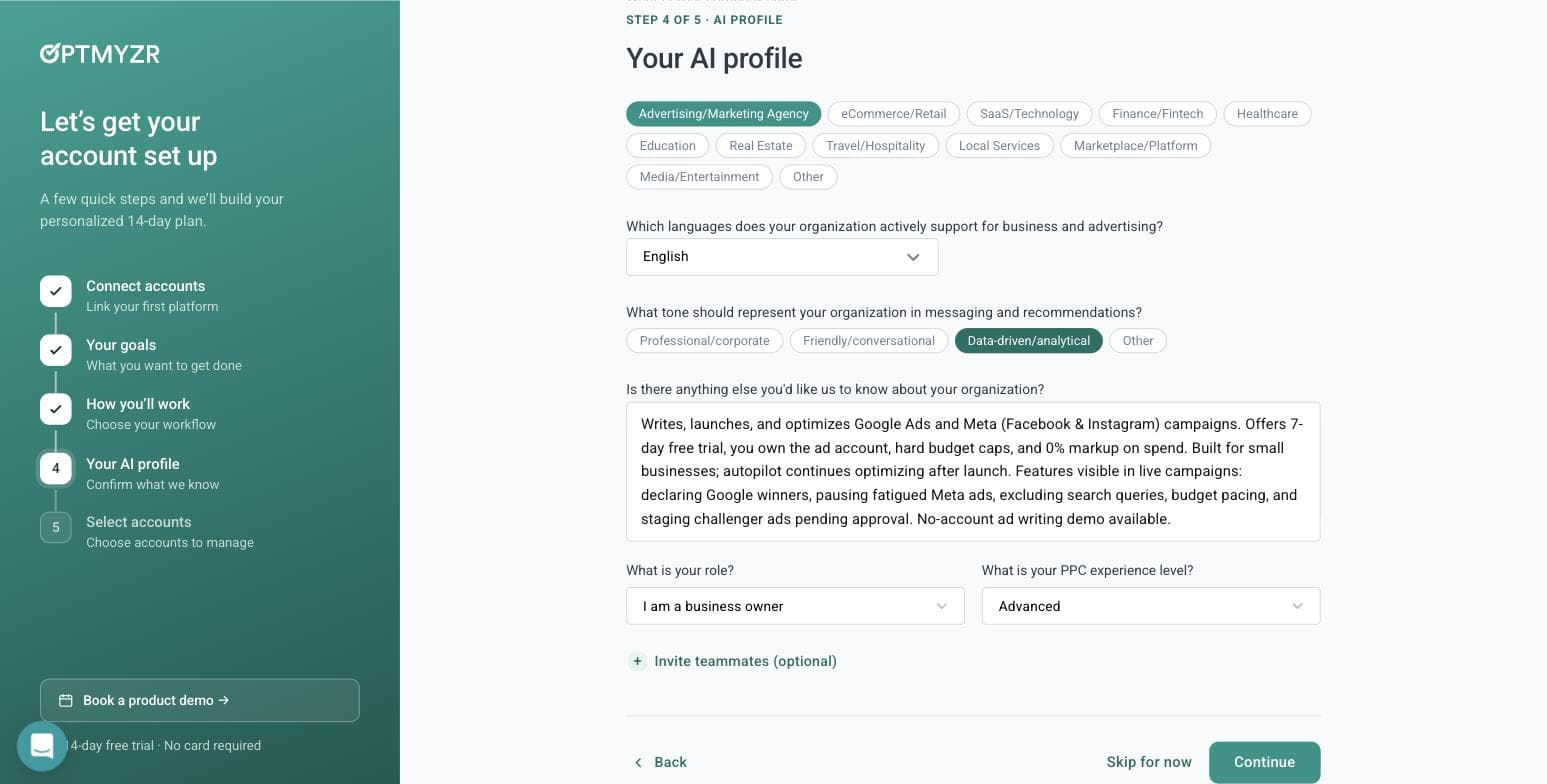
What Optmyzr's AI wrote about our business from the URL alone, in about ten seconds. Captured 30 July 2026. - 07
Skip the account connection — and get in anyway
Step five is where most tools stop you. Optmyzr does not. It says: you didn't connect an account, so we'll start you with a general plan, connect one anytime to tailor it. Then it opens the full application. You can browse the entire tool tree, read what every module does, and use the AI assistant before you ever grant a third party access to a live ad account. For anyone evaluating software on behalf of a client, that is a meaningful difference.
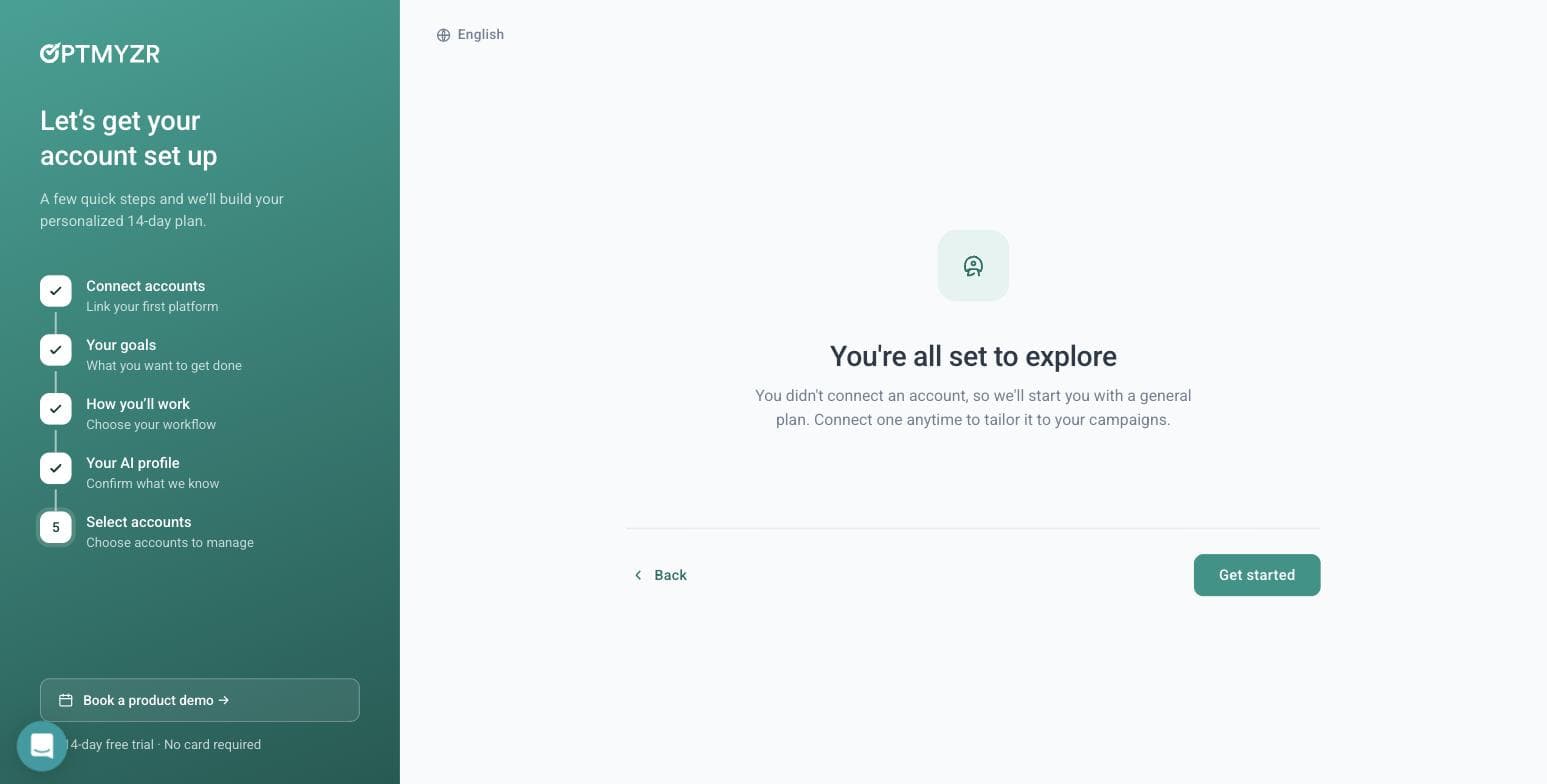
Optmyzr lets you into the product with no ad account connected. Captured 30 July 2026. - 08
Ask the AI assistant a real question
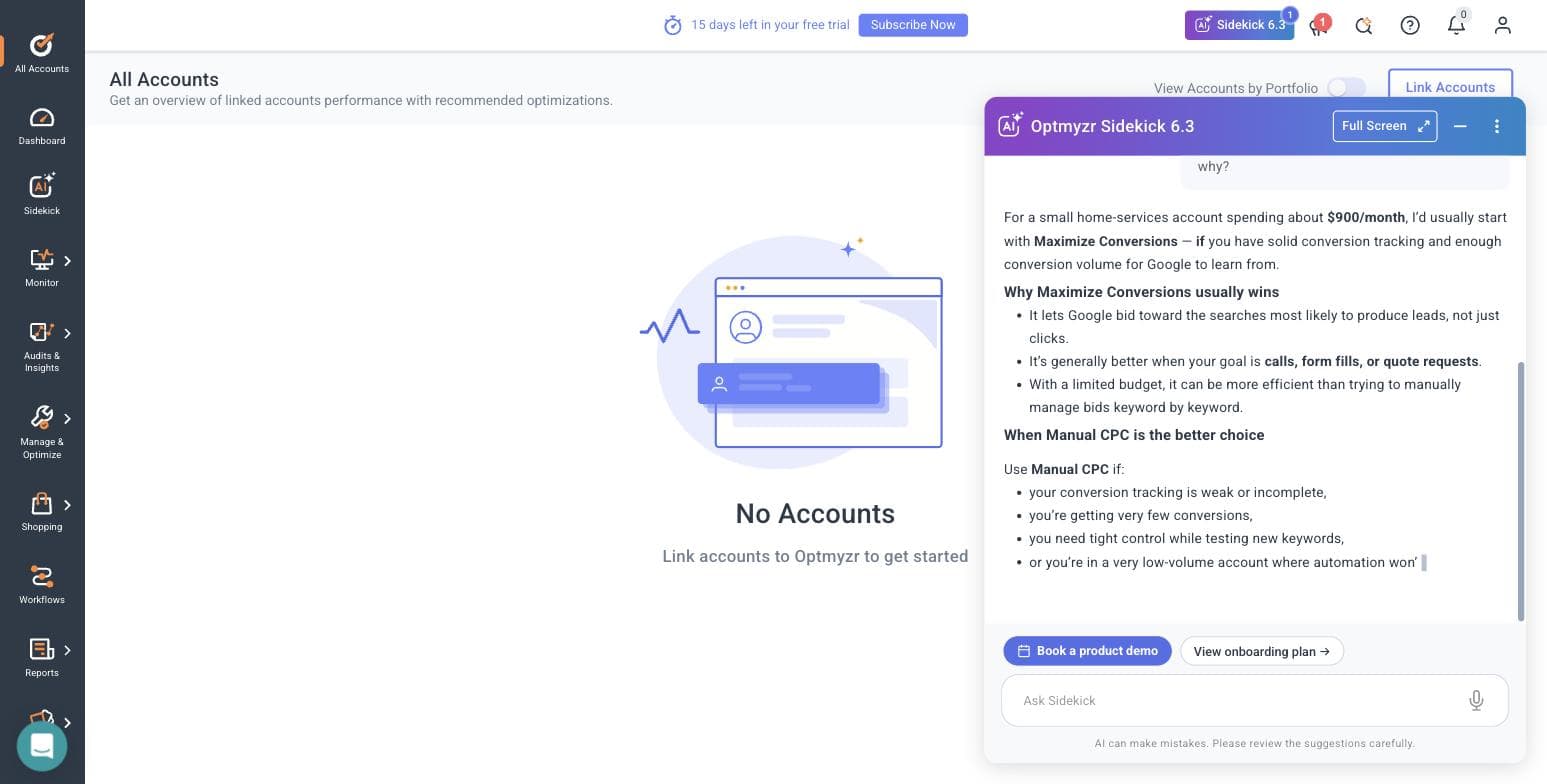
Sidekick 6.3 opens with a day-one-of-fifteen plan built from the three goals we picked. We asked it something a real advertiser would ask: whether a home-services business spending $900 a month should run Maximize Conversions or Manual CPC. It gave a properly conditional answer — Maximize Conversions if your conversion tracking is solid and you have volume for Google to learn from, Manual CPC if tracking is weak, conversions are sparse, or you are testing new keywords under tight control. That is the correct answer, and it arrived with an 'AI can make mistakes' disclaimer attached. Notably, all of this worked with no ad account linked.
Sidekick's answer to our bidding question, with no ad account connected. Captured 30 July 2026. - 09
Open the Rule Engine strategy library
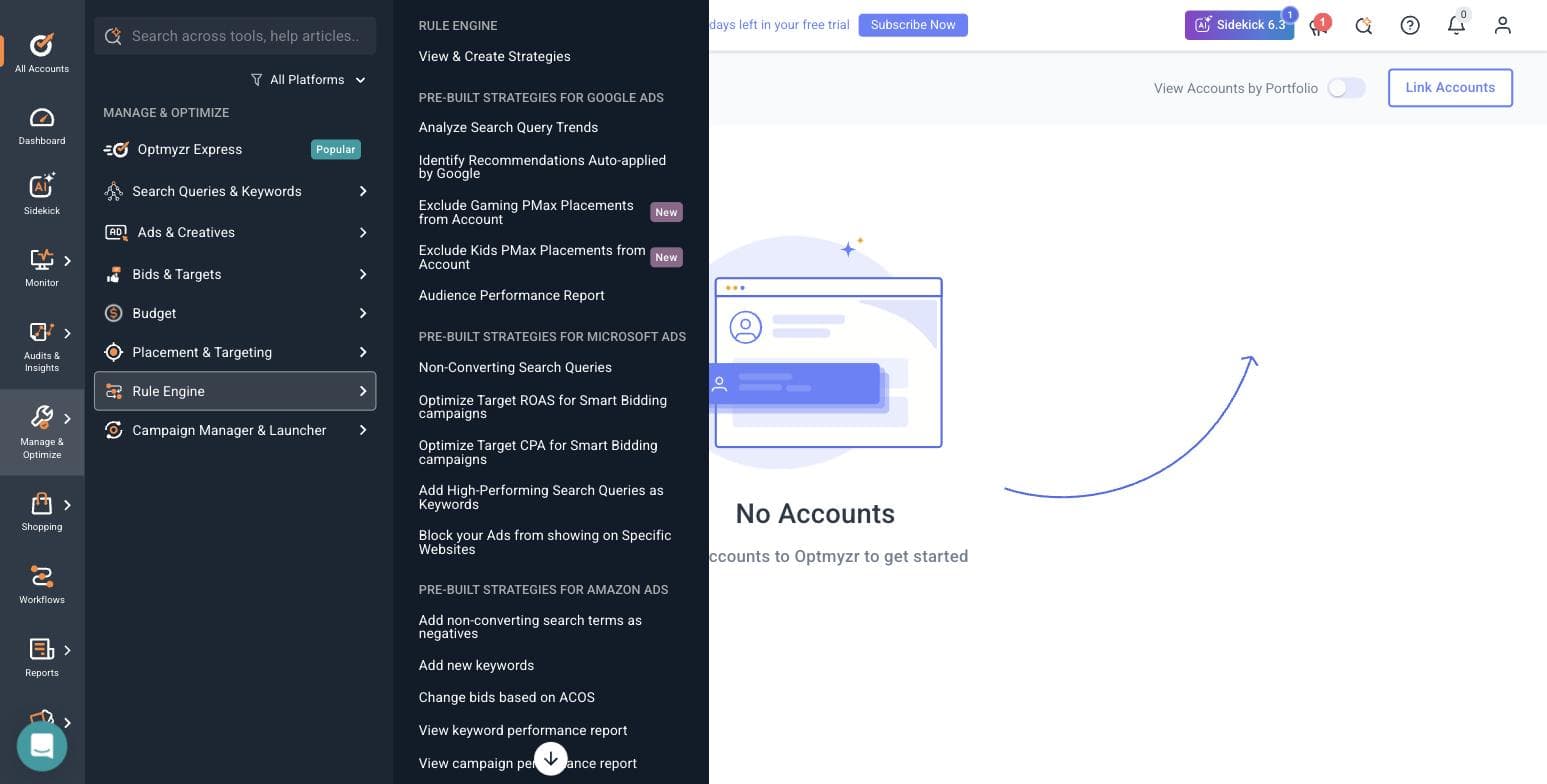
Manage & Optimize holds eight modules: Optmyzr Express, Search Queries & Keywords, Ads & Creatives, Bids & Targets, Budget, Placement & Targeting, Rule Engine, and Campaign Manager & Launcher. The Rule Engine ships pre-built strategies grouped by platform — Google Ads gets search-query trend analysis, a report on recommendations Google auto-applied on your behalf, and two new strategies for excluding gaming and kids placements from Performance Max. Microsoft Ads gets non-converting query cleanup and Smart Bidding target optimization. Amazon Ads gets negative-keyword automation and ACOS-based bid changes. The breadth here is the product's real argument.
Optmyzr's pre-built Rule Engine strategies, split across three ad platforms. Captured 30 July 2026. - 10
Find where the open door closes
Browsing is free; running anything is not. Every optimization module we opened — Rule Engine, Reports, the rest — bounced straight back to the All Accounts screen with 'Link accounts to Optmyzr to get started'. So the honest shape of the trial is this: the AI assistant and the entire tool catalogue are open without a connection, and every tool that would touch a campaign is not.
- 11
Read the integration list, and the consent dialog nobody quotes
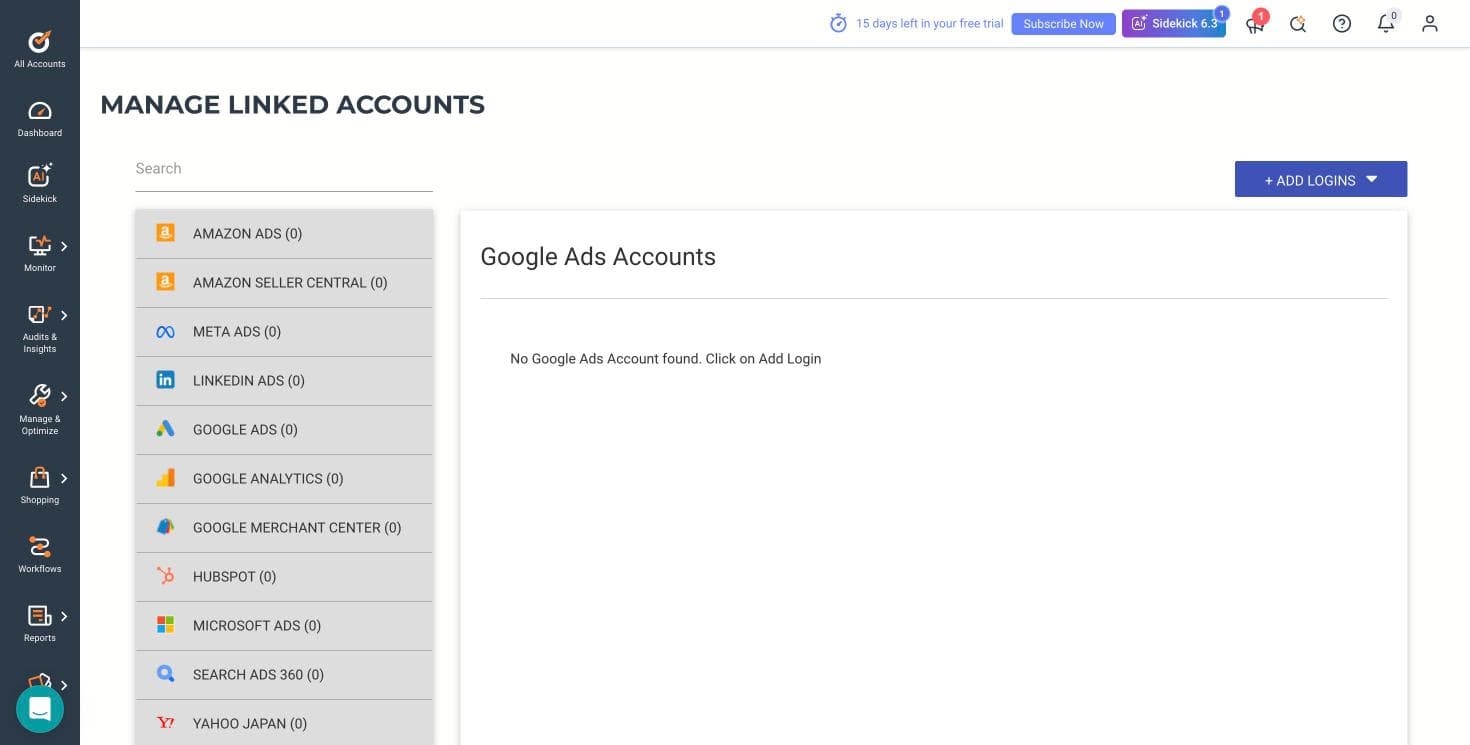
Optmyzr connects eleven sources: Amazon Ads, Amazon Seller Central, Meta Ads, LinkedIn Ads, Google Ads, Google Analytics, Google Merchant Center, HubSpot, Microsoft Ads, Search Ads 360 and Yahoo Japan. Worth noting for agencies: when you link a Google Ads account, Optmyzr offers an optional link to its own manager account for faster support, and the dialog makes you type CONNECT to confirm, warns that Google will automatically email everyone with access to the account, and states outright that it is not recommended if you are an agency without explicit client approval. We have read a lot of these dialogs. That one is unusually straight.
Optmyzr's eleven connectable platforms. Captured 30 July 2026.
What the signup told us
- — No credit card is required, and that claim holds up — we were never asked for one.
- — A phone number and SMS code are required, and that is not mentioned before you start.
- — The banner inside the product counts down from 15 days, while the marketing says 14. A day in your favour, but the two numbers disagree.
- — The wizard is five steps and the qualification form has five required fields. This is a long runway before you see a feature.
- — The lowest ad-spend bracket is Under $10,000 per month and the ladder runs to $500,000+. A business spending a few hundred dollars a month sits below the bottom rung of how this product thinks about customers.
- — Their own published /free-trial/ URL 404s, which suggests the marketing site and the app have drifted apart.
- — The genuine standout: you can enter the product, browse every module and use the AI assistant without connecting an ad account. Almost nothing else in this category allows that.
Where this stops: We did not connect a live Google Ads or Meta account, so no real campaign data ever flowed through Optmyzr for us. That means we cannot speak to the quality of its optimization suggestions against real spend, how its rules behave when they fire, or how its reports look populated. What we can speak to — because we did it — is the signup, the wizard, the AI assistant's reasoning, the tool catalogue, the integration list and the consent flow.
Google Ads Editor
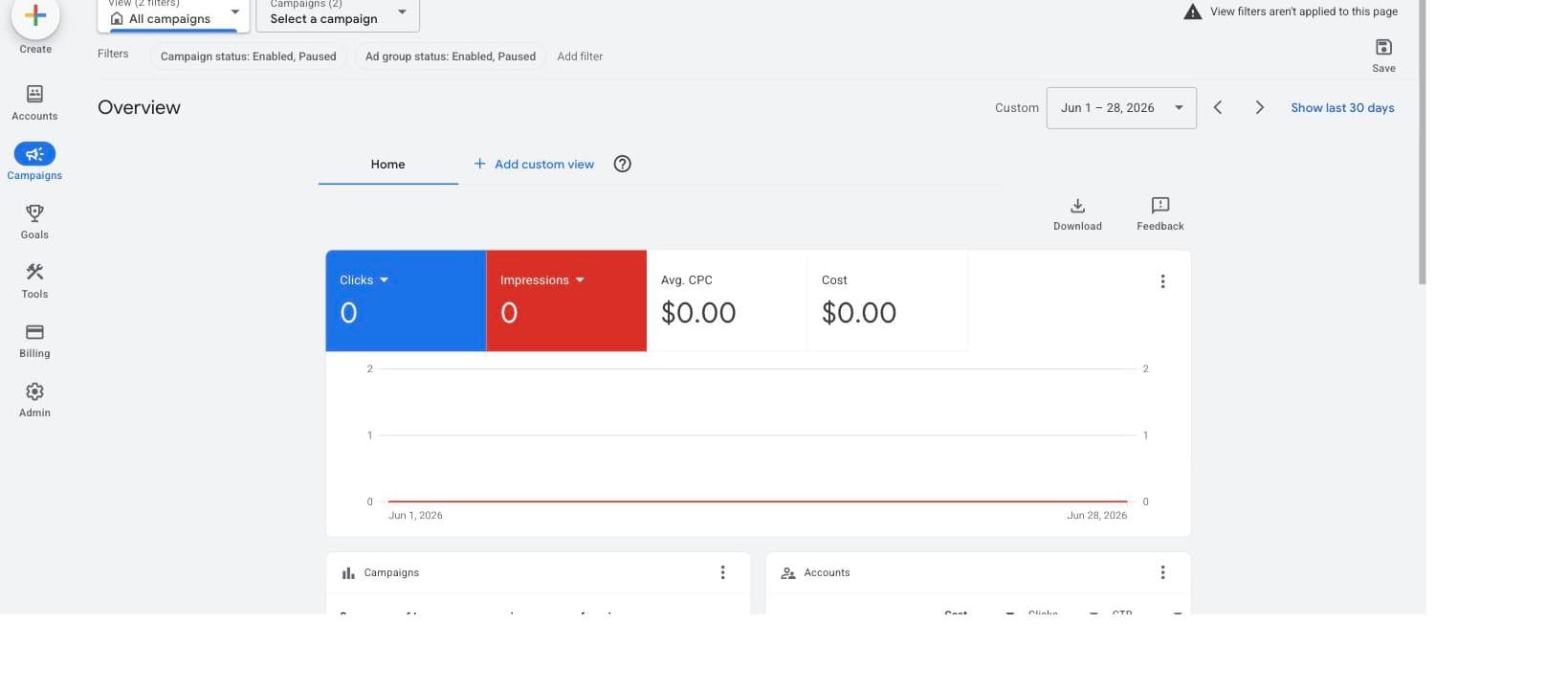
Best free starting pointBefore paying anyone for management software, install the management software Google gives you for free. Google Ads Editor is a no-cost downloadable desktop application that lets you manage campaigns offline and make bulk changes quickly: search and replace text across campaigns, move items, undo and redo, and post everything back in one batch. You can download your account, make a week's worth of changes on a plane, review them as a draft, and push them live when you are ready.
The draft-and-review workflow is the underrated part for a small business. Changes you make in Editor are staged before posting, so you can look at the whole edit before any of it spends money - a safety property that some paid tools handle less carefully. It also stores multiple accounts side by side, and Google's own workflow guidance builds in a 'check changes' pass and an optional step where you share proposed changes with a colleague before anything is posted. It is the free baseline underneath every paid tool on this page, and the one item here with zero budget risk.
What it will not do: think. Editor has no optimization opinions, no alerts, no budget pacing, no reporting worth the name, and it covers Google Ads only. It makes the changes you already decided on faster; it will never tell you which changes to make. Treat it as the workbench, not the mechanic - and expect occasional sync friction when the web interface ships features before Editor supports them.
Pros
- + Completely free, built and maintained by Google
- + Bulk edits and search-and-replace across campaigns that the web interface handles slowly
- + Offline drafts let you review every change before it goes live
- + Handles multiple accounts in one desktop app
- + Export and import lets a colleague review proposed changes
Cons
- − No optimization recommendations, alerts, or meaningful reporting - it edits, it does not advise
- − Google Ads only, nothing for Meta or Microsoft
- − Desktop-only workflow with occasional lag behind new web-interface features
Ideal for
- Every Google Ads advertiser, as a companion to whatever else you use
- Owners making structured bulk changes on a budget of zero
- Anyone who wants a staged draft of changes before they spend money
Pricing: Free. Downloadable desktop application for Windows and Mac; no paid tiers exist. Pricing checked July 2026 on Google's official Ads Editor page.
Visit Google Ads EditorAdFlint
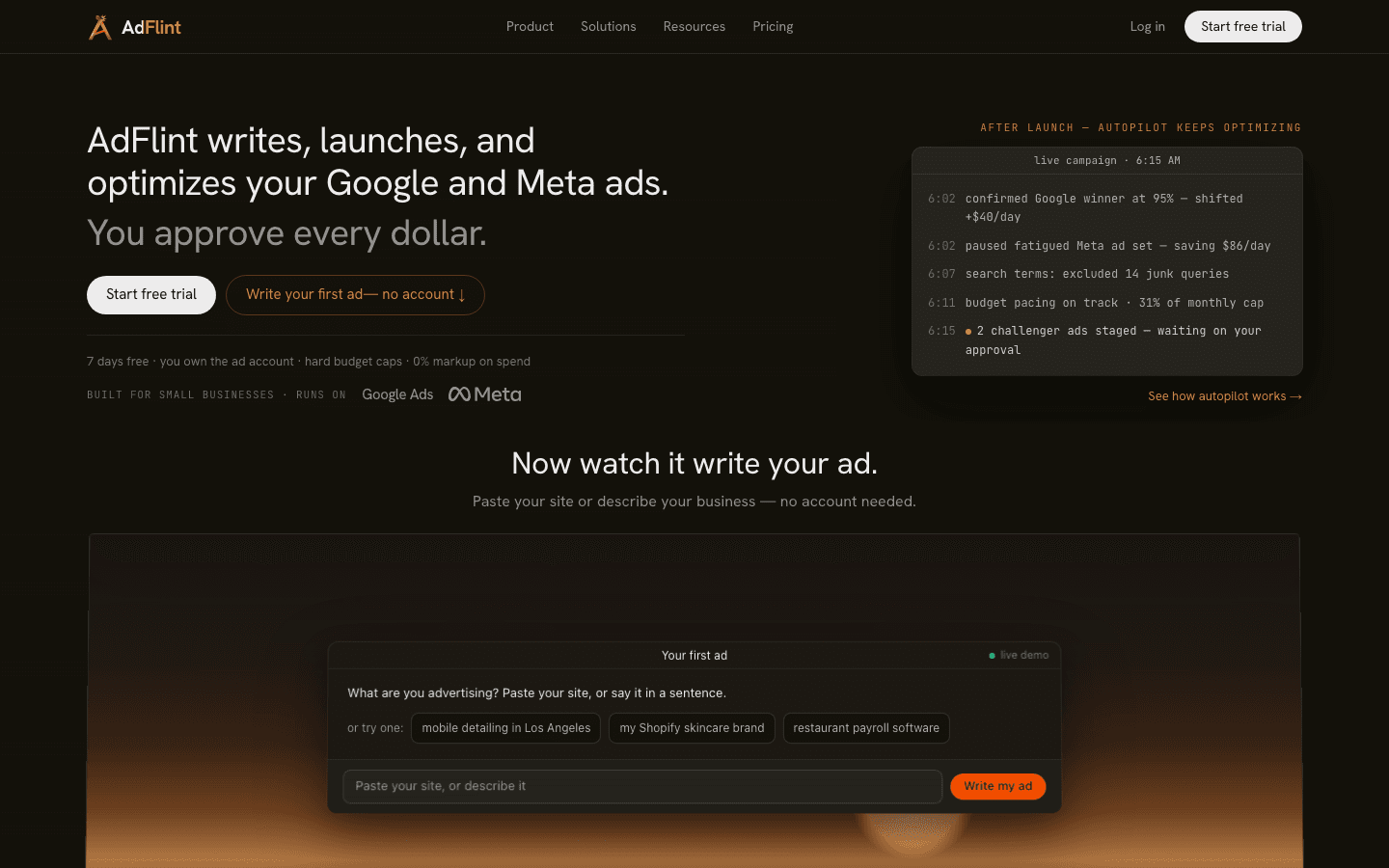
Best for small businesses without a PPC staffOur product — disclosureAdFlint is our product, so read this entry with that disclosure in mind. It exists for the business owner who has concluded, reasonably, that they should not be spending their evenings inside an ads dashboard. The AI writes the ad copy, launches campaigns, and optimizes budgets inside your own Google and Meta ad accounts - you keep account ownership, and on self-serve plans nothing goes live until you click Launch or turn on Full Autopilot. In Autopilot, the default, AdFlint can also pause weak ads and switch on new ad versions it writes. Every change is logged. If you want to approve each later change yourself, Assisted mode applies a fix only when you click.
The pricing is the other structural difference from everything else on this page. Plans are flat monthly fees tied to ad spend caps: Launch at $40 a month covers up to $1,000 a month in ad spend and Growth at $89 covers up to $2,500, and the self-serve plans keep stepping up with spend to Premium at $319 for up to $30,000 a month. A done-for-you Managed plan costs a monthly fee plus a share of the ad spend it manages, priced per account. AdFlint takes no percentage of your self-serve ad spend - you pay Google and Meta directly. For context, the cheapest professional tool on this page starts at $129 a month before you have spent a dollar on ads.
The honest limits: AdFlint is a young product without the decade of public review history that Optmyzr or Opteo have - you will not find a large Capterra profile to check us against, which is exactly the kind of thing this page tells you to look for. Coverage is Google and Meta only, the spend caps mean a fast-growing account will need to move up tiers, and it is not built for agencies managing many client accounts. If you enjoy hands-on PPC work and want deep manual control, the recommendation-engine tools below will fit you better.
Pros
- + Does the work rather than recommending it: writes copy, launches, and optimizes in your own account
- + On self-serve plans, nothing goes live until you click Launch or turn on Full Autopilot
- + Flat fees from $40 a month with hard ad spend caps and no percentage of self-serve spend
- + Runs Google and Meta together, which the Google-only tools here (Opteo, Adalysis, Editor) cannot
- + You keep ownership of your ad accounts and pay the platforms directly
Cons
- − Young product with no established Capterra or G2 review history yet
- − Google and Meta only - no Microsoft, LinkedIn, or other channels
- − Per-plan spend caps mean growing advertisers must upgrade tiers
- − Not designed for agencies running many client accounts
Ideal for
- Owners who want ads running competently without doing the work themselves
- Businesses spending under $2,500 a month across Google and Meta
- First-time advertisers who want approval gates and budget caps as guardrails
Pricing: Launch $40/mo (up to $1,000/mo ad spend), Growth $89/mo (up to $2,500), and higher self-serve tiers up to Premium $319/mo (up to $30,000). Managed is a monthly fee plus a share of the ad spend it manages, priced per account. 7-day free trial on monthly plans, card required. No percentage taken of self-serve ad spend; Google and Meta bill ad spend to your own account. Pricing checked October 2026 at adflint.com/pricing.
Try AdFlint freeOpteo
Best for hands-on owners and freelancersOpteo is a Google Ads recommendation engine with an unusually well-liked interface: it watches your account, surfaces prioritized suggestions - bids, negatives, budget issues, underperforming ads - and applies the ones you accept in one click. Among the professional tools on this page it is the most plausible pick for a single hands-on owner or freelancer, and its Capterra profile (4.9 from 114 reviews as of July 2026) is the strongest in this roundup.
Reviewers consistently describe it as a time-multiplier rather than a replacement for judgment. Longtime user Paul G. put both halves of that honestly in his Capterra review: it speeds up what you could do manually rather than doing something you could not. The counterweight comes from reviewer Gabriel Z.: some recommendations contradict each other, so you still need to review before applying - which is really a description of every recommendation engine, stated plainly.
Two structural cautions for a small business. First, Opteo is Google Ads only - its own site markets Google Ads performance and nothing else, and a Capterra reviewer reported Opteo's team confirming Microsoft Advertising was not on their roadmap. Second, the $129 Basic plan covers 10 accounts and $25,000 in monthly spend - generous capacity that a one-account advertiser mostly will not use, which is why one reviewer questioned its value below a large account portfolio. If you are paying $129 a month against $1,000 of spend, the tool costs 13 percent of your media budget before it has saved you anything.
Pros
- + Clear, prioritized recommendations with one-click apply
- + Highest Capterra rating in this roundup (4.9 from 114 reviews, July 2026)
- + Reviewers repeatedly single out responsive, generous support
- + Straightforward pricing with a free trial
Cons
- − Google Ads only - no Microsoft, Meta, or Amazon coverage
- − Recommendations can be contradictory and still require informed review
- − $129 a month is heavy relative to a small single-account budget
- − Value scales with account count - thin if you manage only one account
Ideal for
- Owners and freelancers who enjoy running Google Ads and want leverage
- Consultants managing 3 to 10 small accounts
- Advertisers who want suggestions explained well enough to learn from
Pricing: Basic $129/mo (10 accounts, $25,000/mo spend limit), Professional $249/mo (25 accounts, $100,000), Agency $499/mo (75 accounts, $250,000), Enterprise custom. Free trial available. Pricing checked July 2026 and re-checked October 2026 at opteo.com/pricing.
Visit Opteo“It's a very easy to use system with some great features. It doesn't do anything that can't be done manually, but it can do it a lot faster, especially if you're running multiple accounts.”
— Paul G., Co-founder, verified Capterra review, May 4, 2023
Optmyzr
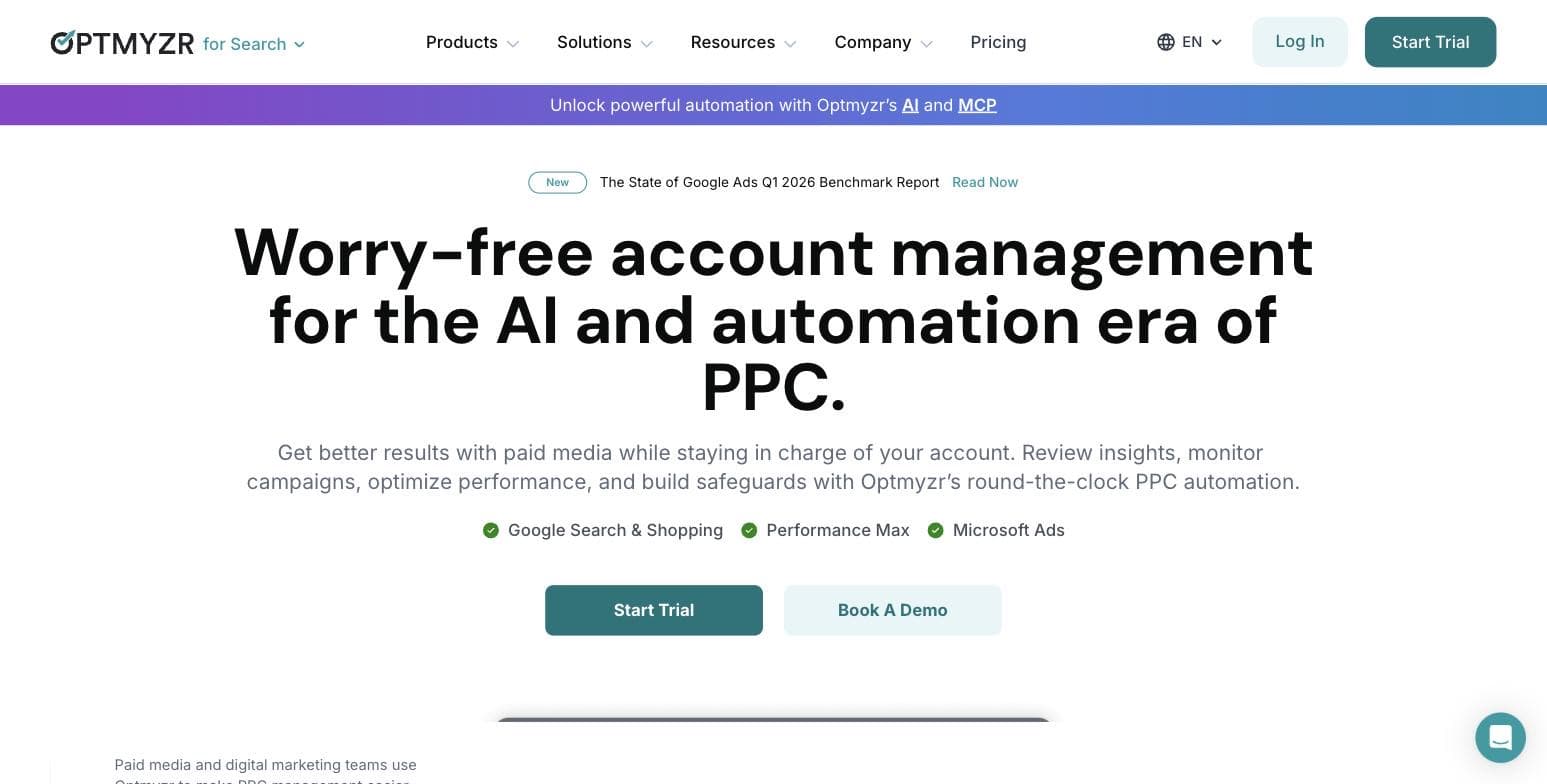
Best for agencies and PPC power usersOptmyzr is the deepest toolkit on this page. Its pricing page headline reads 'The complete PPC toolkit, starting at $209 a month', and the breadth backs that up: one-click optimizations, rule engines, scripts, budget pacing, audits, and campaign builders across Google, Microsoft, Amazon, Meta, LinkedIn, and Yahoo! Japan Ads, with the Amazon and social tools included in every plan and pricing tiers that scale by ad spend from $25,000 a month up past $500,000. Its Capterra profile stands at 4.7 from 184 reviews as of July 2026.
Read that headline price carefully. The $209 is the annual-prepay rate; the entry Essentials tier at the $25,000 spend bracket is $299 a month if you pay month to month. The headline quotes the 30 percent annual discount as if it were the sticker price.
Recent reviews describe exactly what a power user wants. Tushar S., a performance marketing manager, wrote in March 2026 that it consolidates spend, revenue, and ROAS into decisions and saves significant time on audits and campaign builds. The recurring caveat across reviews is capability's price: multiple reviewers describe it as a tool for people who already know PPC, with one COO warning it is not for the novice user because judging whether a recommendation helps requires real knowledge. One reviewer's cautionary tale about default bid settings costing real money is worth reading before you hand any tool bulk powers.
For a typical small business, Optmyzr is the right answer to the wrong question. At $299 a month month-to-month, spend-tiered pricing, and an overage policy that charges fees and upgrades your plan if you exceed your tier two months running, it is priced and designed for agencies and dedicated in-house marketers. If that is you - or you plan to become that - it is the strongest pure toolkit here. If you are an owner with 4 hours a month for ads, it is too much instrument for the song.
Pros
- + Broadest feature set in the category: optimizations, rules, scripts, audits, budget pacing, reporting
- + Covers Google, Microsoft, Amazon, Meta, and LinkedIn Ads, with the Amazon and social tools included in every plan
- + Strong long-run reputation: 4.7 from 184 Capterra reviews as of July 2026
- + 14-day free trial without a credit card
Cons
- − Entry price is professional-tier money for a small business: $299 a month month-to-month, and the advertised $209 requires annual prepayment
- − Reviewers consistently describe a real learning curve and warn it is not for novices
- − Spend-based tiers plus overage fees mean costs rise as you grow, with auto-upgrades after two months of overage
- − Powerful bulk actions can be expensive when misconfigured, as one reviewer's experience with default bids shows
Ideal for
- Agencies managing many accounts
- In-house marketers who run PPC as a core part of their job
- Advertisers spending $25,000 a month or more who need Microsoft, Amazon, or Meta coverage in one place
Pricing: Essentials, Premium, and Enterprise tiers priced by monthly ad spend ($25K through $500K+; custom above that). At the $25K entry bracket, Essentials is $299/mo billed monthly or $209/mo billed annually - the advertised 'starting at $209 a month' is the annual rate. Premium at the same bracket is $389/mo monthly, $272/mo annually. 14-day free trial, no credit card required. Overage fees apply if spend exceeds your tier, with automatic plan upgrade after two consecutive months of overage. Pricing checked July 2026 and re-checked October 2026 at optmyzr.com/pricing.
Visit Optmyzr“It gives a clear, consolidated view of spend, revenue, and ROAS, which makes decision-making much easier. Since using it, I've saved a lot of time on audits, optimizations, and campaign builds.”
— Tushar S., Senior Performance Marketing Manager, verified Capterra review, March 18, 2026
Adalysis
Best for account audits and ad testingAdalysis comes from Brad Geddes, a longtime PPC educator, and it shows in the product's center of gravity: auditing and ad testing. It runs 100-plus audit checks against your account, cross-checks negative keywords, tracks quality score, manages RSA assets, and forecasts budgets using account history and seasonality. Every plan includes unlimited Google and Microsoft Ads accounts and unlimited users - the pricing ladder is based purely on ad spend, starting at $149 a month for up to $50,000 in monthly spend.
Its Capterra profile (4.6 from 119 reviews as of July 2026) sketches a consistent picture. Fans like Justin L. praise the balance of depth and usability; a separate March 2026 reviewer, hupsy P., singles out functions other tools lack, naming the cross-checking of negative keywords. The recurring complaints are equally consistent: the interface reads as dated and overwhelming to new users, several reviewers note data refreshes on roughly a daily cycle rather than in real time, and one March 2026 reviewer was blunt that the absence of Meta ads support was a deal breaker for their team.
The honest small-business read: $149 a month buys far more spend headroom ($50,000) than most small advertisers will use, which makes it strong value for a growing account or a small agency and questionable value at $1,000 a month in spend. Unlimited accounts at the base price undercuts Optmyzr and Opteo for multi-account managers on a budget, and the trial is unusually generous - the pricing page lists 30 to 60 days depending on plan. If audits, ad testing discipline, and budget pacing are your gaps, this is the specialist.
Pros
- + Unlimited Google and Microsoft accounts and users on every plan
- + Deep audit engine (100+ checks) and genuinely strong ad testing tools
- + Budget forecasts that account for history, seasonality, and schedules
- + Long free trial - 30 to 60 days per the pricing page
- + Six-month and annual billing discounts (10 and 15 percent)
Cons
- − No Meta ads support - a stated deal breaker for at least one reviewing team
- − Interface described as dated and overwhelming by multiple reviewers
- − Roughly daily data refresh rather than real-time, per reviewer reports
- − $149 entry price assumes more spend than a very small account carries
Ideal for
- Advertisers on Google plus Microsoft who want systematic audits
- Small agencies wanting unlimited accounts without per-account fees
- Anyone serious about disciplined ad copy testing
Pricing: Starts at $149/mo covering up to $50,000 in monthly ad spend, scaling by spend ($249 at $150K, $349 at $250K, up to $3,000 at $5M). Unlimited accounts and users on all plans. 10 percent off six-month billing, 15 percent off annual. Free trial of 30 to 60 days depending on plan. Pricing checked July 2026 and re-checked October 2026 at adalysis.com/pricing.
Visit Adalysis“Adalysis is the perfect balance of robust features and day to day usability. A lot of tools are overstuffed and complicate processes in an effort to solve everything.”
— Justin L., Full Stack Marketer, verified Capterra review, May 16, 2025
Adzooma
Best free multi-platform checkupAdzooma's distinctive offer is a genuinely free tier that connects unlimited Google, Microsoft, and Meta ad accounts and sends you monthly performance reports and opportunity analyses. For a small business that mostly wants to know 'is anything obviously wrong with my ads?', that is a useful standing appointment at zero cost. Paid tiers raise the cadence and depth: Silver at $69 a month moves reporting and opportunity analysis to weekly and unlocks the full opportunities list; Gold at $179 makes it daily and removes alert limits.
The opportunities engine is the core product: scans that flag issues and suggested improvements you apply from one dashboard, plus rule-based alerts delivered by email or Slack. A Trustpilot reviewer credits the automation features with saving real time on ad scheduling and bid management. Being one of few tools at this price to touch Google, Microsoft, and Meta in one place is its practical edge over the Google-only specialists above.
Set expectations accordingly: this is a checkup and tidy-up layer, not a professional optimization suite. The free tier's monthly cadence and limited opportunities are a sampler, the platform bundles SEO and web-metrics reporting that dilutes its PPC focus, and its suggestions do not approach the depth of Optmyzr or Adalysis audits. Treat free Adzooma as a monitoring net under a DIY account, and the paid tiers as competing with - not beating - the specialists at similar money.
Pros
- + Real free tier: unlimited connected accounts with monthly reports and opportunity analysis
- + Covers Google, Microsoft, and Meta in one dashboard
- + Rule-based alerts with email and Slack delivery
- + Cheapest paid tier ($69) undercuts every professional tool here
Cons
- − Free tier is deliberately limited: monthly cadence, capped opportunities and alerts
- − Optimization depth is lighter than Optmyzr, Adalysis, or Opteo
- − A March 2026 Trustpilot reviewer argues the opportunities largely restate recommendations Google and Microsoft already surface for free
- − Bundled SEO and web-metrics features are padding if you came for PPC
Ideal for
- DIY advertisers who want a free monitoring net over Google, Microsoft, and Meta
- Small businesses wanting basic multi-platform tidiness for under $70 a month
- Anyone not ready to pay professional-tool prices
Pricing: Free plan at $0 (unlimited connected accounts, monthly reports, limited opportunities, 3 alerts). Silver $69/mo or $700/yr (weekly cadence, full opportunities, 10 alerts). Gold $179/mo or $1,800/yr (daily cadence, unlimited alerts). Enterprise custom. Pricing checked July 2026 and re-checked October 2026 at adzooma.com/pricing.
Visit Adzooma“Adzooma's interface is incredibly intuitive, making it easy to navigate and use effectively. With its automation features, I've saved valuable time on tasks like ad scheduling and bid management, allowing me to focus on other important aspects of my business.”
— Mantas Malukas, verified Trustpilot review, June 26, 2023
WordStream by LocaliQ
Best if you want humans to run itWordStream is the name most small-business owners searching this query remember - and the most important thing to know in 2026 is that the software they remember is gone. WordStream no longer sells its Advisor software; the brand now operates as the free-tools and education arm of LocaliQ, the marketing services company under USA TODAY Co. What survives and remains genuinely useful is the free Google Ads Performance Grader, which audits your account and flags costly mistakes - worth running before you buy anything on this page, including our product.
LocaliQ itself is not software you subscribe to; it is a managed service where a team runs search, display, social, and other campaigns for you, built around its marketing platform. That is a legitimate answer to the same problem this page addresses - some owners want a human team, not a tool. Its Trustpilot reviews include businesses crediting their rep and team with consistent lead flow, like the June 2026 reviewer quoted below.
The trade-offs are structural. No pricing is published anywhere on the site - engagement starts with a sales conversation, so you cannot comparison-shop the way you can with every other entry here. You are also buying a relationship: your results will depend heavily on the team assigned to your account, which a pricing page cannot tell you in advance. If you want done-for-you with published flat pricing and approval controls, that is the gap AdFlint was built for; if you want a full-service human agency relationship with broader channels, get the LocaliQ quote and compare it against a local agency's.
Pros
- + Free Google Ads Performance Grader is a genuinely useful account audit
- + Full-service human management across search, display, social, and more
- + Large organization with long history in small-business marketing
- + WordStream's free educational content remains strong
Cons
- − The WordStream software product no longer exists - this is now a managed service
- − No published pricing; costs require a sales conversation
- − Results depend on the individual team assigned, which you cannot evaluate up front
- − Not comparable on self-serve control: you are outsourcing, not operating
Ideal for
- Owners who have decided they want a human team running their marketing
- Businesses wanting one vendor across search, social, listings, and website
- Anyone who wants a free account audit before spending money (the Grader)
Pricing: No published pricing; LocaliQ services are quote-based via a sales consultation. The WordStream Google Ads Performance Grader and related tools are free. Checked July 2026 at wordstream.com and localiq.com.
Visit WordStream by LocaliQ“Most importantly, LocaliQ has been delivering high-quality leads on a consistent basis, which has made a real impact as we grow our business.”
— Eastlin, Trustpilot review of LocaliQ, June 12, 2026
Side by side.
| Tool | Best for | Starting price | Platforms covered | Standout limitation |
|---|---|---|---|---|
| Google Ads Editor | Free bulk editing baseline | Free | Google Ads | No recommendations - it edits, it does not advise |
| AdFlint | Small businesses with no PPC staff | $40/mo (up to $1,000/mo spend) | Google + Meta | Young product; no established third-party review history yet |
| Opteo | Hands-on owners and freelancers | $129/mo | Google Ads | Google-only; pricey against a single small account |
| Optmyzr | Agencies and PPC power users | $299/mo ($209 if prepaid annually) | Google, Microsoft, Amazon, Meta, LinkedIn | Professional pricing and learning curve; overage fees as you grow |
| Adalysis | Audits and ad testing | $149/mo (up to $50K/mo spend) | Google + Microsoft | No Meta support; UI reviewers call dated |
| Adzooma | Free multi-platform checkup | Free ($69/mo Silver) | Google, Microsoft, Meta | Lighter optimization depth than the specialist tools |
| WordStream by LocaliQ | Handing it to a human team | Quote-based | Multi-channel (managed service) | The software is discontinued; pricing not published |
How we chose.
What we did for this page: we read each vendor's official documentation and feature pages, fetched every pricing page listed below directly from the vendor's site in July 2026, and read verified user reviews on Capterra and Trustpilot for every tool that has a public review profile. Every quoted review is verbatim, attributed, and linked to the exact page we pulled it from. Star ratings and review counts cited in this article are Capterra's published figures as of July 2026, not our own scores.
October 2026 update: we re-checked the live pricing pages for Opteo, Optmyzr, Adalysis and Adzooma (no changes from July) and added the software, agency or do-it-yourself section. Its agency figures come from WebFX's own published pricing page; we have not hired an agency for this page, and the $15-a-day example is arithmetic on published prices, not customer data.
What we did not do: we did not run live campaigns through any third-party tool on this page. We opened an Optmyzr trial on July 30, 2026 and worked through its signup, setup wizard and app without connecting an ad account; the walkthrough above shows those screens. Everything about Opteo, Adalysis, Adzooma and LocaliQ comes from their own pages and from named reviewers on public review sites, whom we quote rather than paraphrase. Every screenshot is our own capture: the Optmyzr trial, Optmyzr's public site, our Google Ads manager account and our own product.
Disclosure: AdFlint is our product. It appears on this page because Google Ads management for small businesses is exactly what it is built for, and it carries a visible disclosure tag. We ranked it below the free native option because we think that is the honest order: you should have Google's free tooling regardless, and pay for software - ours included - only when it clearly buys back your time.
- — Fit at small-business spend levels: what the entry price actually buys if you spend $500 to $5,000 a month, not $50,000.
- — Live pricing, verified this month: every figure comes from the vendor's own pricing page fetched in July 2026, with plan names and spend caps stated.
- — Recommend versus act: whether the tool only suggests changes or can write, launch, and adjust campaigns itself - and what approval gates exist when it acts.
- — Platform coverage: Google-only tools are noted as such, since many small businesses also run Meta or Microsoft ads.
- — Verified review evidence: what named reviewers on Capterra and Trustpilot consistently praise and complain about, quoted verbatim rather than summarized into a score.
- — Safety rails: budget caps, draft or approval workflows, and how hard it is to accidentally do expensive damage - a real risk reviewers flag even on well-regarded tools.
Common questions.
Is there any good free Google Ads management software?
Yes, three real options. Google Ads Editor is Google's own free desktop app for bulk edits and offline drafts - every advertiser should have it. Adzooma's free tier connects unlimited Google, Microsoft, and Meta accounts and sends monthly reports and opportunity analyses. And WordStream's free Google Ads Performance Grader gives you a one-off account audit. What you cannot get free is ongoing optimization judgment - that is what the paid tools sell.
What does management software do that Google Ads itself does not?
Google's interface shows you everything but prioritizes nothing, and Google's built-in recommendations tend to favor spending more. Third-party tools add prioritized suggestions, cross-account views, bulk workflows, audit checks, budget pacing alerts, and ad testing discipline. Tools like AdFlint go a step further and do the work - writing, launching, and optimizing - rather than suggesting it. The native tooling is free and capable; what you are buying is either time or judgment.
Do I still need management software if I use Smart Bidding?
Smart Bidding only sets bids. It does not write or test ad copy, add negative keywords, restructure campaigns, catch broken landing pages, pace budgets across the month, or tell you when performance quietly degrades. Every tool on this page operates in that surrounding layer. If anything, automated bidding makes account hygiene more important, because a bidding algorithm optimizes whatever structure and signals you feed it - including bad ones.
How much should a small business pay for Google Ads management software?
Keep the tool cost small relative to your ad spend. At $500 to $2,500 a month in spend, the professional tools ($129 to $299 monthly at entry) can cost 5 to 60 percent of your media budget before saving anything, which is hard to justify. Realistic options at that level: free (Editor, Adzooma free tier), $40 to $89 flat (AdFlint, disclosure - our product), or $69 (Adzooma Silver). The $129-plus tools start making sense with multiple accounts or five-figure monthly spend.
What happened to WordStream's software?
WordStream no longer sells its Advisor software. The brand is now the free-tools and education arm of LocaliQ, a managed marketing services company under USA TODAY Co. The free Google Ads Performance Grader still works and is worth running, but if you engage LocaliQ commercially you are hiring a managed service with quote-based pricing, not buying software.
Should I buy software or hire an agency to run my Google Ads?
It comes down to hours and honesty about them. If you or someone on your team will genuinely spend a few hours a month in the account, a recommendation tool multiplies that time well. If nobody will, unused software changes nothing - you need something that does the work: an agency or managed service (LocaliQ, or a local agency, typically several hundred dollars a month minimum) or AI management software like AdFlint (our product - disclosure) with hard budget caps at flat pricing. Run WordStream's free Grader first either way; it will show you what needs fixing.
How much does an agency charge to manage Google Ads?
Few agencies publish prices. WebFX is one that does: its smallest PPC plan lists $1,200 for the first month, then $750 a month, for ad budgets of $100 to $5,000, and its next plan charges $975 or 15% of spend, whichever is higher. Many agencies quote privately. For a small business the useful comparison is the fee against your monthly ad budget: at $15 a day of spend, a $750 monthly fee is more than one and a half times what reaches Google.
Can a small business manage Google Ads itself?
Yes. Google charges nothing to use Google Ads beyond your ad spend, and Google Ads Editor is free. The cost is your time: building the campaign, then checking search terms, budgets and results every week. If you will do that, doing it yourself with a free checkup tool is the cheapest route on this page. If you won't, the access alone changes nothing, and a done-for-you option or an agency is the better use of money.
Keep reading
- Google Ad Manager vs Google Ads: What's the Difference?
- Google Ads Advertiser Verification Deadline
- AI Ad Automation: What to Let It Change, and Not
- Conversion Tracking Setup for Google and Meta
- Guide: Google Ads Bidding Strategies: The Complete Guide
- Guide: Ad Budgets, Pacing, and What Ad Management Costs
- AI Ad Management Software vs DIY Ad Management
- AI Ad Management Software vs PPC Agency: How to Choose
- Google Ads Editor vs Google Ads Web Interface: When to Bulk-Edit Offline
- Google Ads Editor vs Google Ads Scripts
- Smart Bidding vs Manual CPC: When Automation Actually Wins
- Done-For-You Ad Management vs a PPC Agency
- Free tool: Google Ads Budget Calculator
- Free tool: ROAS Calculator
- Free tool: Google Search Ad Preview & Headline Checker
- Free tool: Cost Per Acquisition Calculator
- Free tool: Google vs Meta Budget Split Calculator