Best PPC Software for Dental Practices (2026)
By the AdFlint research team · We run live campaigns on these platforms; every screenshot is from our own sessions · Published August 3, 2026 · Updated August 3, 2026
TL;DR
- Best for most dental practices running their own ads: AdFlint (that is us - disclosed, and ranked on grounds we defend below). The AI writes, launches, and optimizes Google + Meta campaigns inside an ad account you own, nothing goes live until you click Launch or turn on Full Autopilot, and it costs $40/mo flat at a typical $1,000/mo dental budget.
- Best if you have real PPC skill in-house - a marketing coordinator who will work the account weekly, or a multi-location group with a dedicated marketer: Optmyzr, $299/mo billed monthly ($209/mo billed annually) at the entry $25K-spend bracket on its published price selector. We ran a full trial in July 2026; it is the deepest Google Ads toolkit on this page.
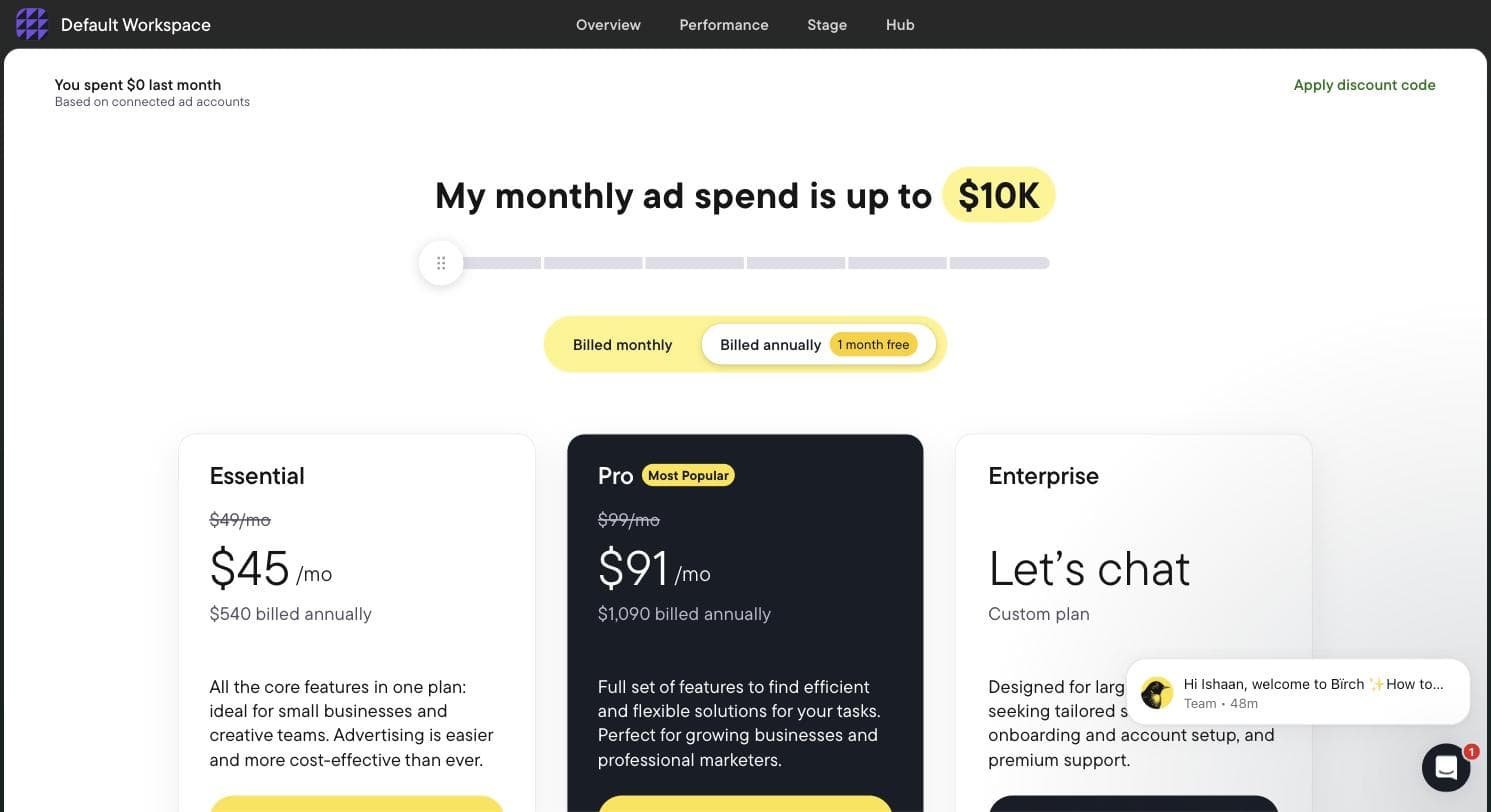
- Best rule-based automation for Meta-heavy multi-location groups: Birch (formerly Revealbot). One catch we confirmed on its own billing screen: automated rules are not in the advertised $49 Essential plan - they require Pro at $99/mo, at up to $10K monthly spend.
- Marketing 360 and WordStream are not software you operate. Marketing 360 bundles its platform with an assigned marketing team at unpublished, quote-only prices, and the WordStream Advisor software no longer exists - wordstream.com today is free graders and content funneling to LocaliQ's managed service.
- Do the budget math before buying any tool: LocaliQ's 2026 search advertising benchmarks (published June 2026) put dentists & dental services at an $8.00 average CPC and $72.97 per search lead. If your front desk books and shows half the leads that come in, a new patient costs roughly $150 in ad spend before any software fee - and implant or clear-aligner clicks cost well above that average, though one accepted case can pay for the year's software.
- Nothing on this page manages Local Services Ads. Dentist is on Google's eligible health-services list for LSA, but those Google Screened listings run in Google's own separate system; every third-party tool here works on regular search, Performance Max, and social campaigns.
Search "best PPC software for dental practices" and most of page one is not PPC software at all. You get dental practice-management and patient-communication suites with a marketing module bolted on, plus agencies ranking themselves under a software headline. If you are a dentist or office manager who typed "software" because you intend to run the practice's own Google and Meta campaigns - or supervise them closely - almost nothing in the current results answers your question. This page does only that: actual advertising software, compared for a dental practice's budget, conversion path, and policy constraints.
One thing the roundups will not say plainly: there is no dental-specific PPC software market. Dental and medical practices draw from the same pool of generalist ad tools, and anything branded as a "dental PPC platform" is almost always an agency service wearing a software costume. What actually changes by vertical is not the tool - it is the economics and the rules. Dental has its own click prices (LocaliQ's 2026 benchmarks: $8.00 average CPC, $72.97 average cost per lead), its own conversion math (a lead is worthless until the front desk answers, books, and the patient shows), its own targeting split (in-network insurance names versus fee-for-service cash-pay), its own seasonality (Q4 use-it-or-lose-it benefits, January deductible resets), and one creative landmine: Meta allows before-and-after images only for general cosmetic ads aimed at adults 18 and over, so the default cosmetic-dentistry ad needs care. Those specifics, not a rebadged dashboard, are what this comparison is built around.
Disclosure up front: this page is published by AdFlint, and we make one of the six tools below. Our entry is marked, its cons section was written before its pros, and the ranking is built to survive a hostile reading. Two competitors - Optmyzr and Birch - we tested hands-on with real trial accounts in late July and early August 2026, and we say exactly what we saw, including the parts that make them look good. The rest we researched from the vendors' own pages, dated, because we will not pretend to have tested what we have not.
A note on how dental money concentrates, because it decides which tool you need: a hygiene or checkup patient arrives on cheap, steady clicks, while a single implant, All-on-4, or clear-aligner case is worth thousands and its keywords are bid accordingly - far above the $8.00 category average. If your growth plan is general dentistry volume, you need consistent, boring, well-guarded campaigns. If it is high-value cases, you need tighter keyword and negative control and a front desk that treats every call like the four-figure lead it is. Both are covered below.
AdFlint
Best for practices running their own ads on Google + MetaOur product — disclosureAdFlint is our product, so read this entry with that in mind. We rank it first for this specific query on one argument: the person searching "PPC software for dental practices" is almost never a PPC professional - it is an owner or office manager who wants the campaigns handled without hiring an agency. Every other tool on this page either recommends changes for a skilled human to apply (Optmyzr), executes rules a skilled human writes (Birch), or is a services engagement in disguise (Marketing 360, LocaliQ). AdFlint is the only entry that does the actual work - writes the ad copy, builds the campaigns, launches them, and optimizes them - while keeping you in control: on self-serve plans nothing goes live until you click Launch or turn on Full Autopilot, and hard budget caps mean a runaway campaign cannot outspend what you set. In a vertical where one careless phrase can cross a health-claim line, that review before launch is the point. In Autopilot, the default, AdFlint can also switch on new ad versions it writes, so a practice that wants to see every headline should use Assisted mode, which applies each later fix only when you click. If you already employ someone who works a Google Ads account every week, rank two is the better tool for you and we say so below.
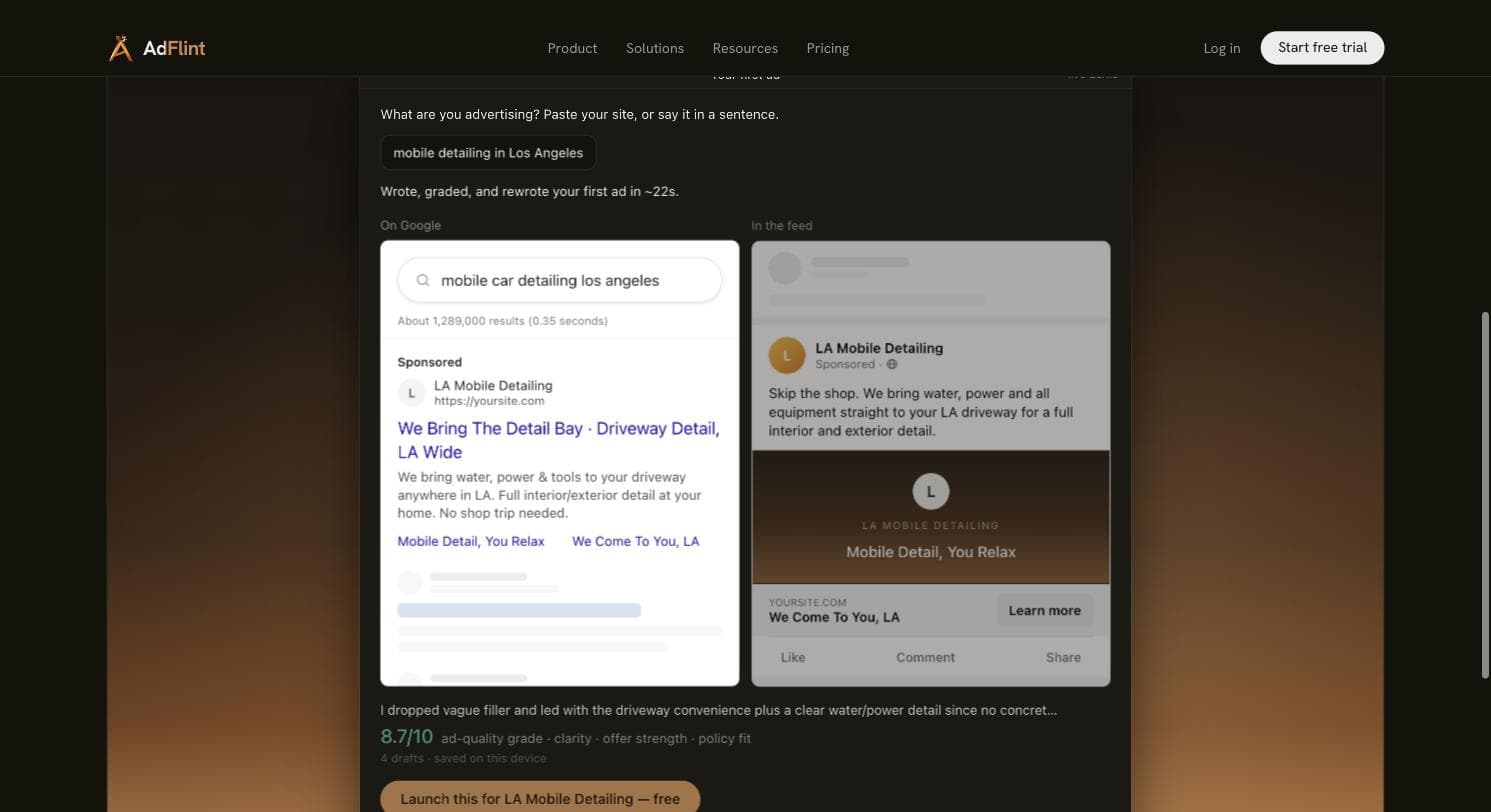
The ownership model matters for dentists specifically, because the classic dental horror story is the marketing vendor who owned the ad account and took the campaign history, the conversion data, and sometimes the phone number with them when the relationship ended. AdFlint connects to your own Google Ads and Meta account through one-click OAuth. You own the account, your card pays Google and Meta directly, and the fee is flat with a 0% markup on spend on every self-serve plan - if you leave, everything stays yours. What we can show today is our live public demo: given the prompt "mobile detailing in Los Angeles," it wrote, graded, and rewrote an ad in about 22 seconds, producing a finished Google search ad and a Meta feed preview and self-grading the result 8.7/10 across four drafts. That demo is a detailing business, not a dental practice - we have not run dental campaigns, and we will not imply otherwise.
Pricing fits how dental practices actually spend. Most single-location practices run $1,000-$5,000 per month in ad spend, which lands on the $40/mo Launch plan (up to $1,000 in spend), the $89/mo Growth plan (up to $2,500), or the $109/mo Scale plan (up to $5,000). The ladder continues to $319/mo at $30,000 in spend, with custom pricing above. A managed done-for-you tier, priced per account as a monthly fee plus a share of managed spend, suits practices that want zero dashboard duty. Entry is a 7-day free trial.
The honest limits: AdFlint runs Google Ads and Meta only - no Microsoft Ads, so the cheaper Bing clicks some dental advertisers test for implant and denture searches are out of reach, and no TikTok. It is a young product with no third-party review footprint on G2 or Capterra yet. And its dental knowledge comes from platform policy documentation, not from years of dental accounts - if you want a vendor with a dental case-study binder, that vendor is an agency, and it will price like one.
Pros
- + Only tool on this page that writes, launches, and optimizes the campaigns itself - built for owners without PPC training
- + Review before launch, Assisted mode for later fixes, and hard budget caps: meaningful guardrails in a health-adjacent vertical
- + You own the ad account via OAuth; your card pays the platforms directly; flat fee with 0% spend markup on every self-serve plan
- + Priced for real dental budgets: $40-$109/mo covers the $1,000-$5,000/mo most single practices spend
- + 7-day free trial with no long-term contract - the opposite of the agency retainer model
Cons
- − Google Ads and Meta only - no Microsoft Ads, TikTok, LinkedIn, or Pinterest
- − No dental-vertical track record: our policy knowledge comes from documentation, not from running dental campaigns
- − Young product with no third-party review presence on G2, Capterra, or Trustpilot yet
- − No rule builder - power users who want Birch-style custom automation logic will not find it here
- − Self-serve tiers cap monthly ad spend (for example, $2,500 on the $89 plan), so fast-scaling groups hit plan changes
Ideal for
- Single-location and 2-3 location practices spending $500-$10,000/mo who want ads run without hiring an agency
- Owners and office managers with no PPC training and no time to acquire it chairside
- Practices burned by a vendor-owned ad account who now insist on owning their own data and history
Pricing: Self-serve, flat fee with 0% markup on ad spend: $40/mo (up to $1,000 ad spend), $89 (up to $2,500), $109 (up to $5,000), $119 (up to $10,000), $219 (up to $20,000), $319 (up to $30,000), custom above. Managed done-for-you is a monthly fee plus a share of managed spend, priced per account. 7-day free trial. Checked August 3, 2026.
Try AdFlint freeOptmyzr
Best if you have PPC skill in-houseWe ran a full Optmyzr trial in July 2026, and it earned its reputation: this is the deepest Google Ads toolkit on this page, built for people who work accounts for a living. Signup asks five mandatory qualification questions and then hits a phone-number-and-SMS verification wall (no credit card), and its own /free-trial/ URL 404s - but once inside, Optmyzr does something rare and, for a protective practice owner, genuinely valuable: it lets you into the full application with no ad account connected. You can explore every module before granting anything access to the account that produces your patients. Its step-4 onboarding generated an accurate business profile from just our URL in about ten seconds, and the in-product trial banner said 15 days while the marketing site says 14 - a small mismatch, in the customer's favor.
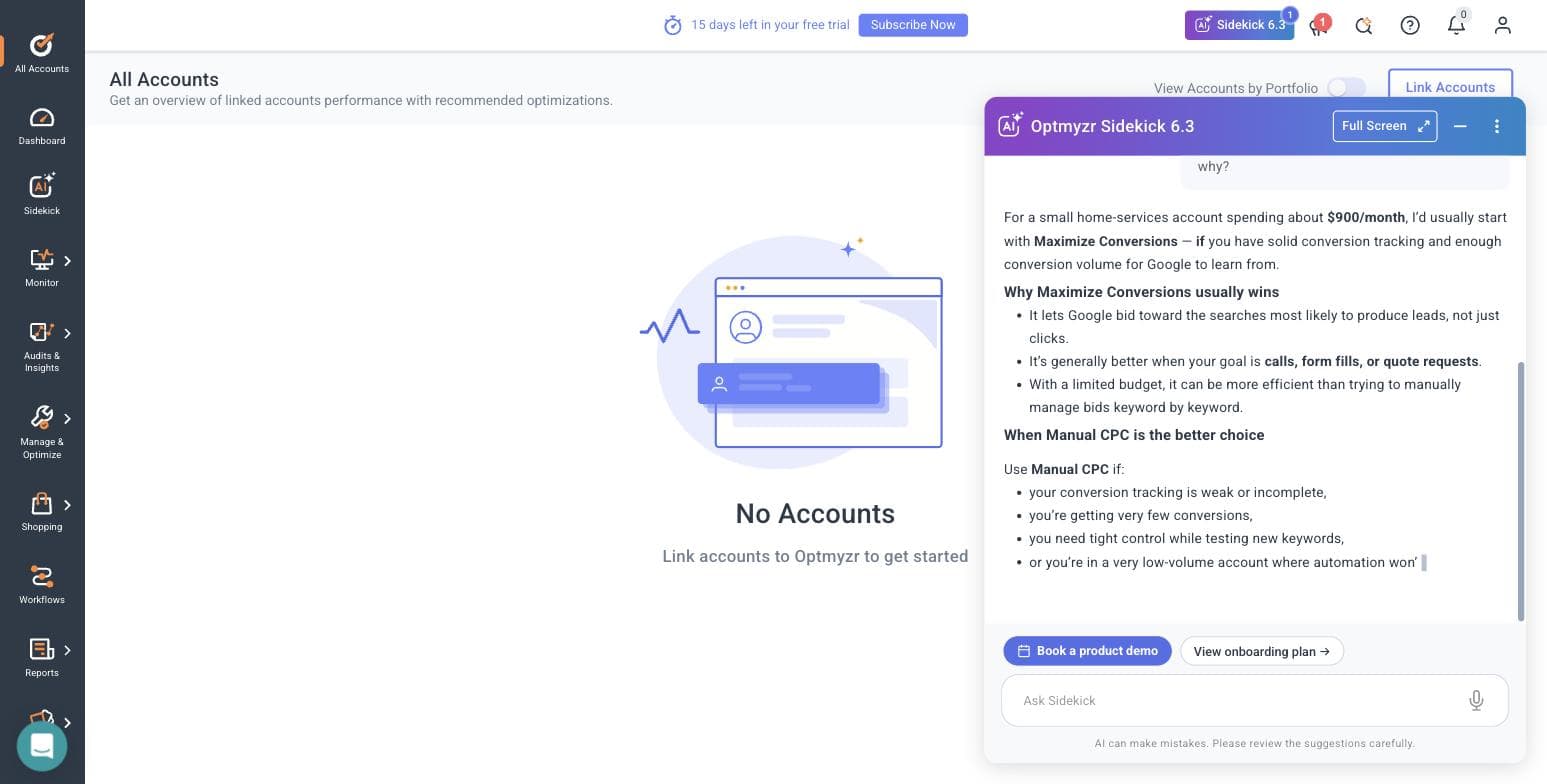
What is inside is a working PPC department's toolbench: an Audits & Insights suite (PPC Investigator, Spend Projection, Account Health & Audits, Search Term Analysis, Competitive & Auction Insights and more), a Monitor suite (KPI tracking and alerts, an Anomaly Detector script, auto budget tracking, a landing page URL checker), workflow "Account Blueprints" with AI-generated blueprints, and a Rule Engine with pre-built strategies across Google, Microsoft, and Amazon Ads - including two new Performance Max placement-exclusion strategies for gaming and kids-app placements. That last one is directly relevant here: a dental practice running PMax will happily have its budget spent on children's gaming apps unless someone excludes them, and Optmyzr ships that exclusion as a one-click strategy. We also tested its Sidekick AI (v6.3) on the exact dilemma a single-location dental account faces - Maximize Conversions versus Manual CPC at low conversion volume - and it answered correctly and conservatively: fix conversion tracking first, use Maximize Conversions on core lead campaigns, fall back to Manual CPC at low volume, with a 3-5 conversions-per-week rule of thumb. That is the same advice a good consultant would bill for.
The friction for a dental practice is structural, not qualitative. Optmyzr recommends; a human decides. Nothing improves unless someone opens it weekly and applies its suggestions, which assumes a marketing coordinator or an owner with unusual discipline. It is also priced for a bigger advertiser than a single practice: the signup form's smallest self-identified bracket is "Under $10,000/mo" in spend, but its published price selector starts at the $25K/mo bracket, where Essentials is $299/mo billed monthly or $209/mo billed annually (checked July 2026). At $299/mo, the software costs about 15% of a $2,000/mo dental ad budget before a single click is bought. One more hands-on detail worth knowing: its optional MCC-link dialog makes you type CONNECT to proceed and warns that Google automatically emails everyone with access to the account - so if a former marketing agency still has lingering access to your Google Ads account, they will get an email the moment you link it. Check your account access first.
For a group practice or DSO with a dedicated marketer, or a practice whose office manager genuinely wants to learn PPC as a craft, Optmyzr is the strongest tool here - and its Microsoft Ads coverage (among 11 integrations including Google, Meta, LinkedIn, and Amazon) opens the cheaper Bing auction that Google-only tools ignore. For a dentist planning to look at the dashboard between patients, it will be an expensive subscription that mostly generates unread emails.
Pros
- + Deepest Google Ads toolkit on this page: audits, monitoring, anomaly alerts, and a pre-built rule strategy library
- + Full app explorable with no ad account connected - evaluate everything before granting access
- + Pre-built PMax placement exclusions (gaming and kids apps) fix a real dental budget leak in one click
- + Sidekick AI gave a correct, conservative answer to a real low-volume bidding question in our test
- + Covers Microsoft Ads and Amazon alongside Google and Meta - 11 integrations total
Cons
- − $299/mo billed monthly ($209/mo annual) at its entry bracket is roughly 15% of a typical $2,000/mo dental ad budget
- − Recommend-first by design: nothing improves unless a skilled human works it every week
- − Phone number and SMS verification wall at signup; its own /free-trial/ URL 404s
- − Priced for professionals: the published spend selector starts at $25K/mo, well above what a solo practice spends
- − Social-side tooling is thinner than its search tooling
Ideal for
- Multi-location groups and DSOs with a dedicated in-house marketer
- Office managers or coordinators who will genuinely learn PPC and work the account weekly
- Practices that also want Microsoft Ads (Bing) coverage for implant and denture searches
Pricing: Priced by monthly ad spend. On the published price selector the entry bracket is $25K/mo spend, where Essentials is $299/mo billed monthly or $209/mo billed annually (annual billing advertised as saving 30%); brackets rise through $500K+ and Enterprise is quote-based. The signup qualification form's lowest bracket is 'Under $10,000/mo.' 14-day free trial per the marketing site (the in-app banner told us 15 days), no credit card required. Checked July 2026 at optmyzr.com/pricing.
Related: AdFlint vs Optmyzr
Visit Optmyzr“The automation framework, scripts, and optimisation workflows have greatly reduced the need for manual checks and repetitive tasks. This allows our strategists to dedicate more time to higher-value activities such as developing strategy, conducting tests, and generating client insights.”
— Bia C., Senior Google Ads Specialist, G2 review, January 2026
Birch (formerly Revealbot)
Best rule automation for Meta-heavy multi-location groupsWe ran Birch hands-on in late July and early August 2026, starting with the rebrand mess: revealbot.com and bir.ch/signup both 404 - the working signup lives at app.bir.ch/signup. From there it was under two minutes to a logged-in screen with no phone number and no card, the fastest signup in this comparison. Then the wall: Birch gates everything on connecting a live ad account. There is no sandbox and no demo data; the rule builder was entirely inaccessible in our trial until an account was connected, with the empty state showing just three example action types - increase bid, duplicate, notify. For a practice owner who wants to evaluate before granting access to a live account (the thing Optmyzr handles so well), that is a real obstacle.
Birch is now three products. The core rules engine executes automations around the clock - the dental use case writes itself: "pause any ad set whose cost per lead exceeds $120 for three consecutive days," or "notify me when the emergency-dentist campaign's spend doubles day-over-day." Stage turns a planning Google Sheet and a Drive folder of creative into bulk ads for Meta, TikTok, and Snapchat with read-only Drive access - which is exactly how a multi-location group should rotate monthly offers, building this month's whitening special or new-patient exam ads for every location from one spreadsheet. Hub is a Signals Gateway deployment for server-side first-party tracking. One dental-specific caution on Hub: routing events server-side does not make patient data HIPAA-safe. A dental practice is a HIPAA covered entity, Meta does not offer a business associate agreement for its ad tools, and names, phone numbers, and appointment details must stay out of event payloads no matter which path they travel.
Now the pricing, which we read directly off Birch's own in-app billing slider at every tier, because the headline number is misleading for this audience: automated rules - the reason you would buy Birch - are not in the $49 Essential plan. They are Pro-only, along with Explorer, Launcher, Stage, custom audiences, and the Sheets/AppsFlyer/Hyros integrations. At up to $10K/mo spend (where most single practices and small groups sit), the real price is Pro at $99/mo. The ladder: at up to $10K spend, Essential $49/Pro $99; up to $30K, $149/$249; up to $75K, $299/$499; up to $150K, $499/$799; up to $300K, Pro only at $1,299; $500K+ is Enterprise-only. Annual buys 12 months for the price of 11, overages bill through Stripe, the trial is 14 days, and on expiry your rules and reports are disabled - so a lapsed card silently stops the automation guarding your budget.
Platform fit for dental is workable but not complete: 12 integrations including Meta, Google Ads, TikTok, Snapchat, YouTube, Google Analytics, Sheets, and Slack - but no Microsoft Ads, no Amazon, and no LinkedIn. And the deeper truth about Birch is that it executes your judgment without supplying any: it will enforce a bad cost-per-lead threshold as faithfully as a good one. It belongs in the hands of a group with someone who knows what the thresholds should be.
Pros
- + True 24/7 rule execution - cost-per-lead guardrails and spend-spike alerts run while you are chairside
- + Stage builds bulk ads from a Google Sheet - the right mechanism for rotating monthly offers across locations
- + Fastest signup we tested: under two minutes, no phone, no card
- + Transparent in-app pricing ladder at every spend tier - we could read every number without a sales call
Cons
- − Automated rules are not in the $49 Essential plan - the real entry price for automation is Pro at $99/mo
- − Cannot evaluate anything without connecting a live ad account: no sandbox, no demo data
- − No Microsoft Ads, Amazon, or LinkedIn among its 12 integrations
- − On trial or subscription expiry, rules and reports are disabled - automation stops silently if billing lapses
- − Executes your rules without judgment: it needs an operator who already knows what good thresholds are
Ideal for
- Multi-location dental groups and DSOs spending heavily on Meta
- Teams with someone who can write and own automation rules
- Groups rotating location-specific promotional creative on a monthly calendar
Pricing: Read off Birch's own in-app billing slider, July 31, 2026: at up to $10K/mo spend, Essential $49/mo, Pro $99/mo (annual $540/$1,090); up to $30K, Essential $149/Pro $249 (annual $1,640/$2,740); up to $75K, $299/$499 (annual $3,290/$5,490); up to $150K, $499/$799 (annual $5,490/$8,790); up to $300K, Essential is not offered and Pro is $1,299/mo (annual $14,290); $500K+ is Enterprise only. Automated rules require Pro. Annual = 12 months for the price of 11; overages billed via Stripe; 14-day trial, after which rules and reports are disabled.
Related: Revealbot (Birch) alternatives · AdFlint vs Revealbot
Visit Birch (formerly Revealbot)“The interface and insights are helpful at times, especially for identifying patterns like creative fatigue, but overall I felt there is still room for improvement in terms of depth, consistency, and actionable recommendations.”
— Bhoomi Arora, Trustpilot review, March 2026
Marketing 360
Best software-plus-people bundle - closest to hiring an agencyWe have not tested Marketing 360 hands-on - it sells through a sales consultation rather than a self-serve trial, so this entry is built from its own public website, checked August 3, 2026. What it describes is not software you operate but a platform-plus-people engagement: a website builder, CRM, advertising management, reputation management, social, email, payment processing, forms and listings, an AI assistant it calls MADi, and a mobile app - paired with an assigned human expert its homepage pitches as, in its own words, a "Chief Marketing Director, without the salary." Its homepage claims "40,000+ Businesses Served Since 2009" and "124.1M+ Ad Spend Managed."
Understood honestly, Marketing 360 is the closest thing on this page to hiring an agency, and it belongs on the list because many people typing this query will discover mid-search that what they actually want is done-for-you. If you want one vendor responsible for the website, the ads, the reviews, and the follow-up - and you never intend to open a dashboard - a bundled platform-with-a-team is a coherent answer, and it is a more honest description of Marketing 360 than "PPC software" is. What we cannot tell you from a website is the thing that decides the outcome: which humans get assigned to your practice, and whether they have run dental accounts before. Ask for that in the sales call, by name and by case.
Two structural cautions, both visible from public information alone. First, pricing: no dollar amounts are published anywhere we could find - the plans page promises "plans to fit any budget" and offers free design concepts before commitment, but the numbers come only from a sales conversation, which makes comparison shopping impossible and puts all pricing leverage on their side of the table. Second, consolidation: when your website, CRM, and payment processing all live inside one vendor's platform, leaving that vendor later is a migration project, not a cancellation. Ask, in writing, what you keep - domain, site files, CRM data, patient contact lists, and above all the ad accounts and their conversion history - before signing anything.
Pros
- + One vendor for website, ads, reviews, CRM, and payments - a genuine fit for owners who want zero dashboard duty
- + Assigned human marketing team rather than software alone
- + Long operating history: in business since 2009, claiming 40,000+ businesses served and $124.1M+ in ad spend managed
Cons
- − No published pricing at all - every number requires a sales consultation, so you cannot comparison-shop
- − Not self-serve software: you are buying a services engagement with a platform login
- − Deep platform consolidation means real switching costs if the relationship sours
- − We could not test it hands-on - there is no trial without going through sales, and no way to assess the assigned team in advance
Ideal for
- Practice owners who have decided on done-for-you and want a single accountable vendor
- Practices that also need a new website and CRM, not just campaign management
Pricing: Unpublished. The plans page shows no dollar amounts ('Plans to fit any budget or reach any goal'); pricing comes via sales consultation, with free design concepts offered before commitment. Checked August 3, 2026.
Visit Marketing 360WordStream (by LocaliQ)
Best free account audit - but the software is goneThis entry exists to correct the record, because dental marketing articles from years past still recommend "WordStream Advisor" as budget PPC software - and that product is no longer sold. We checked wordstream.com on August 3, 2026: it is now a free-tools and content site operated under LocaliQ, offering the Google Ads Performance Grader, a Facebook Ads Performance Grader, a Free Keyword Tool, a website grader, and a ROAS calculator, alongside a large benchmark and how-to library - with calls-to-action that funnel toward LocaliQ's managed marketing services ("technology-backed marketing solutions," demo scheduling). There is no software product and no software pricing on the site. We have not been LocaliQ managed-service clients, so we make no claims about service quality in either direction.
Why it still earns a slot on a dental page: two of its free assets are genuinely useful to a practice. The Google Ads Performance Grader is an instant, free audit that scores an account across ten areas - wasted spend, Quality Score, impression share, account activity, click-through rate, account structure, best and worst text ad, a performance tracker, Display and Shopping ads, and benchmarks - which is the right first move if an agency or a previous office manager built your campaigns and you have no idea whether they are healthy. And LocaliQ's benchmark research is the best public data source for dental ad economics; the 2026 dentists & dental services figures used throughout this page - $8.00 average CPC, 5.66% click-through rate, 10.67% conversion rate, $72.97 average cost per lead - come from its 2026 search advertising benchmarks, published June 2026. Run the grader on your account, compare against those numbers, and you will know more about your account's health in ten minutes than most "free consultations" will tell you.
Go in clear-eyed about the model: the free tools are lead magnets for a managed-service sales conversation, and LocaliQ's service pricing is quote-based with nothing published. If you conclude you want a service rather than software, that is a legitimate path - but it is a hiring decision, and you should evaluate it the way you would evaluate any agency: who owns the ad account, what does reporting look like, and what happens to your campaign history if you leave.
Pros
- + Google Ads Performance Grader is free and surfaces real problems in minutes - ideal for auditing an account someone else built
- + Publisher of the best public dental PPC benchmarks (the 2026 numbers cited throughout this page)
- + A managed-service path exists if you decide DIY is not for you
Cons
- − The WordStream Advisor software this query implies no longer exists - there is nothing to buy here but a service
- − Free tools are lead magnets pointed at a LocaliQ sales conversation
- − LocaliQ managed-service pricing is quote-based and unpublished
- − No self-serve automation of any kind remains on the platform
Ideal for
- Practices that inherited a Google Ads account and want a free, instant health check before spending anything
- Owners benchmarking their current agency's results against published dental numbers
Pricing: Free tools (Google Ads Performance Grader, Facebook Ads Performance Grader, Free Keyword Tool, website grader, ROAS calculator) cost nothing. The WordStream Advisor software is discontinued - there is no software product for sale. LocaliQ managed services are quote-based with no published pricing. Checked August 3, 2026.
Related: WordStream alternatives · AdFlint vs WordStream
Visit WordStream (by LocaliQ)“Most importantly, LocaliQ has been delivering high-quality leads on a consistent basis, which has made a real impact as we grow our business.”
— Eastlin, Trustpilot review of LocaliQ, June 12, 2026
Google Ads Editor + native tools (manual baseline)
The $0 baseline every paid tool must beatBefore paying for anything above, know what free gets you, because every tool on this page must justify its fee against this baseline. Google Ads Editor is Google's free desktop application: it downloads your account, lets you make bulk edits offline - copy changes across campaigns, keyword and negative-list updates, find-and-replace across every ad at once - and nothing posts until you review and push it. The native web interface adds automated rules (pause, enable, budget and bid changes on a schedule or a condition), email alerts, Performance Planner, and conversion tracking, all free with any Google Ads account. A disciplined office manager with this stack and a few hours a week can run a competent single-location search campaign for exactly $0 in software.
The dental-shaped holes are the reason the rest of this page exists. Nothing here watches the account while you are with patients - which for a practicing dentist is most of every day - so a broken landing page or a doubled CPC on your emergency-dentist campaign waits until someone happens to look. Meta is an entirely separate manual job in an entirely separate interface. Nobody writes the ad copy, and in a vertical where Meta restricts before-and-after imagery and bars personal-attribute phrasing, writing compliant creative is its own skill. Dental seasonality becomes a calendar chore done by hand: the Q4 use-it-or-lose-it benefits push, the January deductible-reset messaging swap, the August back-to-school checkup window - each one is a manual rebuild at exactly the times a practice is busiest. And Editor's power cuts both ways: a wrong bulk edit publishes as efficiently as a right one.
The verdict is straightforward: if your account is one campaign, your budget is tight, and someone on staff is genuinely comfortable in the interface, start here and spend the software budget on clicks instead. Use Editor's bulk negative-list tools to keep the job-seeker and dental-school traffic out, and run the free WordStream grader on the account twice a year. The day the account grows past what weekly manual attention can safely hold - more locations, Meta in the mix, high-value implant campaigns where a wasted week is a four-figure loss - that is the day a paid tool earns its fee.
Pros
- + Completely free - the entire software budget goes to ad spend
- + Bulk offline editing with review-before-push safety in Editor
- + Native automated rules and email alerts cover basic guardrails at no cost
- + No third-party vendor to grant account access to at all
Cons
- − Google only - Meta campaigns are a separate manual job in a separate interface
- − No monitoring while you are chairside: problems wait until a human looks
- − No help writing policy-compliant ad copy
- − A wrong bulk edit publishes as efficiently as a right one
- − Seasonal swaps (Q4 benefits push, January deductible reset) are manual calendar chores
Ideal for
- Fee-averse single-location practices with a tech-comfortable office manager
- Simple accounts: one or two search campaigns, no Meta, modest budgets
- Anyone who wants a baseline understanding of their account before buying software over it
Pricing: Free. Google Ads Editor is a free desktop app; automated rules, alerts, Performance Planner, and conversion tracking are included with every Google Ads account. Your only cost is ad spend. Checked August 3, 2026.
Related: AdFlint vs Google Ads Manager
Visit Google Ads Editor + native tools (manual baseline)Side by side.
| Tool | Best for a dental practice | Price (as checked, July-Aug 2026) | Platforms | Hands-on tested? | Standout limitation |
|---|---|---|---|---|---|
| AdFlint | Owner or office manager running the practice's own ads | $40-$109/mo flat at typical $1K-$5K dental budgets; 0% spend markup; 7-day trial | Google + Meta | Our product (live demo verified; no sustained dental spend) | Two platforms only; no dental track record yet |
| Optmyzr | Groups with an in-house marketer who works the account weekly | $299/mo monthly, $209/mo annual at the $25K entry bracket; 14-day trial | Google, Microsoft, Amazon, Meta, LinkedIn + more (11 integrations) | Yes - full trial, July 2026 | Recommend-first: nothing improves unless a skilled human applies it; costs ~15% of a $2K/mo ad budget |
| Birch (formerly Revealbot) | Meta-heavy multi-location groups running automation rules | Essential $49/mo, but rules require Pro $99/mo at up to $10K spend; 14-day trial | Meta, Google, TikTok, Snapchat + 8 more; no Microsoft Ads | Yes - trial account, July-Aug 2026 | Nothing usable until a live ad account is connected; rules are Pro-only |
| Marketing 360 | Done-for-you: website + ads + reviews + CRM from one vendor | Unpublished - sales consultation only | Multi-channel, executed by their team | No - built from its own site, Aug 2026 | No public pricing; a services engagement, not software you run |
| WordStream (LocaliQ) | Free audit of an account someone else built | Free tools; LocaliQ managed service is quote-based | Google + Facebook graders | No - built from its own site, Aug 2026 | The Advisor software is discontinued; the site funnels to a managed service |
| Google Ads Editor + native rules | Fee-averse practices with a capable office manager | Free | Google only | No - Google's own documented free tools | No Meta, no monitoring while you work, no copywriting help |
How we chose.
Hands-on: we created real trial accounts and worked inside Optmyzr and Birch on July 30-31, 2026 and again on August 3, 2026 - through their actual signup walls, empty states, in-app pricing screens, and (in Optmyzr's case) the full app with no ad account connected. Every claim about those two comes from those sessions, and their screenshots on this page are ours.
AdFlint is our own product. We know it completely, which is not the same as testing a competitor - treat our entry as informed but structurally biased, which is why its cons are real and listed without softening.
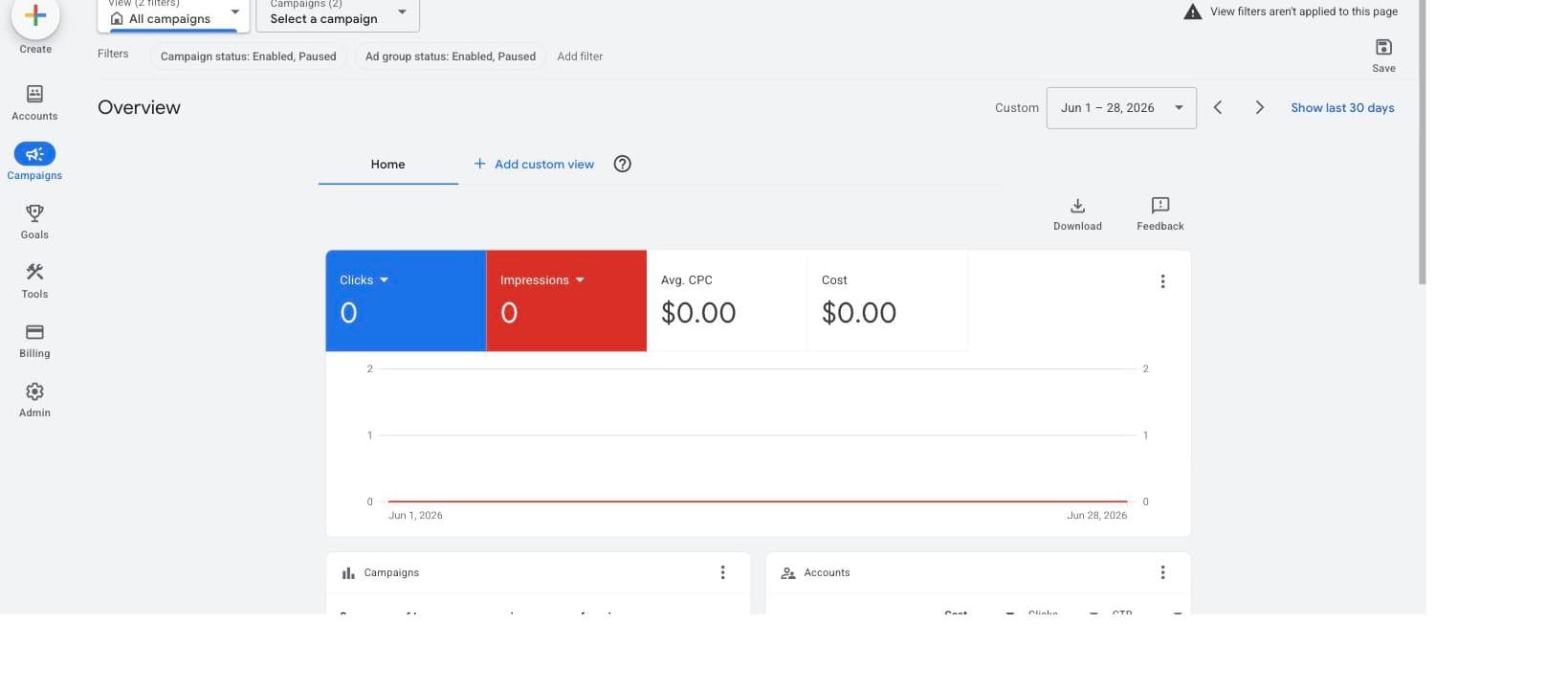
Not tested hands-on: Marketing 360 and WordStream/LocaliQ, both of which sell through a sales process rather than a self-serve trial, so their entries are built from their own public websites, checked August 3, 2026. The Google Ads Editor baseline entry likewise describes Google's own documented free features rather than a product trial; the screenshot on it is our own empty Google Ads account showing $0 spend, included to show the interface, not results.
We have never run dental campaigns - not for a client, not for ourselves. Every vertical-specific claim here comes from published platform policy (Meta Advertising Standards, Google Ads policies, Google Local Services Ads eligibility) and published benchmark research (LocaliQ's 2026 search advertising benchmarks), not from our own campaign data.
All prices were read from the vendor's own pricing page or in-app billing screen on the dates stated next to them. Birch's full price ladder was read directly off its in-app billing slider at every spend tier during our trial.
AdFlint has no sustained live-spend track record to cite, so you will find no performance figures, ROAS claims, client results, or testimonials for it anywhere on this page.
We excluded dental practice-management and patient-communication software - the bulk of what currently ranks for this query - because a recall-reminder module is not PPC software, and pretending otherwise is how this SERP got so useless.
- — Buyer definition first: we ranked for a practice owner or office manager running their own campaigns, not for agencies or PPC professionals. That flips the order you would see on a pro-tools roundup - depth of toolkit matters less than whether the work actually gets done.
- — Actual advertising software only: we excluded the dental practice-management and patient-communication suites that dominate this SERP, because a recall-reminder module does not manage a PPC campaign.
- — Hands-on where possible: Optmyzr and Birch were tested with real trial accounts in July-August 2026; AdFlint is ours; Marketing 360 and WordStream/LocaliQ were researched from their own public pages, dated, and labeled as such.
- — Total cost at dental budgets: every fee was weighed against the $1,000-$5,000/mo most single-location practices actually spend - which is why a $299/mo pro toolkit and a $99/mo real price hiding behind a $49 headline both get called out.
- — Phone-first conversion fit: dental conversions are calls and booked appointments, usually at low weekly volume. We weighed how each tool behaves in a low-conversion-volume account, because that is where automated bidding and automated rules most often go wrong.
- — Policy safety: Meta's health-and-appearance rules make dental creative unusually easy to get wrong, so approval workflows and guardrails were weighted, not just automation horsepower.
Common questions.
What does a dental click and a dental lead cost in 2026?
LocaliQ's 2026 search advertising benchmarks, published June 2026, put dentists & dental services at an $8.00 average CPC, a 5.66% average click-through rate, a 10.67% conversion rate, and $72.97 average cost per lead. Treat those as blended numbers: they average cheap hygiene and checkup terms with expensive procedure auctions. Keywords around implants, All-on-4, veneers, and clear aligners price far above the category average because a single accepted case is worth thousands - which is also why a practice chasing high-value cases should budget per case acquired, not per click.
How do I turn cost per lead into cost per new patient?
Divide cost per lead by the fraction of leads that become seated patients: answer rate at the front desk, times booking rate, times show rate. At the benchmark $72.97 per lead, a practice that answers, books, and seats half its leads pays roughly $146 in ad spend per new patient - before any software fee. Two consequences: first, the front desk is part of your ad funnel, and an unanswered phone during lunch quietly doubles your acquisition cost; second, measure calls-answered-that-booked, not raw calls, or your dashboard will flatter campaigns that ring the phone without filling the chair.
What negative keywords does a dental account need on day one?
Dental search has an unusually expensive junk tail, and at $8.00 a click it drains a small budget fast. Block employment traffic (dental assistant jobs, hygienist salary, dental school, dental assisting program), DIY and information seekers (how to whiten teeth at home, mail-order aligners, home remedy toothache), and insurance shoppers looking for a plan rather than a provider (dental insurance quotes, best dental plans). If you are fee-for-service, add Medicaid, free dental clinic, and low-income/charity terms - those calls take front-desk time you cannot bill. And negative out procedures you refer away: if you do not place implants, paying $30 for an implant click is a donation to a colleague.
Can I use before-and-after photos in my dental ads?
On Meta, only within limits, and do not assume dental work qualifies. Its health and wellness policy lists general cosmetic procedures depicting before and after transformation among the ads that can run when targeting people 18 and over, but it does not say whether veneers or implants count. Its policies also bar ads that imply personal attributes or attack someone's appearance, so copy like "Embarrassed by missing teeth?" is a common cause of rejections. Google's policies generally permit dental services advertising, but its personalized-advertising rules restrict targeting and remarketing around sensitive health categories, so check those rules before you build remarketing audiences off procedure pages. Your own website is not an ad: a before-and-after gallery on your smile-gallery page is fine, and your ads can point there.
Is dentistry a restricted category on Meta?
Dental is not one of Meta's Special Ad Categories (those cover housing, employment, financial products and services, and social issues, elections and politics). But since January 2025 Meta has restricted data sharing for advertisers it categorizes as health and wellness, which can block lower-funnel pixel events from being used for optimization - and dental practices are commonly flagged. Open Events Manager and check for a data-sharing restriction notice on your pixel; if you are restricted, plan campaigns around upper-funnel events, calls, and platform-native lead forms rather than website purchase-style events.
Should a dental practice start with Google Ads or Meta?
Google first, almost always. Dental demand is captured, not created: someone searching "emergency dentist near me" or "dentist that takes [your PPO] near me" is ready to book today, and carrier-name searches are a cheap, high-converting long tail if you are in-network - while fee-for-service practices should do the opposite and negative-match insurance and Medicaid terms to avoid paying for calls the front desk has to turn away. Meta earns its budget second, for demand creation on cosmetic work - whitening, veneers, clear aligners - where policy-compliant creative is possible and the audience does not know it wants you yet.
When is dental PPC seasonal?
Four windows matter. Q4 is the strongest promotional window in dentistry: unused insurance annual maximums expire December 31, so "use it or lose it" messaging from October onward speaks to money patients already have. January brings deductible resets and new plans, when people actively shop for an in-network dentist. August is back-to-school checkup season for families. Spring favors cosmetic pushes ahead of wedding season. Emergency terms are steady year-round but hour-sensitive - schedule call ads for the hours a human actually answers, because an after-hours click on "emergency dentist" that reaches voicemail is the most expensive kind of wasted spend.
What about HIPAA and conversion tracking?
Dental practices are HIPAA covered entities, and ad-platform pixels are not HIPAA-compliant channels - Meta does not sign business associate agreements for its ad tools. The safe pattern is to count events, not people: track that a call started or a booking page was reached, and keep names, phone numbers, appointment details, and anything treatment-specific out of pixel and CAPI payloads entirely. Be especially careful with procedure-specific URLs and event names, since a page path like /dental-implants can itself imply a treatment. Note that server-side tracking products (like Birch's Hub) change the routing, not the obligation - if you are unsure, have your privacy counsel review what your booking form and call tracking actually transmit.
Do any of these tools manage Local Services Ads for dentists?
No. Dentist is on Google's eligible health-services list for Local Services Ads, so the Google Screened listings that appear above regular search results are available to many practices - but they run in Google's own separate system with its own screening, budgeting, and per-lead pricing, and none of the third-party software on this page manages them. Check eligibility in your market from your Google Ads account, treat LSA as a complementary channel run from its native dashboard, and use the tools here for your regular search, Performance Max, and Meta campaigns.
Keep reading
- Roundup: PPC software for medical practices
- Roundup: PPC tools for chiropractors and med spas
- Roundup: PPC software for small business
- Roundup: Google Ads management software
- How Much Do Google Ads Cost for a Small Business?
- Google or Meta Ads First? Decide by Budget
- Conversion Tracking Setup for Google and Meta
- DIY vs Agency vs AI: What Ad Management Costs
- Radius Targeting on Google and Meta, Compared
- Who Owns Your Ad Account, Pixel, and Audiences?
- Free tool: Cost Per Acquisition Calculator
- Free tool: Ad Budget Calculator
- Free tool: Google vs Meta Budget Split Calculator
- Free tool: Ad Management Cost Calculator
- Free tool: Landing Page Ad Readiness Checklist