Meta Ads Manager Alternatives in 2026 (And When to Keep Ads Manager)
By the AdFlint research team · We built trial accounts on Birch (formerly Revealbot) and worked inside them ourselves; every screenshot below is from those sessions, and the rest is documentation and verified user reviews · Published July 28, 2026 · Updated July 30, 2026
TL;DR
- Keep Meta Ads Manager if you have the time to learn it and you want full native control: it is free, and every alternative on this list still runs on top of it through Meta's API.
- For small businesses that want the work done for them, AdFlint (our product, disclosed below) writes, launches, and optimizes ads inside your own Google and Meta accounts from $40/mo, with no percentage-of-spend markup, and on self-serve plans nothing goes live until you click Launch or turn on Full Autopilot.
- For ecommerce teams scaling creative on Meta, Madgicx is the strongest AI-audit-plus-creative option; for power users who think in automation rules across Meta, Google, TikTok, and Snapchat, Birch (formerly Revealbot) starts at $49/mo.
- If you only ever boost posts, the free Meta Business Suite is enough; and if you are nostalgic for AdEspresso, confirm it is still actively maintained before paying - its public content has not moved since late 2022.
Quick answer: the best Adsmanager alternative depends on who does the work. Keep Meta Ads Manager if you have the time to learn it, because it is free and every alternative still runs on top of it. If you want the work done for you, AdFlint (our product, disclosed below) is the small-business option from $40 a month. For ecommerce teams scaling Meta creative, Madgicx is the stronger fit.
Most people searching for an Ads Manager alternative are not looking for a different ad network. They are looking for a way out of the interface: the nested campaign-ad set-ad hierarchy, the settings that quietly reset, the error messages that point nowhere, and the hours it takes to do something that should take minutes. This page is written for that person - typically a small business owner or a one-person marketing team spending a few hundred to a few thousand dollars a month - not for an enterprise media desk.
One honest thing almost no ranking page tells you: you cannot fully replace Meta Ads Manager. Every third-party tool here connects to your ad account through Meta's Marketing API and operates on top of it. Ads Manager remains the system of record where your account, pixel, and billing live. What you are actually choosing is who does the work inside it - you, an AI service, an automation rule engine, or Meta's own simplified surfaces - and how much that costs on top of your ad spend.
The real differentiators between the options below are automation depth (does the tool suggest, execute rules you wrote, or run the account for you), platform coverage (Meta-only versus Meta plus Google and others), pricing model (flat fee versus fees that scale with your ad spend), and who owns the strategy. We start with the case for staying put, because for some advertisers that is genuinely the right answer.
We got inside. Here is every screen.
We created real trial accounts, cleared the verification walls, and worked through the products. Every screenshot below is from those sessions — no vendor marketing imagery, no stock dashboards.
Birch (formerly Revealbot)
Walkthrough performed July 30, 2026Revealbot rebranded to Birch and moved to bir.ch. A lot of published roundups still send readers to revealbot.com, and the old /signup path 404s — the working signup is at app.bir.ch/signup.
We created an account, completed onboarding and worked through the product. The headline finding: Birch in 2026 is three products, not one. The automation tool everyone reviews is now sitting alongside a bulk creative launcher and a server-side tracking gateway, and it is priced against your ad spend.
- 01
Create the account
Email, a password of six or more characters, and your name — or one-click signup with Google. The page states a 14-day free trial, no credit card required, cancel anytime. A newsletter checkbox is present and unticked. No card was requested at any point, and no phone number either. Account creation to the connect screen took under two minutes.
- 02
Set up the company and declare your budget
Step two asks for company name, industry, monthly ad budget, and how you heard about them. Industry options are Agency, Services, Ecommerce, Mobile App, Lead Generation, and Other. The budget brackets run Below $10K, $10K-$30K, $30K-$75K, $75K-$150K, $150K-$300K, $300K-$500K, and Over $500K. As with Optmyzr, everything under ten thousand dollars a month is one undifferentiated bucket at the bottom — and it turns out that bracket is not just a survey question, it is the pricing.
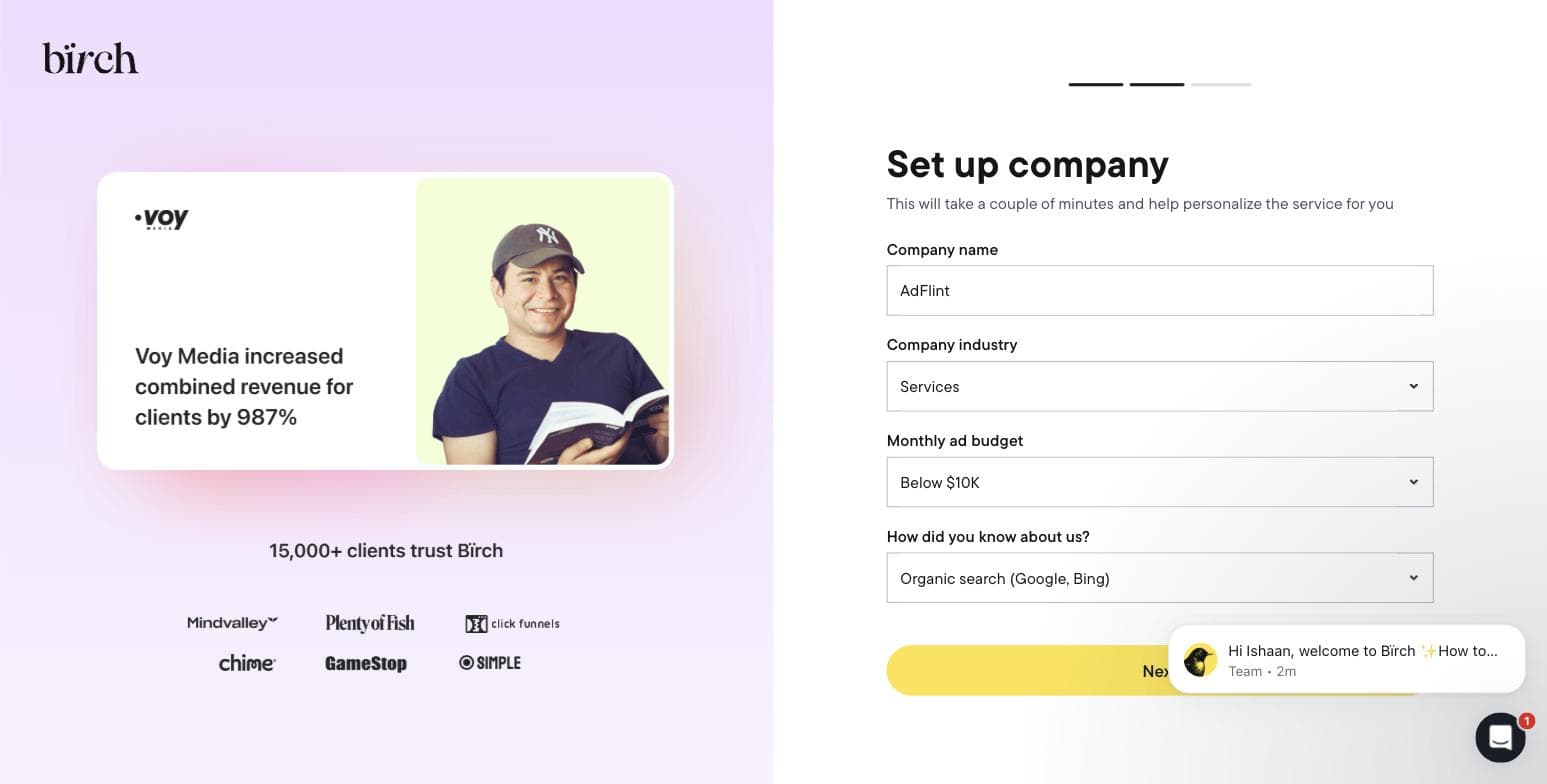
Step two of Birch's onboarding, captured during our own signup on 30 July 2026. - 03
Connect an ad platform — or don't, and see what breaks
Step three asks you to connect Meta Ads, TikTok, Google Ads, or Snapchat before you reach the product. Meta is presented first and most prominently, matching Birch's heritage. We skipped it deliberately, to find out how much of the product survives without granting a third party access to a live ad account. The answer is: the shell, but not the substance.
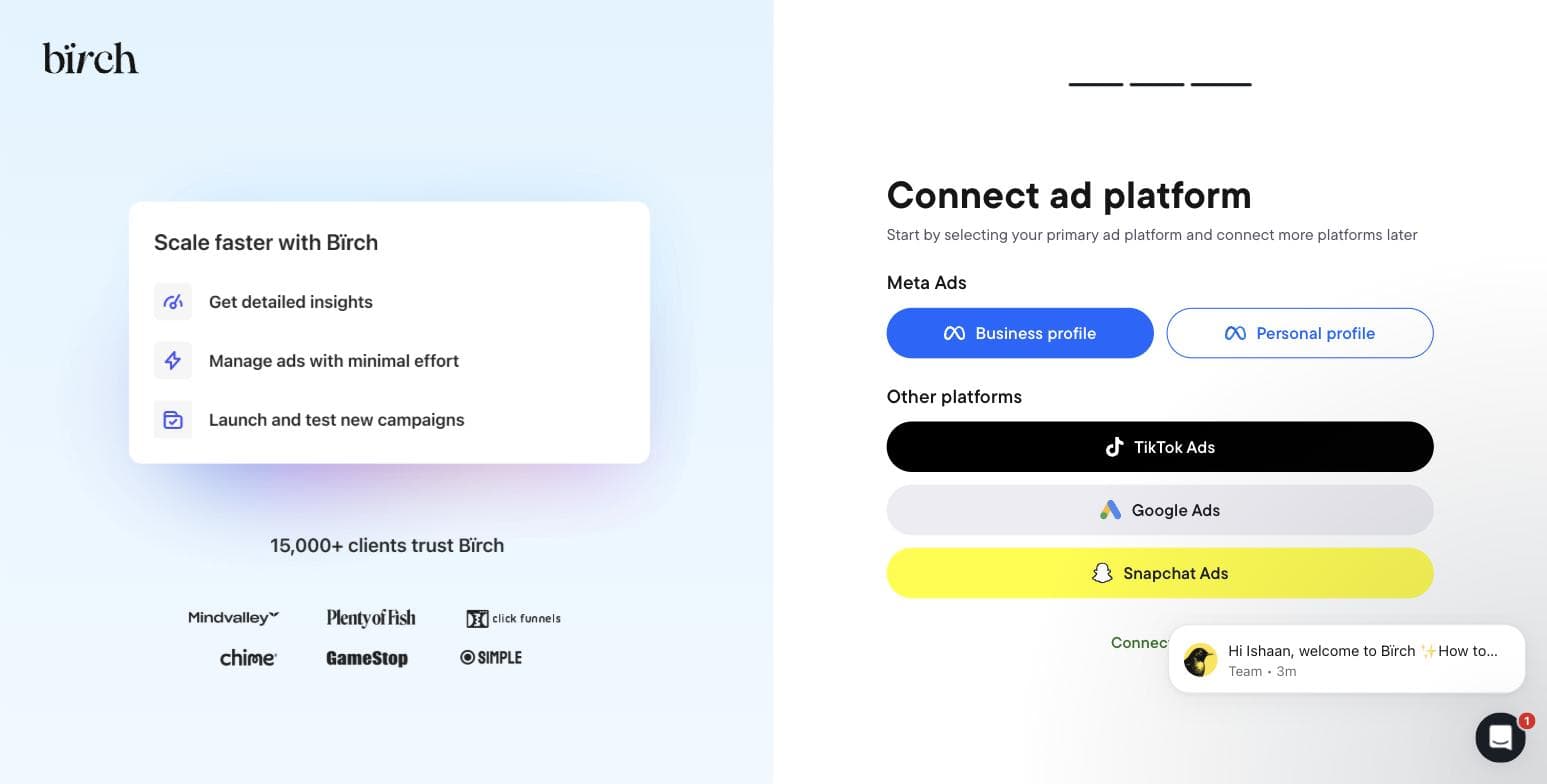
Birch's final onboarding step. Captured 30 July 2026. - 04
Open the Rules engine — the feature it is famous for
The automation screen is the reason most people arrive at Birch. Without a connected account it is a single button reading Connect ad account, over an illustration of the three action types it offers — increase bid, duplicate, notify. That is the entire surface available to an unconnected trial. There is no sandbox and no demo dataset, so you cannot evaluate the rule builder against sample data before handing over access to real campaigns.
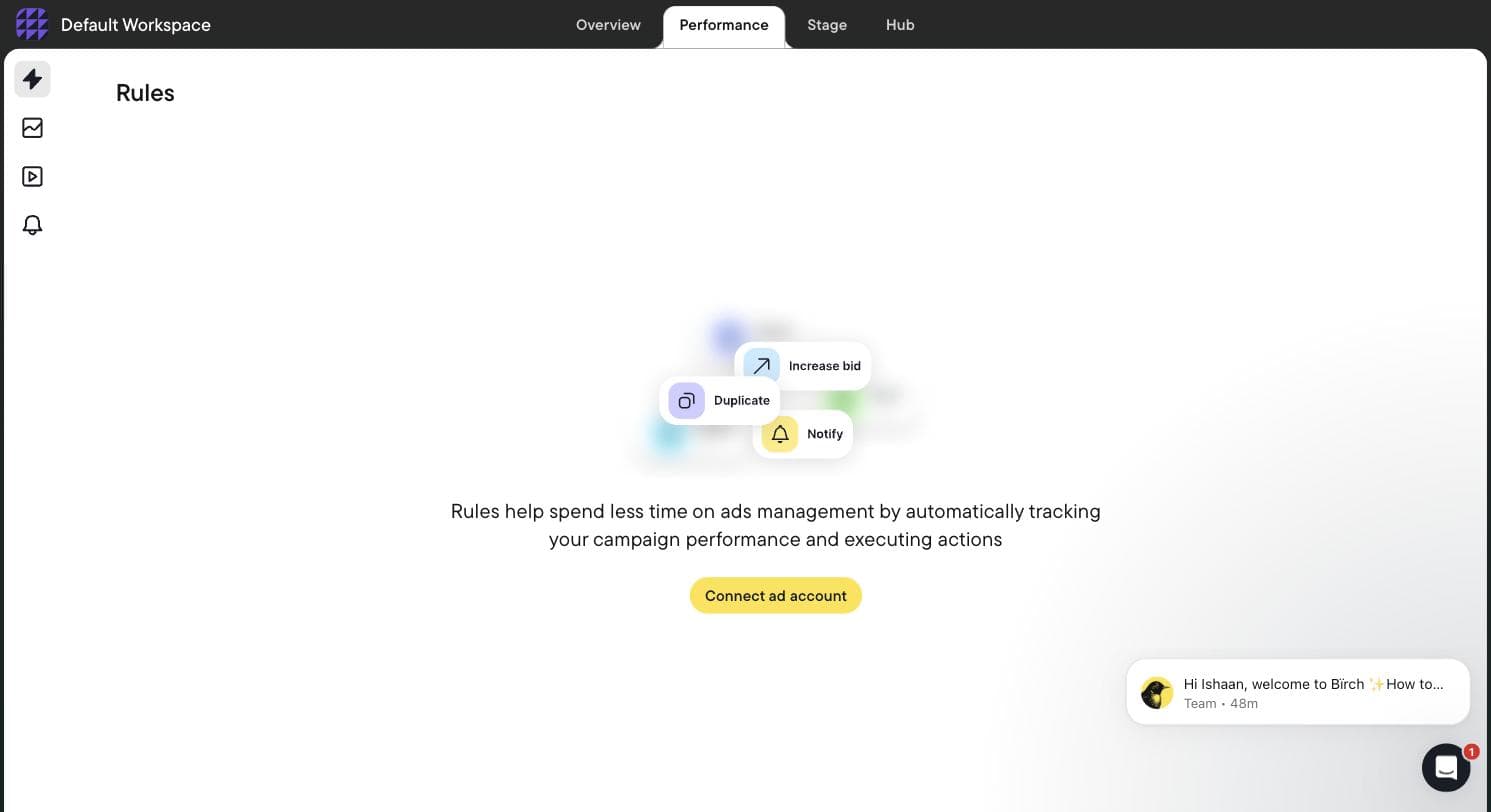
Birch's Rules screen with no ad account connected — the rule builder is entirely gated. Captured 30 July 2026. - 05
Find Stage, the product nobody has reviewed
Stage is a bulk creative launcher: you connect a planning Google Sheet and your Drive folders, and it builds the ads from there — launching creative tests from the sheet, mirroring your Drive folder structure into ad structure, duplicating winning setups with new creative swapped in, and working across multiple Drives and platforms at once. It targets Meta, TikTok and Snapchat. Birch states plainly that its Drive access is read-only and it cannot edit or delete anything. We could not find a single published roundup that mentions this exists.
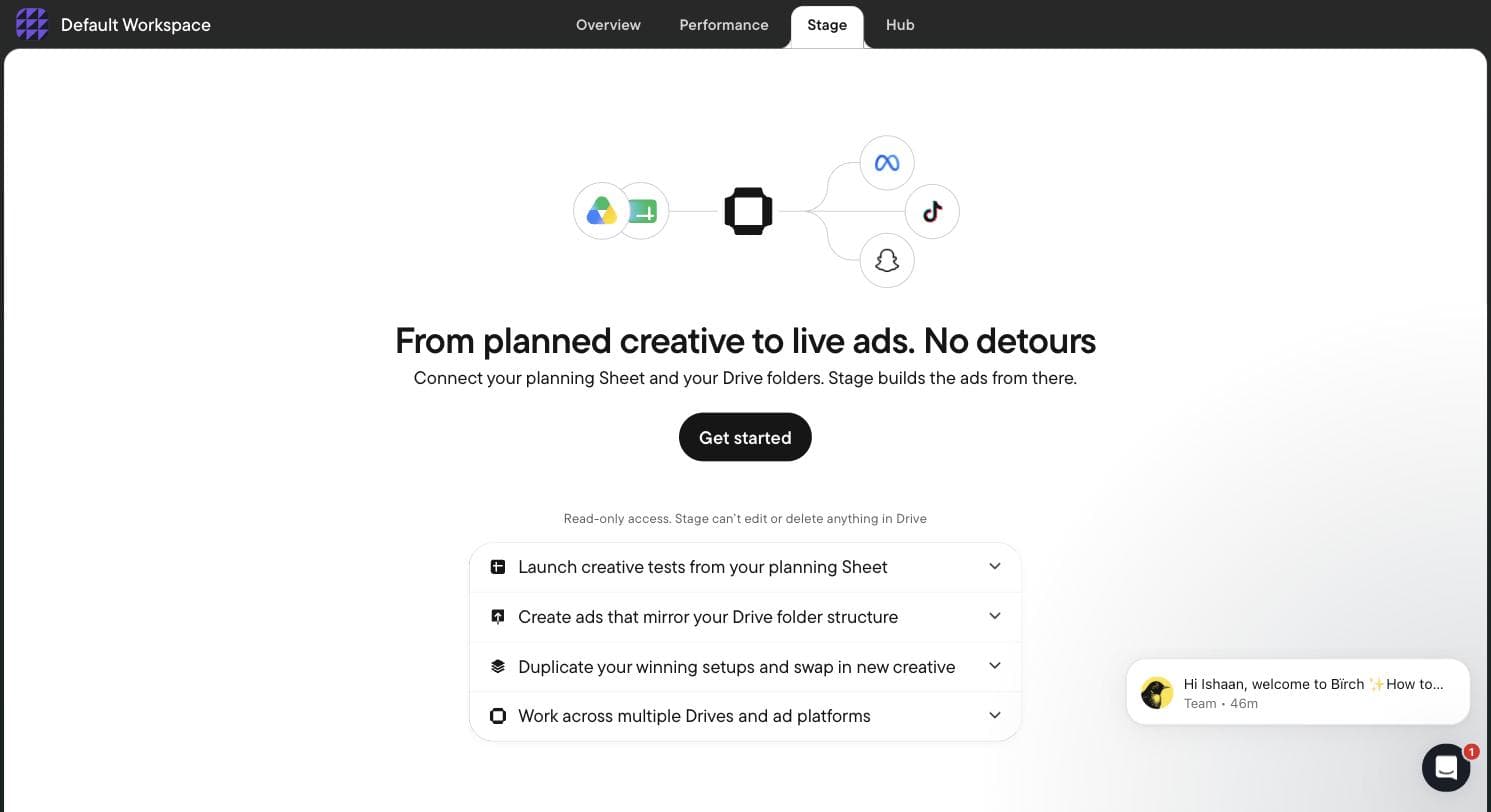
Birch Stage — a Sheet-and-Drive bulk ad launcher absent from every Revealbot-era review. Captured 30 July 2026. - 06
Find Hub, which is not an ads tool at all
Hub is server-side tracking infrastructure. You create a Signals Gateway, pick a hosting region, point it at your primary website, and it collects first-party data and forwards it to the ad platforms — the category occupied by conversions-API and server-side GTM setups. A company that used to sell Facebook rule automation now also sells you the tracking layer underneath it. That is a strategic move worth understanding before you compare Birch to anything on price alone.
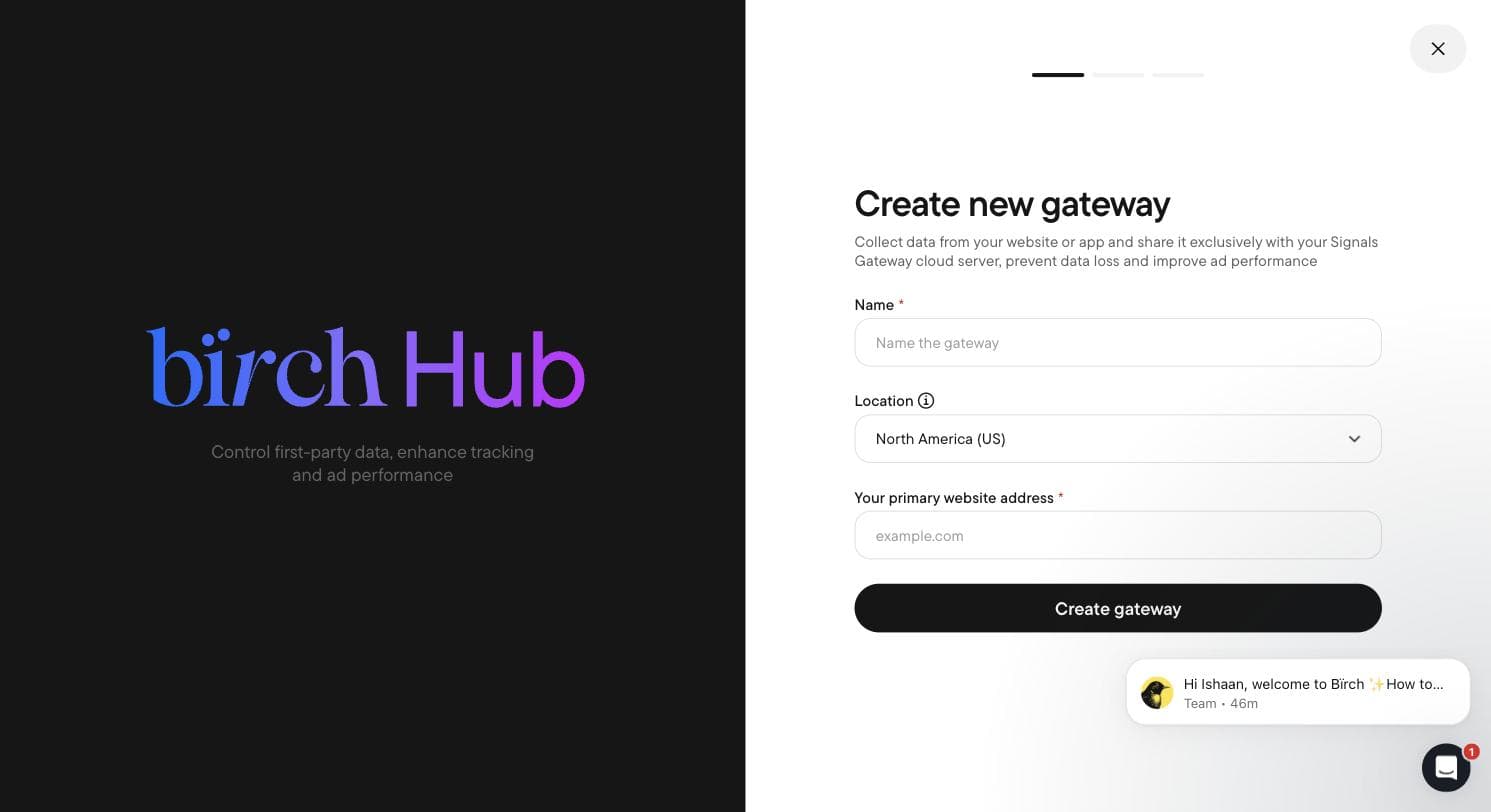
Birch Hub's Signals Gateway — server-side first-party data collection. Captured 30 July 2026. - 07
Read the integration list
Birch connects twelve services: Meta Ads, Google Ads & Google Drive, Snapchat Ads, TikTok Ads, YouTube, Google Analytics, Google Sheets, Slack, and — telling for who it is built for — the attribution stack of AppsFlyer, Adjust (in beta), Hyros and Wicked Reports. There is no Microsoft Ads, no Amazon and no LinkedIn. Set that against Optmyzr's Amazon, Microsoft, LinkedIn and Search Ads 360 and the two products stop looking like competitors at all: Optmyzr is built for search, Birch is built for paid social and direct-to-consumer attribution.
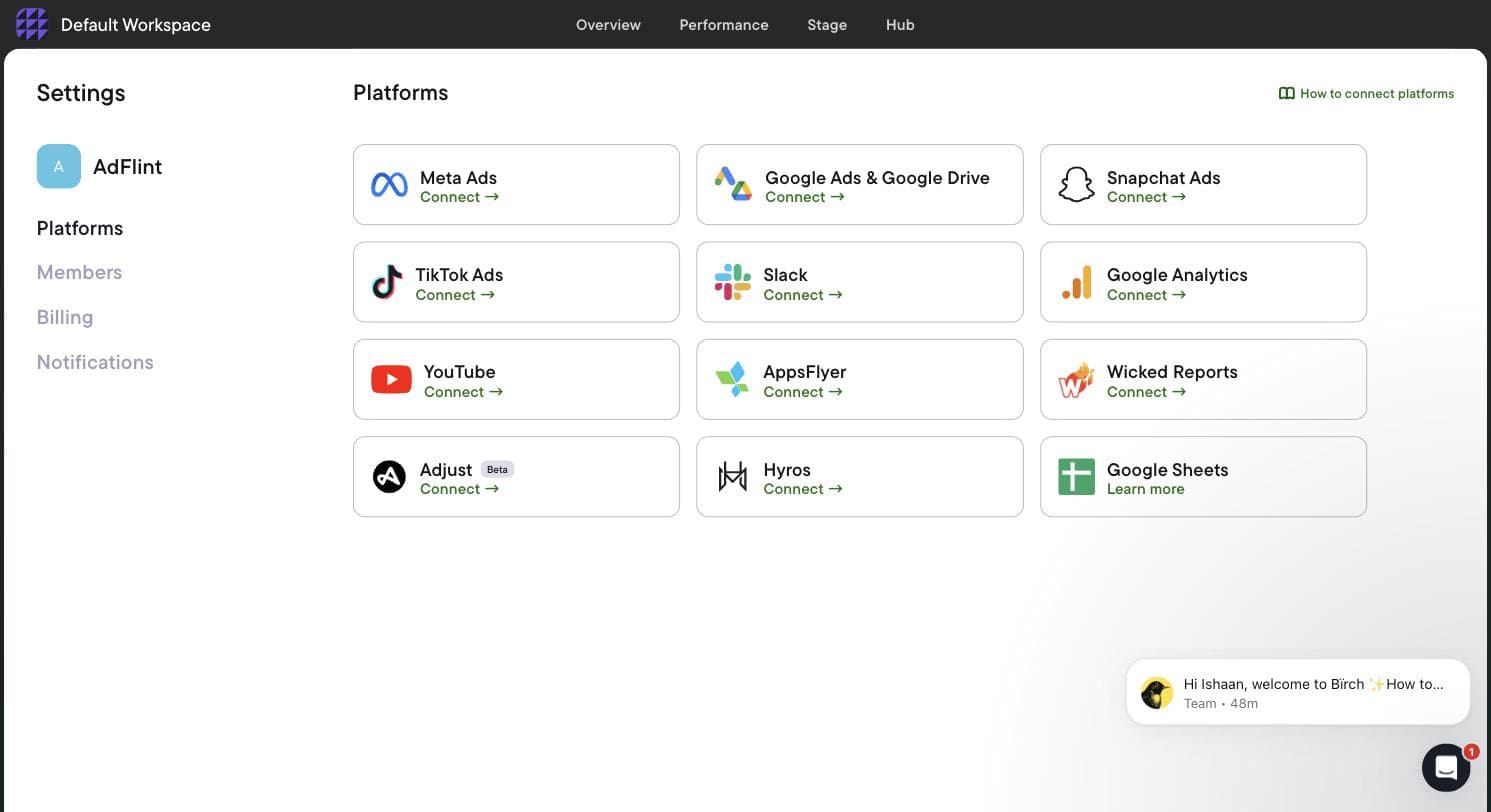
Birch's twelve integrations, heavy on paid social and attribution. Captured 30 July 2026. - 08
Read the real price off the billing screen
Birch does not have a flat price. The billing screen tracks cumulative spend across your connected accounts and charges you against it, with a slider that recalculates every plan as you move up the spend ladder. We walked the whole slider and wrote down every number. Two things matter more than the prices themselves: automated rules — the feature Revealbot was known for — are not in the entry plan at all, and above roughly $150K in monthly spend the entry plan stops being offered.
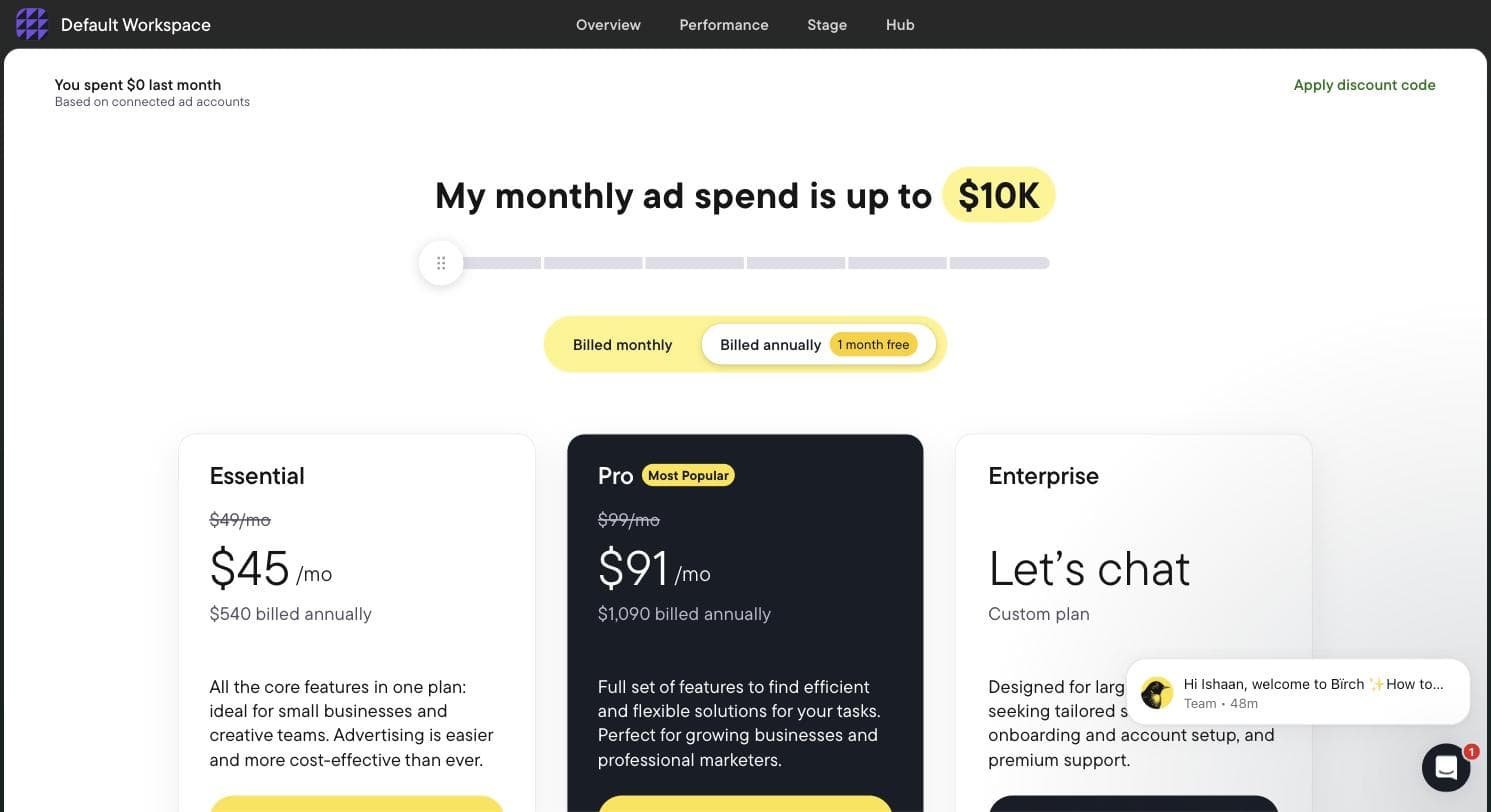
Birch's in-app pricing at the lowest spend tier. The slider above recalculates every plan. Captured 30 July 2026.
What the signup told us
- — Genuinely fast: account creation to the connect screen took under two minutes, with no phone number and no credit card.
- — The rebrand is badly signposted. Arriving from an older article pointing at revealbot.com or bir.ch/signup gets you a 404 before you find the app.
- — No sandbox and no demo data. The rule builder — the main reason to evaluate Birch — is completely inaccessible until you grant access to a live ad account.
- — Pricing is tied to your ad spend, not to seats or usage of the tool, so your bill grows as your campaigns do even if your use of Birch never changes.
- — The entry plan excludes automation entirely, which makes the widely quoted 'from $49' figure misleading for anyone arriving for the rules engine.
- — Meta is the default and most prominent option; Google Ads is present but visually secondary. Treat this as a Meta-first tool that also does Google.
- — One URL we tried inside the app hung on a loading spinner indefinitely rather than resolving or erroring.
Pricing, read off the in-app billing screen
Every figure below was read directly off Birch's own in-app billing slider on 30 July 2026, at each spend tier in turn. Monthly prices are the headline rate; annual prices are the discounted equivalent, billed once a year.
| Your monthly ad spend | Essential | Pro | Annual (Essential / Pro) |
|---|---|---|---|
| Up to $10K | $49/mo | $99/mo | $540 / $1,090 |
| Up to $30K | $149/mo | $249/mo | $1,640 / $2,740 |
| Up to $75K | $299/mo | $499/mo | $3,290 / $5,490 |
| Up to $150K | $499/mo | $799/mo | $5,490 / $8,790 |
| Up to $300K | Not offered | $1,299/mo | — / $14,290 |
| $500K+ | Not offered | Not offered | Enterprise, custom quote |
- — Essential does not include automated rules. This is the single most important line on the page: the feature Revealbot built its reputation on sits behind the Pro tier. Essential buys you workspaces, post boosting, reports, an activity page, Slack and email support — and nothing that automates a campaign.
- — Pro adds automated rules and strategies, Explorer, top audiences, Launcher, Stage, custom metrics and timeframes, the custom and lookalike audience builder, the Sheets/AppsFlyer/Hyros integrations, and live chat support.
- — Price is set by total monthly ad budget across every ad account you connect. If your spend rises past your tier, Birch states you are charged an overage fee through Stripe and notified by email; your features keep working.
- — Annual billing is described as twelve months for the price of eleven.
- — The trial is 14 days with full feature access. When it expires, your rules and reports are disabled rather than deleted, and come back when you pick a plan.
Where this stops: We did not connect a live Meta or Google account, so we have not watched a Birch rule evaluate or fire against real campaigns, and we have not seen Explorer, Stage or Hub populated with real data. Everything above is what the product does and costs, verified in-app; how well its automation actually performs on live spend is not something this walkthrough can tell you.
Meta Ads Manager
Best for full control at zero software costBefore you pay for an alternative, be clear about what you are walking away from. Meta describes Ads Manager as "your starting point for running ads on Facebook, Instagram, Messenger or Audience Network" and "an all-in-one tool for creating ads, managing when and where they'll run, and tracking how well your campaigns are performing." It is free - you pay only for the ad spend itself - and it is the only place with truly complete access to every objective, placement, targeting option, and reporting breakdown, the moment Meta ships them. Every tool below reaches your account through Meta's API and inherits whatever Meta exposes there, usually with a lag.
Keep Ads Manager if any of these describe you: you have a few hours a week and the patience to learn it properly; you need full control over campaign structure for a complex account; your budget is small enough that a monthly software fee would be a meaningful percentage of it; or you are already comfortable in the interface and your problem is results, not workflow. The Advantage+ campaign types have also absorbed a lot of the manual work that used to justify third-party tools - broad targeting plus Advantage+ shopping is a legitimate low-effort setup on its own.
The honest cons are the reasons this page exists: the learning curve is real, the interface buries important settings, error states are notoriously unhelpful, and human support is thin unless you spend enough to get a rep. Reviews of Meta's own mobile app on the Apple App Store run 4.5 stars across roughly 49,000 ratings, but the critical ones describe the exact frustration that sends people searching for alternatives.
Pros
- + Free - no software fee at any spend level
- + Complete, first-party access to every objective, placement, and breakdown
- + New Meta features land here first; third-party tools inherit them later via API
- + Advantage+ campaign types now automate much of what used to require manual work
- + No third party ever touches your ad account
Cons
- − Steep learning curve, and the interface hides consequential settings
- − Error messages and rejection reasons are frequently unclear
- − Human support is hard to reach at small spend levels
- − Doing everything yourself is the whole problem for time-poor owners
Ideal for
- Advertisers with the time and interest to learn the platform properly
- Complex accounts that need full control over structure and targeting
- Very small budgets where any software fee is a large percentage of spend
Pricing: Free. There is no software fee at any budget - you pay Meta only for the ad spend itself. Meta's official Ads Manager page, checked July 2026, describes the tool's features and lists no plans or prices because there is nothing to buy.
Related: AdFlint vs Meta Ads Manager
Visit Meta Ads Manager“Sometimes errors will pop up due to little mistakes like missing info or something, and when you're looking for the place to insert the missing info, it's nowhere to be found.”
— SpaceBearPluto, Apple App Store review of the Meta Ads Manager app
AdFlint
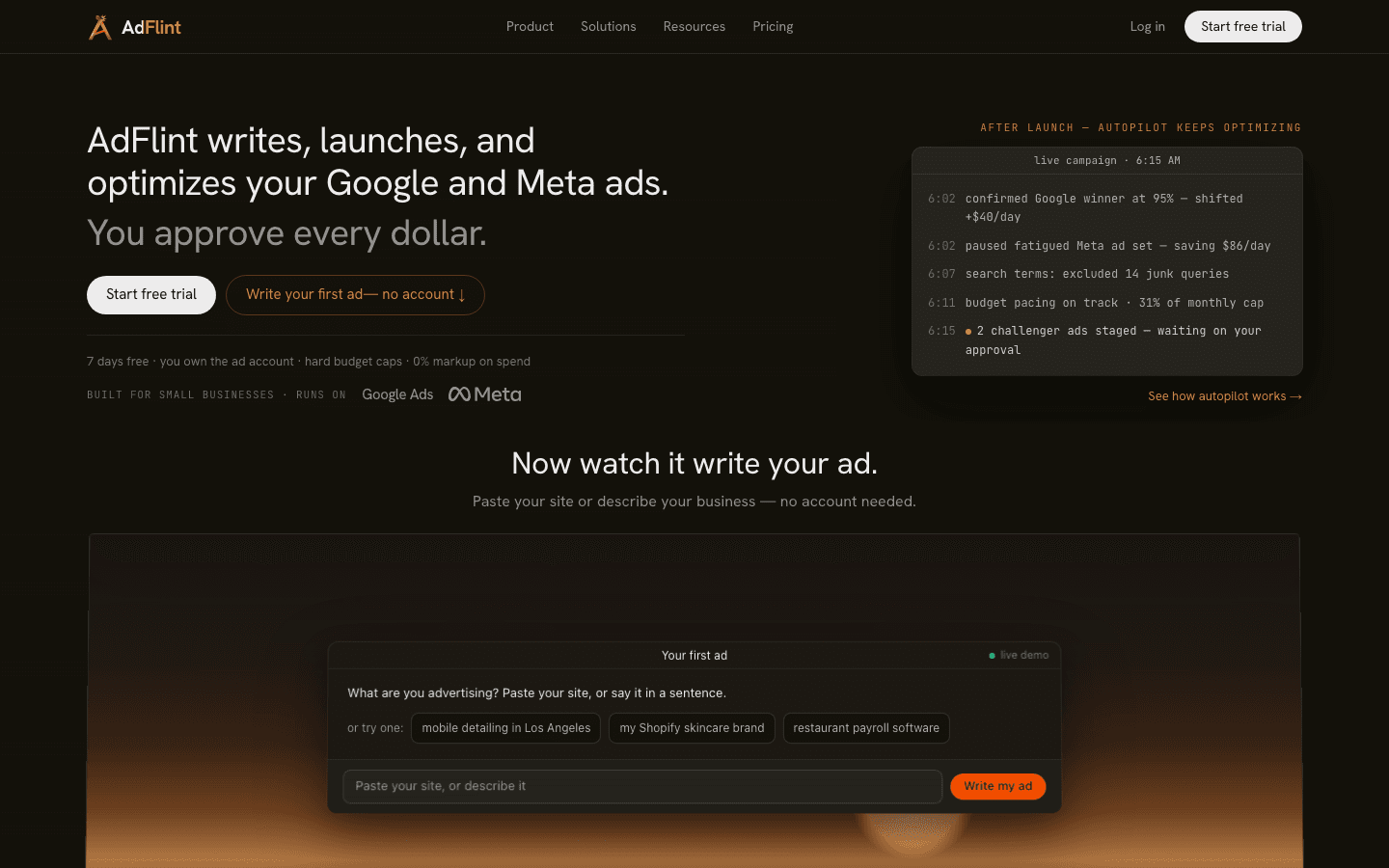
Best for small businesses that want ads handled for themOur product — disclosureAdFlint is our product, so read this entry with that in mind - the disclosure tag is there for a reason. It exists for the small business that searched this exact query: someone who tried Ads Manager, lost evenings to it, and wants ads running without becoming a media buyer. The AI writes the copy, builds the campaigns, launches them in your own Google and Meta ad accounts, and then keeps optimizing: budget pacing, health checks, and recommendations. On self-serve plans nothing goes live until you click Launch or turn on Full Autopilot. In Autopilot, the default, AdFlint can also pause weak ads and switch on new ad versions it writes. Every change is logged. Because everything runs inside accounts you own, your history and pixel data stay yours if you leave.
Two structural choices matter for this page's audience. First, pricing is a flat monthly fee with a hard ad-spend cap per tier - Launch at $40/mo covers up to $1,000/mo in spend, Growth at $89/mo up to $2,500 - so the software fee never scales as a percentage of your spend, and on these self-serve plans AdFlint takes no markup on the spend itself. Second, the caps double as a guardrail: the system cannot outspend the budget you set. There is also a custom-priced Managed tier where the work is done end to end with approval by exception.
The honest cons: each plan's spend cap means a growing account has to move up plans as its budget rises (Growth at $89/mo covers up to $2,500/mo), and it is not built for agencies running many client accounts. It covers Google and Meta only - no TikTok, Snapchat, or Pinterest. And it is a young product: you will not find a long public review trail on G2 or Capterra yet, which is exactly the kind of thing this page dings other tools for, so we are dinging ourselves too.
Pros
- + AI writes, launches, and optimizes campaigns; on self-serve plans nothing goes live until you click Launch or turn on Full Autopilot
- + Works inside your own Google and Meta ad accounts - your data and history stay yours
- + Flat pricing from $40/mo with hard budget caps; no percentage-of-spend markup
- + Covers Google and Meta from one place, which the Meta-only tools here cannot
- + 7-day free trial on monthly plans (card required)
Cons
- − Each plan caps ad spend, so a growing account moves up plans as its budget rises
- − No TikTok, Snapchat, or Pinterest support
- − Young product with a small public review footprint - no established G2/Capterra trail yet
- − Not designed for agencies managing many client accounts
Ideal for
- Local and small businesses spending up to about $2,500/mo
- Solo founders who tried Ads Manager and gave up on the time cost
- Advertisers who want automation but insist on the final say before launch
- Businesses that want Google and Meta handled together
Pricing: Launch $40/mo (up to $1,000/mo ad spend), Growth $89/mo (up to $2,500/mo), higher self-serve plans stepping up with spend and custom pricing above $30,000/mo, Managed tier custom-priced. 7-day free trial on monthly plans with card required; annual billing gives 2 months free. No percentage-of-spend markup on self-serve plans. Checked on adflint.com/pricing, October 2026.
Try AdFlint freeMadgicx
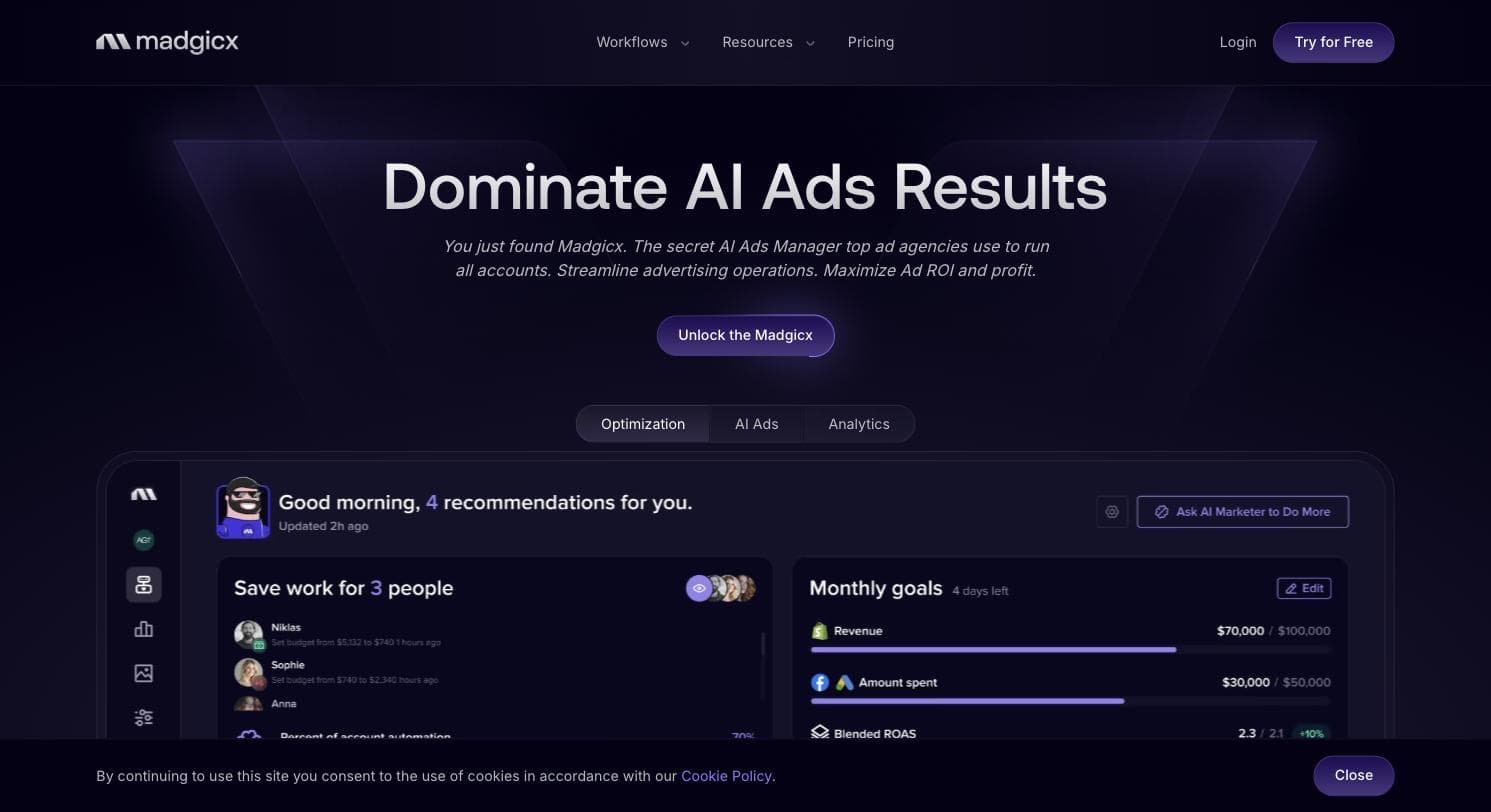
Best for ecommerce teams scaling Meta creative with AIMadgicx is the most product-rich Meta specialist on this list. Its current positioning centers on three workflows: an AI Marketer that audits your account and surfaces optimization opportunities, an end-to-end AI creative workflow for generating and deploying ads, and an analytics layer for Meta performance data. Around those sit ad-rotation and creative-refresh automation and ad-fatigue detection - features aimed squarely at DTC and ecommerce accounts that live or die on creative velocity. It is Meta-only: the site names no Google, TikTok, or other network support.
Pricing climbs with your spend: the public pricing page shows a single plan (Madgicx Pro Complete with AI) priced by monthly ad spend, from $45/mo under $1K to $329/mo at $20K-$30K on monthly billing, and only the $30K+ tier says "See price inside the app" (checked October 26, 2026). The homepage dangles a $29/mo early-bird hook for its data-analysis offering, and a Tracking Pro server-side attribution add-on runs $49/mo. A 7-day trial is advertised as "Try 100% free for 7 days", though the page does not state whether a card is required to start it.
Public reviews are genuinely mixed. Its Shopify App Store listing sits at 4.0 across 13 reviews - nine five-star and three one-star. The three one-star reviews are about the managed media-buying service Madgicx sells alongside the software, an unexpected bill, and unresponsive support, rather than the core product; one of them also reports tools that worked one day and not the next. Worth separating service complaints from software quality when you evaluate it. If you are an ecommerce brand on Meta with rising creative demands, it is the strongest specialist here; if you need multi-platform coverage, look elsewhere on this list.
Pros
- + Deep Meta specialization: AI account audits, creative generation, and fatigue detection in one product
- + End-to-end creative workflow suits DTC brands that need constant new ads
- + 7-day free trial to evaluate the product before committing
- + Optional server-side tracking add-on for attribution (Tracking Pro, $49/mo)
Cons
- − Price climbs with ad spend (from $45/mo under $1K to $329/mo at $20K-$30K), and the $30K+ tier is priced only in-app
- − Meta-only; no Google, TikTok, or other network support named on the site
- − Public reviews are polarized (9 five-star, 3 one-star on Shopify); the negatives cite its managed media-buying service, billing surprises, and support
- − Feature breadth can overwhelm the small advertiser it is sometimes marketed to
Ideal for
- Ecommerce and DTC brands spending on Meta with high creative turnover
- Teams that want AI audit suggestions but keep their own hands on the account
- Advertisers already committed to Meta as their primary channel
Pricing: One plan priced by monthly ad spend. Monthly billing, checked October 26, 2026: $45 under $1K, $99 for $1K-$2.5K, $119 for $2.5K-$5K, $129 for $5K-$10K, $229 for $10K-$20K, $329 for $20K-$30K; the $30K+ tier shows 'See price inside the app.' Homepage advertises a $29/mo early-bird offer for its data-analysis offering; Tracking Pro add-on is $49/mo. A 7-day free trial is advertised as 'Try 100% free for 7 days'; the page does not state whether a card is required.
Related: Madgicx alternatives · AdFlint vs Madgicx
Visit Madgicx“I have been using Madgicx for a year now, and it's an amazing platform. It has greatly simplified the management of my Facebook ad accounts.”
— Jet Italian Deli, Shopify App Store review of Madgicx
Birch (formerly Revealbot)
Best for rule-based automation across multiple ad platformsBirch is Revealbot after a rebrand, and it is the automation power tool of this list. Instead of an AI that decides for you, you write the rules - pause ads when CPA crosses a threshold, scale budgets when ROAS holds, restart winners at a set hour - and Birch executes them around the clock. Its site names support for Meta ads, Instagram, Google Ads, Snapchat Ads, and TikTok Ads, which makes it the broadest platform coverage of any paid tool here. Around the rule engine sit bulk ad launching, reporting, workspaces, a Slack integration, and connections to Google Sheets and attribution tools.
Pricing scales with your connected ad spend. At the lowest tier (up to $10K/mo in spend), the Essential plan shows at $49/mo and the Pro plan - which is where automated rules, the Launcher, and most of the interesting features actually live - at $99/mo. Overages apply on monthly billing if you exceed your spend tier, and the trial runs 14 days with full feature access. A separate product, Signals Gateway, prices server-side event tracking from free (10,000 events/mo) up to $499/mo.
The honest framing: Birch automates execution, not strategy. You still need to know what a good rule looks like, and badly designed rules will scale mistakes as efficiently as wins - this is a tool for people who already understand their numbers. Note also that we could not reach any independent review source for Birch in July 2026 (G2 and Trustpilot blocked automated access, and its Product Hunt listing has no reviews), so unlike some entries here we have no attributable outside quote to give you.
Pros
- + Broadest platform coverage of the paid tools here: Meta, Instagram, Google, Snapchat, and TikTok named on its site
- + Powerful custom rule engine for pausing, scaling, and restarting ads automatically
- + Bulk launching and reporting reduce repetitive Ads Manager work at scale
- + 14-day free trial with full feature access
Cons
- − You still design the strategy - rules only automate decisions you already know how to make
- − Pricing scales with connected ad spend, with overages on monthly billing
- − Automated rules on Meta and Google natively cover simpler versions of this for free
- − The Revealbot-to-Birch rebrand makes older reviews and tutorials harder to match to the current product
Ideal for
- Experienced media buyers who think in if-then rules
- Small agencies and freelancers managing several accounts across platforms
- Advertisers spending enough that manual daily checks no longer scale
Pricing: Essential from $49/mo and Pro from $99/mo at the lowest tier (up to $10K/mo connected ad spend); price scales with ad spend and overages apply on monthly billing, while annual billing waives overages and bills 12 months for the price of 10. 14-day free trial. Signals Gateway event tracking is priced separately from free to $499/mo by volume. Checked on bir.ch/pricing, July 2026.
Related: Revealbot (Birch) alternatives · AdFlint vs Revealbot
Visit Birch (formerly Revealbot)Meta Business Suite
Best for boosting posts without the Ads Manager learning curveMeta's own answer to "Ads Manager is too much" is not a third-party tool - it is Business Suite, which Meta describes as "a one-stop shop where you can manage all of your marketing and advertising activities on Facebook and Instagram." It is free, it combines page management, messaging, post scheduling, and insights in one place, and it lets you create simplified ads and boost posts without ever opening the full campaign hierarchy. For a meaningful slice of the people searching for an Ads Manager alternative, this is the actual answer, and it costs nothing to find out.
The trade is control for simplicity. Boosting and simplified ad creation choose most settings for you; you do not get the full objective list, granular placement control, or the campaign-ad set-ad structure that serious optimization work depends on. That is fine if your advertising is "put money behind the posts that work and stay visible locally." It is not fine if you need structured prospecting and retargeting, careful budget allocation, or anything Advantage+ shopping does for ecommerce - at that point you are back in Ads Manager or one of the paid tools above.
Its mobile app holds a 4.7 rating across roughly 489,000 ratings on the Apple App Store, with the recurring critical themes being notification management and limited reporting on boosted ads. Treat Business Suite as the honest floor of this list: try the free simple mode first, and pay for an alternative only when you hit its ceiling.
Pros
- + Free, official, and requires no third-party account access
- + Boost posts and create simplified ads without learning campaign structure
- + Combines page management, messages, scheduling, and insights in one place
- + Good mobile experience for owners who manage things from a phone
Cons
- − No full campaign structure, objective list, or granular placement control
- − Reporting on boosted posts is shallow compared with Ads Manager
- − Boost-only habits often waste budget on engagement that never converts
- − Facebook and Instagram only
Ideal for
- Local businesses that mainly boost posts and manage messages
- Owners who run everything from a phone
- Anyone who should try the free option before paying for software
Pricing: Free. Boosted posts and simplified ads are billed as ad spend only. Meta's official Business Suite page, checked July 2026, lists no plans or prices because the tool carries no software fee.
Visit Meta Business Suite“I do like to create posts through the app when possible because I can schedule them or post immediately without going through the desktop's annoying and difficult to find Creator Studio.”
— Leskape, Apple App Store review of the Meta Business Suite app
AdEspresso
Best for classic A/B testing, if you confirm it is still maintainedAdEspresso deserves an honest status check rather than a straight recommendation, because it still ranks in searches like this one on reputation earned years ago. It made its name as the friendly way to create, manage, and analyze Facebook campaigns, with grid-style ad creation that spun up A/B test variations faster than Ads Manager allowed. The site is still up, still positions itself around Create, Manage, Analyze, Collaborate, and Learn, and still sells subscriptions with a 14-day free trial.
Here is what we found checking it in July 2026: the pricing page lists Starter at $49/mo (capped at $1,000/mo ad spend), Plus at $99/mo with unlimited spend, and Enterprise from $259/mo. But the most recent blog content visible on the homepage dates to December 2022, and the footer year appears to auto-update - the classic signature of a site on autopilot. Meta's ad platform has changed enormously since then, most notably the consolidation around Advantage+ campaigns, and we found no visible evidence on the site of how, or whether, the product has tracked those changes.
We could not reach any current, independent review source for AdEspresso in July 2026, which reinforces the caution. The fair conclusion: if you loved AdEspresso's testing workflow, use the 14-day trial to verify for yourself that campaign creation works against today's Meta objectives before giving it a card. At $49/mo it is not expensive - but paying anything for software whose public pulse stopped in 2022 is a bet you should make with open eyes.
Pros
- + Historically the most approachable A/B testing workflow for Facebook campaigns
- + Published, straightforward pricing from $49/mo
- + 14-day free trial makes the status question testable at no cost
Cons
- − Public content visibly frozen since late 2022 - predating Meta's Advantage+ era - with no visible changelog
- − No reachable current independent reviews to confirm the product's present state
- − Starter plan's $1,000/mo spend cap is easy to outgrow
- − Facebook and Instagram only - no Google, TikTok, or other networks
Ideal for
- Former AdEspresso users deciding whether to return
- Methodical testers who will verify the product on trial before paying
- Advertisers on Facebook who value simple split-testing workflows
Pricing: Starter $49/mo (up to $1,000/mo ad spend), Plus $99/mo (unlimited ad spend), Enterprise from $259/mo; 14-day free trial on all plans. Note that the surrounding site content shows no visible updates since late 2022 - verify the product's current state on trial before subscribing. Checked on adespresso.com/pricing, July 2026.
Related: AdEspresso alternatives · AdFlint vs AdEspresso
Visit AdEspressoSide by side.
| Tool | Best for | Starting price | Platforms covered | Standout limitation |
|---|---|---|---|---|
| Meta Ads Manager | Full native control | Free (ad spend only) | Facebook, Instagram, Messenger, Audience Network | Steep learning curve and near-zero support at small spend |
| AdFlint | Done-for-you small-business ads | $40/mo (up to $1,000/mo ad spend) | Google + Meta | Spend caps per tier; not built for agencies |
| Madgicx | AI creative and audits for ecommerce on Meta | From $45/mo under $1K spend, rising with spend; $49/mo Tracking Pro add-on | Meta only | Meta-only; price climbs with ad spend |
| Birch (Revealbot) | Custom automation rules at scale | $49/mo Essential, $99/mo Pro (up to $10K/mo spend) | Meta, Instagram, Google, Snapchat, TikTok | You still write the strategy; fees scale with ad spend |
| Meta Business Suite | Boosting posts without the learning curve | Free (ad spend only) | Facebook + Instagram | No real campaign structure or deep reporting |
| AdEspresso | Classic A/B testing workflows | $49/mo Starter (up to $1,000/mo ad spend) | Facebook + Instagram | Public content frozen since 2022; verify maintenance before paying |
How we chose.
What we actually did for this page: in July 2026 we fetched every vendor's live pricing page and official product pages directly, recorded plan names and dollar figures exactly as published, and read each product's own documentation and positioning. We did not run paid campaigns through Madgicx, Birch, or AdEspresso, and nothing on this page should be read as hands-on testing of those products. Where a claim could not be verified on the vendor's own site this month, we either flagged it or left it out.
Review quotes come from named public reviewers on pages we fetched ourselves - the Shopify App Store and the Apple App Store - quoted verbatim and linked to the exact listing. Several major review platforms (G2, Trustpilot, TrustRadius) blocked automated access during our research, and some products had public listings with no reviews at all; in those cases we omitted the quote rather than paraphrase something we could not verify. That is why some entries below have a quote and others do not.
Disclosure: AdFlint is our product. We built it for exactly the reader this page serves, which is why it is included, and also why its entry carries a visible disclosure tag. We ranked it below the honest first answer - keeping Ads Manager when that fits - and we have tried to write its cons the way a competitor would.
- — Pricing verified on each vendor's own site in July 2026, with plan names, dollar figures, and spend caps recorded as published - not quoted from memory or from other roundups.
- — Fit for the actual searcher: a small team leaving Ads Manager over time and complexity, not an agency media desk managing dozens of accounts.
- — Whether the tool works inside your own ad account, so your campaign history, pixel data, and account standing stay yours if you cancel.
- — Platform coverage as stated on the vendor's site today - Meta-only versus Meta plus Google and other networks - not historical marketing claims.
- — Public, attributable review evidence over vendor testimonials; where no verifiable review source was reachable, we said so instead of inventing one.
- — Signs of active maintenance: current pricing pages, recent content, and visible product changes versus sites that appear frozen for years.
Common questions.
Is Meta Ads Manager free to use?
Yes. Ads Manager itself costs nothing - you pay Meta only for the ad spend. Every paid alternative on this page adds a software fee on top of that spend, so the question is whether the time it saves or the results it improves are worth that fee at your budget.
Is there a good Adsmanager alternative for a small business?
Start by keeping Meta Ads Manager, which is free, because every alternative still runs on top of it through Meta's Marketing API. If you want the work done for you, AdFlint's Launch plan is $40/mo for up to $1,000/mo in ad spend. Madgicx suits ecommerce teams scaling Meta creative, and Birch suits rule-based automation from $49/mo.
Can any tool completely replace Ads Manager?
No. Third-party tools like AdFlint, Madgicx, and Birch connect to your ad account through Meta's Marketing API and work on top of it. Your account, pixel, billing, and policy standing all still live with Meta. What changes is who operates the account day to day and through what interface.
What is the cheapest real alternative to Ads Manager?
Meta Business Suite is free and covers boosting and simplified ads, so try it first if your needs are simple. Among paid tools checked in July 2026, AdFlint's Launch plan is $40/mo for up to $1,000/mo in ad spend, and Birch's Essential plan and AdEspresso's Starter plan are each $49/mo at their lowest tiers.
Is AdEspresso still active in 2026?
Its site is up and sells subscriptions ($49 to $259+ per month with a 14-day trial as of July 2026), but the newest content visible on its homepage dates to December 2022 and we could not reach any current independent reviews. If you are considering it, use the free trial to confirm the product works against today's Meta campaign types before paying.
What happened to Revealbot?
Revealbot rebranded as Birch (styled Birch at bir.ch). It is the same automated-rules product: custom rules, bulk launching, and reporting across Meta, Instagram, Google, Snapchat, and TikTok ads, with pricing that scales with your connected ad spend.
Do Ads Manager alternatives charge a percentage of my ad spend?
Most price by spend tier rather than a straight percentage: Birch and Madgicx both charge more as your monthly ad spend grows, and Birch applies overages on monthly billing if you exceed your tier. AdFlint's self-serve plans charge a flat monthly fee with a hard spend cap per plan and take no markup on spend. Meta's own tools are free.
Keep reading
- Roundup: Facebook ads management tools
- Roundup: Automated Facebook ads tools
- Roundup: AdEspresso alternatives
- Roundup: Madgicx alternatives
- Roundup: Facebook ads tools for restaurants
- How Long to Get a First Ad Live, Tool by Tool
- Google Ad Manager vs Google Ads: What's the Difference?
- Ad Account OAuth Scopes: What a Tool Really Gets
- Guide: Meta Ads Objectives and Bidding: The Complete Guide
- Guide: Ad Budgets, Pacing, and What Ad Management Costs
- Meta Ads Manager vs Meta Business Suite: Which Console for Which Job
- Boosted Posts vs Meta Ads Manager: When to Graduate to the Full Console
- AI Ad Management Software vs DIY Ad Management
- Done-For-You Ad Management vs a PPC Agency
- Advantage+ Shopping vs Manual Sales Campaigns on Meta
- Free tool: Meta Lifetime Budget Pacing Calculator
- Free tool: Meta Ad Copy Preview & Character Checker
- Free tool: Ad Budget Calculator
- Free tool: ROAS Calculator