Best Facebook (Meta) Ads Management Tools in 2026
By the AdFlint research team · We built trial accounts on Birch (formerly Revealbot) and worked inside them ourselves; every screenshot below is from those sessions, and the rest is documentation and verified user reviews · Published July 28, 2026 · Updated July 30, 2026
TL;DR
- Most advertisers should start with Meta Ads Manager itself: the native tool plus Advantage+ automation is free and covers more than most paid tools admit.
- Small businesses that want the work done for them: AdFlint (our product - disclosed below) writes, launches, and optimizes ads inside your own account from $40/mo with human approval on every ad and 0% markup on self-serve ad spend.
- Lean teams and agencies that want rule-based automation: Birch (formerly Revealbot) from $49/mo across Meta, Google, Snapchat, and TikTok, with a 14-day no-card trial.
- Ecommerce teams that live in Meta and want the deepest AI toolkit: Madgicx - but read its billing terms carefully; its Trustpilot profile showed a 1.8/5 from 269 reviews when we checked in July 2026.
Search this query and almost every page that ranks is written by a vendor that placed its own product first. That is not a conspiracy theory; it is just how this category's content works. This page tries to be the thing we could not find: a roundup that treats the free native option seriously, prices every tool from its live pricing page, quotes real reviewers by name with links, and lists the cons an affiliate site would hide.
Who this is for: anyone spending roughly $500 to $50,000 a month on Facebook and Instagram ads and wondering whether a third-party tool is worth it. The honest answer is that the tools in this list solve genuinely different problems. Some automate rules on top of Ads Manager (Birch), some bolt an AI analysis and creative layer onto Meta accounts (Madgicx), some are enterprise creative factories (Smartly, Hunch), one is a legacy split-testing product coasting on its name (AdEspresso), and one - ours - is a done-for-you service for small businesses that do not want to open Ads Manager at all (AdFlint).
What actually differentiates them is less the feature checklists and more four practical questions: how much of the work the tool takes off your plate, whether its pricing is public and predictable, whether independent reviewers trust the company behind it, and whether it still leaves you in control of your own ad account and budget. We scored the list against those questions, and we have marked our own product clearly where it appears.
We got inside. Here is every screen.
We created real trial accounts, cleared the verification walls, and worked through the products. Every screenshot below is from those sessions — no vendor marketing imagery, no stock dashboards.
Birch (formerly Revealbot)
Walkthrough performed July 30, 2026Revealbot rebranded to Birch and moved to bir.ch. A lot of published roundups still send readers to revealbot.com, and the old /signup path 404s — the working signup is at app.bir.ch/signup.
We created an account, completed onboarding and worked through the product. The headline finding: Birch in 2026 is three products, not one. The automation tool everyone reviews is now sitting alongside a bulk creative launcher and a server-side tracking gateway, and it is priced against your ad spend.
- 01
Create the account
Email, a password of six or more characters, and your name — or one-click signup with Google. The page states a 14-day free trial, no credit card required, cancel anytime. A newsletter checkbox is present and unticked. No card was requested at any point, and no phone number either. Account creation to the connect screen took under two minutes.
- 02
Set up the company and declare your budget
Step two asks for company name, industry, monthly ad budget, and how you heard about them. Industry options are Agency, Services, Ecommerce, Mobile App, Lead Generation, and Other. The budget brackets run Below $10K, $10K-$30K, $30K-$75K, $75K-$150K, $150K-$300K, $300K-$500K, and Over $500K. As with Optmyzr, everything under ten thousand dollars a month is one undifferentiated bucket at the bottom — and it turns out that bracket is not just a survey question, it is the pricing.
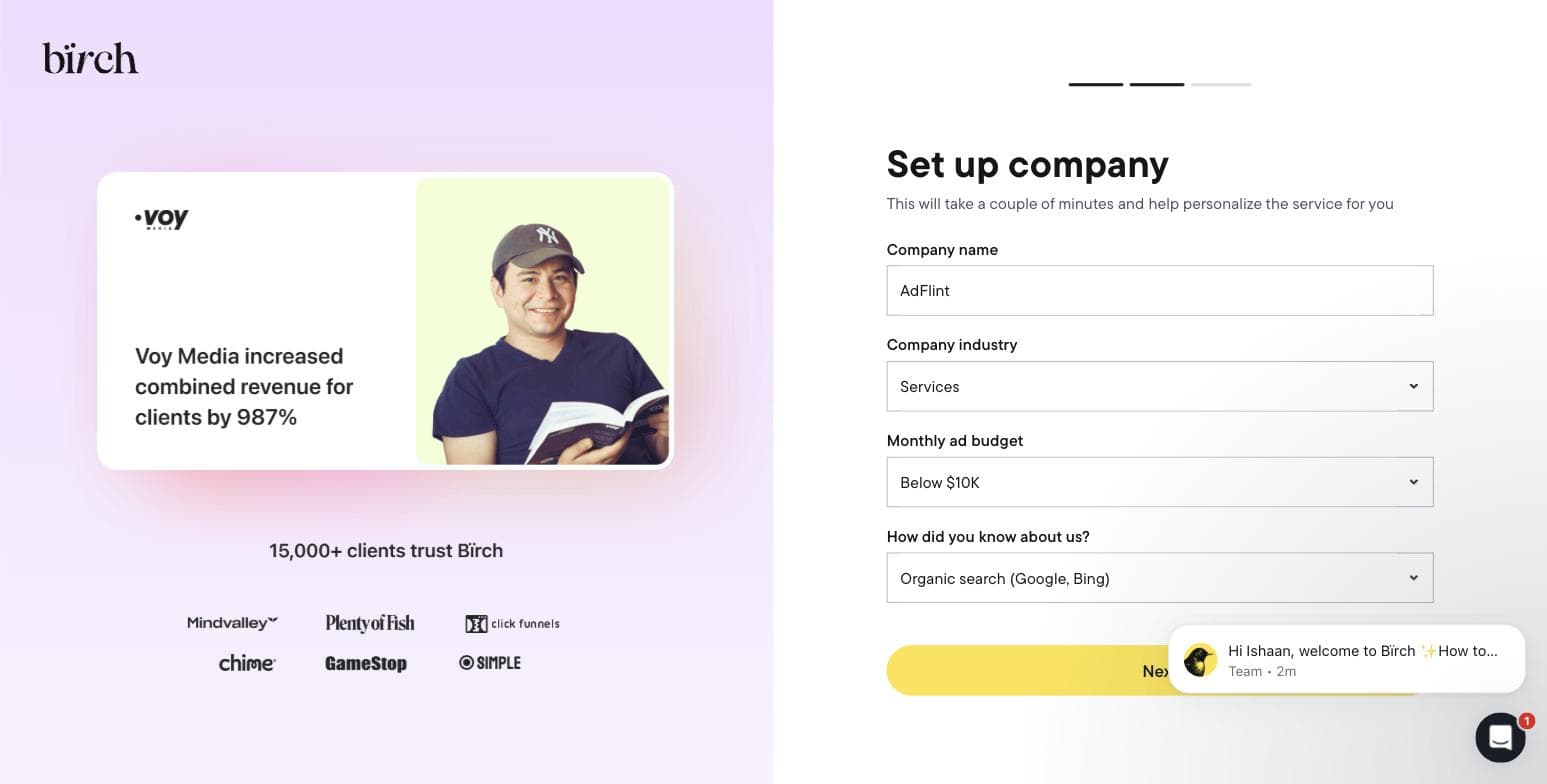
Step two of Birch's onboarding, captured during our own signup on 30 July 2026. - 03
Connect an ad platform — or don't, and see what breaks
Step three asks you to connect Meta Ads, TikTok, Google Ads, or Snapchat before you reach the product. Meta is presented first and most prominently, matching Birch's heritage. We skipped it deliberately, to find out how much of the product survives without granting a third party access to a live ad account. The answer is: the shell, but not the substance.
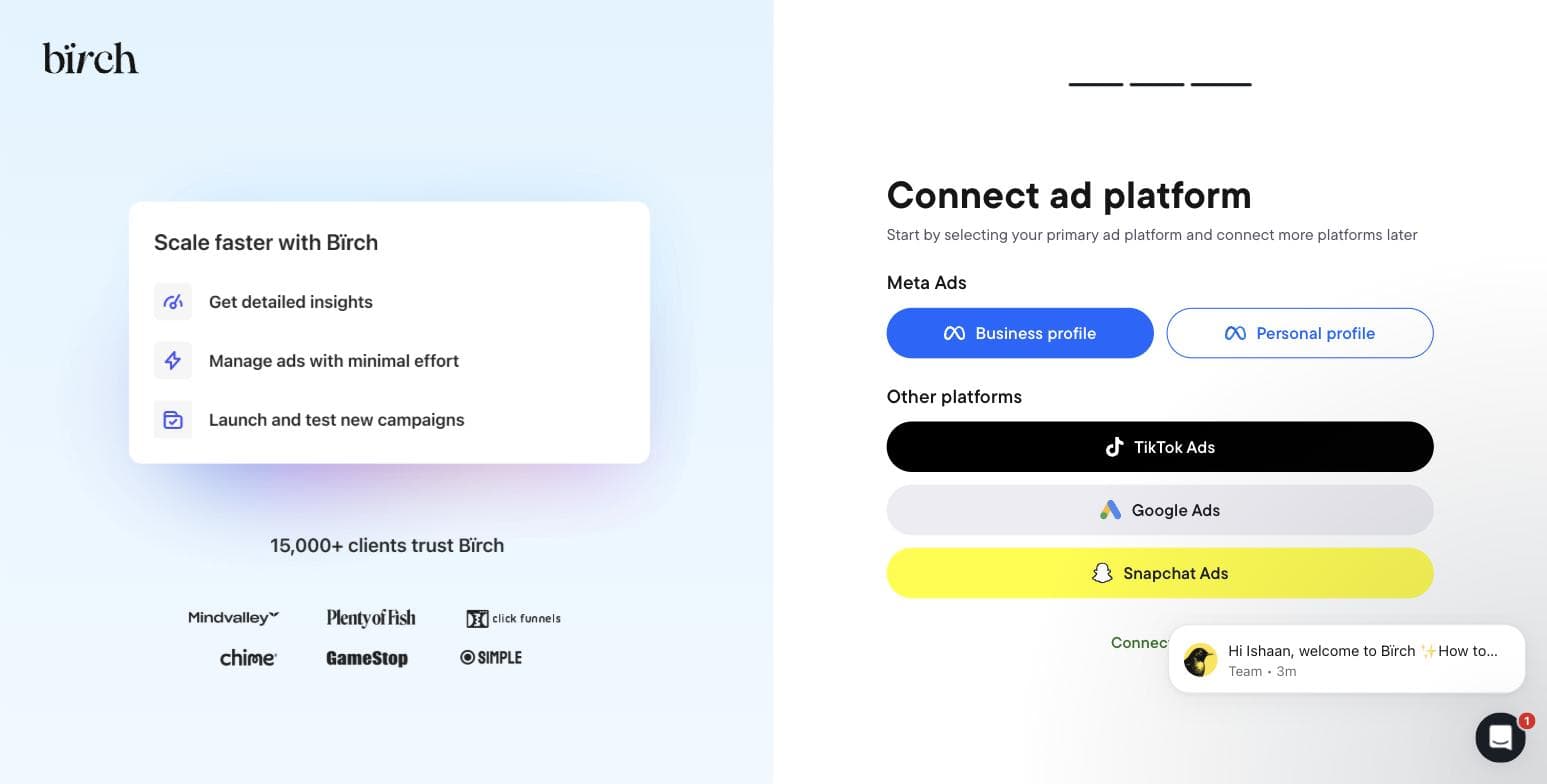
Birch's final onboarding step. Captured 30 July 2026. - 04
Open the Rules engine — the feature it is famous for
The automation screen is the reason most people arrive at Birch. Without a connected account it is a single button reading Connect ad account, over an illustration of the three action types it offers — increase bid, duplicate, notify. That is the entire surface available to an unconnected trial. There is no sandbox and no demo dataset, so you cannot evaluate the rule builder against sample data before handing over access to real campaigns.
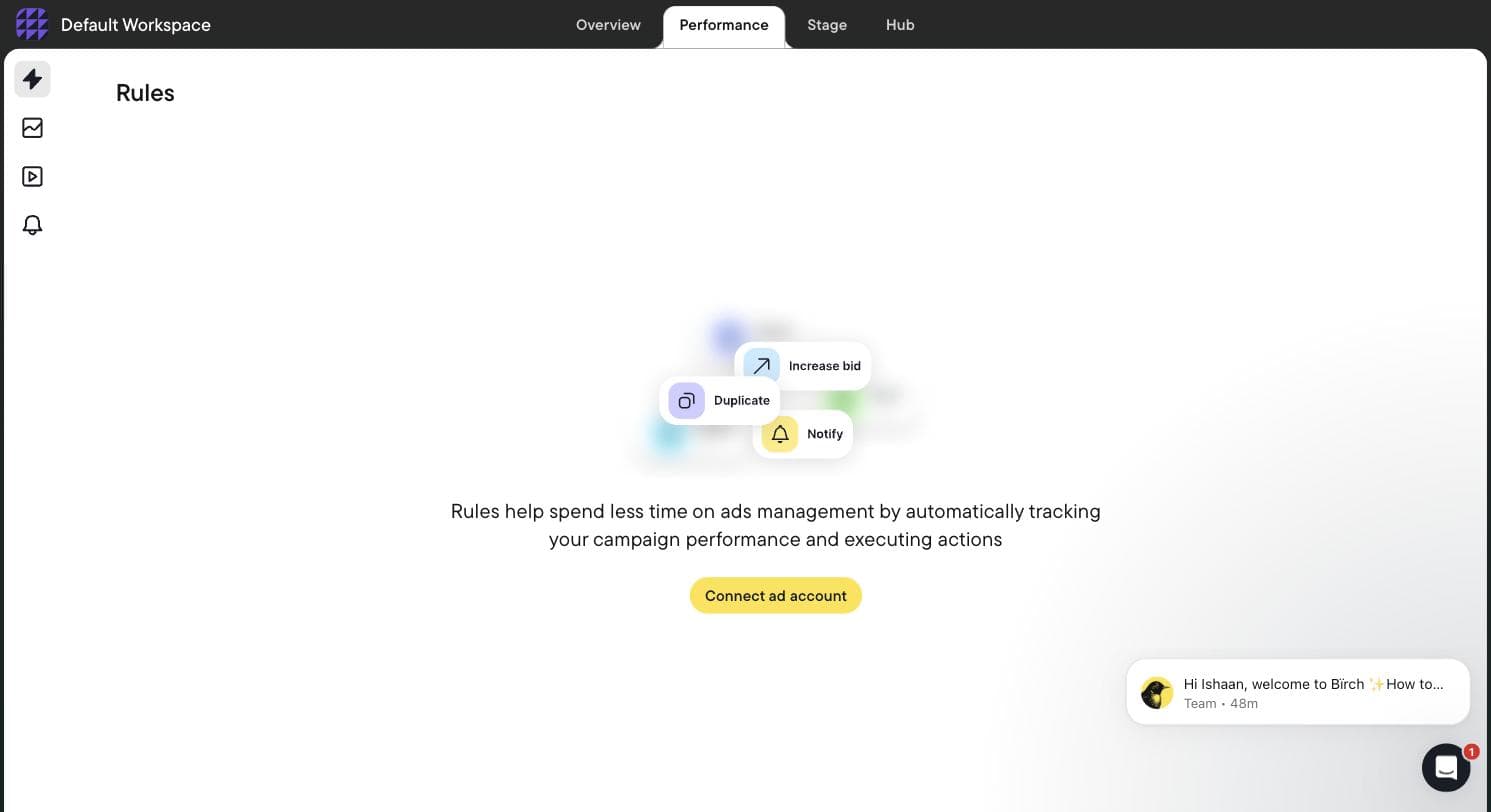
Birch's Rules screen with no ad account connected — the rule builder is entirely gated. Captured 30 July 2026. - 05
Find Stage, the product nobody has reviewed
Stage is a bulk creative launcher: you connect a planning Google Sheet and your Drive folders, and it builds the ads from there — launching creative tests from the sheet, mirroring your Drive folder structure into ad structure, duplicating winning setups with new creative swapped in, and working across multiple Drives and platforms at once. It targets Meta, TikTok and Snapchat. Birch states plainly that its Drive access is read-only and it cannot edit or delete anything. We could not find a single published roundup that mentions this exists.
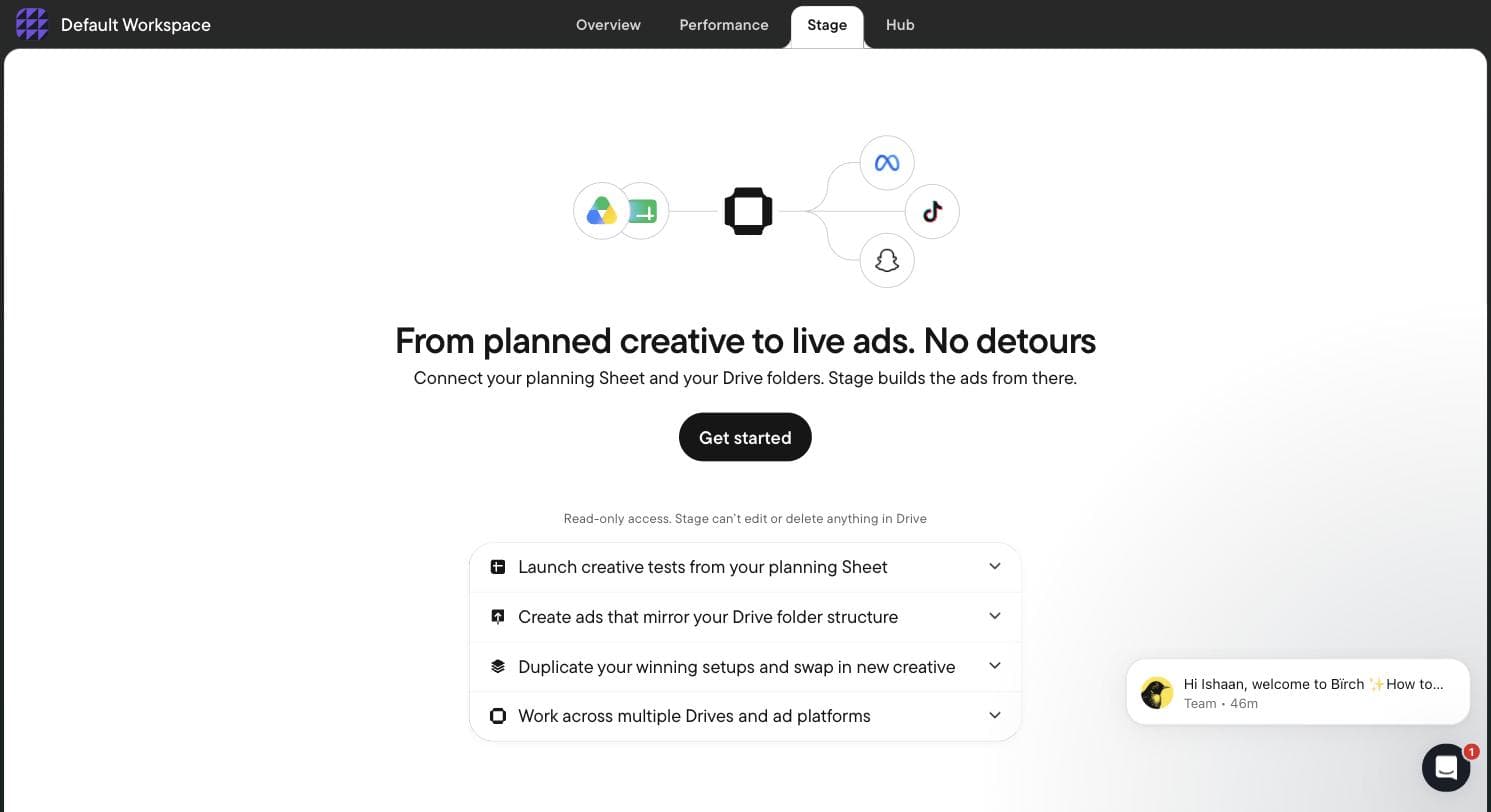
Birch Stage — a Sheet-and-Drive bulk ad launcher absent from every Revealbot-era review. Captured 30 July 2026. - 06
Find Hub, which is not an ads tool at all
Hub is server-side tracking infrastructure. You create a Signals Gateway, pick a hosting region, point it at your primary website, and it collects first-party data and forwards it to the ad platforms — the category occupied by conversions-API and server-side GTM setups. A company that used to sell Facebook rule automation now also sells you the tracking layer underneath it. That is a strategic move worth understanding before you compare Birch to anything on price alone.
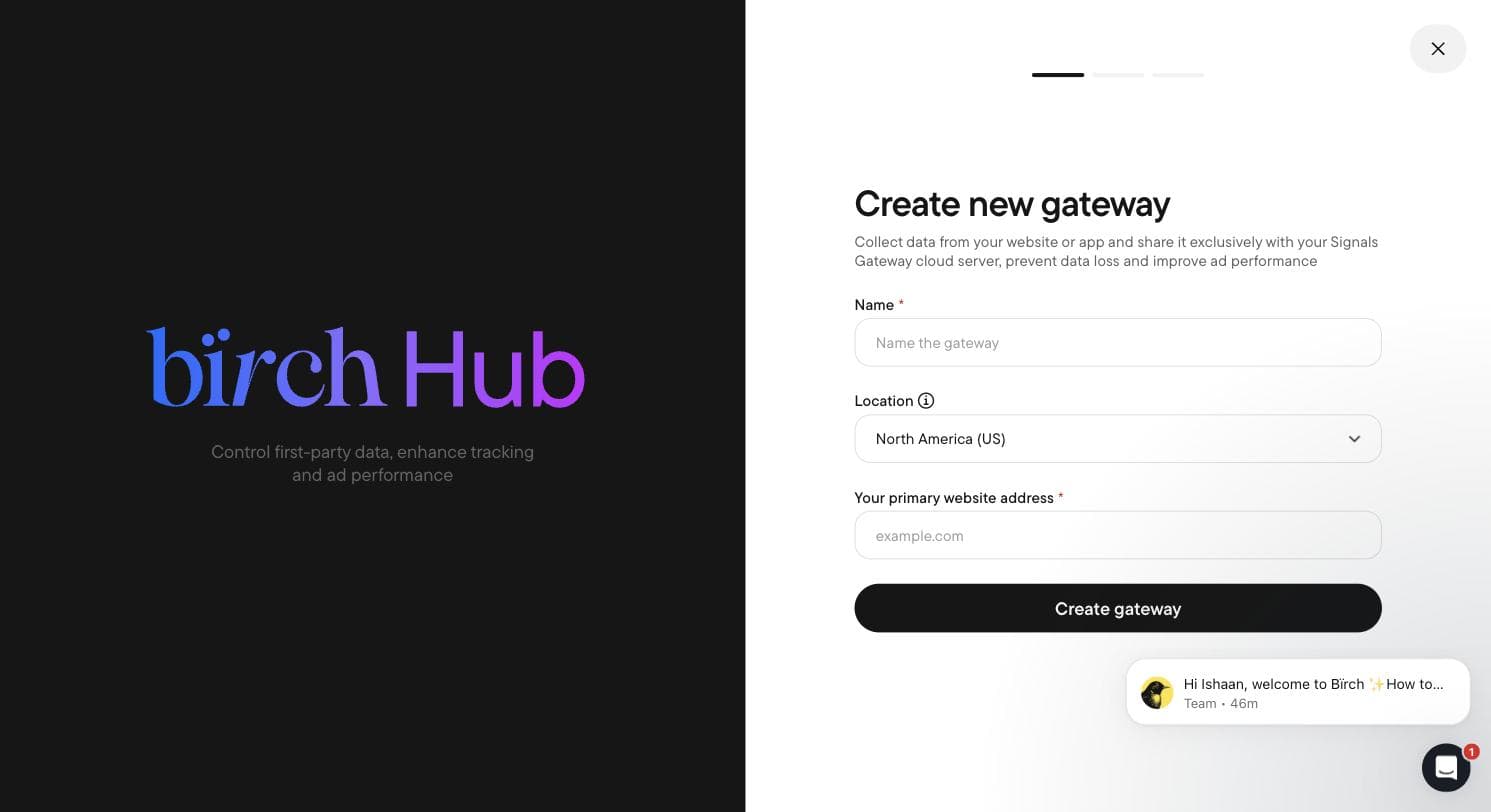
Birch Hub's Signals Gateway — server-side first-party data collection. Captured 30 July 2026. - 07
Read the integration list
Birch connects twelve services: Meta Ads, Google Ads & Google Drive, Snapchat Ads, TikTok Ads, YouTube, Google Analytics, Google Sheets, Slack, and — telling for who it is built for — the attribution stack of AppsFlyer, Adjust (in beta), Hyros and Wicked Reports. There is no Microsoft Ads, no Amazon and no LinkedIn. Set that against Optmyzr's Amazon, Microsoft, LinkedIn and Search Ads 360 and the two products stop looking like competitors at all: Optmyzr is built for search, Birch is built for paid social and direct-to-consumer attribution.
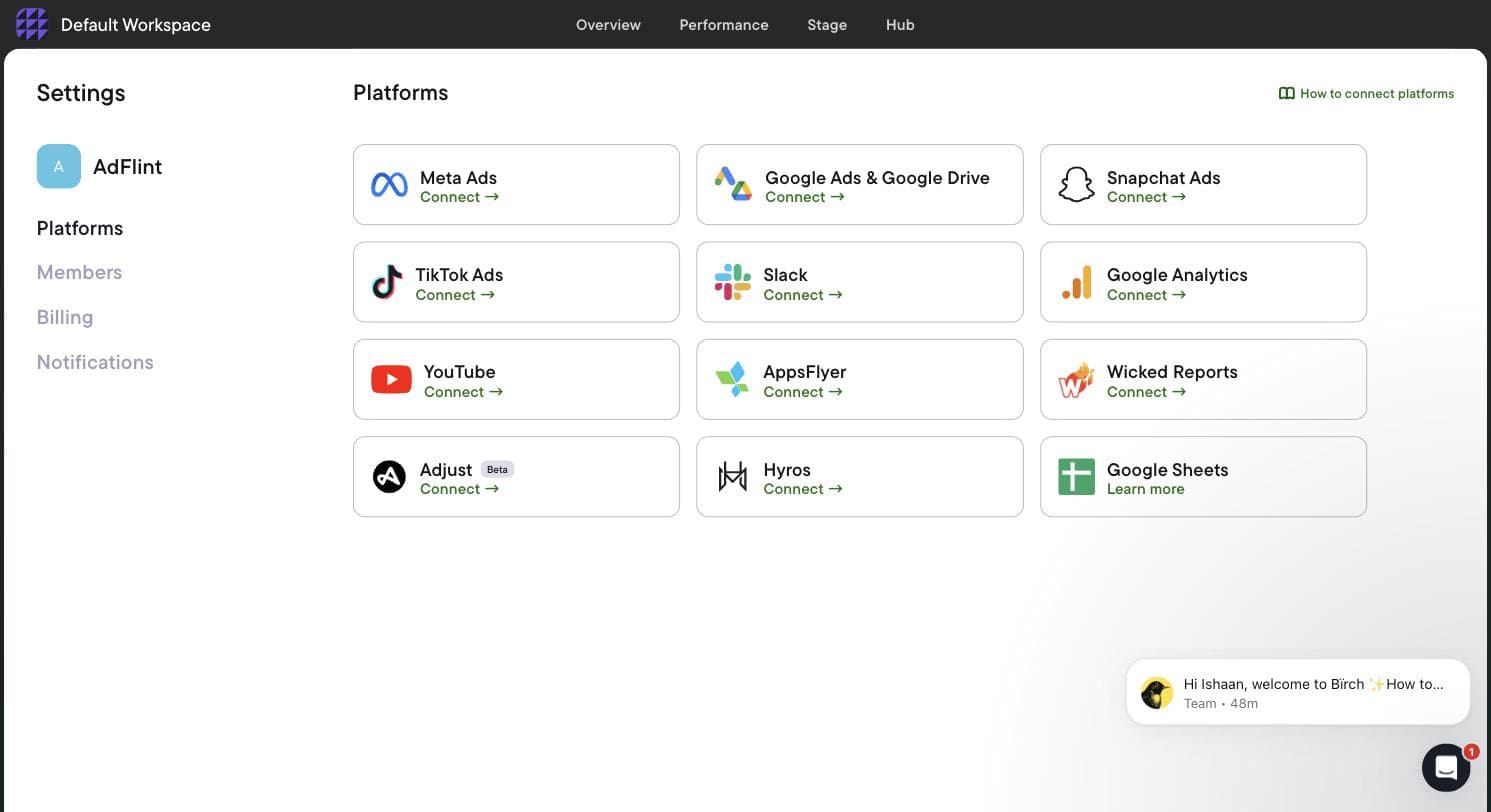
Birch's twelve integrations, heavy on paid social and attribution. Captured 30 July 2026. - 08
Read the real price off the billing screen
Birch does not have a flat price. The billing screen tracks cumulative spend across your connected accounts and charges you against it, with a slider that recalculates every plan as you move up the spend ladder. We walked the whole slider and wrote down every number. Two things matter more than the prices themselves: automated rules — the feature Revealbot was known for — are not in the entry plan at all, and above roughly $150K in monthly spend the entry plan stops being offered.
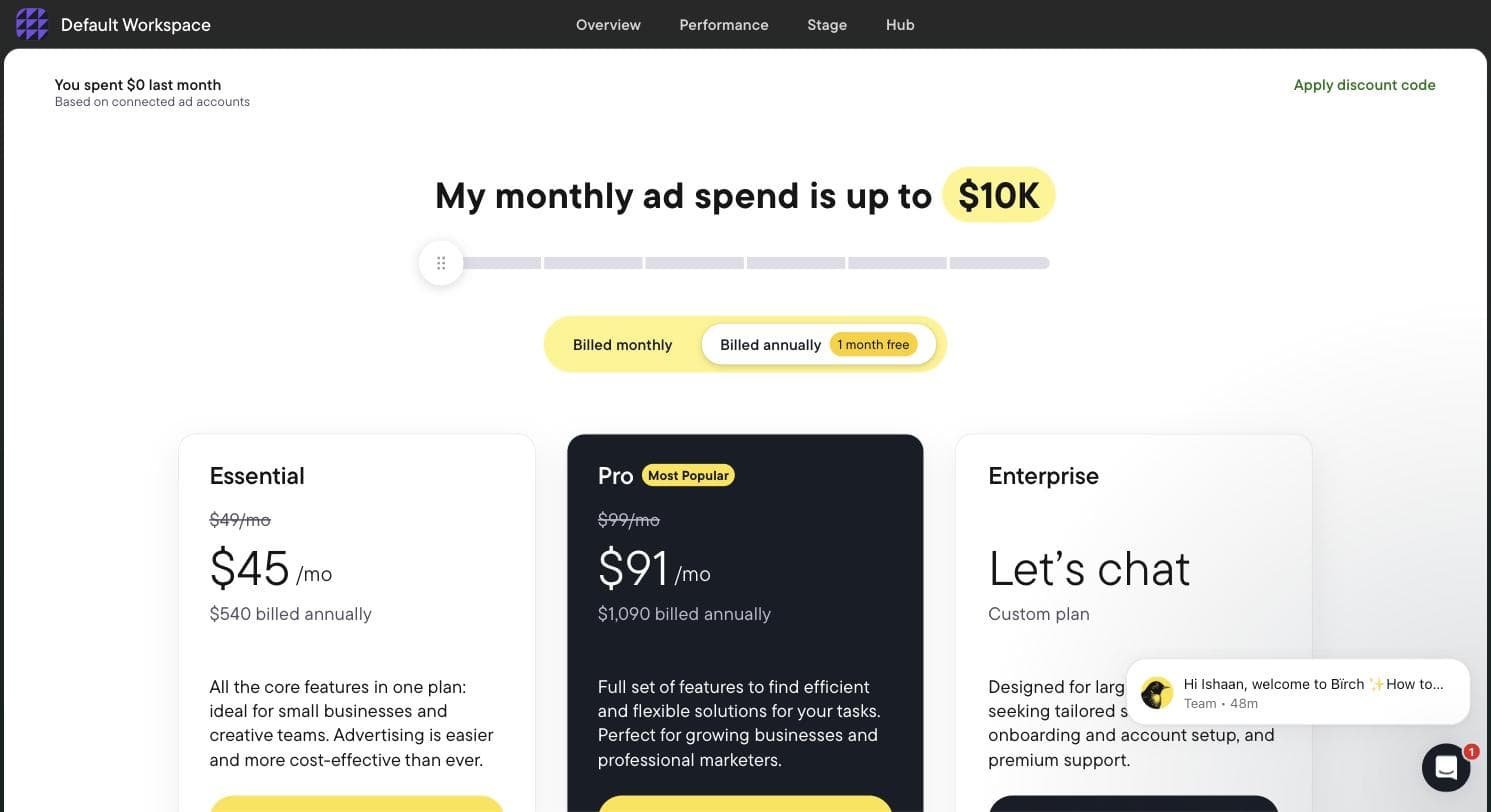
Birch's in-app pricing at the lowest spend tier. The slider above recalculates every plan. Captured 30 July 2026.
What the signup told us
- — Genuinely fast: account creation to the connect screen took under two minutes, with no phone number and no credit card.
- — The rebrand is badly signposted. Arriving from an older article pointing at revealbot.com or bir.ch/signup gets you a 404 before you find the app.
- — No sandbox and no demo data. The rule builder — the main reason to evaluate Birch — is completely inaccessible until you grant access to a live ad account.
- — Pricing is tied to your ad spend, not to seats or usage of the tool, so your bill grows as your campaigns do even if your use of Birch never changes.
- — The entry plan excludes automation entirely, which makes the widely quoted 'from $49' figure misleading for anyone arriving for the rules engine.
- — Meta is the default and most prominent option; Google Ads is present but visually secondary. Treat this as a Meta-first tool that also does Google.
- — One URL we tried inside the app hung on a loading spinner indefinitely rather than resolving or erroring.
Pricing, read off the in-app billing screen
Every figure below was read directly off Birch's own in-app billing slider on 30 July 2026, at each spend tier in turn. Monthly prices are the headline rate; annual prices are the discounted equivalent, billed once a year.
| Your monthly ad spend | Essential | Pro | Annual (Essential / Pro) |
|---|---|---|---|
| Up to $10K | $49/mo | $99/mo | $540 / $1,090 |
| Up to $30K | $149/mo | $249/mo | $1,640 / $2,740 |
| Up to $75K | $299/mo | $499/mo | $3,290 / $5,490 |
| Up to $150K | $499/mo | $799/mo | $5,490 / $8,790 |
| Up to $300K | Not offered | $1,299/mo | — / $14,290 |
| $500K+ | Not offered | Not offered | Enterprise, custom quote |
- — Essential does not include automated rules. This is the single most important line on the page: the feature Revealbot built its reputation on sits behind the Pro tier. Essential buys you workspaces, post boosting, reports, an activity page, Slack and email support — and nothing that automates a campaign.
- — Pro adds automated rules and strategies, Explorer, top audiences, Launcher, Stage, custom metrics and timeframes, the custom and lookalike audience builder, the Sheets/AppsFlyer/Hyros integrations, and live chat support.
- — Price is set by total monthly ad budget across every ad account you connect. If your spend rises past your tier, Birch states you are charged an overage fee through Stripe and notified by email; your features keep working.
- — Annual billing is described as twelve months for the price of eleven.
- — The trial is 14 days with full feature access. When it expires, your rules and reports are disabled rather than deleted, and come back when you pick a plan.
Where this stops: We did not connect a live Meta or Google account, so we have not watched a Birch rule evaluate or fire against real campaigns, and we have not seen Explorer, Stage or Hub populated with real data. Everything above is what the product does and costs, verified in-app; how well its automation actually performs on live spend is not something this walkthrough can tell you.
Meta Ads Manager
Best free starting pointNo vendor-written roundup will tell you this, so we will: the native tool is the right answer for a large share of the people searching this query. Meta describes Ads Manager as the all-in-one tool for creating ads, managing when and where they run, and tracking performance across Facebook, Instagram, Messenger, and Audience Network. The tool itself costs nothing - you pay only for ad spend - and every third-party product on this list ultimately operates on top of it.
The automation story has also improved to the point where it eats into paid tools' pitches. Meta describes Advantage+ as a suite of products that enhance and optimize campaign performance through AI and automation, free, inside the account you already have. The headline campaign types as of July 2026 are Advantage+ sales campaigns (the product formerly called Advantage+ shopping campaigns), app campaigns, and leads campaigns. Meta splits the suite into end-to-end solutions, which automatically apply AI across a campaign's audience, placement, and budget, and single-step solutions such as Advantage+ catalog ads and Advantage+ creative that automate one piece while you keep manual control of the rest. If you have not yet exhausted what Advantage+ gives you, a paid layer on top is often premature.
The honest cons are structural. Support is thin and account restrictions can be abrupt and hard to appeal - a persistent theme in public reviews of the mobile app, which held a 4.5-star average across roughly 49,000 App Store ratings when we checked, with the critical minority concentrated on support and account access. The interface remains dense for beginners, there are no cross-account automation rules, and nothing here helps you if you also run Google or TikTok.
Pros
- + Completely free to use - your entire budget goes to ad delivery
- + End-to-end Advantage+ campaigns automate audience, placement, and budget at no extra cost
- + Always first to get new Meta features; every third-party tool depends on its API
- + Full native control over campaigns, budgets, and billing with no intermediary
Cons
- − Weak support and little recourse when accounts are restricted or banned
- − Dense, frequently rearranged interface that overwhelms occasional advertisers
- − No rule-based automation across accounts and no coverage of non-Meta platforms
Ideal for
- First-time advertisers who should learn the native tool before paying for anything
- Small accounts where Advantage+ automation is genuinely enough
- Anyone evaluating this list - you need to know the baseline before buying add-ons
Pricing: Free. There is no fee for the tool itself; you pay only your ad spend. The Meta Ads Manager mobile app (iOS/Android) is also free.
Visit Meta Ads Manager“Sometimes errors will pop up due to little mistakes like missing info or something, and when you're looking for the place to insert the missing info, it's nowhere to be found.”
— Apple App Store review of the Meta Ads Manager app (Dec 2024)
AdFlint
Best for small businesses that want ads done for themOur product — disclosureDisclosure first: AdFlint is our product. We have ranked it where we think an honest reader would put it - ahead of the tools with opaque pricing or billing-complaint patterns, behind the free native option that many small advertisers should try first.
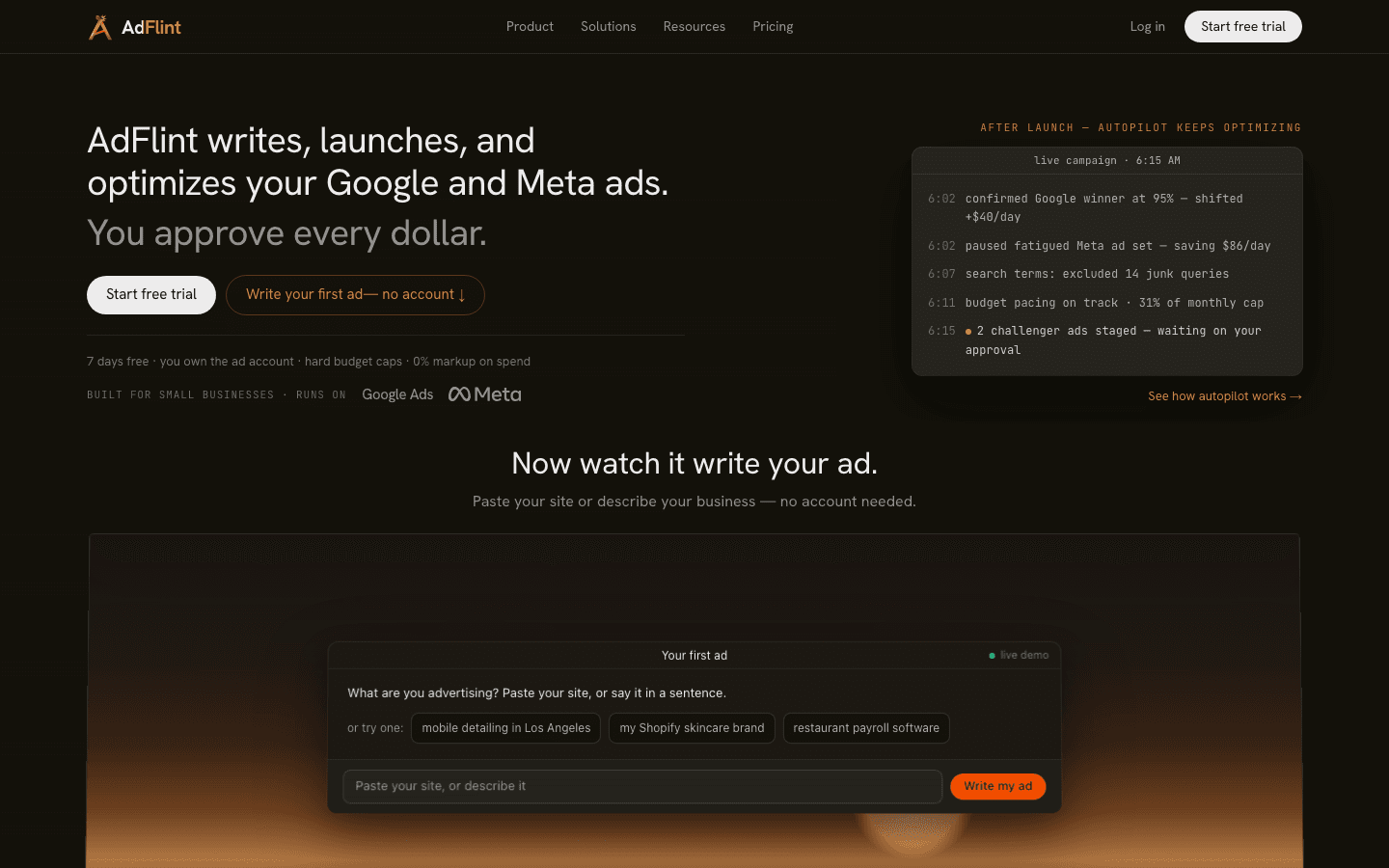
AdFlint is not a dashboard layer; it is closer to a small agency in software form. The AI writes your ads, launches them, and optimizes them on both Google and Meta, inside your own ad account - you keep ownership of the account and the data, and campaigns survive if you cancel. Two design choices matter for this page's audience: every ad waits for your approval before it goes live, and hard budget caps with pacing are enforced by the platform, so autopilot cannot overspend you. On the self-serve plans there is no percentage-of-spend fee - you pay a flat monthly software fee and 0% markup on your ad spend. One caveat we would rather state than bury: the done-for-you Managed tier is billed differently, as a monthly floor plus a share of the ad spend it manages, so the 0% markup promise applies to the self-serve ladder, not to Managed.
The honest cons: every plan is capped by monthly ad spend, and the pricing page only surfaces the three cheapest tiers by default - the higher self-serve plans that run up to $30,000/mo sit behind a 'show more' toggle, so the ladder is both longer and more expensive than the headline suggests; it covers Google and Meta only, so TikTok or Snapchat advertisers need something else; Meta-specific tooling is thinner than what Madgicx builds for ecommerce power users; and as a young product it does not yet have the third-party review base the incumbents have, which is why this entry carries no review quote - we will not invent one.
Pros
- + AI writes, launches, and optimizes ads on both Google and Meta - not just Meta
- + Runs inside your own ad account; you keep ownership, data, and campaigns if you leave
- + Human approval required on every ad plus hard budget caps - autopilot cannot overspend you
- + 0% markup on self-serve ad spend and flat monthly pricing from $40
- + Cheapest paid entry point in this list at $40/mo, though the free native tool is still cheaper
Cons
- − Every plan is capped by monthly ad spend ($100 on Starter up to $30,000 on Premium); past that you need a custom contract
- − Only the three cheapest tiers show by default - the rest of the ladder is behind a 'show more' toggle
- − Google and Meta only - no TikTok, Snapchat, or Pinterest
- − Managed tier is billed as a monthly floor plus a share of managed ad spend, so 0% markup applies only to self-serve
- − Young product with no established third-party review base yet
- − 7-day free trial requires a card up front
Ideal for
- Small businesses without a marketer who want ads handled end to end
- Owners who want a veto on every ad and a hard ceiling on spend
- Advertisers running Google and Meta together who want one flat-fee tool
Pricing: From the live pricing page, July 2026: Launch $40/mo (up to $1,000/mo ad spend), and Growth $89/mo (up to $2,500) are shown by default. Behind the 'show more' toggle: Scale $109/mo ($5,000), Accelerate $119/mo ($10,000), Performance $219/mo ($20,000), Premium $319/mo ($30,000), and a custom contract above $30,000/mo. Managed is the operator-onboarded done-for-you tier, billed as a monthly floor plus a share of the ad spend it manages. Self-serve plans cover Google + Meta with 0% markup on spend. 7-day free trial, card required; annual plans are billed upfront with no trial.
Try AdFlint freeBirch (formerly Revealbot)
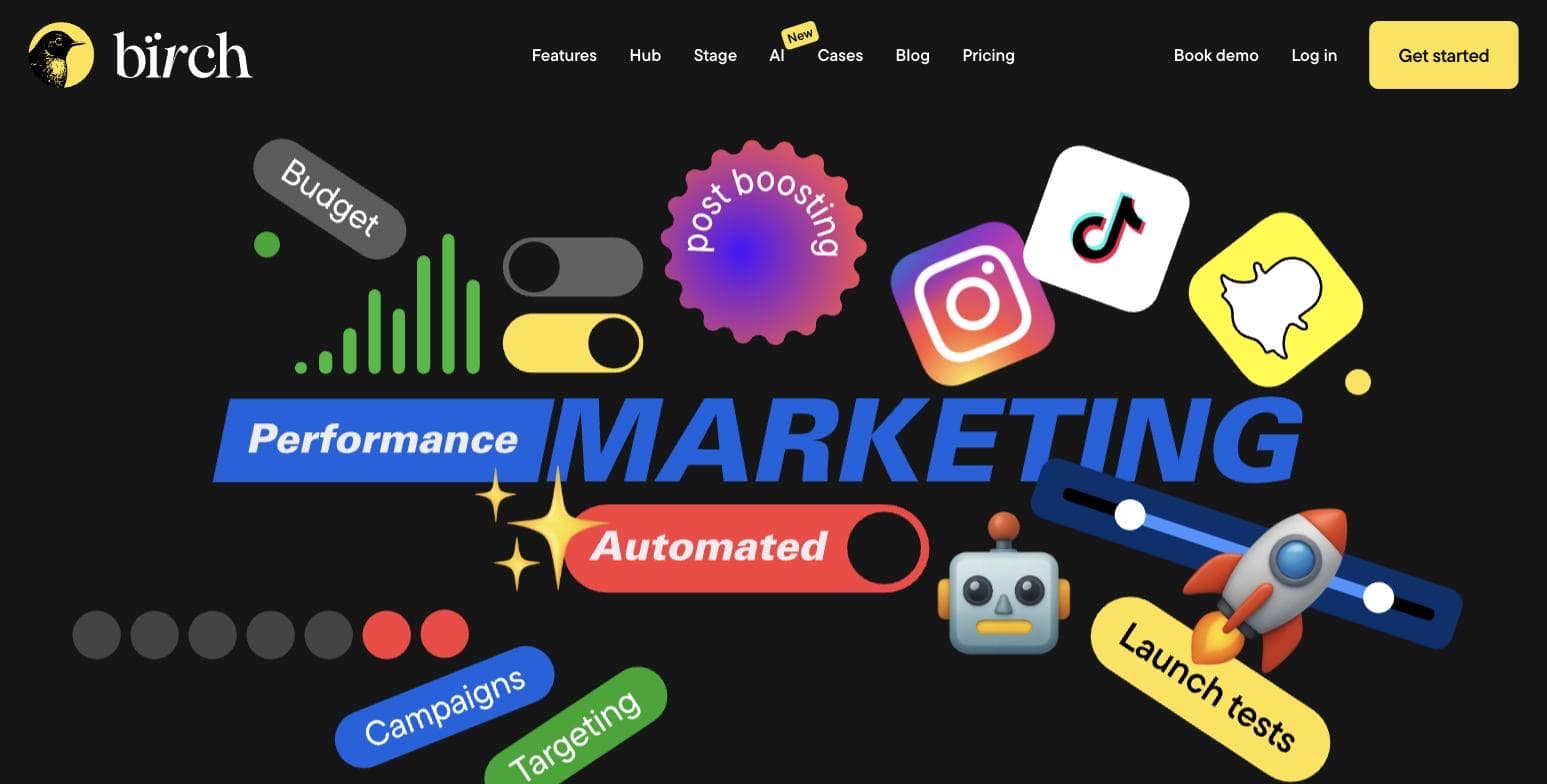
Best for rule-based automation across platformsIf you searched for Revealbot and landed on a bird logo, you are in the right place - revealbot.com now redirects to bir.ch, and the product carries its old name as a subtitle. Birch is the cleanest example of the rule-automation category: you write if-this-then-that rules on top of your campaigns - pause on CPA spikes, shift budget to winners, restart at custom intervals - across Meta, Google, Snapchat, and TikTok, with reporting and alerting built in.
It also has the most buyer-friendly commercial terms of the paid tools here: public pricing from $49/mo, a 14-day free trial with no credit card, and one month free on annual billing (Essential drops to $45/mo, billed $540 a year). The catch is that pricing scales with the ad spend connected to your account. The plan cards are set by a spend slider, and at the $10K bracket both Essential and Pro read 'no overages apply' - but Birch's own FAQ is clear that exceeding your plan limit triggers an extra charge based on your tier's percentage, billed through Stripe. Model your real spend before comparing it to flat-fee tools.
Trust signals are decent but thin: its Trustpilot profile showed 3.8/5 from just 18 reviews when we checked (55% five-star, 28% one-star), and its G2 listing was quiet in recent months. Recent reviewers are split between people who find it genuinely useful for scaling Meta campaigns and people who wanted deeper insight than rules alone provide.
Pros
- + Powerful, granular automation rules with a large library of triggers and actions
- + Covers Meta, Google, Snapchat, and TikTok in one tool
- + Transparent public pricing and a 14-day trial with no card required
- + Automated reporting and alerts to Slack/email reduce daily babysitting
Cons
- − Pricing scales with connected ad spend and overages are charged automatically - costs climb as you grow
- − Small independent review base (18 Trustpilot reviews at 3.8/5 in July 2026)
- − Rules automate execution, not judgment - reviewers wanting strategic insight found it limited
Ideal for
- Media buyers and small agencies managing several accounts who are tired of manual checks
- Teams that already know what rules they want and need them enforced 24/7
- Advertisers spending across Meta plus TikTok/Snapchat who want one automation layer
Pricing: From the live pricing page, July 2026, at the $10K monthly ad spend setting: Essential $49/mo, Pro $99/mo, Enterprise custom. Price is driven by total monthly ad spend across connected accounts, so these figures rise as you move the spend slider. Annual billing gives one month free (Essential $45/mo, $540 billed annually). Birch's FAQ states that exceeding your plan limit results in an additional automatic charge based on your tier. 14-day free trial, no credit card required.
Visit Birch (formerly Revealbot)“I tried Birch for about a month to support my campaign monitoring and performance analysis workflows. While the platform shows promise and has some useful features, it didn't fully meet my expectations in its current state.”
— Bhoomi Arora on Trustpilot (Mar 2026)
Madgicx
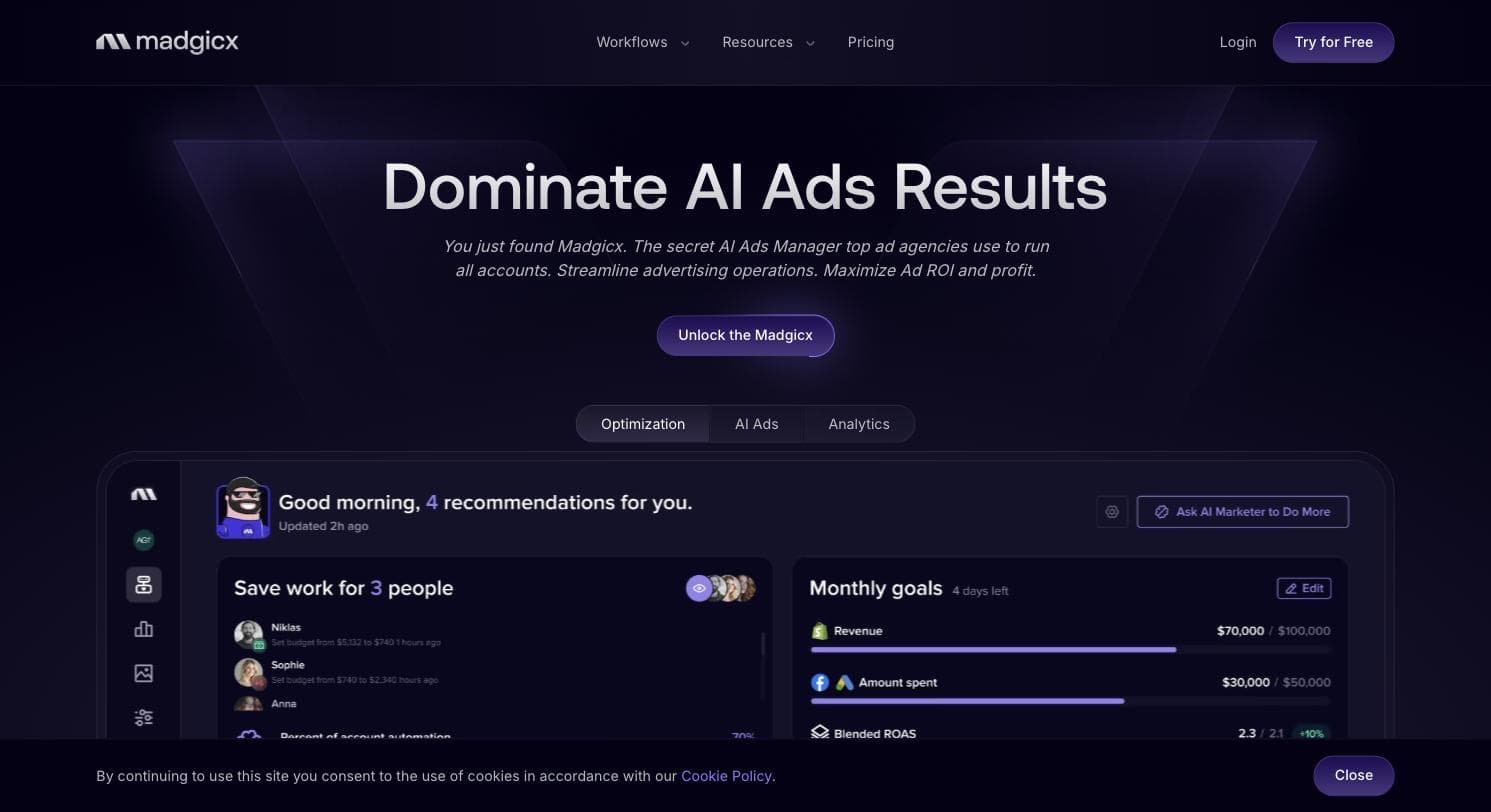
Best Meta-only AI toolkit for ecommerceMadgicx is the deepest Meta-specific toolkit on this list. It positions itself as an agentic AI ad platform - an AI Marketer that audits your account and proposes optimizations, plus creative generation, a creative performance tracker, audience tooling, and analytics, all built exclusively for Facebook and Instagram advertisers. It is an official Meta Business Partner, and its site advertised a 4.5-star average from 380+ reviews in July 2026; its G2 profile showed 4.6/5 from 217 reviews when we checked.
Two things temper the recommendation. First, pricing is opaque: the homepage advertises a $29/mo early-bird hook, but the pricing page shows no actual figures - it asks for your monthly ad spend bracket (from under $1K to $30K+) and tells you to see the price inside the app. A Tracking Pro attribution add-on is listed at $49/mo per connected account. Second, and more seriously, its Trustpilot profile told a very different story from G2: 1.8/5 from 269 reviews in July 2026, with the recurring theme - visible in Trustpilot's own review summary - being unexpected charges for annual subscriptions during or after free trials and refusals to refund.
Our read: the product's Meta tooling is widely praised and the G2 crowd rates it highly, but the billing pattern on Trustpilot is too consistent to ignore. If you try it, set a calendar reminder before the 7-day trial ends, screenshot your plan selection, and avoid annual billing until you are certain.
Pros
- + Deepest Meta-specific feature set in this list: AI audits, creative generation and tracking, audience tooling, analytics
- + Official Meta Business Partner with a strong G2 rating (4.6/5, 217 reviews, July 2026)
- + Low advertised entry point ($29/mo early-bird hook) and a 7-day free trial
- + Attribution add-on (Tracking Pro) addresses post-iOS14 signal loss for ecommerce
Cons
- − Real pricing is hidden behind an in-app calculator keyed to your ad spend bracket
- − Trustpilot profile showed 1.8/5 from 269 reviews (July 2026) with a repeated pattern of surprise annual charges around free trials
- − Meta only - no Google, TikTok, or Snapchat coverage
- − Sprawling toolset has a real learning curve for non-specialists
Ideal for
- Ecommerce brands spending $2K+/mo on Meta who want AI-assisted optimization without an agency
- Media buyers who want creative-level performance data Meta does not surface well
- Teams comfortable managing their own billing terms carefully
Pricing: From the live pricing page, July 2026: no public plan figures - pricing is quoted inside the app based on monthly ad spend brackets (under $1K up to $30K+), billed monthly, quarterly, or annually. Homepage advertises an early-bird offer at $29/mo. Tracking Pro add-on $49/mo per connected account. 7-day free trial.
Visit Madgicx“Madgicx was mediocre as a software. However, their billing is worse. They do not make it easy to cancel, they charged my card after canceling and they won't respond to refund requests”
— Luke Scherba on Trustpilot (Sep 2025)
Smartly
Best for enterprise creative and media at scaleSmartly (smartly.io) is what this category looks like at the enterprise tier: a creative-plus-media platform that builds, personalizes, and optimizes ads across every major social platform, plus connected TV and the open web through major DSPs. It is pitched at agency, performance, brand, and creative teams at large advertisers - the customers for whom producing and localizing thousands of ad variants is the bottleneck, not writing one campaign.
There is no public pricing: the pricing page we tried returned a 404 and the site funnels everything to a demo request. Reviewers fill in the blank - one named Capterra reviewer notes the pricing model is based on a percentage of total media spend for connected ad accounts, and calls that a barrier for high-spend advertisers who only want a subset of features. Its review profile is solid for the category: 4.5/5 from 13 Capterra reviews and 4.4/5 from 470+ G2 reviews when we checked in July 2026.
The cons in those same reviews are consistent: a steep learning curve, periodic bugs, and a sharp split between the dedicated customer success managers, which reviewers rate highly, and the in-app chat line, which they do not. One founder-level Capterra reviewer praised the UI as intuitive while calling the chat help '100% awful' and a very large negative when weighing whether to renew. None of this matters much if you are the target customer - a team spending six figures a month with a customer success manager attached - and matters a lot if you are not.
Pros
- + Creative automation at a scale nothing else on this list matches - templated production, localization, and testing across platforms
- + Multi-channel: social platforms plus CTV and open-web DSPs in one workflow
- + Strong aggregate ratings for the enterprise tier (4.4/5 on G2 from 470+ reviews, July 2026)
- + Dedicated customer success managers are the most-praised part of the service (Capterra customer service subscore 4.7/5)
Cons
- − No public pricing - demo-gated, and reviewers describe a percentage-of-media-spend model
- − Enterprise minimums put it out of reach of small and mid-size advertisers
- − Reviewers report bugs, a steep learning curve, and uneven in-app chat support
Ideal for
- Enterprise brands and large agencies producing creative variants at volume
- Teams consolidating social, CTV, and open-web buying into one platform
- Organizations that expect (and pay for) a dedicated customer success relationship
Pricing: No public pricing as of July 2026 - the /pricing URL returned a 404 and all purchase paths run through a demo request. A named Capterra reviewer describes the model as a percentage of total media spend across connected ad accounts. Expect a custom quote with enterprise minimums.
Visit Smartly“It is an indispensable tool for media buying, reporting, and automation. By far the best thing about the platform is the unparalleled level of support we receive both from our customer success managers and Smartly's real time support.”
— Chris K., Paid Ads Specialist, on Capterra (Dec 2021)
Hunch
Best for catalog-driven creative automation with a dedicated strategistHunch sits in the same enterprise neighborhood as Smartly but with a narrower, sharper pitch: automated creative production plus media buying for feed-based advertisers - ecommerce, retail, travel, grocery, automotive, and gaming brands whose ads are generated from product catalogs and localized at volume. It is a Meta Business Partner and sells itself as software plus dedicated strategic support rather than pure self-serve.
Commercially it is quote-only: the site says you pay for what you use, with full access to AI tools, creative automation, and cross-channel insights, and no seat limits - but publishes no numbers, so budget for a sales conversation. Its public review footprint is small and very stale: 7 Trustpilot reviews, every one of them five-star, yet the profile still shows 4.3/5 because Trustpilot weights recent activity and there has been none - all seven were posted in April 2020, more than six years before our check. The reviews that exist are enthusiastic and specific - template-driven production of thousands of ad variants is the recurring theme.
Treat it as a shortlist candidate, not a verdict: the thin, dated review base means you are relying more on the demo and reference calls than on independent evidence. For a small account it is straightforwardly overkill.
Pros
- + Feed and catalog-driven creative automation praised for producing thousands of ad variants from one template
- + Software comes with dedicated strategic support, closer to a hybrid service than a pure tool
- + Usage-based commercial model with no seat limits, suited to seasonal retail volume
Cons
- − No public pricing - every path runs through a demo request
- − Tiny, stale independent review base - all 7 Trustpilot reviews date from April 2020, none since
- − Built for large catalogs and budgets - overkill for small accounts
Ideal for
- Retail and ecommerce brands with large product catalogs and localized campaigns
- Teams that want creative automation plus an embedded strategist, not another dashboard
- Advertisers already at the spend level where quote-only vendors make sense
Pricing: No public pricing as of July 2026. The site states: pay for what you use, with full access to AI tools, creative automation, and cross-channel insights, no hidden fees and no seat limits. Expect a custom, usage-based quote via demo.
Visit Hunch“With Hunch we managed to make over 2000 ads automatically just by creating a template in Hunch Studio. It is amazing how it can automatically remove background from product images and place them in ads.”
— Ivan M on Trustpilot (Apr 2020)
AdEspresso
Best-known legacy option for simple split testingAdEspresso, now owned by Hootsuite, effectively invented the approachable Facebook ads tool: simple campaign creation, aggressive A/B testing of creative variants, and readable analytics. That legacy is why it still appears in every roundup - and why it ranks last in ours. The product and its once-famous educational content have visibly aged; its own flagship guide to Facebook automated ads still dates from 2021, before Meta consolidated automation into Advantage+, and the feature set has not kept pace with the AI tooling elsewhere on this list.
The commercial terms are at least transparent: Starter at $49/mo covers only up to $1,000/mo in ad spend on Facebook and Instagram, Plus at $99/mo removes the spend limit and adds team features, and Enterprise from $259/mo adds a dedicated consultant. All tiers carry a 14-day free trial, and campaigns remain accessible in Ads Manager if you cancel - a genuinely good policy.
The trust picture is the weakest here after Madgicx's Trustpilot: 3.6/5 from 74 reviews on G2, and a 2.5/5 Trustpilot profile built on only 5 reviews, 80% of them one-star, led by 2025 complaints about charges that kept running after a cancelled free trial. We flag the sample size deliberately - five reviews is not a verdict, but the specific complaint repeats across them and matches the pattern on Madgicx. At $49/mo with a $1,000 spend cap, most small advertisers will get more from Advantage+ for free or from a modern tool at similar money.
Pros
- + Simple, approachable split-testing workflow that non-specialists can learn quickly
- + Transparent public pricing and a 14-day free trial
- + Campaigns remain accessible in Ads Manager after cancellation
- + Enterprise tier includes a dedicated Facebook marketing consultant
Cons
- − Product and educational content date from the pre-Advantage+ era and it shows
- − Starter's $1,000/mo ad spend cap makes the $49 price worse than it looks
- − Weak trust signals: 3.6/5 on G2 (74 reviews) and a 2.5/5 Trustpilot from 5 reviews, 80% one-star, citing post-cancellation charges
- − Facebook and Instagram focus only - no meaningful multi-platform story
Ideal for
- Beginners who specifically want guided A/B testing with training wheels
- Hootsuite customers consolidating vendors
- Teams that value the mandatory campaign-approval workflow on higher tiers
Pricing: From the live pricing page, July 2026: Starter $49/mo (up to $1,000/mo ad spend), Plus $99/mo (unlimited spend, up to 15 seats, white label), Enterprise from $259/mo (dedicated Facebook Marketing Consultant, API access, Salesforce sync). Facebook and Instagram campaigns. 14-day free trial on all plans.
Visit AdEspresso“Avoid!! Still charging us after a free trial which was cancelled a month ago.. we have had two $49 invoices come out of our account”
— Mark Brown on Trustpilot (Jul 2025)
Side by side.
| Tool | Best for | Starting price | Platforms covered | Standout limitation |
|---|---|---|---|---|
| Meta Ads Manager | Free native baseline everyone should learn first | Free (pay only ad spend) | Facebook, Instagram, Messenger, Audience Network | Thin support and little recourse on account restrictions |
| AdFlint (our product) | Small businesses that want ads written and managed for them | $40/mo, 0% markup on self-serve spend | Google + Meta | Every plan capped by ad spend ($100-$30,000/mo); Managed takes a share of spend |
| Birch (ex Revealbot) | Rule-based automation for lean teams and agencies | $49/mo at $10K spend, scales with ad spend | Meta, Google, Snapchat, TikTok | Costs climb with spend; automates execution, not strategy |
| Madgicx | Ecommerce teams that live in Meta | $29/mo advertised hook; real price shown in-app | Meta only | Opaque pricing; 1.8/5 Trustpilot (269 reviews) on billing |
| Smartly | Enterprise creative + media across channels | Custom quote (reviewers describe % of ad spend) | Social, CTV, open web | No public pricing; enterprise minimums |
| Hunch | Catalog-driven creative automation with embedded support | Usage-based, quote only | Meta-centric, cross-channel | No public pricing; 7 Trustpilot reviews, all from 2020 |
| AdEspresso | Simple split testing under the Hootsuite umbrella | $49/mo (capped at $1,000/mo ad spend) | Facebook + Instagram | Aging product; 3.6/5 on G2 and billing complaints on Trustpilot |
How we chose.
This is a researched page, not a hands-on test. We have not run campaigns through the third-party products listed here, and nothing below claims otherwise. Where you see experience-based observations, they come from named, attributed reviewers on public review platforms, quoted verbatim and linked to the exact page we pulled them from.
What we actually did, in July 2026: fetched every vendor's live pricing page and recorded plan names and figures exactly as published (where a vendor hides pricing behind a demo form, we say so rather than guessing); read official product documentation, including Meta's own Ads Manager and ad-automation pages; and collected aggregate ratings and individual reviews from Trustpilot, Capterra, G2, and the Apple App Store as they appeared during this research pass. Review counts and scores cited in this article are what those platforms displayed in July 2026 and will drift over time.
One disclosure and one limitation. The disclosure: AdFlint is our product, its entry is tagged, and we have tried to rank it where an honest reader would put it rather than at the top. The limitation: G2 blocked part of our automated access during this pass, so for some tools we cite G2 aggregate scores we could verify but quote individual reviews from Trustpilot, Capterra, or the App Store instead.
- — Fit for a self-serve small-business buyer versus an enterprise or agency team - we say plainly who each tool is actually built for.
- — Live, verifiable pricing: plans and figures come from each vendor's pricing page as published in July 2026, and we flag every vendor that hides pricing behind a sales call.
- — Independent trust signals: aggregate ratings and named reviews across Trustpilot, Capterra, G2, and the Apple App Store, including negative patterns like billing complaints - not just the vendor's own testimonial wall.
- — Depth of Meta-specific capability: automation rules, Advantage+ awareness, creative tooling, and reporting beyond what native Ads Manager already gives you for free.
- — Platform coverage beyond Facebook and Instagram, for teams that also run Google, TikTok, or Snapchat.
- — Control and ownership: whether the tool works inside your own ad account, what happens to your campaigns if you cancel, and whether budget caps and approvals protect you from surprise spend.
Common questions.
Do I actually need a third-party Facebook ads management tool?
Often, no. Meta Ads Manager is free, and its end-to-end Advantage+ campaigns already apply AI across audience, placement, and budget, with single-step tools like Advantage+ creative handling pieces of the creative work. A paid tool earns its keep in three cases: you want rules or automation Meta does not offer (Birch), you want AI analysis and creative tooling on top of a serious Meta budget (Madgicx), or you want someone or something else to do the work entirely (AdFlint, or an agency). Exhaust the free tier first.
How much do Facebook ad management tools cost in 2026?
Entry prices for self-serve tools sit between $29 and $49 per month: AdFlint from $40, Birch and AdEspresso from $49, and Madgicx advertises a $29 entry offer with the real price keyed to your ad spend inside the app. Those entry figures are misleading on their own, because most of these tools price against ad spend - AdFlint's ladder runs to $319/mo at a $30,000 spend cap, Birch's $49 Essential is quoted at a $10K spend setting and rises from there, and AdEspresso's $49 Starter caps you at $1,000/mo in spend. Enterprise platforms like Smartly and Hunch publish no pricing at all and quote per customer; a named Capterra reviewer describes Smartly's model as a percentage of total media spend.
What happened to Revealbot?
It rebranded to Birch. revealbot.com now redirects to bir.ch, and the company lists its old name alongside the new one. The product is the same rule-based automation platform, now covering Meta, Google, Snapchat, and TikTok, with pricing from $49/mo based on connected ad spend.
Is AdEspresso still worth it?
Only for a narrow user: someone who wants guided split testing with a simple interface and is comfortable with a $1,000/mo ad spend cap on the $49 Starter plan. The product is owned by Hootsuite, its best-known educational content predates Meta's Advantage+ era, and its recent trust signals are weak - 3.6/5 from 74 G2 reviews, and a 2.5/5 Trustpilot profile that rests on only 5 reviews, 80% of them one-star and several describing charges that continued after a cancelled trial (July 2026). Most small advertisers will do better with Advantage+ for free.
Can these tools protect my ad account from getting banned?
No tool can prevent Meta from restricting an account, and aggressive automation - mass duplication, rapid budget changes, high ad velocity - can add risk. What helps is oversight: approval workflows (AdFlint requires sign-off on every ad; AdEspresso offers mandatory campaign approval on higher tiers) and conservative automation rules. If an account is restricted, recourse runs through Meta's own review process regardless of which tool you use.
Whose reviews should I trust when tools show wildly different ratings?
Read multiple platforms and look for patterns, not averages. Madgicx is the clearest example on this page: 4.6/5 on G2 but 1.8/5 on Trustpilot in July 2026, because product-focused reviewers and billing-dispute reviewers cluster on different sites. If one platform shows a repeated, specific complaint - unexpected annual charges, unresponsive refunds - treat that as signal even when the other platform looks rosy.
Keep reading
- Facebook Ads Without a Page: What Meta Allows
- How Much Do Facebook Ads Cost a Small Business?
- Special Ad Categories: Setup on Meta and Google
- Google or Meta Ads First? Decide by Budget
- Guide: Meta Ads Objectives and Bidding: The Complete Guide
- Guide: Ad Budgets, Pacing, and What Ad Management Costs
- Advantage+ Shopping vs Manual Sales Campaigns on Meta
- Advantage+ Audience vs Detailed Targeting
- CBO vs ABO: Who Should Control Your Meta Budget?
- Cost Cap vs Bid Cap: Which Meta Control to Use
- Daily Budget vs Lifetime Budget: Pacing, Caps, and Dayparting
- AI Ad Management Software vs Done-For-You Ad Management
- Free tool: Meta Ad Copy Preview & Character Checker
- Free tool: Meta Lifetime Budget Pacing Calculator
- Free tool: Free AI Ad Copy Generator
- Free tool: ROAS Calculator
- Free tool: Google vs Meta Budget Split Calculator