Google Ad Manager vs Google Ads: What's the Difference?
Short answer: Google Ad Manager is for publishers who sell ad space on their own website or app. Google Ads is for advertisers who pay Google to show their ads. If you want customers for your business, you want Google Ads, not Ad Manager.
| Compared | Google Ad Manager | Google Ads |
|---|---|---|
| Who uses it | Publishers: sites, apps and networks with traffic | Advertisers: any business that wants customers |
| What you do there | Sell and serve ad space on your own property | Buy ads on Google Search, YouTube and sites in Google’s network |
| Which way the money goes | Toward you, from advertisers | From you, to Google |
| Old name | DoubleClick for Publishers + Ad Exchange | AdWords |
| You need it if | You earn money from ads on your site | You pay for clicks to get leads or sales |
They are not the same product and they are not even on the same side of the transaction. Google Ad Manager is publisher software: you use it to sell and serve ad space on a site or app you own. Google Ads is advertiser software: you use it to buy traffic. If you typed “Google Ads manager” because you want someone or something to run your search campaigns, Google Ad Manager is the wrong door and nothing inside it will help you.
Four things get mashed together in this search, and three of them are real Google products with confusingly adjacent names. Here is the map, a 30-second test for which one you need, and — if you turn out to be the advertiser — the order to set things up in.
The four things people mean
1. Google Ad Manager (GAM) — publisher side
This is the ad server. You own a website, an app, or a newsletter with real traffic, and you want to sell the space on it. Google Ad Manager is where you define ad units, traffic direct-sold deals to them, run the leftover inventory through programmatic demand, and get paid by advertisers. Google’s own Ad Manager Help Center uses that vocabulary throughout: inventory, line items, creatives, yield. None of those words describe anything an advertiser does.
The naming history is a large part of why this is confusing. Ad Manager is the 2018 consolidation of two older products — DoubleClick for Publishers (DFP) and DoubleClick Ad Exchange (AdX) — announced by Google in its June 2018 post “Introducing simpler brands and solutions for advertisers and publishers”. The same post is where AdWords became Google Ads. Two products were renamed on the same day, in the same announcement, into names one letter apart.
If you have a smaller site and just want tags that fill themselves, the publisher product you probably want is AdSense, not Ad Manager. Ad Manager is for publishers with a sales motion, multiple demand sources, or enough volume that yield management is somebody’s job.
2. Google Ads — advertiser side
This is the buying platform. Search campaigns, Performance Max, Display, Shopping, YouTube. Keywords, bids, budgets, conversion tracking. If you are a plumber, a dentist, a SaaS founder, or a Shopify store, this is your product and it always was. Our Google Ads glossary entry covers the vocabulary, and our Google Ads page covers what has to be in place before a campaign is worth turning on.
Note that “Google Ads Manager” is not an official product name. When people say it they almost always mean one of three real things: the Google Ads web interface itself, a manager account (below), or Google Ads Editor, the free desktop app for bulk edits offline.
3. A manager account / MCC — a container, not a tool
A Google Ads manager account, historically called My Client Center or MCC, is an umbrella login that holds multiple Google Ads accounts under one roof. Agencies use it so one person can move between twelve clients without twelve passwords, and so access and billing can be handled centrally.
The critical thing to understand: an MCC does not run anything. It has no optimization, no automation, no intelligence. It is access plumbing. We wrote it up in more detail in the manager account (MCC) glossary entry, because a lot of people are told “you need an MCC” when what they actually need is someone competent operating the one account they already have.
MCC links are also not casual. When we walked through Optmyzr’s onboarding on 30–31 July 2026, its optional MCC-link dialog made us type the word CONNECT to confirm, warned that Google automatically emails everyone with access to the account when a link request is made, and said explicitly that it is not recommended for agencies without explicit client approval. That is a fair warning, and it tells you what an MCC link really is: a permissions event on somebody else’s asset. We did not complete that link, so we have not seen what the account owner receives on the other end.
4. An AI ad manager — software that operates the advertiser side
This is the category people are usually hunting for when they search a phrase with “manager” in it. Not an ad server, not a container — software that builds, launches and adjusts campaigns inside your Google Ads and Meta accounts on your behalf. That is what AI ad management means as a product category, and it competes with hiring a freelancer or an agency, not with Google Ad Manager.
The comparison, in one table
| Product | Side of the transaction | What it actually does | Who it is for | Money direction |
|---|---|---|---|---|
| Google Ad Manager (formerly DFP + AdX) | Publisher — you sell space | Serves ads on your property, manages inventory and line items, runs programmatic demand, reports yield | Sites, apps and networks with traffic to monetize | Toward you. Google publishes its tiering and revenue-share terms in the Ad Manager Help Center linked above |
| Google Ads (formerly AdWords) | Advertiser — you buy traffic | Campaigns, keywords, bids, budgets, creative, conversion tracking | Anyone who wants customers from Google | Out. You pay Google for clicks and impressions; the interface itself costs nothing |
| Manager account (MCC) | Advertiser — access layer | Holds multiple Google Ads accounts under one login; centralizes access and billing. Runs nothing itself | Agencies, consultants, multi-brand owners | Neither. The container is free; the accounts inside it still bill normally |
| AI ad manager (software category) | Advertiser — operator | Writes and launches campaigns, enforces budget caps, keeps adjusting after launch inside your own accounts | Owners with no in-house media buyer | Out, on top of ad spend. Vendors price it as a flat monthly fee, a spend-tiered subscription, or a percentage of spend |
Provenance: not measured. Product roles are summarized from Google’s public documentation for Ad Manager, Google Ads and manager accounts, plus Google’s June 2018 renaming announcement — both Google sources are linked above so you can check them. The AI ad manager row describes the software category as vendors sell it, not a single product.
The 30-second test
Work down this list. Stop at the first one that is true of you.
- Do you own a website or app with meaningful traffic, and do you want to earn money from the space on it? You are a publisher. Google Ad Manager, or AdSense if you are smaller. Stop reading this page; nothing below applies to you.
- Do you want more customers, leads or sales, and are you willing to pay for clicks? You are an advertiser. Google Ads. Keep going.
- Do you manage ad accounts belonging to other businesses? You are an advertiser who also wants a manager account (MCC) as plumbing. It will not do any of the work.
- Are you an advertiser who does not want to sit in the interface every week? You need an operator: a freelancer, an agency, or an AI ad manager. We compared the three in ad agency vs AI ad manager.
- Do you need to buy display inventory programmatically across the open web at enterprise scale? That is Google Marketing Platform — Display & Video 360 and Campaign Manager 360. Also advertiser side, also not Ad Manager, and almost certainly overkill if you are reading a disambiguation post.
One more trap worth naming, because it catches everyone who runs both platforms. On Meta, the advertiser tool is called Ads Manager — that is where you buy. On Google, the product called Ad Manager is where you sell. Nearly the same words, opposite jobs. Our comparison with Meta Ads Manager covers the buying side of Meta specifically, and the Google Ads manager comparison covers the Google one.
If you are the advertiser, here is the order to do things in
Opening the right product is step zero, not the answer. This is the sequence that keeps the first month from being tuition. Do them in order; each one makes the next one cheaper.
- 1. Decide what a conversion is — a form fill, a call over 60 seconds, a purchase. Write it down as one sentence before you touch a campaign. Everything downstream is scored against it.
- 2. Fix the landing page before the ads. Traffic magnifies whatever the page already does. Our landing page ad readiness checklist is the pass we run first.
- 3. Install conversion tracking and verify it fires. Trigger the event yourself and confirm it lands. Untracked campaigns cannot be optimized by you or by any tool, because the bidding system is guessing.
- 4. Tag your URLs consistently so you can separate paid from organic later. The UTM builder stops the parameters drifting between campaigns.
- 5. Set a budget you can hold for a full month, not a week. Learning happens on volume over time. The Google Ads budget calculator turns a target cost per lead into a daily number.
- 6. Start with intent, not reach. A tight search campaign on the words that describe what you sell beats a broad Display or Performance Max push when you have no conversion history to feed it.
- 7. Build the negative keyword list on day one — free, jobs, salary, DIY, cheap, plus your competitors if you do not want to pay for their brand. Then add to it weekly from the search terms report.
- 8. Write ads that match both the query and the page. The headline promise has to be visible on arrival, or you pay for the click twice.
- 9. Set a hard spend cap you cannot exceed by accident. Daily budgets flex; a cap is what stops a bad week from becoming a bad month.
- 10. Leave it alone long enough to learn, then read the search terms report, not the dashboard summary. That report is where the wasted money is visible by name. The specific beginner failure modes are listed in why Google Ads wastes money for beginners.
Who is going to do those ten things every week?
That is the real question behind the search, and there are four honest answers.
- Run it yourself. The tool is free, the time is not, and the learning curve is billed by the click. Viable if you enjoy it and can give it a standing weekly slot.
- Hire a freelancer or agency. Usually a monthly retainer or a percentage of ad spend, with a minimum retainer that comes out of the same budget as the ads. Ask what that floor is before the discovery call — we do not quote an industry-wide figure here, because we have not measured one.
- Buy a professional PPC tool. Optmyzr, Birch and similar products sit on top of accounts you already run. They are built for people who already know what they are doing: Optmyzr’s own signup spend brackets start at “Under $10,000/mo” and run to “$500,000+”, and it put five qualification questions plus a phone-and-SMS verification wall in front of the product before we could see it. Birch prices by the spend it manages: at up to $10K/mo it is $49 Essential or $99 Pro, and automated rules are Pro-only, not in the $49 tier — we read those numbers off its own in-app billing slider on 31 July 2026.
- Use an AI ad manager. Software that does the operating rather than handing you better dashboards. That is what AdFlint’s AI ad management is. If you want the category priced side by side first, that is AI ad tool pricing compared.
What a manager-account view actually looks like
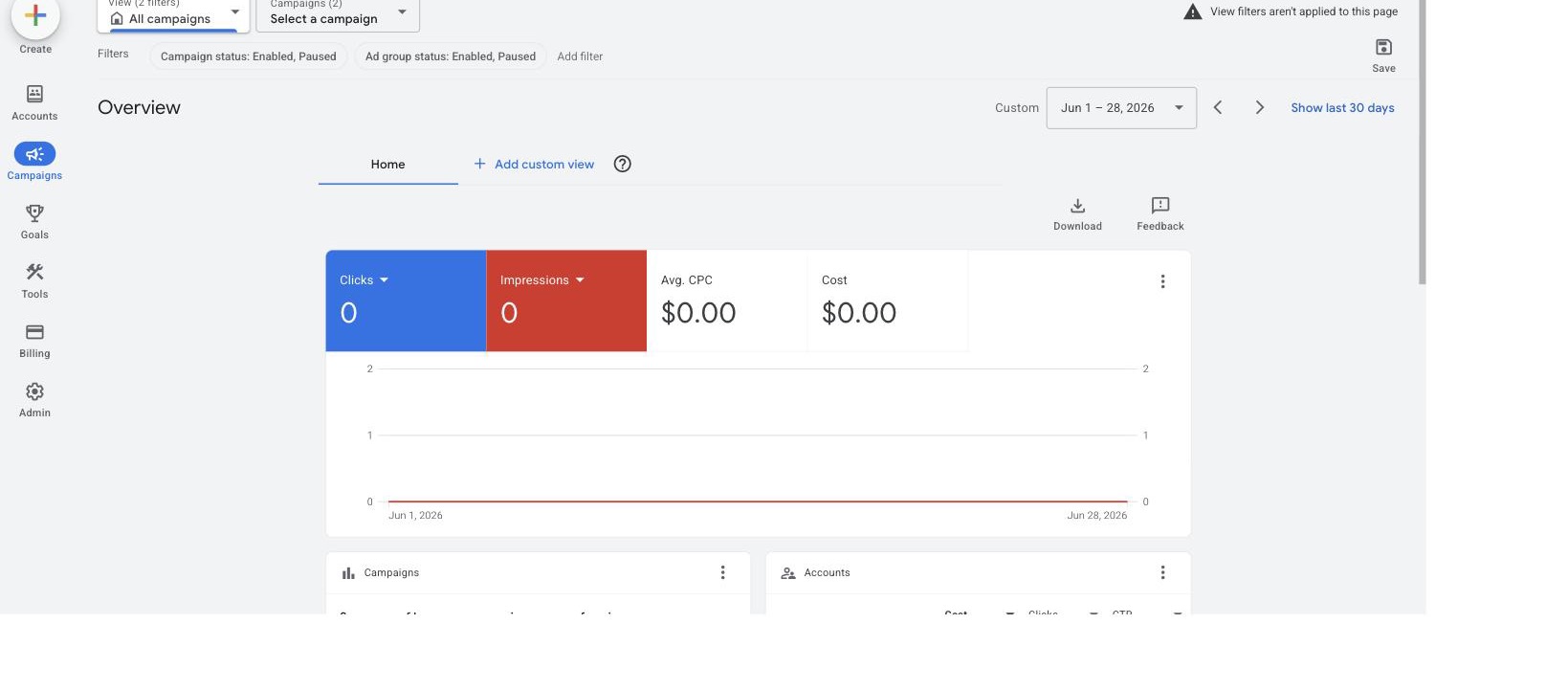
Our own Google Ads manager account, Overview tab, date range Jun 1–28 2026: 0 clicks, 0 impressions, $0.00 average CPC, $0.00 cost. This is the interface, not a performance result. When we took this screenshot in June 2026, AdFlint had not yet run sustained live ad spend, so we had no ROAS, cost-per-lead or client numbers to show, and we were not going to manufacture any.
Look at the left rail: Campaigns, Goals, Tools, Billing, Admin — plus Accounts, the manager-account container view. That is the entire advertiser vocabulary. No inventory, no line items, no yield report, because none of that exists on this side of the transaction. If you opened Google Ad Manager expecting a screen like this, that absence is the fastest way to know you are in the wrong product.
What we have not tested
Stating the gaps is more useful than papering over them. We never connected a live ad account to either Optmyzr or Birch, so everything above about them describes signup, pricing and gating — not optimization quality, rule execution, or populated reports. Birch in particular gates its rule builder behind connecting a real ad account, with no sandbox and no demo data, so nobody can evaluate that part without handing over an account first. We also have not captured MCC link or unlink screens, so we are describing Optmyzr’s warning dialog, not the flow after you confirm it.
How AdFlint fits, stated plainly
AdFlint runs Google Ads and Meta on the advertiser side. You keep your own ad account — we connect through your OAuth grant, we do not pool customers into a provider-owned account, and if you leave, the account and its history stay yours. That distinction matters more than most vendors admit, and we walked through it in who owns your ad account.
Pricing, since the whole point of this page is being precise. The self-serve plans are a flat monthly fee with 0% markup on ad spend — your card pays Google and Meta directly. Launch is $40/mo for up to $1,000/mo in spend, Growth $89 for up to $2,500, Scale $109 for up to $5,000, Accelerate $119 for up to $10,000, Performance $219 for up to $20,000, Premium $319 for up to $30,000, and above that it is quoted. The front door is a 7-day free trial; there is also a $0 Free state, but that is where an account lands after a trial or a cancellation, not an advertised entry tier. Our done-for-you Managed tier is priced differently and the 0% line does not apply to it: it is a monthly fee plus a share of the ad spend it manages, priced per account, and it is operator-provisioned rather than self-serve selectable. Full detail is on pricing.
If you want to see the mechanics before deciding — connect, budget cap, first campaign, ongoing autopilot — how it works is the short version and the AI ad management page is the long one. If you would rather compare the category first, our roundup of Google Ads management software is explicit about which products we used hands-on and which we only researched.
The one-line version
Google Ad Manager = you sell ad space. Google Ads = you buy traffic. A manager account (MCC) = a folder for Google Ads accounts. An AI ad manager = software that operates Google Ads for you. If money is supposed to flow out of your bank account rather than into it, you want the last three, and never the first.
Quick answers
Is Google Ad Manager the same as Google Ads?
No. Ad Manager is where publishers sell and serve ad space on their own sites and apps. Google Ads is where advertisers buy ads. Google renamed both on the same day in June 2018, which is why the names are so close.
What is Google Ad Manager used for?
Running the ads that appear on a publisher’s own property: defining ad units, booking direct-sold deals, filling leftover space with programmatic demand and reporting what the space earned. Smaller sites that just want ads to fill themselves usually use AdSense instead.
Do I need Google Ad Manager to advertise my business?
No. To advertise, you need a Google Ads account, a clear idea of what counts as a lead or sale, and conversion tracking that records it. Ad Manager plays no part in buying ads.
What is “Google Ads Manager”?
It is not an official product name. People usually mean the Google Ads website itself, a manager account (MCC) that holds several Google Ads accounts, or Google Ads Editor, the free desktop app for bulk edits.
Can one business use both?
Yes, if it both sells ad space and buys ads, for example a news site that also advertises its subscriptions. They are separate products with separate accounts, and nothing connects the two automatically.
Related guides
Best AI Ad Management Platforms in 2026
Four categories, not one leaderboard: launch-and-run tools, creative generators, rules and pacing platforms, and enterprise suites. Which fits your budget.
Native Ad AI vs Third-Party Tools in 2026
One platform, under $10k a month? The native AI is probably enough. The four things Google and Meta structurally will not do, and when a layer earns its keep.
AI Ad Automation: What to Let It Change, and Not
Let AI make bounded, reversible, spend-reducing changes alone. Require approval for anything that resets learning. Never automate a budget cap or category.
Skip the learning curve
AdFlint writes, launches, and optimizes Google and Meta campaigns inside the ad account you own — you approve every ad, and hard budget caps protect your spend. 7-day free trial.
Free tools: ad copy generator, ROAS calculator, budget calculator · ads by industry