First Campaign, No Results: A 16-Step Diagnostic
Two weeks in, a few hundred dollars gone, zero conversions in the dashboard. Before you conclude that Facebook ads don’t work for your business, run this in order. Three causes are worth ruling out before any other, because each one produces exactly the symptom you are looking at and each is cheap to check: your conversion tracking never fired, your campaign never actually delivered, or you have not bought enough clicks to have learned anything yet. Real creative and offer problems exist, but they are the last thing to blame, not the first.
One disclosure first, because it changes how you should read this: AdFlint has not run sustained live ad spend. The ordering is argued from how the platforms mechanically work and from arithmetic you can redo yourself, not from our own campaign results. Every number below is either arithmetic shown in full or a published figure with a link to its source.
This is an ordered procedure, not a checklist to skim. Each step says what to open, what a bad reading looks like, and what to do. Steps 1 through 3 disqualify most of the panic. Where the two interfaces differ, both are called out, since most small advertisers end up running Google and Meta side by side.
1. Prove the conversion event fires, by triggering it yourself
Tracking goes first because a broken tag looks exactly like a failed campaign, it invalidates every number below it, and it costs nothing to rule out. Do not check this in a report. Go to your own site in an incognito window, complete the exact action you count as a conversion — submit the form, finish checkout, book the slot — and watch it register.
On Google, use Tag Assistant and confirm the conversion tag fires on the thank-you step. On Meta, open Events Manager and watch the event arrive in Test Events. Bad reading: nothing appears, the tag fires on page load instead of on submission, or the event lands on a different dataset than the one your ad account uses. Fix this before you touch a bid. Everything below is unreadable until it passes.
2. Confirm the tracked event is the one being counted and optimized
A tag can fire and still not show up. On Google Ads, open Goals → Conversions and check whether the action is included in the “Conversions” column — in current accounts that is the primary-versus-secondary setting on the goal. A secondary action is recorded, but Smart Bidding does not bid toward it. Check the count setting (Every vs. One) and the attribution model too. On Meta, check that the ad set’s optimization event is the event you actually fire, and that the pixel and the ad account sit in the same business portfolio.
Bad reading: the campaign optimizes for “Purchase” while your site only ever sends “Lead,” or the Google conversion column shows nothing while “All conversions” shows a number. Fix the mapping, then wait for fresh data — historical gaps do not backfill.
3. Check whether your offline conversions can be seen at all
If your sale happens on the phone, in a DM, by email reply, or after a quote, the ad platform cannot see it. Ask the ground-truth question instead: have you had any new inquiry in the last two weeks that you cannot account for? If the phone rang three times and none of it is in the dashboard, you do not have a performance problem, you have a measurement problem. Add call tracking, add a “how did you hear about us” field, and tag your links with the UTM builder so the source survives into your inbox and CRM.
4. Do the click arithmetic before you judge anything
This step is where most beginners find their real answer. Two weeks at a small budget buys very few chances to convert.
| Daily budget | 14-day spend | Assumed CPC | Clicks bought | Expected conversions at 3% |
|---|---|---|---|---|
| $10 | $140 | $2.00 | 70 | 2.1 |
| $20 | $280 | $2.50 | 112 | 3.4 |
| $50 | $700 | $3.00 | 233 | 7.0 |
| $100 | $1,400 | $4.00 | 350 | 10.5 |
Arithmetic, not measured data: spend divided by an assumed CPC, times an assumed 3% conversion rate. Both inputs are illustrative — replace them with your own in the CPC/CPM/CTR calculator. These are worked examples, not AdFlint results and not benchmarks.
At $20 a day and a $2.50 CPC, the honest expectation for two weeks is roughly three conversions. Getting zero when you expected three is an ordinary outcome of small numbers, not evidence that the campaign is broken.
5. Accept what 50 clicks can and cannot tell you
At 50 clicks you cannot distinguish a 2% conversion rate from a 6% one. A 2% true rate produces about 1 conversion in 50 clicks; a 6% true rate produces about 3. Run the exact binomial confidence intervals and 1-of-50 spans roughly 0.05% to 10.6%, while 3-of-50 spans roughly 1.3% to 16.5%. Those ranges overlap almost entirely. You have not measured your conversion rate — you have measured noise.
Even at 200 clicks, 4 conversions (2%) and 12 conversions (6%) give intervals of about 0.5–5.0% and 3.1–10.2%. They barely separate. Put your own numbers into the A/B test significance calculator before you kill an ad. Killing a variant on 50 clicks is a coin flip dressed up as a decision.
Interval figures are arithmetic, not measured results: Clopper-Pearson exact binomial intervals at 95%, computed for this post and reproducible from the click and conversion counts shown.
6. Verify the campaign actually delivered
Now look at delivery. On Google Ads, check campaign, ad group and ad status. “Eligible” is fine; “Limited by budget,” “Under review,” “Disapproved” and “Paused” are not. One disapproved ad in a single-ad ad group means that ad group served nothing — see why ads get disapproved on Google and Meta. On Meta, read the Delivery column at the ad set level and check whether spend is actually pacing to budget.
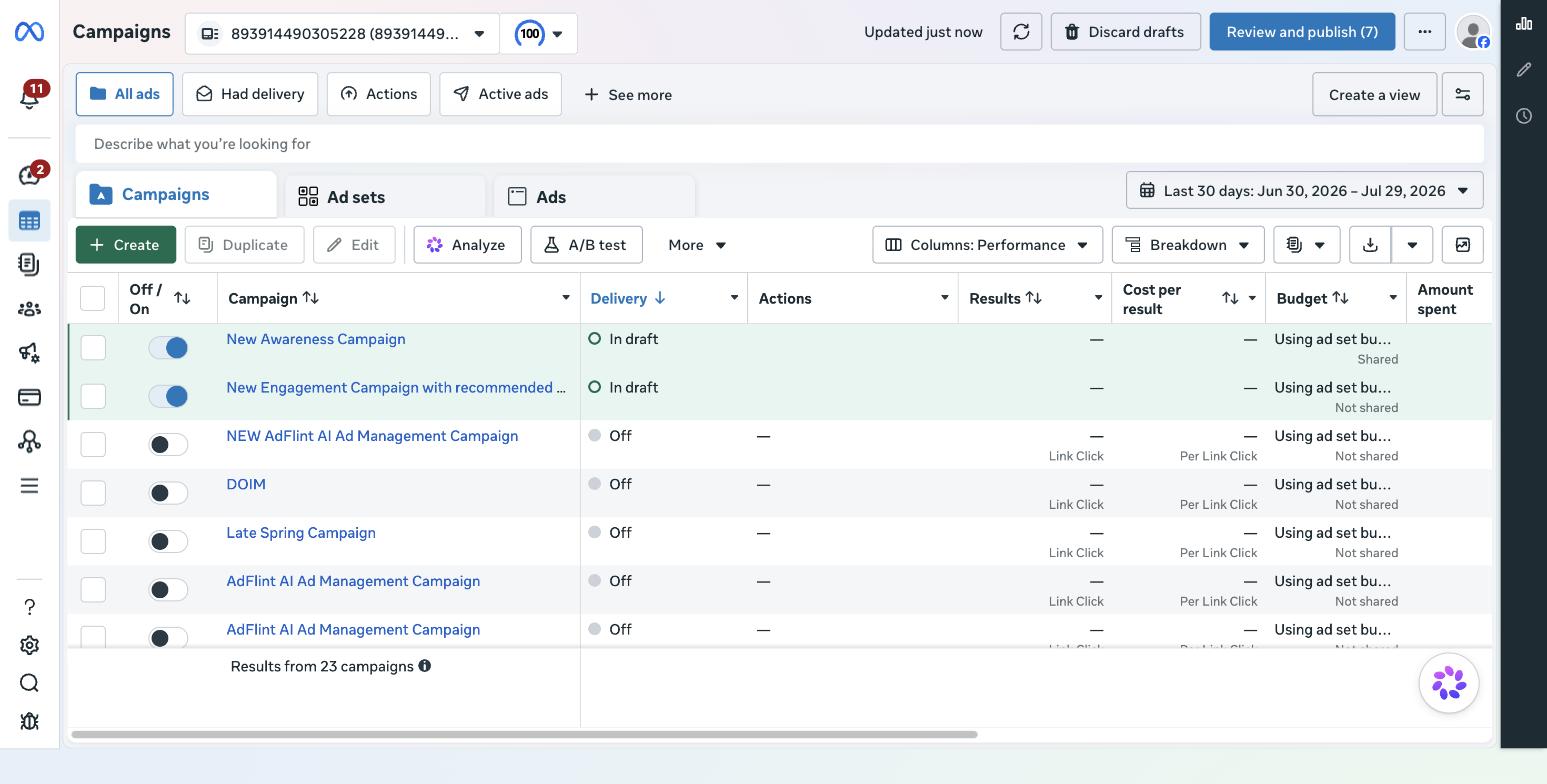
Meta Ads Manager, showing where the Delivery, Results and Amount Spent columns live. This is our own account and it has no sustained spend, so treat this purely as a map of the interface, not as a performance example.
7. Check the Meta learning phase
Meta’s own documentation says an ad set exits the learning phase after roughly 50 optimization events in a 7-day period. If your ad set is stuck in “Learning limited,” it is telling you plainly that it cannot get enough events to optimize. Bad reading: three ad sets each stuck in Learning limited. The fix is consolidation — one ad set with the whole budget instead of three splitting it — or optimizing for an earlier, more frequent event (Add to Cart, Lead) while volume is low.
8. Read the Google search terms report line by line
Reports → Search terms. Read every term that took a click. You are looking for intent mismatch: informational queries, competitor names, job-seekers, wrong geography, wrong product. Broad match on an account with no conversion history has almost nothing steering it, so read the real terms instead of assuming they resemble your keywords. We have no measured figure for how much of a typical account’s spend lands wrong, and neither does anyone quoting you one. Add the bad terms as negatives, tighten to phrase or exact match, re-read in a week. More on why the defaults do this in why Google Ads wastes money for beginners.
9. Check impression share and the budget-limited flag
Add the Search impression share, Search lost IS (budget) and Search lost IS (rank) columns — Google documents these here. High lost IS (budget) means you are capped and the day ends before the good searches happen: raise the cap, or narrow the keyword set so the same money buys better clicks. High lost IS (rank) means your bids or ad relevance are too weak to enter the auction — a quality and bid problem, not a budget one. If total impressions are tiny, nothing downstream is interpretable.
10. Sanity-check bid strategy against your data history
A new account with zero conversions has nothing for Smart Bidding to model. Target CPA and Target ROAS bid toward a predicted conversion rate, and on a fresh account there is no history to predict from, so delivery can throttle while the system waits for signals it will never get. Bad reading: a tCPA campaign spending a fraction of its budget. Start on Maximize Clicks or Manual CPC to buy the first tranche of data, then move to conversion bidding once you have real events. Set your target with the CPA calculator rather than a number that feels nice.
11. Check audience size and targeting settings
On Meta, an audience of 20,000 people at $20/day will saturate fast. On Google, check the location setting: the default targets people “interested in” your area, not only people in it, which is how a local plumber ends up paying for clicks from three states away. Check ad scheduling, device bid adjustments, and whether Display Network expansion was left on for a Search campaign. Turn Display expansion off for your first campaign — it mixes cheap, low-intent inventory into a report you are trying to read as search intent.
12. Check frequency and creative fatigue — honestly
As a working rule of thumb, not a measured threshold: frequency above about 3 on a two-week window with a small audience means the same people have seen the same ad repeatedly and stopped reacting, and CTR decaying across the period is the corroborating signal. But be honest: at $20/day into a broad audience you probably have not delivered enough impressions to fatigue anyone. If frequency is 1.2, creative fatigue is not your problem and swapping the image will not fix anything.
13. Load your own landing page on a cold phone
Not on your laptop. On cellular data, on a device that has never seen the page. Time it with a stopwatch and treat more than about three seconds before the page is usable as a problem — a working threshold, not a measured cutoff. You are paying for clicks that leave during the wait. Then check message match: does the headline repeat the promise in the ad, in the same words? A click that lands on a generic homepage after a specific ad converts worse than one that lands on the specific offer. Run the landing page ad-readiness checklist before you spend another dollar.
14. Complete your own conversion path end to end
Fill in the form. Add to cart and check out with a real card. On mobile. Look for: a required field nobody would fill in, a phone-number validator that rejects valid formats, a checkout that demands account creation, a booking link with no availability for eleven days. Broken funnels are invisible from the ads dashboard, because from the platform’s side everything looks fine — the click was delivered.
15. Ask whether the conversion window can even capture your sale
If your average buying cycle is 30 days and your attribution window is 7-day click, the conversions you eventually get will never be credited to the campaign. Check the window on both platforms and compare it to how long your customers actually take. For considered purchases, judge two weeks of spend on leading indicators — CTR, cost per landing page view, form starts, calls — not on closed revenue. Then reconcile against your own records later.
16. Decide whether you have spent enough to conclude anything
Here is the rule we would apply. If steps 1–3 passed, delivery is clean, search terms are relevant, and you have bought fewer than about 100 qualified clicks, the honest answer is: you do not know yet. That threshold is not a benchmark; it falls out of step 5, where even 200 clicks failed to separate a 2% rate from a 6% one. Do not rewrite the creative, switch platforms, or conclude that ads do not work. Either extend the same test until you have enough clicks to read, or stop and come back when you can fund one that produces a signal. Both are legitimate. Redesigning on noise is not.
What a clean diagnosis looks like
| What you observe | Most likely cause | First action |
|---|---|---|
| Clicks yes, conversions exactly zero | Tracking not firing or not counted | Steps 1–2 |
| Spend far below daily budget | Disapproval, learning limited, or tCPA throttle | Steps 6, 7, 10 |
| Lots of clicks, high bounce | Intent mismatch or landing page | Steps 8, 13 |
| Everything looks fine, no sales | Sample too small, or offline sale unrecorded | Steps 3, 4, 5, 16 |
Heuristic mapping written for this post from the diagnostic order above. Not measured data and not derived from any account’s performance history.
Where a tool helps and where it does not
Nothing above requires software. It requires an hour and the willingness to look at your own funnel. What software can do is stop the expensive failures repeating silently: a hard budget cap so a misconfigured campaign cannot run away over a weekend, and continued optimization after launch instead of a campaign left to drift. Those two things are what running Google and Meta together through one system is for — guardrails, not magic. Which decisions are safe to hand to automation at all is a separate question, covered in AI ad guardrails: what to automate.
AdFlint runs on connected accounts only: you own the Google Ads and Meta account, and your card pays the platforms directly. The self-serve plans are a flat monthly fee with 0% markup on ad spend: Launch $40/mo up to $1,000 of monthly ad spend, Growth $89/mo up to $2,500, then $109, $119, $219 and $319 a month as the ceiling rises to $30,000. The separate done-for-you Managed tier is priced differently: a monthly fee plus a share of the spend it manages, priced per account and set up by our team rather than self-serve. The 0% markup line applies to the self-serve ladder only. Full detail is on pricing, and monthly plans start with a 7-day free trial. We have not run sustained live ad spend ourselves, so we publish no ROAS claims and no case studies.
Still deciding where a limited budget should go at all? The side-by-side in Facebook Ads vs Google Ads sets expectations before you spend. If you would rather run both channels from one place with caps and post-launch optimization built in, that is the Google and Meta setup we built.
The uncomfortable finding, most of the time, is not that your ads are bad. It is that you bought 90 clicks and asked them a question 200 clicks still could not answer. Fix the tracking, fix the delivery, then buy enough data to have an opinion.
Related guides
Radius Targeting on Google and Meta, Compared
Google enforces a 1 km minimum radius and defaults to presence or interest; Meta retired its four location types. Radius floors, defaults, and five myths.
How Much Do Facebook Ads Cost a Small Business?
Facebook ads cost about $0.60 to $1.80 a click and $7 to $15 per 1,000 impressions in 2026, depending on your goal and who is counted; you set the budget.
Why Google Ads Wastes a Beginner's First $500
Smart Campaigns, broad match, and audience expansion drain a small budget before it teaches you anything. What to switch off, plus a $500 test framework.
Compare the options
Skip the learning curve
AdFlint writes, launches, and optimizes Google and Meta campaigns inside the ad account you own — you approve every ad, and hard budget caps protect your spend. 7-day free trial.
Free tools: ad copy generator, ROAS calculator, budget calculator · ads by industry